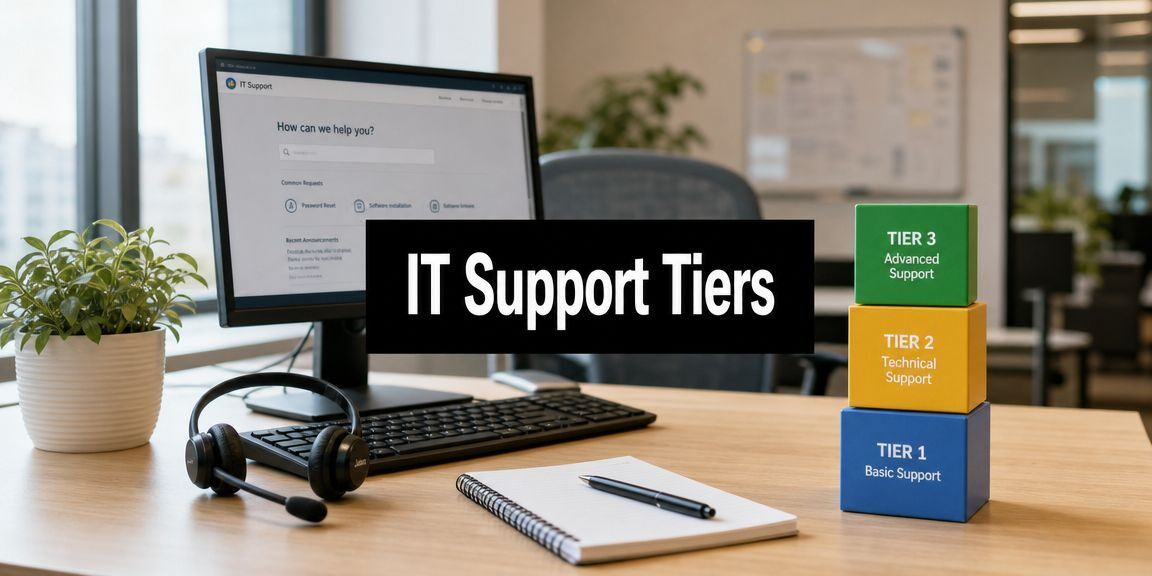
A business owner doesn’t have an IT problem when a password reset takes too long. A business owner has a productivity problem, a focus problem, and often a management problem. If the wrong people keep handling the wrong issues, the company pays for it twice. Once in wasted labor, and again in delayed work.
That’s why the tiers of IT support matter. They aren’t a technical diagram for the help desk. They’re a decision framework for protecting skilled employees from low-value interruptions, pushing routine issues toward self-service, and making sure serious incidents reach the right technical depth quickly. For North Texas companies trying to grow without adding chaos, that distinction matters.
Table of Contents
- Is Your Best Talent Wasting Time on IT Problems
- The Five Tiers of IT Support Explained
- The Escalation Workflow How Issues Move Through Tiers
- Strategic Staffing Internal vs Outsourced Support
- Tailoring Support for Your DFW Industry
- Beyond the Ladder When to Rethink Your Support Model
- How Technovation Delivers Tiered Support Excellence
Is Your Best Talent Wasting Time on IT Problems
A company doesn’t need a major outage to lose money. It only needs a sales manager locked out of email before a client meeting, a project lead waiting on file access, or a senior engineer pulled into a printer, login, or Wi-Fi problem that should never have reached that desk.
That’s where many small and midsized businesses get it wrong. They treat support as an informal function. Whoever knows the most gets interrupted first. The office manager becomes the ticket queue. The owner gets copied on recurring issues. The “IT person” becomes a catch-all role with no structure, no routing, and no protection for higher-value work.
The cost isn’t abstract. Skilled employees stop doing the work they were hired to do.
Business owners should ask a blunt question: who in the company is spending time on problems that someone else, or no one at all, should be handling?
The tiers of IT support exist to stop that pattern. The model creates layers of handling so basic requests don’t consume senior technical staff and complex incidents don’t stall with the wrong responder. It turns support from interruption-driven chaos into an operating system for issue handling.
The real business issue
A support structure isn’t just about fixing devices. It’s about deciding:
- Who handles repeatable issues: Password resets, access requests, and simple setup work should move fast without dragging in specialists.
- Who handles deeper troubleshooting: When systems fail, someone needs the right permissions, tools, and technical judgment.
- Who owns escalation: If nobody clearly owns handoffs, tickets sit, users chase updates, and accountability disappears.
A business that grows without formal support tiers usually develops expensive habits. Employees hoard tribal knowledge. Managers become dispatchers. Escalation happens based on who shouts loudest, not who’s best equipped to solve the issue.
What disciplined support protects
A structured support model protects three things business owners care about:
- Time: Fewer interruptions to revenue-generating and client-facing staff.
- Risk: Better routing for security, compliance, and infrastructure issues.
- Capacity: More room for internal technical leaders to focus on projects, planning, and prevention.
For DFW companies with lean teams, that shift matters. Support shouldn’t rely on heroics. It should rely on design.
The Five Tiers of IT Support Explained
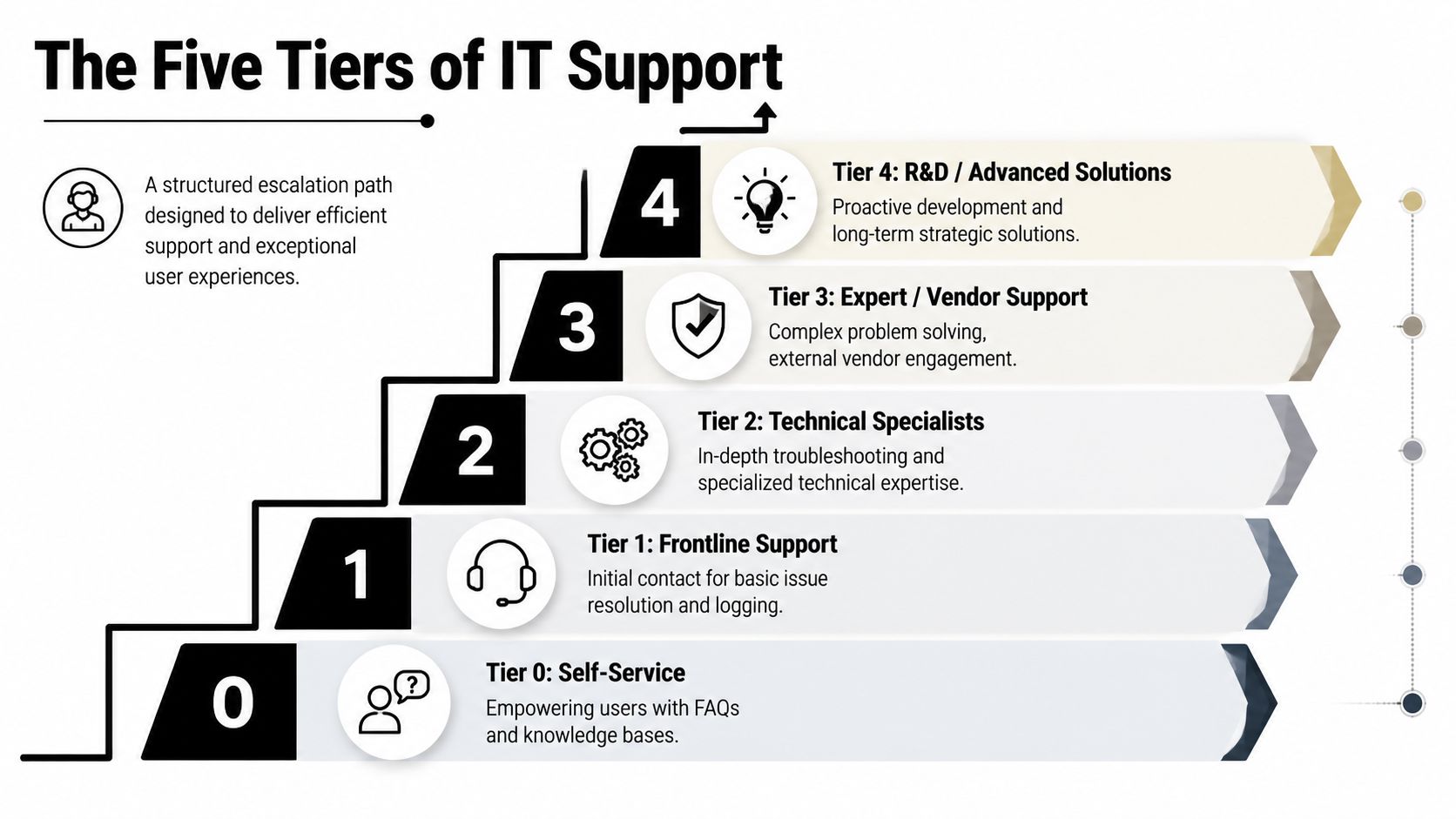
The standard model is broader than the old L1, L2, L3 explanation many companies still use. A widely used support structure now runs from Tier 0 through Tier 4, with self-service at Tier 0, frontline help at Tier 1, deeper troubleshooting at Tier 2, expert engineering at Tier 3, and external vendor support at Tier 4, as outlined in this five-level IT support model.
The purpose of the model is simple. Match the complexity of the problem to the right level of expertise before the issue wastes more time than it should.
Why the model exists
Most businesses don’t need more technical people touching every issue. They need better routing.
Tier 0 is the library. It includes knowledge bases, portals, and virtual agents that let users solve common issues on their own. If a person can regain access to an account, find a setup guide, or follow a documented fix without opening a ticket, that’s not lower quality support. That’s efficient support.
Tier 1 is the front desk. It’s the first human point of contact for standard incidents. This tier logs issues, answers routine questions, follows runbooks, and resolves repeatable problems without overcomplicating them.
Tier 2 is the specialist bench, handling deeper troubleshooting. These technicians work with logs, admin tools, and more advanced diagnostics when the frontline can’t close the issue cleanly.
Tier 3 is the engineering room. This tier handles root-cause analysis, architecture-level fixes, code-related issues, infrastructure failures, and coordination with developers or senior technical experts.
Tier 4 is the outside authority. When the issue belongs to a manufacturer, software publisher, telecom provider, or another third party, the problem moves to external vendor support.
IT support tiers at a glance
| Tier | Primary Role | Example Issues | Key Skill |
|---|---|---|---|
| Tier 0 | Self-service guidance | Password instructions, onboarding steps, FAQ answers | Documentation |
| Tier 1 | Frontline ticket handling | Login issues, basic connectivity, account access | Triage |
| Tier 2 | Technical troubleshooting | System errors, application behavior, admin-level checks | Diagnostics |
| Tier 3 | Expert engineering resolution | Infrastructure faults, root-cause analysis, advanced fixes | Deep technical expertise |
| Tier 4 | External vendor escalation | Product defects, carrier issues, OEM support cases | Vendor coordination |
A lot of SMBs stop at defining the tiers and assume the job is done. It isn’t. Genuine value comes from making the boundaries clear enough that tickets don’t bounce around.
What each tier should and shouldn’t do
A healthy model depends on discipline:
- Tier 0 should remove friction: If self-service content is outdated or hard to find, users skip it and flood human support.
- Tier 1 should solve known issues: This team shouldn’t guess through complex failures. It should diagnose enough to resolve or escalate cleanly.
- Tier 2 should go deeper, not wider: This level needs access, technical context, and time to troubleshoot properly.
- Tier 3 should focus on exceptions: Senior experts shouldn’t become an overflow queue for avoidable frontline work.
- Tier 4 should be managed, not chased: Someone must own vendor communication, updates, and pressure when an outside provider is holding up resolution.
Businesses reviewing service workflows often benefit from examples of streamlining IT with Freshservice because the operational challenge usually isn’t understanding the labels. It’s building repeatable intake, escalation, and documentation around them.
The Escalation Workflow How Issues Move Through Tiers
A support model looks neat on paper. The ultimate test is what happens when someone can’t do their job.
A common business scenario
A user reports that a critical cloud application won’t open. The first question isn’t “Who’s smartest?” It’s “What’s the fastest reliable path to diagnosis?”
The user starts with Tier 0. If the issue is caused by a known login step, browser setting, or documented access process, self-service may solve it immediately. If that fails, Tier 1 takes over.
Tier 1 confirms the user, gathers symptoms, checks whether the issue affects one person or multiple users, and runs basic troubleshooting. Frontline support handles a high volume of inquiries; a practical benchmark is that a Tier 1 technician typically handles 30 to 50 tickets per day, which is one reason businesses formalize escalation instead of expecting one layer to do everything, according to this overview of Tier 1, Tier 2, and Tier 3 support.
If Tier 1 sees signs of a broader permissions issue, service outage, application failure, or network dependency, the ticket should move quickly. It shouldn’t sit in a queue while the user keeps retrying.
What good escalation looks like
A clean handoff includes context. The next tier should receive the user impact, the business priority, the troubleshooting already performed, and any evidence already collected. That’s the difference between escalation and rework.
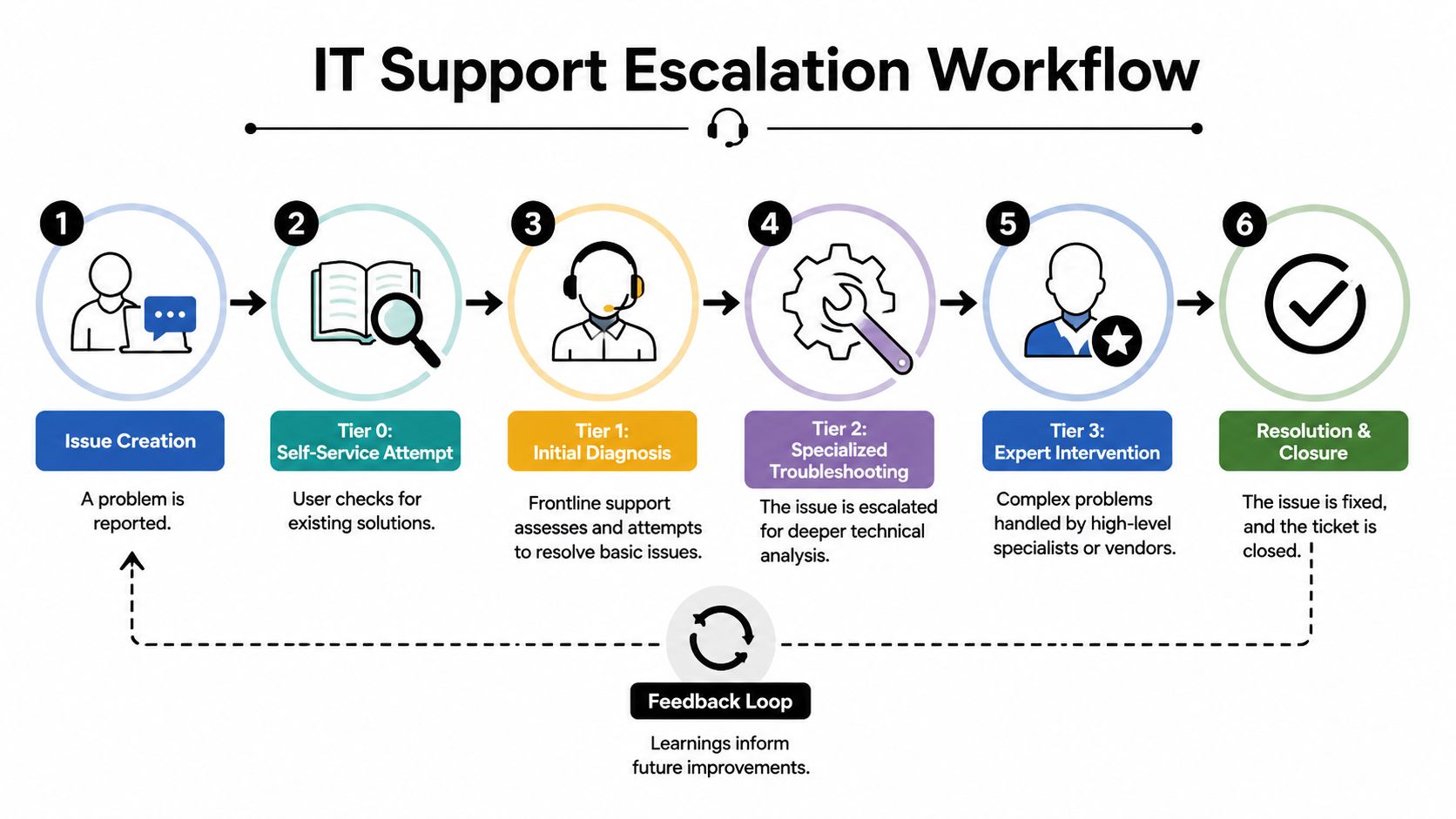
A practical workflow usually looks like this:
- Issue reported: The user opens a ticket, calls, or submits a request through a portal.
- Self-service checked: The business confirms whether a documented fix already exists.
- Frontline diagnosis: Tier 1 verifies the issue, follows runbooks, and rules out common causes.
- Escalation by criteria: The ticket moves up when the issue exceeds the tier’s scope, access, or authority.
- Specialist resolution: Tier 2 or Tier 3 investigates based on technical depth and business impact.
- Closure and knowledge capture: The resolution is documented so future tickets move faster.
A ticket should move up because the next tier can solve it better, not because the current tier ran out of patience.
Service level agreements matter here. They define response expectations, escalation urgency, and ownership. Without them, tickets drift. With them, users know what to expect and managers can see where support is performing poorly.
For infrastructure-heavy businesses, escalation also depends on whether the issue touches core connectivity. In those environments, strong network support and maintenance services often determine whether a ticket stays local to the user or gets treated as a wider operational issue.
Strategic Staffing Internal vs Outsourced Support
Most SMBs ask the wrong staffing question. They ask whether they need an internal IT person or an outside provider. The better question is whether the business can build and sustain the full range of support coverage it needs.
A single internal hire can be valuable. That person may know the company, understand users, and handle day-to-day needs well. But one person doesn’t equal a support system. If the company expects that role to cover intake, troubleshooting, security response, vendor management, after-hours needs, documentation, and strategic planning, the business has created a bottleneck, not a department.
Where internal teams work well
An internal model works best when the business needs close operational alignment, regular onsite presence, and direct support for workflows that are unique to the organization.
That approach can make sense when the company has:
- Stable demand: The issue volume is manageable and predictable.
- Strong documentation: The team doesn’t rely on one person’s memory.
- Leadership support: Someone is funding training, process improvement, and security maturity.
- Clear role boundaries: The technical team isn’t also expected to be facilities support, procurement, and emergency response for every device problem.
Even then, staffing gaps appear quickly. Vacation, turnover, after-hours incidents, and specialized problems expose the limits of a lean internal structure.
Where outsourced support changes the equation
Outsourced or co-managed support changes the model from person-dependent to process-dependent. That’s often the smarter move for growing businesses.
A managed service structure can give a company broader technical depth, formal escalation, better continuity, and a more predictable operating model. It also helps when the business wants internal staff focused on business systems and projects rather than endless ticket pressure.
A practical middle ground is co-managed IT support, where internal staff keep visibility and control while outside specialists add coverage, escalation depth, and operational discipline.
The decision isn’t internal versus outsourced as a matter of pride. It’s whether the business has enough reliable coverage across all support layers without burning out key people.
For companies evaluating staffing strategy more broadly, the talent planning perspective in nexus IT group is useful because support performance often breaks down for hiring reasons before it breaks down for technical reasons. Businesses either underhire, hire too narrowly, or expect one person to cover too many tiers.
A business owner should be skeptical of any model that depends on heroics. If support quality collapses when one employee is unavailable, the staffing design is weak.
Tailoring Support for Your DFW Industry
The tiers of IT support shouldn’t look identical across industries. A healthcare clinic, law firm, construction company, and nonprofit may all use the same framework, but they shouldn’t route tickets the same way or assign the same urgency to the same event.

Regulated work needs faster judgment
In regulated environments, the cost of a bad handoff can be worse than the cost of involving senior support early. That’s why industry context matters.
A user locked out of a line-of-business application isn’t always a standard access issue. In some firms, it may affect client confidentiality, billing continuity, records availability, or compliance obligations. Support teams need routing logic that reflects business consequences, not just technical categories.
What changes by industry
Different sectors in DFW usually need different support priorities:
- Healthcare clinics: Access issues involving clinical systems, protected records, or user permissions often require tighter escalation discipline because delays affect care workflows and compliance handling.
- Law firms: File access, email security, document management, and remote work controls need support teams that understand confidentiality risk and chain-of-custody concerns.
- Financial services and accounting firms: Authentication problems, endpoint alerts, and suspicious account behavior may need immediate specialist review rather than routine queue handling.
- Construction, engineering, and architecture firms: Connectivity between office and field teams matters. Support has to account for remote access, shared project files, mobile devices, and jobsite downtime.
- Nonprofits: Budget pressure changes priorities. These organizations often need a support structure that emphasizes stability, documentation, and practical triage over oversized complexity.
A smart support model reflects the risk of the work being interrupted, not just the device or application involved.
That’s why generic support desks often disappoint regulated and security-conscious businesses. They can resolve routine issues, but they may not recognize when a ticket carries legal, compliance, or operational weight.
For North Texas organizations, local familiarity also matters. Businesses with multiple offices, mobile teams, or industry-specific systems need support that understands the region’s pace, staffing realities, and onsite expectations. A rigid one-size-fits-all queue won’t do that well.
Beyond the Ladder When to Rethink Your Support Model
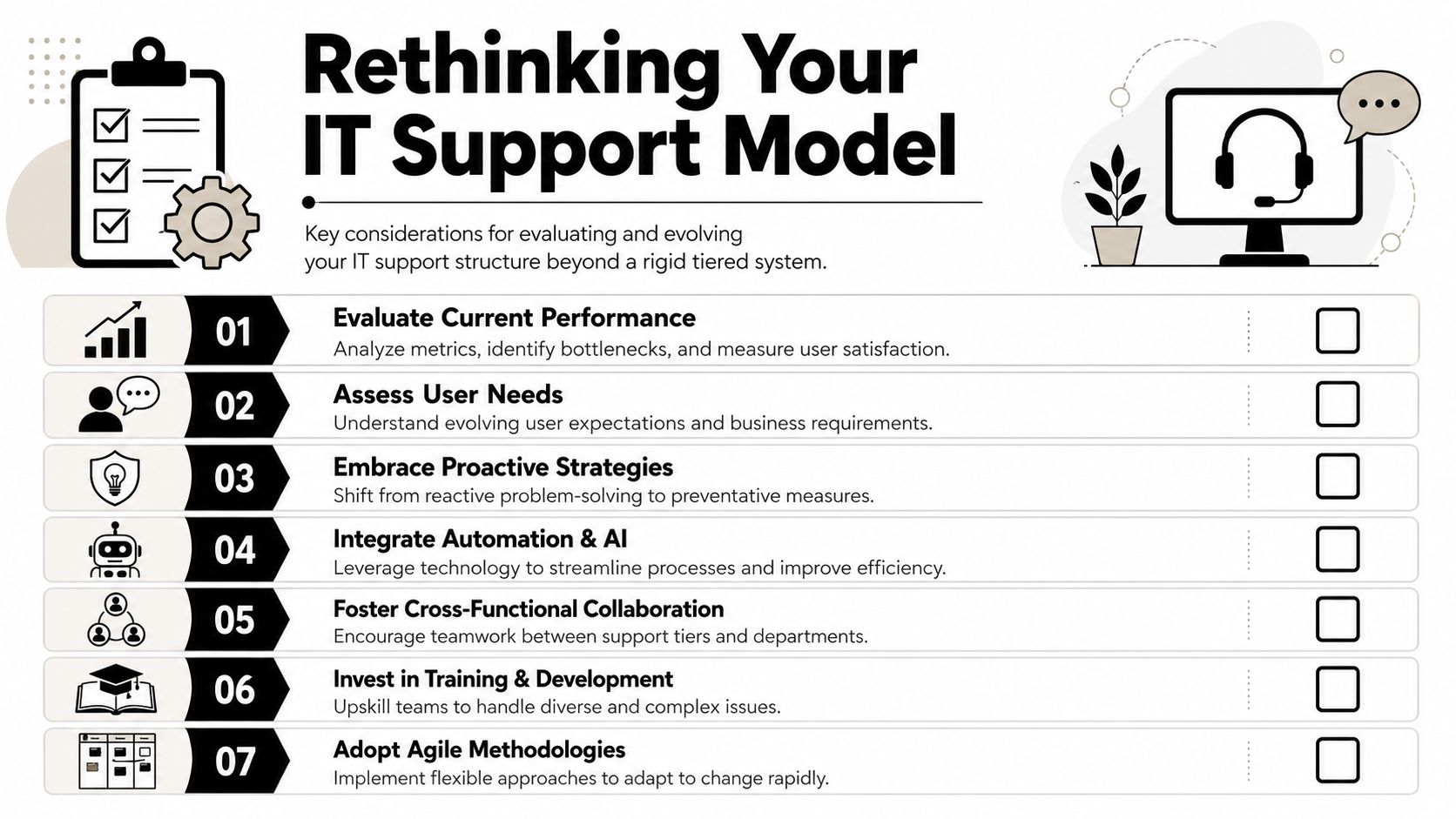
The tiered model is useful. Treating it like a rigid ladder is not.
A common gap in tiers of IT support guidance is that it rarely answers the practical SMB question of when a ticket should skip a tier entirely, even though most explanations present support as a clean step-by-step ladder. That limitation is highlighted in this discussion of dynamic routing and exception handling in IT support tiers.
When a ticket should skip a tier
A business shouldn’t force every issue through Tier 1 just because the chart says so. That wastes time.
Skipping a tier makes sense when:
- The user impact is unusually high: An executive, clinician, revenue-critical team, or time-sensitive client workflow may justify direct escalation.
- The issue is already known to be complex: If the symptom points to infrastructure, application failure, permissions architecture, or vendor dependency, there’s no value in pretending it’s a basic help desk ticket.
- The responding tier lacks the needed authority: If the team can’t access logs, admin settings, or core systems, it can’t meaningfully diagnose the problem.
- The business risk is high: Security events, compliance-sensitive incidents, and data handling concerns should route by risk first.
What smarter routing looks like
A mature support model uses rules, not just ranks.
That usually means combining the support tiers with factors like user role, affected system, business criticality, security implications, and vendor ownership. A password reset for a standard user and an authentication failure tied to a regulated application may look similar at first glance, but they shouldn’t be treated the same way.
Good support leaders also push repeat issues down, not up. If the same basic request keeps reaching Tier 2, the answer isn’t to accept the waste. The answer is to improve Tier 0 content, update runbooks, or train Tier 1 better.
Practical rule: If a ticket predictably ends up in the same higher tier every time, the routing model is wrong or the lower tier is under-equipped.
Business owners should also rethink the ladder when internal staff are overloaded with project work. In that case, direct routing to outside specialists or a co-managed support structure can be more efficient than preserving a textbook escalation path.
The point isn’t to abandon tiers. It’s to stop worshipping them.
How Technovation Delivers Tiered Support Excellence
A business doesn’t need to build every support layer from scratch to benefit from the model. It needs a structure that covers intake, escalation, specialist troubleshooting, vendor coordination, and ongoing improvement without creating internal drag.
What a complete support structure should include
A practical support design usually includes:
- Frontline response: Fast handling for common user issues, ticket intake, and repeatable fixes.
- Technical escalation: Deeper troubleshooting when the issue moves beyond standard runbooks.
- Engineering depth: Support for infrastructure, root-cause analysis, and system-level correction.
- Vendor management: Clear ownership when outside providers must be engaged.
- Knowledge improvement: Documenting resolutions so the same issue doesn’t cost the business twice.
Technovation LLC fits this model by providing managed and co-managed support for North Texas organizations that need structured help desk coverage, proactive monitoring, strategic IT planning, and escalation support aligned to regulated and security-conscious operations.
What business owners should ask next
The right question isn’t whether the company has “IT support.” Most businesses do, in some form.
The right questions are sharper:
- Which issues should never touch senior staff?
- Which incidents should bypass the normal queue?
- Where do tickets stall today?
- Who owns vendor escalation when the problem leaves the building?
- What’s being done to move repeat issues into self-service or documented fixes?
If leadership can’t answer those questions clearly, the support model isn’t mature enough yet.
A business that wants clearer escalation, stronger support coverage, and less wasted staff time can start with a practical review from Technovation LLC. A focused IT health check can reveal where the current support structure is slowing users down, overloading internal staff, or exposing the business to avoidable risk.