

Cloud backup copies files, applications, or databases to a remote, internet-accessible server so a business can restore them after hardware failure, accidental deletion, ransomware, or disaster without relying on the original device. The category reached USD 4.69 billion in 2023, with a projected 24.4% compound annual growth rate from 2024 to 2030, according to recent cloud backup market research.
A busy Dallas-Fort Worth office rarely gets a warning before a technology disruption. A server may fail on a Monday morning, an employee may delete a folder, or ransomware may make shared files unavailable just as customers start calling. The immediate question isn't whether data exists somewhere. It's whether the business can restore the right systems quickly enough to keep operating.
Table of Contents
- Introduction What Cloud Backup Means for Your Business Today
- How Cloud Backup Works Behind the Scenes
- Types and Architectures of Cloud Backup Explained
- Benefits and Limitations Every Business Should Weigh
- Security Compliance and Making Backups Ransomware Resilient
- Best Practices and Recovery Planning That Actually Works
- Choosing a Solution and How Technovation Supports DFW Businesses
Introduction What Cloud Backup Means for Your Business Today
A server fails before the workday starts. An employee deletes a shared folder, or ransomware blocks access while customers wait for answers. In each case, the business needs more than a copy stored somewhere. It needs a usable recovery point, a clear order for restoring systems, and a plan that works under pressure.
Cloud backup creates protected copies outside the primary devices and local network. Backup software can capture files, applications, databases, or complete system images, then send that information to a remote cloud environment. Retention policies preserve selected recovery points, allowing authorized staff to restore a single file or rebuild a larger workload when the original system is unavailable.
The distinction matters for small and midsize businesses. A USB drive in a desk drawer may hold a copy, yet it could be outdated, connected to the same environment as the original data, or difficult to use during an emergency. Cloud backup belongs in a continuity plan. This cloud backup guide for business provides helpful background before leaders assess specific designs.
A backup also needs protection from the event it is meant to address. Ransomware resilience depends on more than off-site storage. Immutability can help prevent recovery points from being altered or deleted, while restore testing confirms that the copies can be used. Business leaders also need RTO and RPO decisions. RTO defines how quickly a system must return to service. RPO defines how much recent work the business can afford to lose. Together, they determine whether a backup plan matches operational needs.
DFW medical practices, law firms, accounting offices, construction companies, nonprofits, and other organizations depend on shared files, business applications, cloud software, and remote access. A failed system can delay patient care, document production, billing, payroll, or project delivery.
Industry forecasts reflect the broader shift from optional off-site storage toward a standard resilience layer. One report valued cloud backup at USD 7.47 billion in 2025, USD 9.41 billion in 2026, and USD 23.31 billion by 2030, with a projected 25.5% CAGR from 2026 to 2030 according to Fortune Business Insights.
Technovation helps DFW businesses connect backup technology with operational decisions. A useful starting point is the cloud backup benefits for business continuity.
Ask one question first: if the primary server disappeared today, what would the business restore first, and how would anyone prove that copy works?
How Cloud Backup Works Behind the Scenes
A useful analogy is a safety-deposit box for business information. The original files remain in the office or primary cloud application, while a separate service creates controlled copies and places them in a remote vault. The vault isn't useful just because it exists. Its value comes from having the right contents, the right history, appropriate access controls, and a reliable way to retrieve them.
Core concept: Cloud backup is a managed copy-and-recovery process, not a second folder that employees happen to access online.
The data path
Most implementations follow a recognizable sequence:
- Discovery and selection: Backup software identifies protected devices, servers, databases, applications, or cloud data. Policies define what receives protection and what can be excluded.
- Scheduling: The service runs according to a schedule or policy. A first full copy may transfer a large amount of information, while later jobs commonly capture changed data.
- Protection in transit: Data travels over the internet using security controls designed to reduce exposure during transfer.
- Storage and retention: The remote environment stores recovery points, often with versions that allow a team to return to an earlier state.
- Restore: An authorized user or administrator selects a file, folder, application, database, or system recovery point and sends the restored data to its original or alternate destination.
Full, incremental, and differential copies
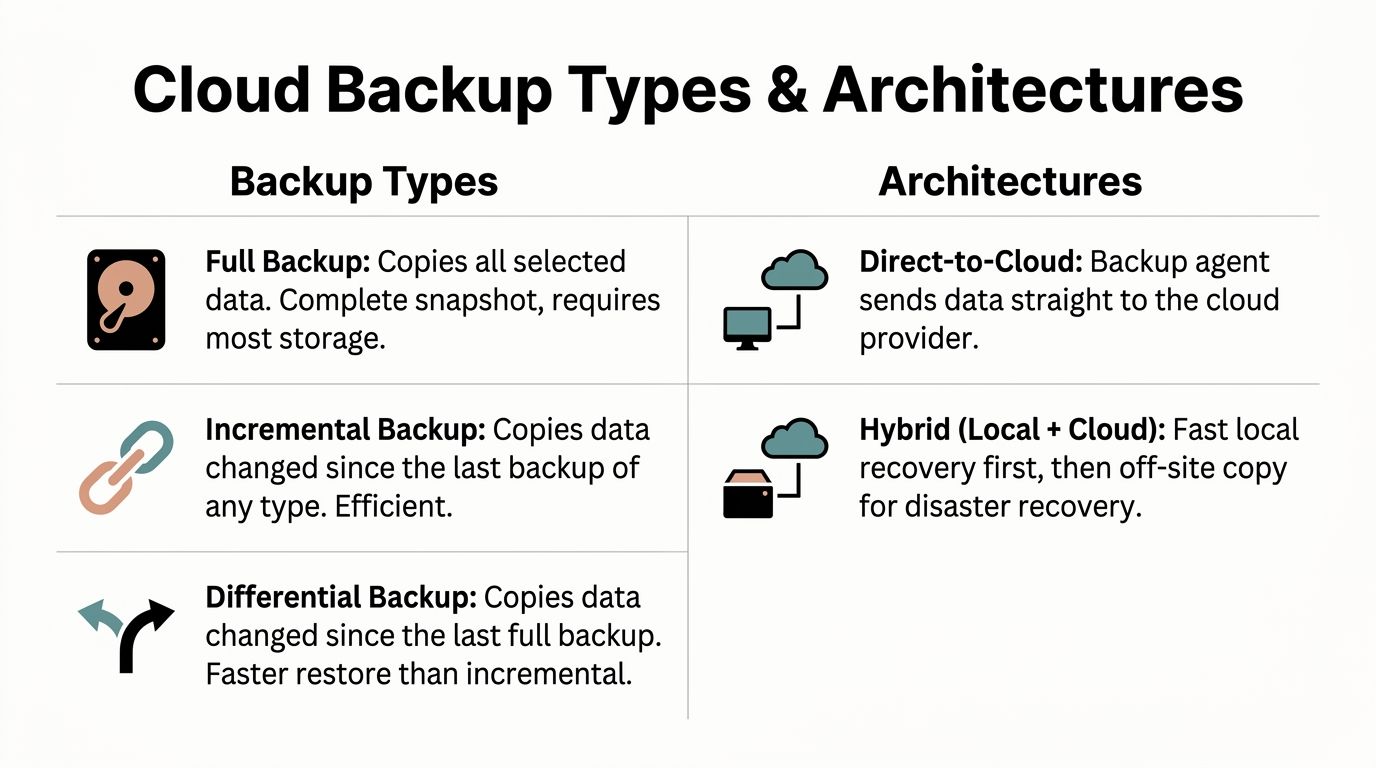
A full backup copies all selected data. It creates a straightforward recovery point, but it can require substantial storage and network capacity. An incremental backup copies data changed since the previous backup of any type, which can reduce transfer requirements. A differential backup copies data changed since the last full backup, so the copy can grow as changes accumulate, while recovery may require fewer backup pieces.
Retention determines how many versions remain available. A short policy may reduce storage use but leave fewer historical choices. A longer policy may help with accidental deletion or delayed detection of compromise, but it increases operational and storage considerations.
What the restore process reveals
A successful backup job only confirms that a job completed. It doesn't automatically prove that an application will start, permissions will work, or the recovery point meets the business's needs. A proper restore process tests the selected recovery point, destination, dependencies, and user access.
The most important gap usually appears between the dashboard and the business process. A system may report that files are protected while a critical database, SaaS account, or newly deployed workload remains outside the policy. Technovation can review those boundaries through its cloud backup benefits guidance and help map protected data to actual recovery requirements.
Types and Architectures of Cloud Backup Explained
Different backup methods solve different problems. Full, incremental, and differential approaches describe how much data each job copies. Direct-to-cloud, hybrid, and cloud-to-cloud architectures describe where the data moves and where recovery begins. File-level and image-based protection describe how much of a system can be restored.
A small legal office may need fast access to individual documents, while a medical practice may need a dependable application and database recovery path. A construction company may prioritize project files and remote access, while a financial firm may need carefully retained records and documented recovery evidence.
Backup methods
- Full backup: Copies all selected data into a complete snapshot. It offers a clear recovery base but requires the most storage and transfer capacity.
- Incremental backup: Captures changes since the last backup of any type. It can be efficient for bandwidth and storage, though a recovery may depend on a chain of related recovery points.
- Differential backup: Captures changes since the last full backup. It generally creates a larger copy over time than incremental backup, but the recovery set can be simpler.
Deployment architectures
Direct-to-cloud sends data from a protected device or server straight to the provider's remote environment. This arrangement reduces dependence on a local backup appliance and can suit organizations with distributed offices or limited server-room capacity.
Hybrid local and cloud backup keeps a local recovery copy for faster restoration while sending another copy off-site. Local recovery can help with an accidentally deleted file or a localized system problem, while the remote copy addresses events affecting the office itself.
Cloud-to-cloud backup protects information stored in hosted applications by copying it to a separate backup environment. Synchronization or availability inside a SaaS application isn't automatically the same as an independent backup, so the policy should identify which application data, configurations, and retention requirements matter.
File-level protection works well when users need selected documents or folders. Image-based protection captures a broader system state, which can help rebuild a server or workstation with its operating environment and applications.
Choosing the right cloud backup type for your needs
| Backup Type or Architecture | Best For | Trade Off to Consider |
|---|---|---|
| Full backup | Clear recovery baseline and complete snapshots | Higher storage and transfer demand |
| Incremental backup | Efficient recurring protection for changing data | Recovery may rely on multiple linked points |
| Differential backup | Businesses prioritizing a simpler recovery set | Copies can grow between full backups |
| Direct-to-cloud | Distributed offices and lean IT environments | Recovery depends more heavily on connectivity |
| Hybrid local and cloud | Fast local recovery plus off-site resilience | Requires management of both destinations |
| Cloud-to-cloud | Hosted application data requiring independent retention | Application coverage and export details need review |
| File-level protection | Individual documents and folders | Doesn't rebuild an entire operating environment |
| Image-based protection | Servers, workstations, and complete system recovery | Larger scope can require more planning and storage |
A cloud migration or application change can alter what needs protection. Organizations evaluating those changes can review cloud migration services from Technovation to make sure backup policies follow workloads into their new environments.
Benefits and Limitations Every Business Should Weigh
A ransomware incident can turn a routine outage into a business interruption. Cloud backup helps by keeping recovery data away from the systems it is meant to restore, but storage alone does not guarantee recovery. The useful measure is whether the business can restore the required files, applications, and permissions within its recovery objectives.
Cloud backup can reduce the need to buy and maintain large on-premises backup appliances. Subscription capacity may also make spending easier for an SMB to plan than a large hardware purchase. Market analysis describes cloud backup as a way to copy, store, and restore enterprise data in remote cloud environments, supporting continuity and cyber resilience in their cloud backup market analysis.
The off-site copy provides separation from local problems. Fire, flooding, power events, or equipment failure can affect production systems and nearby backup devices at the same time. A remote copy also supports organizations with multiple offices or a primary location that cannot be accessed.
Where cloud backup helps
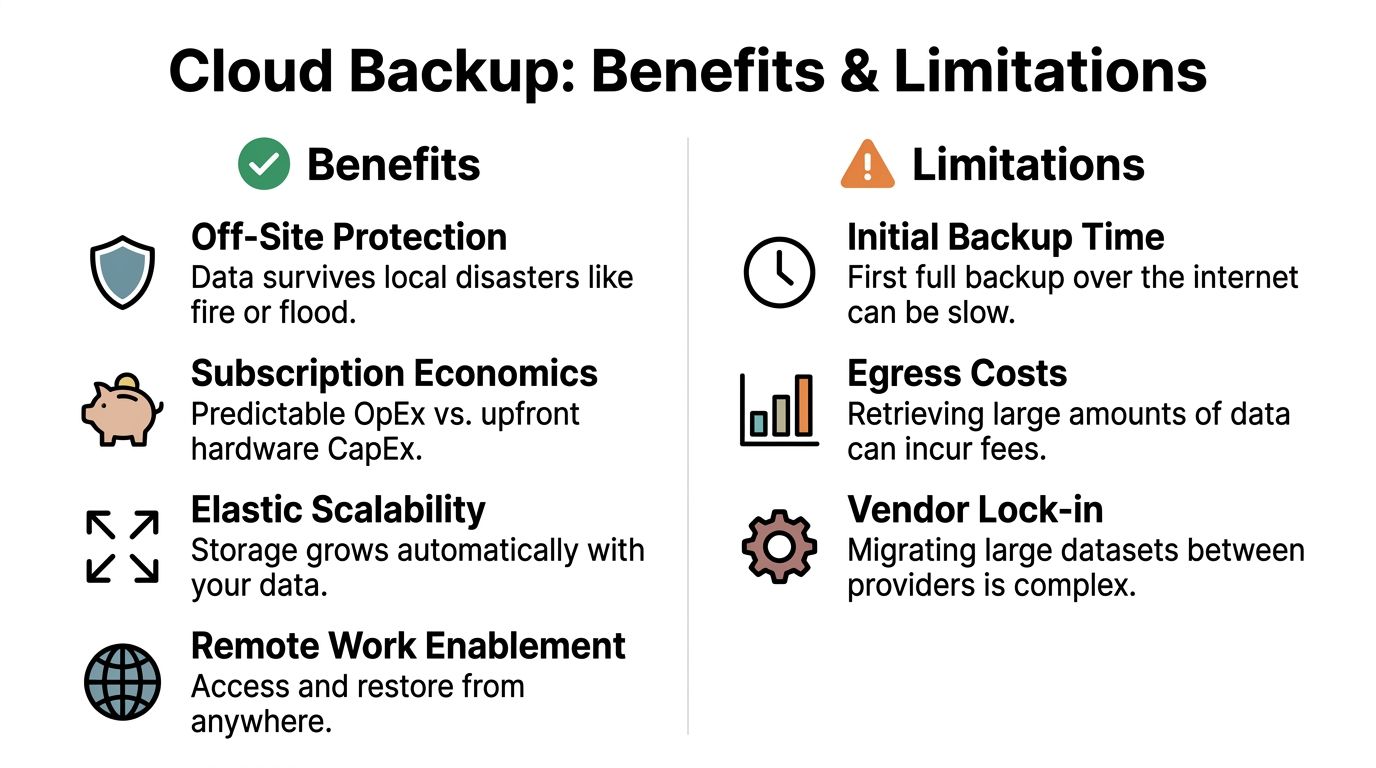
- Off-site protection: Recovery data can remain available when local hardware or facilities cannot.
- Elastic capacity: Storage can expand as protected data changes, subject to retention rules and cost controls.
- Remote recovery: Authorized staff can start a restore without standing beside the original server.
- Operational consistency: Scheduled policies reduce reliance on employees remembering manual copy jobs.
- Business continuity: Recovery priorities give managers a practical order for bringing systems back.
The practical trade-offs
Connectivity affects both the first transfer and later restores. An initial copy may take time when upload capacity is limited or staff continue changing files during the transfer. Restoring data also requires bandwidth unless the selected architecture provides another recovery route.
Subscription costs need regular review. Storage, retention, protected workloads, support, and data retrieval can all change the total. Retrieving a large dataset may create egress charges, while moving that dataset between providers can require planning. These factors make scope, retention terms, retrieval pricing, and contract responsibilities important review points.
Restore speed varies by recovery task. One document may return quickly, while rebuilding a complete server requires more data, coordination, and testing. Recovery time objectives, or RTOs, define how long a system can remain unavailable. Recovery point objectives, or RPOs, define how much recent data the business can afford to lose. Those decisions should determine backup frequency, retention, recovery destinations, and testing.
A scheduled backup can exist and still fail during a crisis if its copies are incomplete, mutable, or untested. Immutability, restore testing, and clearly assigned recovery responsibilities determine whether the backup can withstand ransomware and support operations.
Practical question: Would the current backup restore the files, applications, and permissions the business needs within its acceptable downtime?
Technovation can help DFW owners review storage scope, retention, connectivity, recovery destinations, RTO and RPO priorities, and support responsibilities before an outage reveals gaps.
Security Compliance and Making Backups Ransomware Resilient
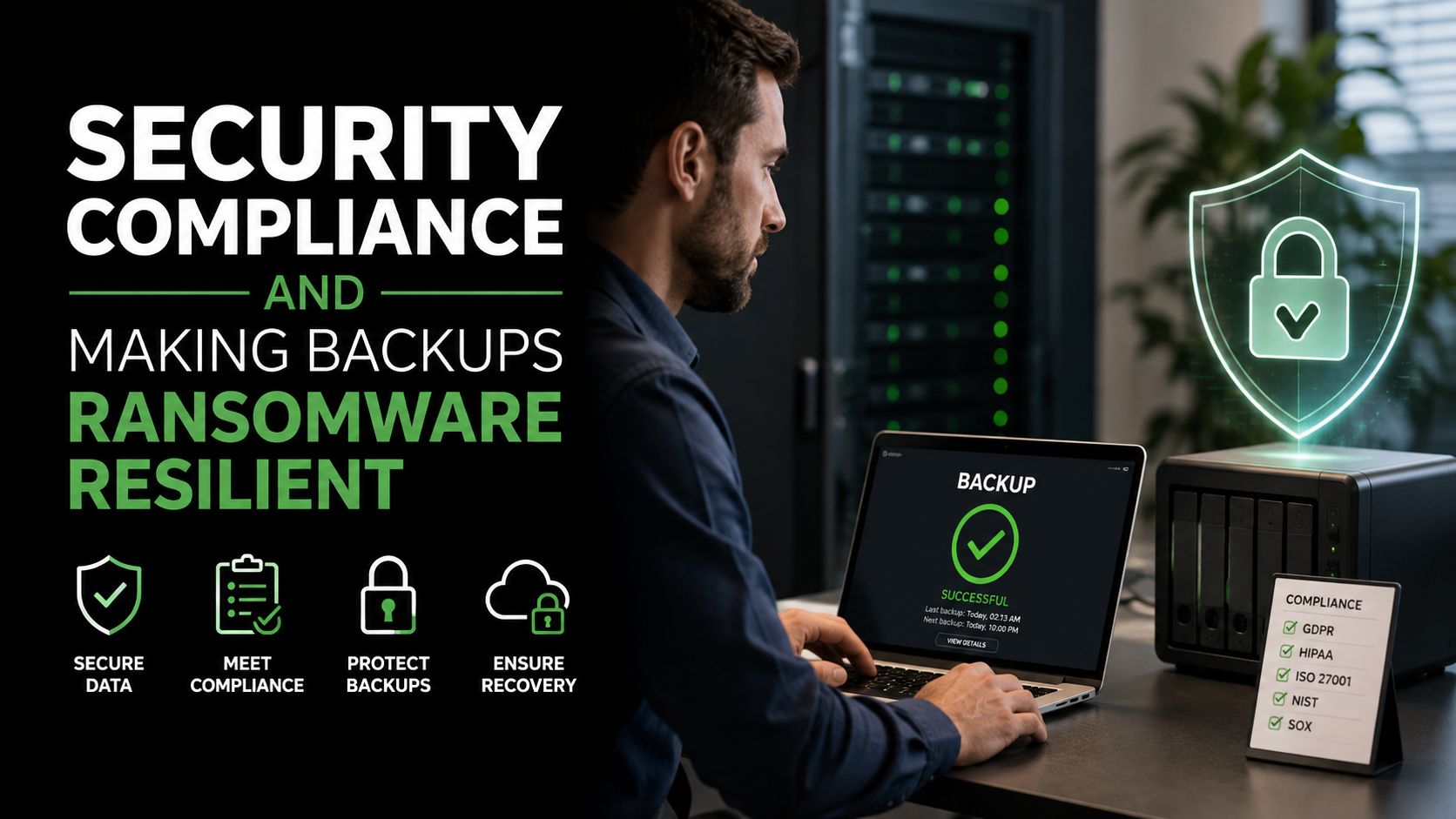
A resilient backup plan treats security, compliance, and recovery as one system. Encryption helps protect data while it travels and while it rests. Access controls limit who can create, delete, or restore copies. Retention policies define how long recovery points remain available. Immutability adds another layer by preventing protected copies from being modified, deleted, or encrypted during a defined retention period.
Immutable object storage locks recovery data at the storage layer, independently of operating-system or application credentials. Even if ransomware compromises a privileged account, protected recovery points can remain recoverable until the retention window expires. NIST SP 800-209 recommends considering immutable storage to isolate and protect recovery data, including retention locking and immutability policies.
Applying the 3-2-1 baseline
The 3-2-1 backup rule remains a practical foundation:
- Three copies: Keep the production data and two backup copies.
- Two media types: Place copies on two different forms of storage.
- One off-site copy: Keep at least one copy away from the primary location.
CISA describes cloud storage as a valid off-site copy, while the Texas State Library identifies an off-site copy as a final defense against catastrophic physical and technological failure. NIST materials also present the 3-2-1 rule as a backup best practice for protecting data and supporting recovery.
For a healthcare clinic, legal practice, or financial office, the design should align with applicable privacy, retention, access, and audit requirements. Compliance isn't satisfied by storing a copy somewhere. The organization needs evidence that the right data receives protection, that access is controlled, and that recovery can be performed.
Why restore testing belongs in the security plan
Attackers increasingly target backup systems because a compromised backup can remove the recovery option. Recent reporting found that 94% of organizations affected by ransomware said attackers attempted to compromise their backups, and 57% of those attempts succeeded in the cited ransomware survey. The same source reported that only 54% used backups to restore data after an attack, while 62% did not perform regular backup-and-restore testing.
Those figures don't mean every business faces the same outcome. They do show why a completed backup job isn't enough. Technovation's ransomware protection for small business approach can place immutable storage, access controls, monitoring, and recovery validation into one operational plan rather than treating backup as an isolated task.
Best Practices and Recovery Planning That Actually Works
A workable recovery plan starts with business decisions, not software settings. The owner and department leaders should identify which services keep revenue, customer care, compliance, and daily operations moving. Each priority then receives a recovery target.
RTO, or recovery time objective, is the maximum tolerable downtime before a service is restored. RPO, or recovery point objective, is the maximum acceptable age of the recovered data. Together, they answer two different questions: how long can the business be without the system, and how much recent information can it afford to lose? A practical RTO and RPO explanation provides the formal definitions.
Build the plan around decisions
- Classify the workloads. Separate essential applications, sensitive records, user files, and low-priority data. A patient-management system and an old archive may not need identical recovery treatment.
- Set RTO and RPO targets. Write the acceptable downtime and data age beside each workload. If the target can't be met by the current connection, storage design, or support arrangement, change the design or change the target deliberately.
- Apply the 3-2-1 rule. Keep three copies, use two storage media types, and place one copy off-site. Cloud storage can serve as the off-site copy, but the plan should document who controls access.
- Add immutability. Protect critical recovery points with retention locking so an administrator or compromised credential can't shorten the protection window.
- Automate and monitor. Scheduled jobs should generate alerts for failures, missed workloads, unusual changes, and capacity issues. Someone must own the response to those alerts.
- Document the runbook. Record contacts, priorities, recovery destinations, credentials procedures, dependencies, and approval steps. A recovery plan that exists only in one administrator's memory isn't operationally dependable.
Monthly restore-readiness checklist
For critical systems, a monthly validation routine can include:
- Select a recovery point: Choose a representative backup and record its date, workload, and retention status.
- Restore safely: Use an isolated or approved destination rather than overwriting production during the test.
- Check usability: Open files, start applications, inspect database access, and confirm required permissions.
- Measure results: Compare actual restoration time and recovered data age with the stated RTO and RPO.
- Record exceptions: Document missing files, failed dependencies, access errors, or performance limitations.
- Assign corrections: Give each issue an owner and due date, then verify the fix in a later test.
- Preserve evidence: Keep the test record for internal governance and audit preparation.
Authoritative ransomware-resilience guidance emphasizes immutable or offline backups and regular recovery testing, with some practical programs recommending monthly tests for critical systems and documented results as part of restore validation. Technovation can operationalize these tasks through its disaster recovery planning services, including monitoring, documentation, testing, and reporting for organizations without dedicated internal staff.
Choosing a Solution and How Technovation Supports DFW Businesses
The right cloud backup solution starts with recovery requirements rather than a feature list. A vendor evaluation should ask whether the service protects every required workload, supports immutable retention, documents encryption and access controls, provides usable restore options, and offers support during an incident. The agreement should also define response expectations, escalation paths, reporting, and assistance with compliance evidence.
Cost depends on more than the amount of original data. Protected devices, application coverage, retention duration, backup frequency, local recovery components, support, and large-scale retrieval can all affect the subscription. A careful assessment prevents under-scoping, where the contract protects only a portion of the environment, and over-scoping, where low-value data consumes capacity without a clear business reason.
Questions for a DFW SMB
- Coverage: Are servers, endpoints, databases, SaaS information, and new workloads included?
- Recovery: Can the team restore a single file, an application, or an entire system?
- Resilience: Is at least one critical copy immutable or otherwise isolated?
- Evidence: Does the service produce usable job, access, retention, and restore-test records?
- Support: Who responds during a failed job or business interruption?
- Fit: Can the architecture meet the organization's RTO and RPO targets?
An enterprise cloud backup review can provide additional context for evaluating broader business requirements, but each DFW organization still needs a design based on its own workloads, compliance obligations, and operating model.
Technovation LLC provides managed cloud backup as part of broader cybersecurity, compliance, and business IT services. For local SMBs, that can include proactive monitoring, encrypted off-site protection, recovery planning, restore validation, and help preparing for audit or continuity discussions. The practical advantage of a managed approach is accountability. Someone reviews failed jobs, notices coverage changes, maintains documentation, and coordinates recovery rather than leaving those tasks to an already busy owner or office administrator.
The next step isn't buying storage. It's determining whether current backups would restore the systems the business needs, within the time it can tolerate, after an event that affects both production data and ordinary backup copies.
Technovation LLC helps Dallas-Fort Worth businesses assess cloud backup coverage, strengthen ransomware resilience with protected recovery copies, and test whether restoration meets real RTO and RPO needs. Visit Technovation LLC to request a security audit or IT health check and turn backup from a scheduled task into a recovery plan the business can rely on.





![Black sign reading 'Law Firm IT' mounted above a desk with a laptop, mug, notebook, and rows of legal books in a law office setting.]](https://technovationdfw.com/wp-content/uploads/2026/09/it-services-for-law-firm-law-office-110x80.jpg)