A DFW business owner can see the pattern without anyone naming it. Staff split time between home, client sites, and the office. A manager needs access to a desktop application that only lives on one workstation. An employee forgets a file on an office PC. The IT team has to fix a problem fast, but nobody is standing in front of the machine.
That's where remote access software tools enter the conversation. But the key decision isn't whether remote access is useful. It's whether the business will enable it in a way that supports productivity without opening unnecessary security and compliance risk. For healthcare clinics, law firms, financial offices, and other regulated organizations across Dallas Fort Worth, that difference matters more than any feature list.
Table of Contents
- The New Reality of Work and Remote Access
- What Are Remote Access Software Tools Really Doing
- Securing Your Digital Doorway for Compliance and Risk
- Managed vs Self Managed Who Holds the Keys
- Your Buyers Checklist for Remote Access Software
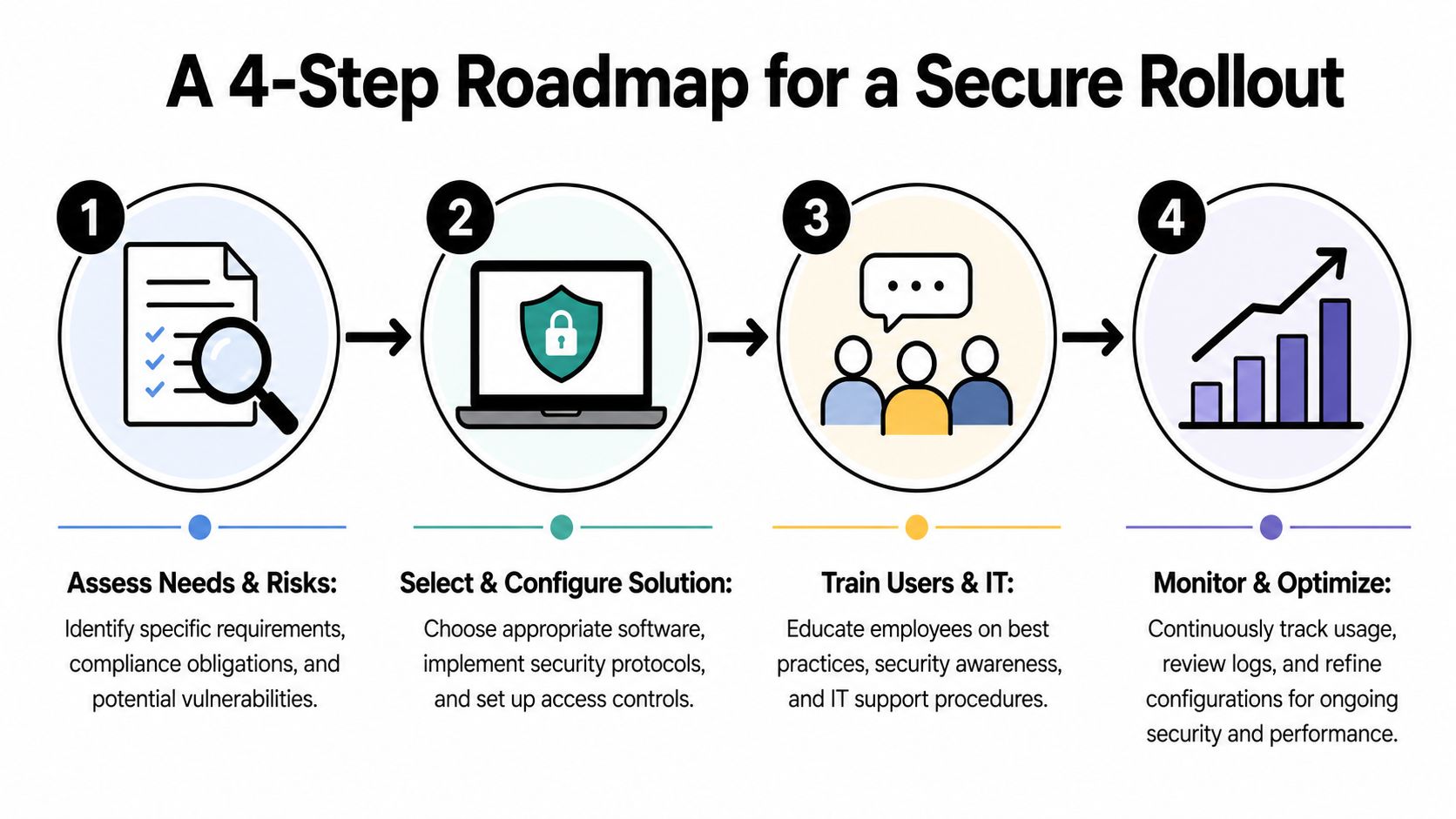
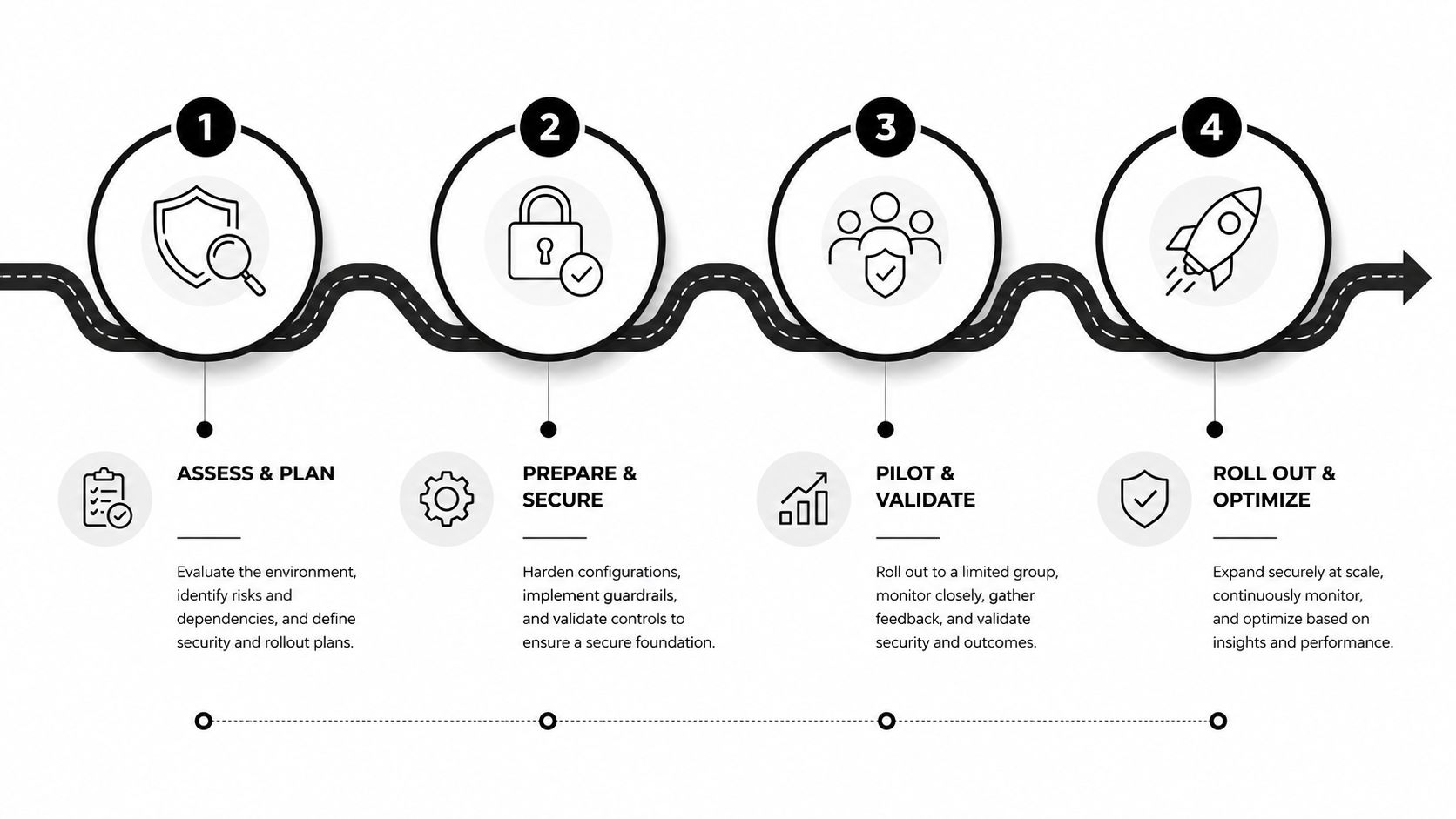
- A 4 Step Roadmap for a Secure Rollout
- Your Next Steps for Secure Remote Access in DFW
The New Reality of Work and Remote Access
Remote access used to be treated as a convenience. Now it's part of day to day operations. The shift to hybrid work changed the category from a niche IT function into a core business capability, and by 2023 Gartner estimated that 39% of global knowledge workers would work hybrid according to Datto's overview of remote access software.
That trend matters in practical terms. A business can't rely on everyone being in one building, on one network, at one predictable time. Staff need to reach desktops, files, and internal systems from approved locations. IT teams need to troubleshoot machines without waiting for someone to drive back to the office. Leadership needs business continuity when weather, travel, illness, or schedule changes disrupt a normal workday.
For DFW companies, this usually shows up as an operations problem before it looks like a technology one. Work slows down because access is inconsistent. Support takes longer because technicians don't have the right pathway into the affected system. Security gets patched together because the original remote setup grew informally.
Practical rule: If remote access exists in the business already, it should be treated as part of the security architecture, not as a side utility.
That's why the conversation needs to move beyond “Can employees log in from home?” A better question is whether the business has chosen remote access software tools that match how people work, how the company is regulated, and how risk is being controlled. In many environments, that decision also overlaps with broader cloud-based network strategy for modern businesses, because access, identity, and connectivity now affect each other every day.
What Are Remote Access Software Tools Really Doing
A lot of confusion disappears once remote access is explained in plain terms. These tools aren't magic, and they shouldn't feel mysterious to a business owner signing off on them.
The basic model behind remote access
The simplest analogy is a digital keycard. The target computer has a small installed component that waits for authorized instructions, and the technician or employee uses a separate application to connect. The connection is specific, controlled, and designed to let an approved person work on that remote machine as if sitting in front of it.
According to Splashtop's remote desktop explanation, remote access tools typically use a client-server model. A small agent or streamer is installed on the target machine, and that system connects to a client app used by the operator. That setup enables full control without relying on a traditional VPN.
In business terms, that means three things usually determine whether deployment goes smoothly:
- The endpoint must support an agent: The device being accessed has to run the host component reliably.
- Outbound connectivity has to be permitted: Security controls can't block the communication path the tool needs.
- Permissions must match job roles: A billing employee, office manager, and technician shouldn't all have the same level of access.
Why that architecture matters to a business owner
Remote access is never just a purchase. It affects identity, endpoint management, support workflow, and auditability. If the architecture is wrong, users work around it. If users work around it, security loses visibility.
A good setup gives the business controlled access to the exact systems that matter. A poor setup creates broad standing access that nobody reviews until there's an issue. That's one reason identity governance should sit close to any remote access decision, especially when multiple staff roles need different privileges. Businesses that want cleaner control often benefit from stronger identity management services for role based access and authentication.
Some IT leaders are also reevaluating remote support in the context of workflow automation, not just screen control. For teams interested in how AI can support support operations, it can be useful to explore SupportGPT-1 as a reference point for how documentation and technician assistance are evolving.
A remote session should behave like a controlled business process, not like a hidden tunnel into the network.
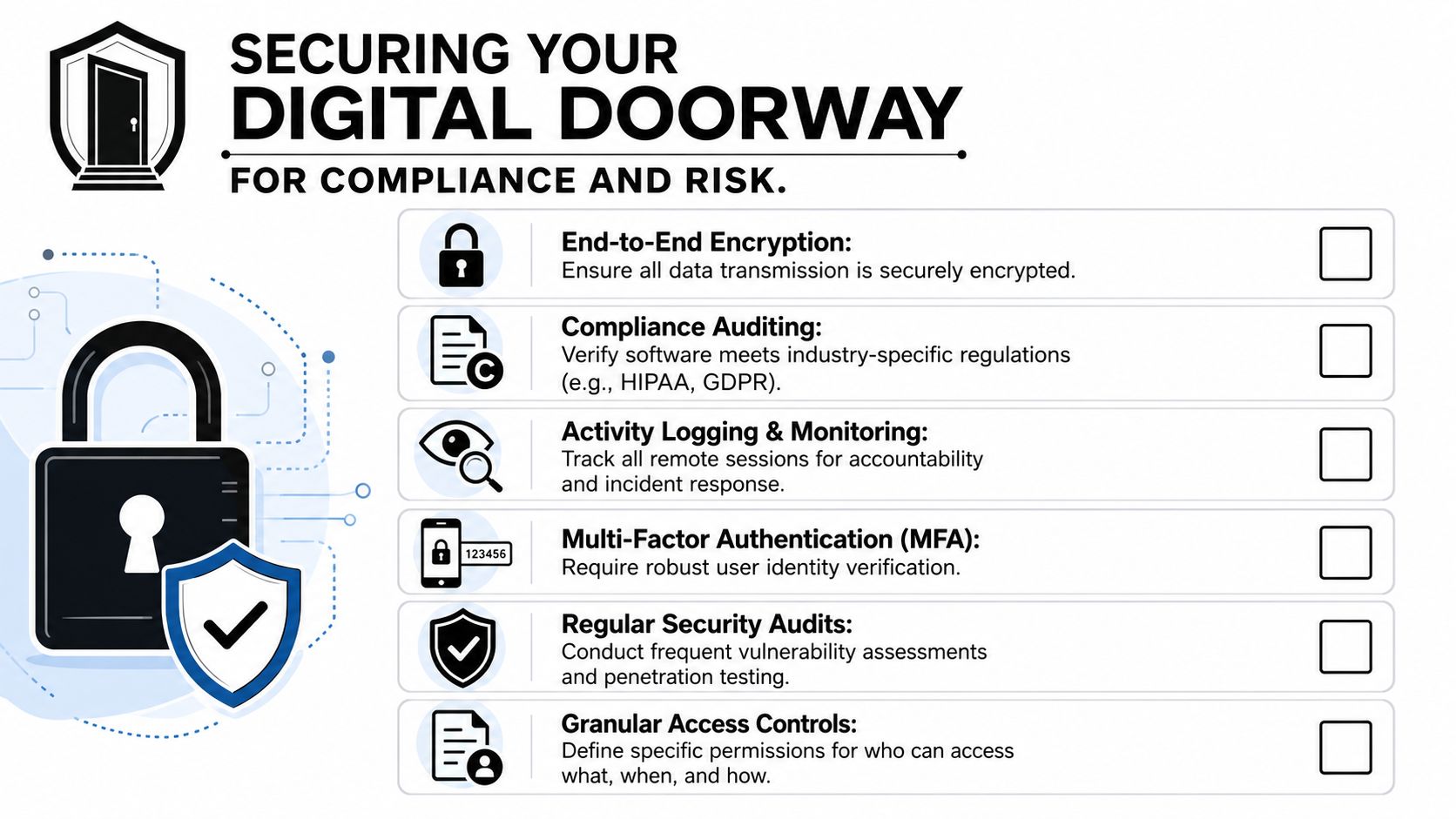
Securing Your Digital Doorway for Compliance and Risk
For regulated businesses, remote access isn't risky because it exists. It becomes risky when it's broader, looser, or less monitored than it needs to be.
Why remote access needs tighter controls
The security issue is straightforward. A tool designed for legitimate support can also create opportunity for misuse if access is persistent, poorly scoped, or lightly monitored. That's why the MITRE ATT&CK entry for remote services and tools matters here. MITRE classifies remote access tools as a potential adversary technique and recommends practical mitigations such as disabling unused features, filtering traffic, using application control, and blocking unnecessary IP based KVM devices.
That point often gets missed in buyer conversations. Many firms compare ease of use, pricing model, and connection quality. Those are valid factors, but they aren't the whole decision for a clinic handling patient data, a law office managing confidential case files, or an accounting firm touching financial records.
A safer posture usually comes from reducing capability to the minimum required. Not every user needs unattended access. Not every device should accept remote control. Not every file transfer function should stay enabled by default.
What regulated businesses should require
For compliance conscious organizations, the right standard is disciplined control. That normally includes the following:
- Strong authentication: Access should require more than a password. If credentials are stolen, the session shouldn't start automatically.
- Granular permissions: Different users need different rights. Temporary contractors, office administrators, and senior technicians should not inherit the same privileges.
- Session logging: If someone connects to a system, the business should be able to review who accessed what, when, and for what purpose.
- Feature minimization: Disable functions that aren't required for the role or workflow.
- Network filtering and allowlisting: Limit where sessions can originate and what systems can be reached.
A second layer of protection matters too. If a business is reviewing access risk, it also makes sense to monitor dark web for stolen data so credential exposure can be found before it turns into unauthorized access.
The safest remote access environment usually isn't the one with the most options. It's the one with the fewest unnecessary ones.
Endpoint posture also belongs in this discussion. A remote connection into an unmanaged or weakly protected machine doesn't become safe just because the session is authorized. Strong endpoint protection for business environments helps limit what happens if a compromised device, reused credential, or unauthorized user attempts to exploit that pathway.
For regulated DFW organizations, remote access shifts from convenience to governance. The business isn't only choosing how people connect. It's deciding how much exposure it's willing to accept.
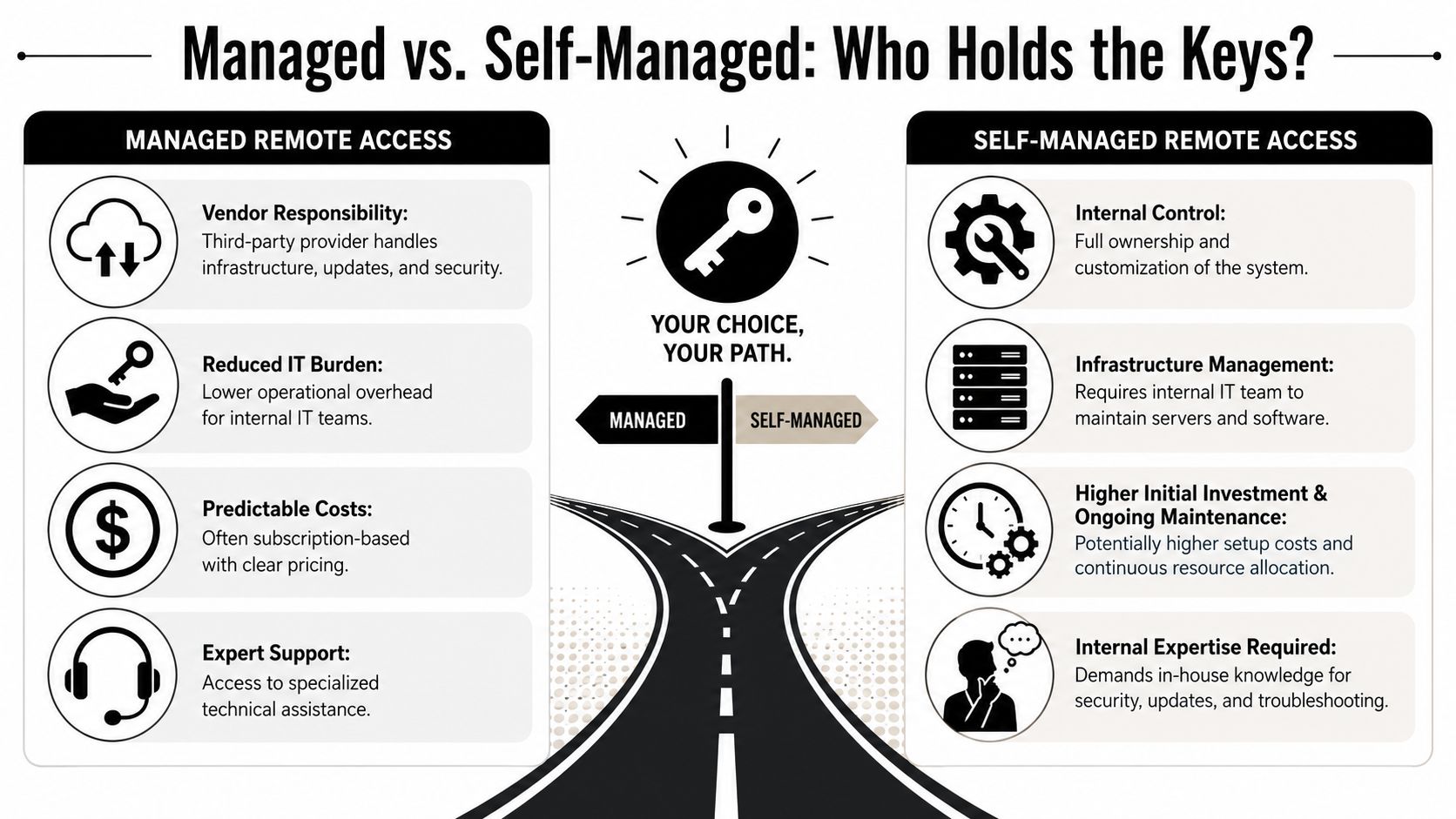
Managed vs Self Managed Who Holds the Keys
This decision is less about ideology and more about operating model. Some businesses want direct ownership over every part of the remote access environment. Others want the outcome, without dedicating internal time to design, monitor, tune, and review it.
Where self managed makes sense
A self managed approach gives the business tighter direct control over infrastructure, configuration, and customization. That can make sense when an internal IT team has the bandwidth and experience to own policy design, rollout, patching, permissions, logging, exception handling, and ongoing review.
The upside is control. The downside is responsibility.
When a business self manages remote access software tools, it also owns questions like these:
| Decision area | What the business must handle |
|---|---|
| Access design | Define who gets access, to which systems, under what conditions |
| Security tuning | Remove unnecessary features and maintain approved settings |
| Monitoring | Review logs, investigate anomalies, and adjust policy |
| User lifecycle | Add, change, and remove permissions as roles evolve |
| Compliance evidence | Produce records that show access was controlled appropriately |
For some firms, that's reasonable. For many SMBs, it becomes one more critical system that depends on a small number of people who are already stretched thin.
Why many SMBs choose managed oversight
A managed model changes the burden. The business still decides policy and acceptable risk, but day to day operational work moves to a partner that handles configuration discipline, monitoring, review, and support processes in a more consistent way.
That matters when remote access touches multiple departments. A legal office may need partner level access controls, staff level restrictions, and documented session activity. A healthcare group may need tighter oversight around who can connect to workstations that handle protected information. A construction firm may need reliable access for field teams without weakening internal systems.
A business shouldn't ask only who can log in. It should ask who will keep that access model clean six months from now.
The managed route often works best for owners who want predictable oversight instead of ad hoc administration. It also reduces the chance that remote access settings drift over time. When evaluating that path, it helps to use the same discipline applied to any outside technology partner. This guide on how to choose a managed service provider is a useful benchmark for what to evaluate before handing over that responsibility.
Your Buyers Checklist for Remote Access Software
A strong buying process avoids two bad outcomes. The first is buying a tool that can connect but doesn't fit the business. The second is buying a tool with acceptable features and discovering later that administration, documentation, and oversight take more effort than expected.
Questions worth asking before approval
A practical checklist should cover more than user convenience.
- Access scope: Does the tool support access by role, device type, and business need, or does it encourage broad standing permissions?
- Authentication controls: Can the business enforce stronger identity checks for every remote session?
- Session visibility: Are logs detailed enough to support internal review, investigations, and compliance documentation?
- Administrative simplicity: Can internal staff manage permissions and policy changes without creating confusion or gaps?
- Support workflow fit: Does the tool work with existing service processes, or will technicians create workarounds outside policy?
- Deployment model: Does the business want to maintain infrastructure directly, or does it prefer vendor hosted delivery with governance around it?
- User experience: Will staff use the approved method, or will friction drive them to unsanctioned shortcuts?
A buyer should also ask a less common question. What capabilities should stay turned off unless a specific use case requires them? That one question often reveals whether a tool supports disciplined security or assumes maximum access by default.
How to think about efficiency and total cost
The remote access market is shifting. Connection quality still matters, but many teams are judging platforms by how they affect overall support operations. According to ScreenMeet's discussion of remote IT support platforms, modern platforms can reduce mean time to resolution by 25 to 30% and cut documentation time by over 60% through AI assisted automation.
That changes the buying conversation. A familiar platform may feel comfortable, yet still create extra technician effort through weak documentation flow, fragmented workflows, or manual note taking. A more effective choice may be the one that reduces operational drag around the session, not just during it.
A useful buyer checklist should include:
- Technician time saved per ticket
- Documentation burden after each session
- Ease of policy enforcement
- Audit readiness
- Ability to scale without messy permission growth
For a DFW business owner, the key point is simple. The right remote access software tools should improve support quality while reducing risk and admin friction. If a platform only solves the connection itself, it may not solve the business problem.
A 4 Step Roadmap for a Secure Rollout
Implementation usually determines whether a remote access project succeeds. Many businesses don't fail at selection. They fail at rollout discipline.
Step 1 and Step 2
Step 1 is planning and policy definition. Before any deployment, the business should define who needs remote access, which systems are in scope, what level of control is permitted, and what approval process governs exceptions. This is also where compliance obligations should be mapped to real settings, not left as general intentions.
Step 2 is a limited pilot. Start with a small group that represents real use cases, such as one manager, one administrative user, and one IT support function. The goal isn't just testing whether the software connects. The goal is learning whether permissions, session flow, user prompts, and audit records work the way the business expects.
Start small enough to see problems clearly, but broad enough to expose policy gaps before full deployment.
Step 3 and Step 4
Step 3 is phased deployment with training. Rollout should expand by business function, not by convenience. Staff need to understand when remote access is appropriate, how to request help, what approvals are required, and which shortcuts are prohibited. Technicians need separate training on permission hygiene, session documentation, and escalation rules.
Step 4 is ongoing review and adjustment. Remote access should be audited like any other sensitive pathway. Accounts should be reviewed as roles change. Unused access should be removed. Session patterns that don't match policy should be examined. If a feature isn't being used for a business purpose, it should be considered for removal.
A secure rollout doesn't end at installation. It becomes an operating practice. That's the difference between enabling access and governing it.
Your Next Steps for Secure Remote Access in DFW
Remote access software tools solve a real business need. They help staff work from different locations, help support teams respond faster, and help companies stay productive when work no longer happens in one place. But its true value depends on how access is scoped, secured, monitored, and maintained over time.
For DFW businesses, especially those in healthcare, legal, financial, nonprofit, and other security conscious sectors, this isn't a minor IT choice. It's a business risk decision. A loose setup can create unnecessary exposure. A disciplined setup can support compliance, improve support operations, and reduce avoidable interruptions.
The most useful next step isn't guessing based on marketing language or choosing the tool with the longest feature sheet. It's reviewing the current environment with a clear set of questions:
- Who has remote access today
- Which systems can they reach
- Which features are active but unnecessary
- Whether session visibility is strong enough for review
- Whether access still matches current job roles and compliance needs
A business that can answer those questions clearly is in a much better position to choose the right model and deploy it responsibly.
Technovation LLC helps Dallas Fort Worth businesses evaluate remote access risk, tighten security controls, and build compliant support processes that fit real operations. If the current setup feels unclear, outdated, or harder to govern than it should be, schedule a conversation with Technovation LLC for a practical review of remote access posture, security gaps, and next-step options.