
A Dallas business owner usually notices the phone system problem in the middle of a normal workday. A client calls the main line, gets bounced to the wrong person, leaves a voicemail that no one checks until late afternoon, and then calls a competitor. Meanwhile, a remote employee is using a personal cell phone because the office system still assumes everyone sits at the same desk every day.
That isn’t a phone problem. It’s an operations problem.
For companies searching for business phone systems, the decision isn’t just which phones to buy. It’s whether the communication system will support hybrid work, protect sensitive conversations, and hold up under compliance scrutiny. In Dallas-Fort Worth, that matters more than most buyers realize. Healthcare clinics, law firms, financial offices, construction companies, and nonprofits all depend on calls moving cleanly, securely, and without drama.
Table of Contents
- Is Your Phone System Holding Your Dallas Business Back?
- Cloud vs On-Premise Systems for the DFW Metroplex
- Defining Your Must-Have Communication Features
- The Overlooked Risk of Unsecured Phone Systems
- Your Vendor Selection Checklist for the DFW Market
- Ensuring a Smooth and Seamless System Migration
Is Your Phone System Holding Your Dallas Business Back?
At 8:07 a.m., your office manager is already juggling three calls. A new patient needs an appointment, a client wants an update, and a vendor is trying to confirm delivery. One call goes to the wrong person. Another hits voicemail. The third gets forwarded to a personal cell phone with no record of what was said. That is not a phone problem. It is an operations, security, and compliance problem.

I see this across Dallas-Fort Worth all the time. Front desks still act as manual switchboards. Attorneys and account managers rely on voicemail to patch over missed handoffs. Employees forward business calls to personal numbers because the office system cannot keep up with how the company works.
That friction costs money. It also creates risk.
A construction estimator misses a callback while driving between job sites. A legal assistant cannot tell whether a partner already returned a client call. A medical front desk sends callers through the same main number queue, even when the call should go straight to scheduling or billing. In financial services, poor call handling can create recordkeeping gaps and access problems that should never exist in the first place.
The office phone is now part of your operating system
Your phone system should route calls correctly, show who handled what, and keep business conversations inside a controlled environment. If it cannot do those things, it is slowing down service and exposing the business.
For regulated Dallas businesses, the bar is higher. Healthcare groups need to protect patient information. Law firms need tighter control over client communications. Financial firms need stronger oversight, cleaner records, and better access controls. A phone system that depends on personal cell forwarding, shared voicemail boxes, or undocumented call transfers fails that test fast.
Mobility matters, but control matters more. Staff should be able to answer from a desk phone, laptop, or mobile app without pushing business calls onto personal devices or private voicemail. Managers should be able to review call activity, spot missed-call patterns, and fix routing issues before they turn into lost revenue or client complaints.
Practical rule: If your business cannot answer, route, document, and protect calls across, your phone system is holding you back.
What outdated systems usually look like
Old phone environments rarely collapse all at once. They create small failures that pile up.
- Calls land in the wrong place: Routing is inconsistent, so callers bounce between extensions or end up in a general mailbox no one owns.
- Employees work outside the system: Staff use personal phones, text threads, and manual callbacks because the main platform does not support real workflows.
- Leadership has no visibility: There is little or no reporting on missed calls, abandoned calls, response times, or call handling by team.
- Security is weak by default: Shared credentials, open forwarding rules, and unmanaged devices create easy openings for data exposure and phone fraud.
- Growth turns into a hassle: Adding users, departments, or locations becomes a hardware project instead of a simple admin task.
Dallas businesses do not need more phones on more desks. They need a communication system that protects conversations, supports mobile work, and gives leadership clear control over service quality.
Start with one blunt question. Does your current system help your team respond faster, serve clients better, and keep sensitive communications secure? If not, keeping it is usually the more expensive decision.
Cloud vs On-Premise Systems for the DFW Metroplex
This decision shapes everything that follows. It affects support burden, business continuity, remote work, and how painful expansion will be next year.
For most small and midsized Dallas businesses, cloud PBX is the better choice. Not because it’s trendy. Because it matches the way teams now operate across offices, homes, job sites, and satellite locations.
Why cloud fits most Dallas businesses
Cloud systems remove a lot of the baggage that drags down older phone environments. The business doesn’t have to babysit aging hardware in a back closet. Admin changes happen faster. New users can be added without turning every move into a mini project.
That matters in DFW, where teams are often spread across Dallas, Fort Worth, Plano, Irving, Frisco, Arlington, and beyond. A cloud platform gives everyone one system, one company identity, and one calling workflow.
| Factor | Cloud PBX (Hosted VoIP) | On-Premise PBX |
|---|---|---|
| Deployment | Faster to roll out across multiple locations | Slower, with more local infrastructure to manage |
| Hybrid work | Strong fit for mobile and remote staff | Often requires workarounds or added complexity |
| Scalability | Easier to add users, locations, and devices | Growth usually means more hardware planning |
| Maintenance | Provider-managed platform reduces internal burden | Internal team or outside support must maintain the system |
| Business continuity | Better positioned for location-specific disruptions | More dependent on what happens at the office |
| Control | Less hands-on control of underlying infrastructure | More direct control over local equipment |
A cloud setup also supports the features most companies use. Softphones, mobile apps, video meetings, call forwarding, auto-attendants, and CRM screen pops fit naturally into that model.
Businesses with hybrid staff shouldn’t force a fixed office system onto a flexible workforce.
When on-premise still makes sense
On-premise isn’t dead. It’s just a narrower fit.
A company may still choose on-premise if it has unusual internal control requirements, a strong in-house telecom team, or site-specific operational needs that justify managing local equipment directly. Some businesses prefer that level of ownership and are willing to accept the maintenance burden that comes with it.
That said, buyers should be honest about the tradeoff. Owning the box also means owning the headaches. Firmware, backup planning, replacement cycles, local outage exposure, and support complexity don’t disappear because the hardware sits inside the building.
A practical evaluation should look at these questions:
- How mobile is the workforce? Field teams, traveling staff, and hybrid employees usually push the decision toward cloud.
- How much internal IT capacity exists? If the team is already stretched, adding phone infrastructure won’t help.
- How many locations need to act like one office? Multi-site organizations usually benefit from central cloud management.
- How sensitive is downtime? If missed calls directly affect intake, scheduling, or revenue, continuity matters more than nostalgia for old hardware.
Businesses across the metroplex often overvalue familiarity. They keep an on-premise setup because it’s what they know, not because it’s the better business decision. In most cases, the better move is simpler management, better mobility, and less dependence on office-bound equipment.
Defining Your Must-Have Communication Features
Most buyers get distracted here. They ask for a list of features before they define what the staff needs to do all day. That’s backward.
A phone system should be built around work patterns. A Dallas construction firm needs different capabilities than a clinic, law office, or accounting practice. The right feature set solves bottlenecks. The wrong one just creates a fancier menu.
Start with business process, not feature lists
A useful requirements review starts with a few plain questions. Where do calls get stuck? Who needs to answer from outside the office? Which conversations need documentation? Where do callers lose patience?
Once those answers are clear, the feature list usually sorts itself out.
- For healthcare offices: Auto-attendants can route patients to scheduling, billing, or nurse lines without sending every call through the front desk.
- For legal teams: Call recording and transcription can support documentation, training, and internal review when handled under the firm’s policies.
- For financial services: Clear routing and identity consistency help clients reach the right advisor quickly without informal callback chains.
- For construction and field operations: Mobile-first access matters. Calls need to move from office to field without exposing personal numbers or losing context.
- For nonprofits: Shared visibility into inbound calls helps lean teams cover each other without dropping donor or client communication.
Features that usually earn their keep
Not every advanced feature deserves budget. A few do.
Auto-attendant and call routing should be near the top of the list. They reduce front-desk overload and shorten the path between caller and answer.
Softphones and mobile apps are no longer optional for distributed teams. If employees work from multiple locations, the business number has to travel with them.
Call analytics and reporting dashboards help leadership see missed calls, response gaps, and team load. Without visibility, service issues turn into guesswork.
CRM integration matters when call context affects sales, intake, or client service. Staff work faster when caller details appear automatically instead of forcing a manual lookup.
Call logging and searchable history reduce confusion. Teams can verify whether someone already called back, transferred the issue, or left a message.
A good feature earns its place by removing one repetitive pain point from the workday.
There’s also a compliance angle. Some features create risk if they’re turned on casually. Recording, transcription, voicemail-to-email, mobile access, and SMS can all become policy issues when a business handles protected, privileged, or financial information. Features should be approved through an operational and compliance lens, not just enabled because they’re available.
A strong buying process doesn’t ask, “What can this system do?” It asks, “Which capabilities improve response time, reduce staff friction, and fit the business’s security obligations?” That approach keeps the system useful instead of bloated.
The Overlooked Risk of Unsecured Phone Systems
Monday morning in Dallas. Your front desk is answering calls, a manager is using a mobile softphone from home, and someone in billing is pulling up a voicemail that contains private client details. If that phone system is poorly secured, you do not have a phone problem. You have a business risk problem.
That is the part many discussions about business phone systems dallas miss. They stay focused on uptime, mobile apps, and monthly cost. Those matter, but voice now touches user accounts, mobile devices, cloud access, stored messages, and regulated data. In healthcare, legal, and financial firms across DFW, the phone system belongs in the same risk conversation as email and endpoint security.
Why voice systems are now part of the attack surface
A modern phone platform is tied to logins, apps, voicemail, call recordings, texting, and remote access. Every one of those pieces can expose the business if the setup is sloppy. Shared admin accounts, weak passwords, personal devices without controls, and recordings kept forever are common mistakes. They are also avoidable.
The risk changes by industry, but the pattern is the same.
- Healthcare practices can expose patient information through voicemail, recordings, transcription, or insecure mobile access.
- Law firms can create privilege and confidentiality problems when calls, messages, or transcripts are stored without tight access controls.
- Financial firms can mishandle client data when identity verification happens over unsecured channels or when retention settings are poorly managed.
- Any multi-site Dallas business can lose control fast if branch offices, remote staff, and mobile users all handle calls differently.
Convenience creates a lot of these problems. Staff will work around a clumsy system. They forward calls to personal phones, save messages in the wrong place, or use whatever app gets the job done fastest. That behavior turns a routine communication tool into a compliance gap.
Security controls that should be standard
Security needs to be built into the phone environment before rollout, not patched in later after someone notices a problem.
A critical standard: If a provider cannot clearly explain how they protect voice traffic, endpoints, admin access, recordings, and retention settings, they are not the right fit for a regulated business.
Start with these controls:
- Encrypted calling and signaling: Sensitive conversations should not travel in plain text.
- Tight admin access: Limit who can change routing, recordings, user permissions, and retention rules.
- Managed endpoints: Desk phones, laptops, and mobile devices that access the system need policy control, updates, and visibility.
- MFA for admin accounts: Password-only access is not enough for system administration.
- Retention rules that match policy: Voicemails, call recordings, transcripts, and logs should be kept only as long as the business and compliance requirements say.
- Monitoring and alerting: Failed logins, unusual call activity, suspicious forwarding, and configuration changes should trigger review.
- Documented user policies: Staff need clear rules for mobile use, texting, recording, and handling sensitive caller information.
For Dallas businesses with compliance exposure, this should be part of a broader Dallas IT security strategy for regulated business systems, not a standalone telecom purchase.
Here is the practical test. If your phone system vendor talks only about features and price, keep looking. A business phone system that does not address access control, endpoint security, retention, and compliance is not business-grade. It is a liability that happens to make calls.
Your Vendor Selection Checklist for the DFW Market
The wrong provider can make a good platform feel broken. The right provider can make a complex transition feel routine.
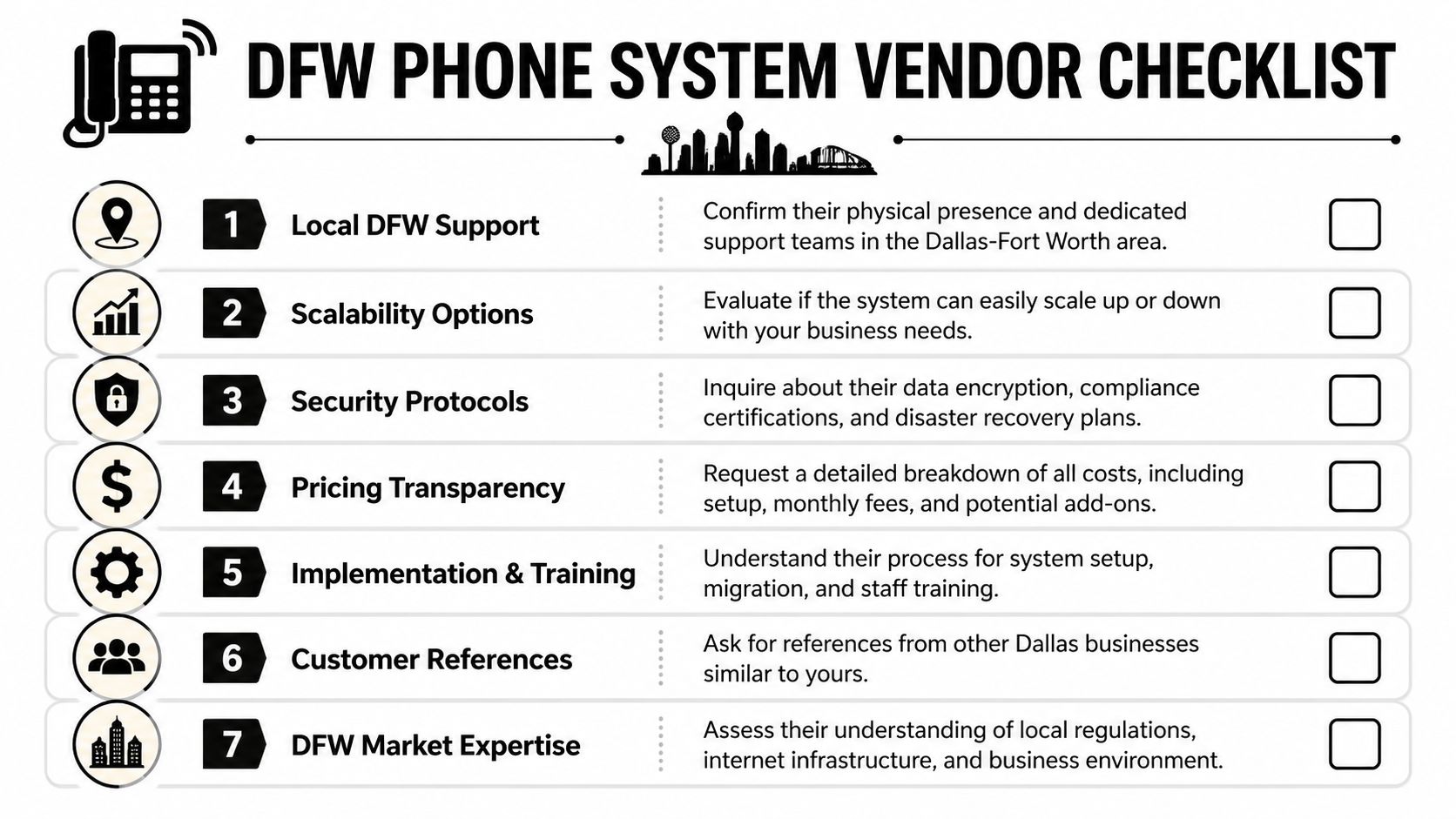
Dallas businesses often get this backwards. They spend all their time comparing feature sheets and almost none evaluating the people who will configure, support, and secure the system after the contract is signed. That’s a mistake, especially for firms that can’t afford finger-pointing between telecom, internet, and IT support.
Questions that expose weak vendors fast
A serious vendor should answer direct questions without hiding behind marketing language.
- Who supports the system locally? DFW businesses need to know whether the provider can respond in this market, not just from a distant call center.
- How are security and compliance handled? The answer should include encryption, endpoint controls, admin governance, and policy alignment for regulated industries.
- What does implementation include? Setup, testing, training, call flow design, and post-go-live support should all be spelled out.
- How are outages and escalations managed? A provider should define ownership clearly when something breaks.
- What reporting will leadership receive? Buyers should expect visibility into call handling, service quality, and administrative changes.
- How transparent is pricing? The proposal should separate recurring charges, setup work, hardware, training, and support scope.
A vague answer during sales usually turns into a painful answer during support.
What a strong provider relationship looks like
The best providers don’t just install phones. They align the system with how the business operates.
That means they ask about call flows, intake priorities, compliance obligations, field users, and internal escalation paths. They help the business avoid bad design decisions before they become support tickets. They train staff based on real usage, not generic handouts.
Good vendor selection comes down to one test. Can this provider support how the business actually works on an ordinary Tuesday morning?
A disciplined evaluation should also look beyond telecom. For many organizations, the phone system is one piece of a larger managed services relationship. Buyers who need help evaluating that broader partnership model can use this guide on how to choose a managed service provider.
A practical shortlist should favor providers that demonstrate these traits:
- Operational curiosity: They ask smart questions about departments, workflows, and risk exposure.
- Local context: They understand the DFW business environment and support expectations.
- Implementation discipline: They don’t improvise number porting, training, or cutover planning.
- Security maturity: They treat communications as part of the protected IT environment.
- Clear accountability: They define who owns what before there’s a problem.
A phone system vendor shouldn’t feel like a box seller. For a Dallas business that depends on reliable intake, client service, and secure communications, the provider needs to act like an operational partner.
Ensuring a Smooth and Seamless System Migration
Most phone migrations fail before the first number is ported. They fail during planning, when the business assumes the new system will behave like magic as long as the contract is signed.
It won’t. Good migrations are boring on purpose. They work because the business inventories the current environment, designs the call flow carefully, tests everything that matters, and trains the staff before cutover day.
The migration sequence that avoids chaos
A sensible migration starts by documenting the current system. That includes main numbers, direct lines, auto-attendants, hunt groups, voicemail dependencies, after-hours routing, and any department-specific quirks that people forget until they break.
Then the business should map those pieces into the new environment with intention, not copy-paste habits. Some old workflows deserve to be retired. A migration is the right time to simplify routing, tighten permissions, and standardize how staff answer and transfer calls.
The implementation usually goes better when it follows a clear sequence:
- Inventory the legacy setup. Every number, extension, device, and routing rule should be accounted for.
- Provision the new environment. Users, devices, softphones, call groups, and policies should be built before anyone touches cutover.
- Configure business-critical features. Auto-attendants, logging, reporting, forwarding rules, and mobile access should be tested against daily workflows.
- Validate interoperability. Internet readiness, endpoint behavior, and internal call paths should be tested under realistic conditions.
- Train users by role. Front-desk staff, managers, field users, and executives don’t need the same training.
A structured migration can pay off quickly. A source focused on phone platform transitions reports that a successful move to cloud communications can improve productivity by 30% to 50%, but 42% of initial setups fail because of NAT or firewall misconfigurations, and number porting delays average 2 to 4 weeks, according to this cloud phone migration overview.
Where migrations usually break
The technical mistakes are usually predictable. The business underestimates firewall behavior. It assumes porting dates are fixed. It doesn’t test one-way audio scenarios. It gives employees logins without teaching them how calls should move through the company.
Those failures create avoidable disruption:
- Porting delays leave numbers in limbo: If the main line is tied to intake or patient scheduling, that delay hurts immediately.
- Poor testing misses real-world problems: Internal test calls aren’t enough. The business needs external, mobile, after-hours, and transfer scenarios.
- Training happens too late: Users who don’t understand the new workflow create accidental downtime even when the system is technically live.
- Old habits survive the cutover: Staff keep bypassing the system unless leadership enforces the new process.
Smooth go-live days are usually the result of strict preparation, not luck.
The best migration mindset is simple. Treat the phone system as a business process change, not a hardware refresh. When that happens, the switch becomes manageable, user adoption improves, and the new platform starts delivering value immediately instead of becoming the next source of frustration.
A Dallas business that needs secure, compliant, and well-managed communications should talk with Technovation LLC. Their team supports DFW organizations that can’t afford dropped calls, weak security, or messy migrations, especially in healthcare, legal, financial, construction, nonprofit, and other security-conscious environments.