
The most popular advice about managed IT services is also the least useful: they save money. That pitch reduces a business decision about uptime, security, compliance, and employee productivity to a line item on a budget.
DFW owners in Plano, Frisco, Las Colinas, and throughout North Texas usually make the switch for a different reason. They're tired of operational surprises, including a failed server before a quarterly close, a ransomware close call at a dental practice, or a law firm that can't produce the audit logs a client or regulator expects. Managed IT services benefits include fewer emergencies, faster response, cleaner controls, and technology decisions that support revenue.
The market's scale confirms that this is no longer a niche support arrangement. Recent estimates place the global managed services market between $330.4 billion and $401 billion in 2025 and 2026, with one forecast projecting approximately $847.41 billion by 2033 at growth near 9.9% CAGR. Grand View Research's market overview connects that expansion with the move from break-fix support toward proactive, recurring service models.
The contrarian point is simple: an MSP doesn't create operational discipline by itself. The benefits appear when the business has clear ownership, approved policies, accurate user and asset records, and leaders willing to act on the provider's recommendations.
Table of Contents
- The Real Reason DFW SMBs Are Switching to Managed IT Services
- What Managed IT Services Actually Mean for Your Business
- Predictable Costs, Less Downtime, and Round-the-Clock Monitoring
- Compliance Support for Healthcare, Legal, and Financial Firms
- Internal IT Versus a Managed IT Partner in North Texas
- DFW Scenarios Where Managed IT Changes the Outcome
- Measuring ROI and Choosing Your Next Step in DFW
The Real Reason DFW SMBs Are Switching to Managed IT Services
The tired savings pitch fails because most owners don't wake up worried about whether an IT invoice is classified as an operating expense. They wake up worried about whether the order system will work, whether staff can access files, whether a client will receive a secure response, and whether a compliance review will expose years of weak controls.
Managed IT is better understood as a business stability model. The provider monitors systems, manages routine maintenance, coordinates vendors, documents changes, and escalates issues before employees discover them. That changes the conversation from “How much does IT cost?” to “How much disruption can the business prevent, measure, and recover from?”
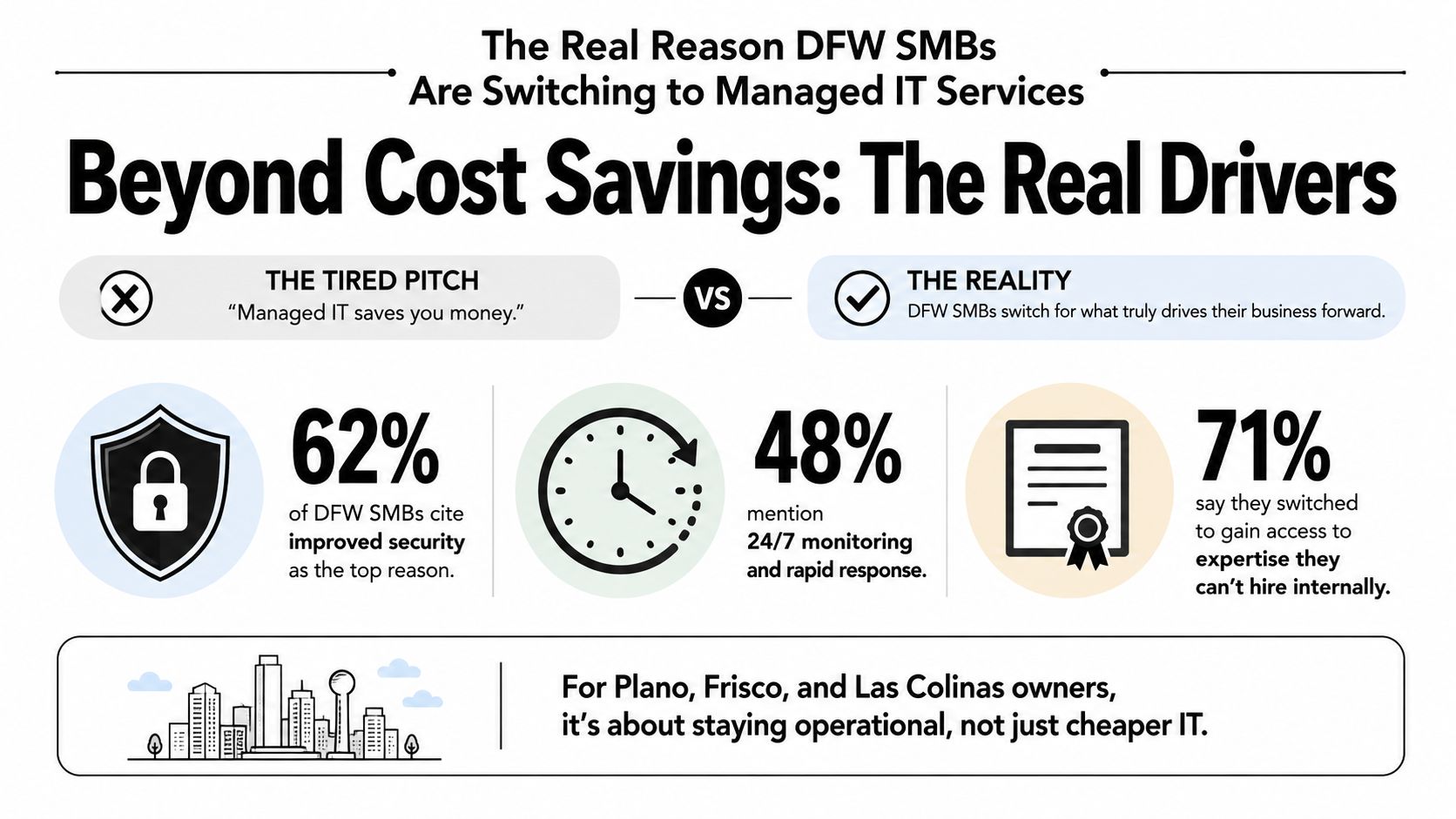
The shift from support to outcomes
Independent adoption data points in the same direction. One industry report found that almost 80% of surveyed SMBs outsourced at least one IT service to an MSP, compared with 64% in 2022. Another survey reported that 84% of SMBs already outsourced some operations, while 70% planned to increase outsourcing in 2025. The MSP Alert summary describes the recurring motivations as cost control, productivity, and access to specialized expertise.
Those figures don't prove that every DFW company needs a full outsourcing arrangement. They do show that managed services have become a mainstream operating model, particularly for businesses that can't justify a large internal team but still need reliable security and infrastructure management.
What leaders should measure
A useful agreement should connect service activity to business results:
- Operational continuity: Track unplanned downtime, recurring incidents, and the time between detection and restoration.
- Employee productivity: Record delayed onboarding, blocked users, and repeated support interruptions.
- Risk reduction: Measure unresolved security findings, backup exceptions, access-review completion, and policy gaps.
- Business alignment: Review whether technology projects support expansion, remote work, client service, or margin protection.
A practical overview of the broader benefits of outsourcing IT support can help owners frame the decision around those outcomes rather than a generic help-desk comparison.
Practical rule: If an MSP proposal only promises cheaper support, it isn't yet a business case.
What Managed IT Services Actually Mean for Your Business
A part-time handyman fixes a broken door after someone reports it. A property management company checks the building, schedules maintenance, coordinates contractors, and keeps the property operating every day. Managed IT services should work like property management, not like a technician waiting for a crisis call.
The model typically combines help desk support, infrastructure management, cybersecurity controls, backup and recovery, vendor coordination, and strategic planning. The exact scope varies by provider, so the contract must state what is monitored, what is included, what is excluded, and who owns each response.
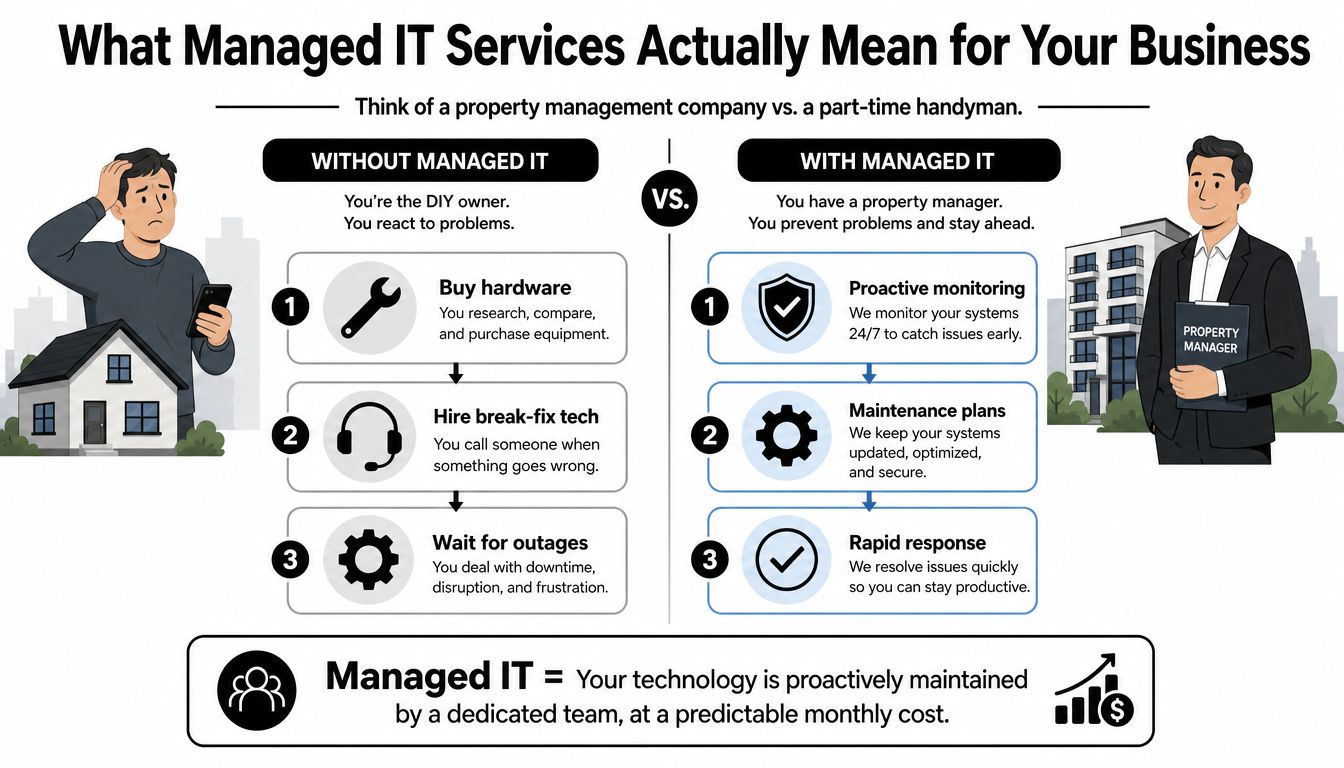
What changes after the contract starts
The first visible changes are procedural:
- Requests move into a ticketing process. Employees use a defined support channel instead of texting an owner, office manager, or informal IT contact.
- Maintenance becomes scheduled. Patches, configuration checks, backup reviews, and device health checks happen according to an operating plan.
- Vendors gain a coordinator. The MSP can manage internet providers, software vendors, hardware suppliers, and other technology contacts.
- Security receives a baseline. The provider establishes standards for identity, endpoint protection, access, backup, and alert handling.
- Planning gets a regular cadence. Leadership receives a roadmap instead of making technology decisions only after something fails.
That last point matters for growing DFW companies. A new location, acquisition, remote workforce, or regulated client can expose weaknesses that a break-fix arrangement never addresses.
The operating model matters
A provider can monitor a system, but the business still has to approve access rules, enforce offboarding, report suspicious activity, and fund necessary remediation. Service management principles also apply to cloud-based organizations, so a resource on B2B SaaS reliability strategies can help leadership think beyond individual devices and toward dependable service delivery.
Businesses evaluating a provider should review the difference between a general support arrangement and a managed IT services provider. The right question isn't whether the provider offers a long service list. It's whether the provider can operate the environment consistently and prove what happened when an issue occurs.
Predictable Costs, Less Downtime, and Round-the-Clock Monitoring
These are the benefits owners ask about first, but they need to be separated. Predictable costs control planning. Monitoring reduces the time between failure and detection. Downtime reduction protects employee output and customer commitments. Together, they create a more stable operating model.
Managed contracts commonly package services into a set monthly or annual fee. That structure can replace irregular break-fix invoices with a planned operating expense and reduce the need for large upfront spending on hardware, software, and a full internal team, as described by Citrin Cooperman's managed IT services guidance.
Budget predictability is useful, not automatically cheaper
A fixed fee doesn't guarantee savings. It gives leadership a clearer basis for planning and makes the cost of ongoing maintenance visible. A contract that excludes security response, backup remediation, after-hours work, or strategic projects may look affordable until those items arrive as separate charges.
Owners should ask for a full cost map:
- Included services: Help desk, monitoring, patching, backup oversight, security administration, and vendor coordination.
- Excluded work: Projects, hardware, licensing, emergency response, and onsite visits.
- Growth rules: How additions, departures, locations, and devices change the monthly fee.
- Reporting: Which service-level and outcome metrics appear every month.
Downtime should be valued in business terms
Downtime costs more than a replacement device. Employees may be unable to work, orders may wait, calls may go unanswered, and managers may spend hours coordinating recovery. One independent whitepaper cites an estimate of $127 to $427 per minute in SMB labor and recovery costs, and says some small businesses can lose up to $100,000 per hour during critical outages. The same source compares annual downtime costs for a 15 to 25 user business, placing managed IT below $3,000 annually and break-fix support between $10,000 and $25,000. Those figures come from the IT downtime whitepaper, and each business should validate the assumptions against its own payroll, revenue, and recovery process.
Internal metrics also provide a useful directional benchmark. A reported 70% of businesses outsourcing IT saw notable service-delivery and downtime improvements, while average technical issue resolution times fell by 35% in cited internal metrics. The supporting industry article attributes the mechanism to broader expertise and continuous monitoring. Those figures aren't a guarantee for a particular DFW company, but they show what a serious measurement plan should examine.
Monitoring has to produce action
Round-the-clock monitoring isn't a decorative dashboard. It should identify failed backups, unusual login behavior, device health warnings, patch failures, and other conditions that can become business interruptions. The provider then needs a documented escalation path, authority to take approved actions, and a way to report the result.
| Category | Break-Fix IT (Annual) | Managed IT (Annual) |
|---|---|---|
| Scheduled maintenance | Variable and incident-driven | Contracted operating expense |
| Emergency response | Billed when problems occur | Defined by service scope |
| Monitoring | Often limited or manual | Continuous monitoring where included |
| Backup oversight | Reviewed after failure risk appears | Scheduled verification and exception handling |
| Budget planning | Irregular invoices | Planned monthly or annual fee |
| Strategic guidance | Usually project-based | Included when stated in the agreement |
The financial case becomes stronger when the provider prevents avoidable interruptions, not merely when the invoice looks smaller. A 2026 industry summary reports Microsoft's estimate that the average SMB cyberattack costs approximately $254,000, including recovery and downtime drivers, as reported by Sectigo's small-business breach summary. Prevention, detection, and readiness deserve a place in the operating budget because recovery rarely follows a neat schedule.
Compliance Support for Healthcare, Legal, and Financial Firms
Compliance support isn't a certificate that an MSP hands over at contract signing. It's the daily operation of access controls, encryption, retention, backups, patching, documentation, and review.
Healthcare organizations face obligations involving patient privacy and safety, employee safety, electronic medical records, communication technology protection, billing, coding, and financial reporting. This healthcare compliance overview explains the breadth of those responsibilities. A managed provider can operationalize controls, but the clinic remains accountable for its policies, workforce behavior, and business decisions.
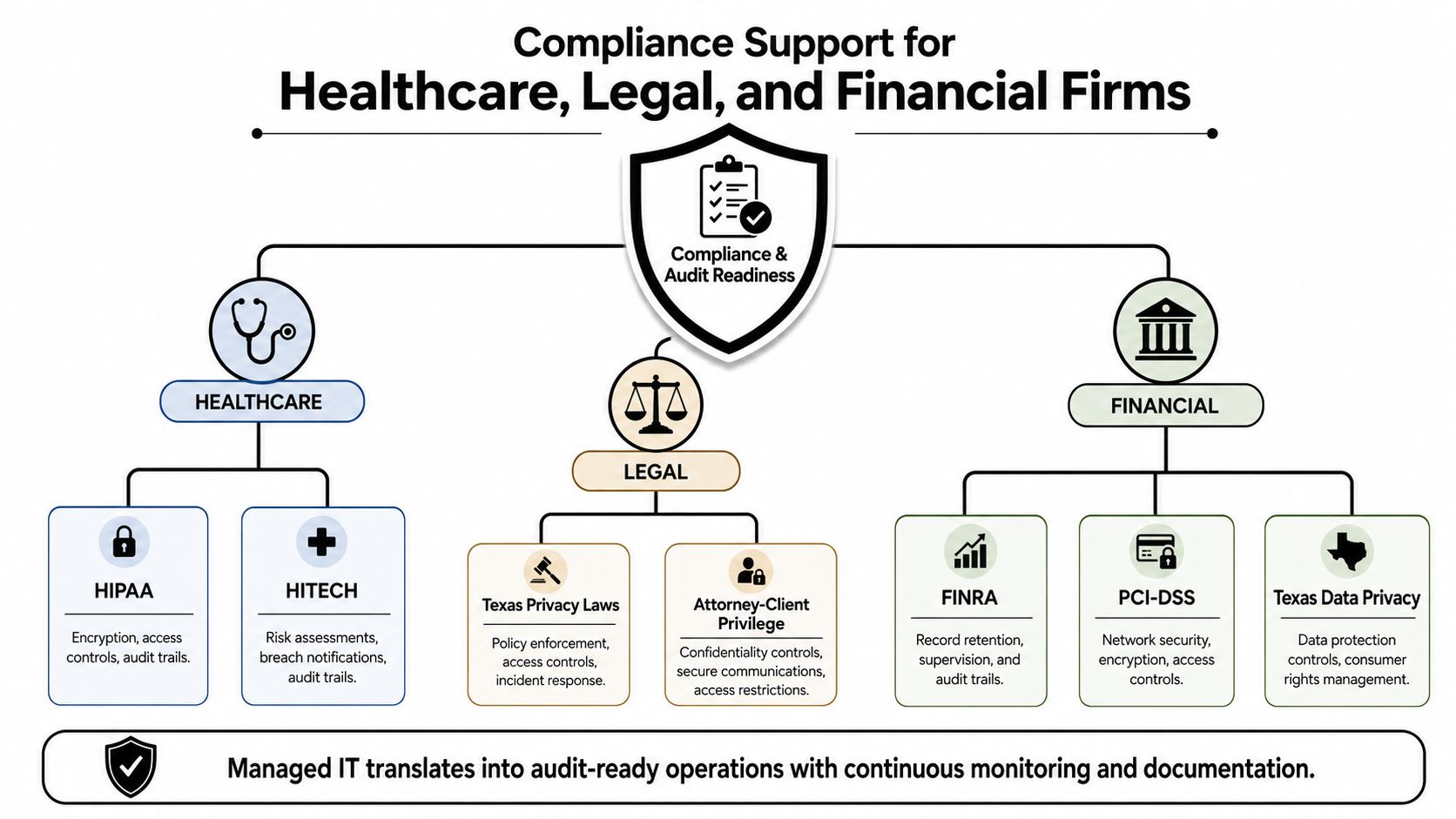
Healthcare needs evidence, not reassurance
A Plano dental group may need documented handling for protected health information, encrypted backups, user access, vendor agreements, and incident response. The MSP's value comes from maintaining evidence that those controls operate, then making exceptions visible before an audit or client review.
For a therapy clinic, that can mean an access inventory, backup verification records, policy acknowledgments, and a clear process for removing former workers. A clinic shouldn't accept “the system is secure” as an answer. It should request the records that demonstrate who had access, what changed, and whether recovery procedures were tested.
Legal and financial firms need control over information
A Fort Worth law firm has to protect client matters through role-based access, careful sharing practices, retention rules, and defensible disposal. A Dallas financial advisory firm may need documented supervision, secure communications, retention controls, and evidence that sensitive records remain available when required.
An MSP can support those needs through quarterly access reviews, standardized configurations, documented onboarding and offboarding, backup management, and evidence packets. It can also coordinate with compliance counsel, auditors, and software providers instead of leaving the firm's staff to translate technical details alone. For a broader reference point, firms can review this IT compliance overview from myhalo.
Compliance principle: Technology supports compliance only when employees follow the policy every day.
A provider should help create repeatable controls, but leadership must approve the policy, assign owners, train staff, and review exceptions. For healthcare practices evaluating their current position, a healthcare compliance audit resource offers a practical starting point for identifying missing evidence and weak processes.
Internal IT Versus a Managed IT Partner in North Texas
A single internal IT hire can be valuable, especially when the business needs a daily technology owner who sits with operations. The problem appears when leadership expects one person to provide help desk coverage, security analysis, cloud administration, vendor management, compliance support, project delivery, and after-hours response.
For a DFW firm with 15 to 50 employees, the decision should account for more than salary. A fully loaded internal role includes compensation, benefits, recruiting, training, tools, backup coverage, and the cost of losing that person during vacation, illness, or departure. A generalist may also lack the depth required for security investigations, recovery design, or regulated records management.
| Dimension | Internal IT Hire | Managed IT Partner |
|---|---|---|
| Primary coverage | One employee's available hours | Defined team coverage under an agreement |
| Skill depth | Usually broad and generalist | Access to help desk, security, infrastructure, and strategic roles |
| Vacation coverage | Must be arranged internally | Built into provider operations when stated |
| Recruiting burden | Business owns sourcing and hiring | Provider owns staffing and training |
| Security response | Depends on individual capability and availability | Depends on contracted monitoring and escalation scope |
| Strategic planning | Competes with daily tickets | Can be assigned as a recurring service |
| Vendor coordination | Falls on the employee or owner | Centralized through the provider |
| Co-managed option | Internal staff remains the primary owner | Provider fills defined capability or coverage gaps |
Use a decision rule instead of a habit
Internal IT makes sense when the business has enough scale to support multiple complementary roles or when daily onsite ownership is a core operational requirement. Managed IT fits more naturally when leadership needs broad expertise, consistent coverage, or regulated-industry controls without building a complete department.
Co-managed support is often the practical middle ground. An internal employee can handle business-facing priorities, while an external team manages monitoring, security, backup, escalation, and specialized projects.
The break-even point isn't a universal headcount. It arrives when the cost of one employee plus tools and coverage exceeds the value of the work that person can reliably perform. Leadership should compare actual coverage and capability, not just the salary line.
DFW Scenarios Where Managed IT Changes the Outcome
A managed model changes the sequence of events. The business doesn't wait for an employee to notice the issue, decide whom to call, explain the environment, approve a response, and then begin recovery.
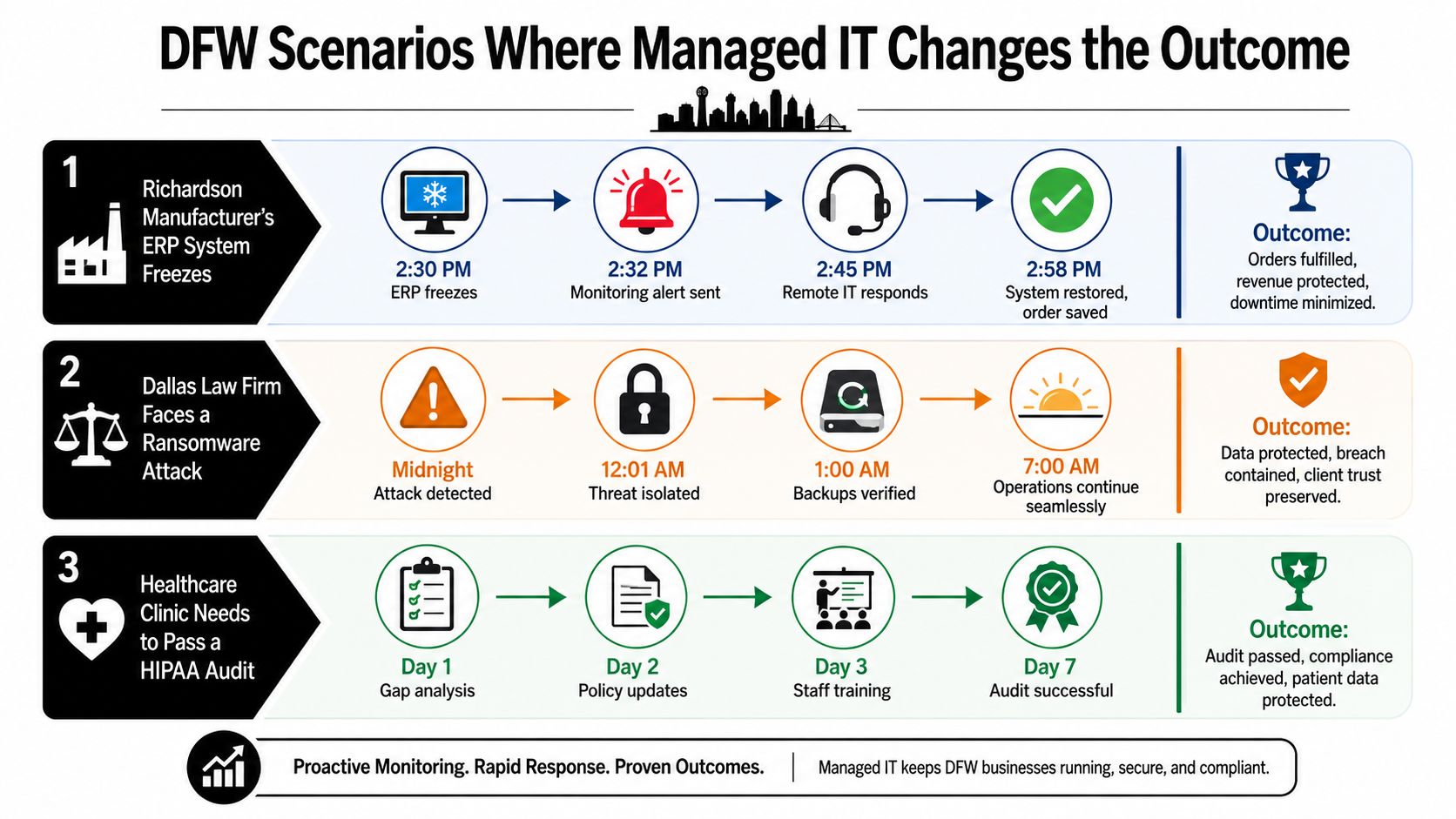
A Richardson manufacturer protects an order push
A Richardson manufacturer's enterprise resource planning system begins freezing during a Friday afternoon order push. In a reactive environment, production staff report symptoms while an owner searches for a technician.
In a monitored environment, a hardware warning reaches the provider before the failure becomes a plant-wide stoppage. The provider validates the alert, escalates according to the playbook, coordinates replacement or repair, and keeps leadership informed. The value isn't the alert itself. It's the documented response that protects the order process.
A Las Colinas staffing firm contains a phish
A staffing firm in Las Colinas experiences credential phishing on the morning of a major client pitch. A managed response process can disable the affected session, protect the mailbox, review related activity, and guide password and access remediation while the business continues preparing for the meeting.
That outcome depends on more than monitoring. The firm needs multifactor authentication, clear reporting instructions, current employee records, and authority for the provider to isolate an account quickly. Without those internal decisions, an MSP may detect the event but lose valuable time waiting for approval.
A Frisco clinic responds to an audit
A Frisco therapy clinic receives an unexpected healthcare audit request. If policies, access records, backup evidence, and training documentation already have owners, the clinic can assemble a response from maintained records instead of reconstructing its history under pressure.
The operational benefit is readiness. The provider maintains the technical evidence, while clinic leadership confirms that staff behavior and business processes match the documented controls.
Measuring ROI and Choosing Your Next Step in DFW
ROI should start with a baseline, not a vendor promise. Before approving an MSP, leadership should record current tickets, response delays, downtime, backup exceptions, open access issues, audit gaps, and hours employees lose to technology problems.
The first 90 days should test whether the provider is changing those conditions. Every metric should connect to a defensible business value, such as recovered labor time, avoided emergency work, protected billing activity, or reduced audit preparation effort.
Build the scorecard before signing
| Metric | Baseline (Pre-Engagement) | 90-Day Target | Estimated DFW Impact |
|---|---|---|---|
| Ticket response | Current average and worst-case delay | Defined response by priority | Fewer blocked employees |
| Unplanned downtime | Hours and affected workflows | Declining incidents and documented causes | Protected production and client service |
| Backup exceptions | Failed or unverified jobs | Exceptions reviewed and resolved | Stronger recovery readiness |
| Access gaps | Unreviewed users and stale permissions | Current inventory and completed review | Cleaner compliance evidence |
| Security findings | Open endpoint, identity, and patch issues | Prioritized remediation plan | Lower exposure and clearer ownership |
| IT distraction | Leadership and staff hours spent chasing issues | Fewer escalations outside the process | More time for revenue work |
A proposal should also receive a weighted review based on local response capability, regulated-industry experience, reporting quality, escalation authority, backup design, and the provider's willingness to define measurable outcomes. Leadership can use this guide to choosing a managed service provider to structure that evaluation.
The next step should be a baseline assessment, not a rushed contract. A free security audit or IT health check should identify:
- Who has access: Former employees, shared accounts, privileged users, and third-party connections.
- What can be recovered: Backup coverage, recovery ownership, and documented testing.
- What remains exposed: Unpatched systems, weak identity controls, unmanaged devices, and vendor dependencies.
- What the business needs: Revenue-critical applications, compliance commitments, growth plans, and acceptable downtime.
That assessment gives the owner something a marketing presentation can't provide, a starting point against which managed IT services benefits can be measured.
Technovation LLC provides fully managed and co-managed IT support for DFW businesses, including proactive monitoring, cybersecurity, cloud backup, compliance support, and strategic planning. Businesses can begin with a free security audit or IT health check by visiting Technovation LLC and turning current IT uncertainty into a measurable operating plan.





