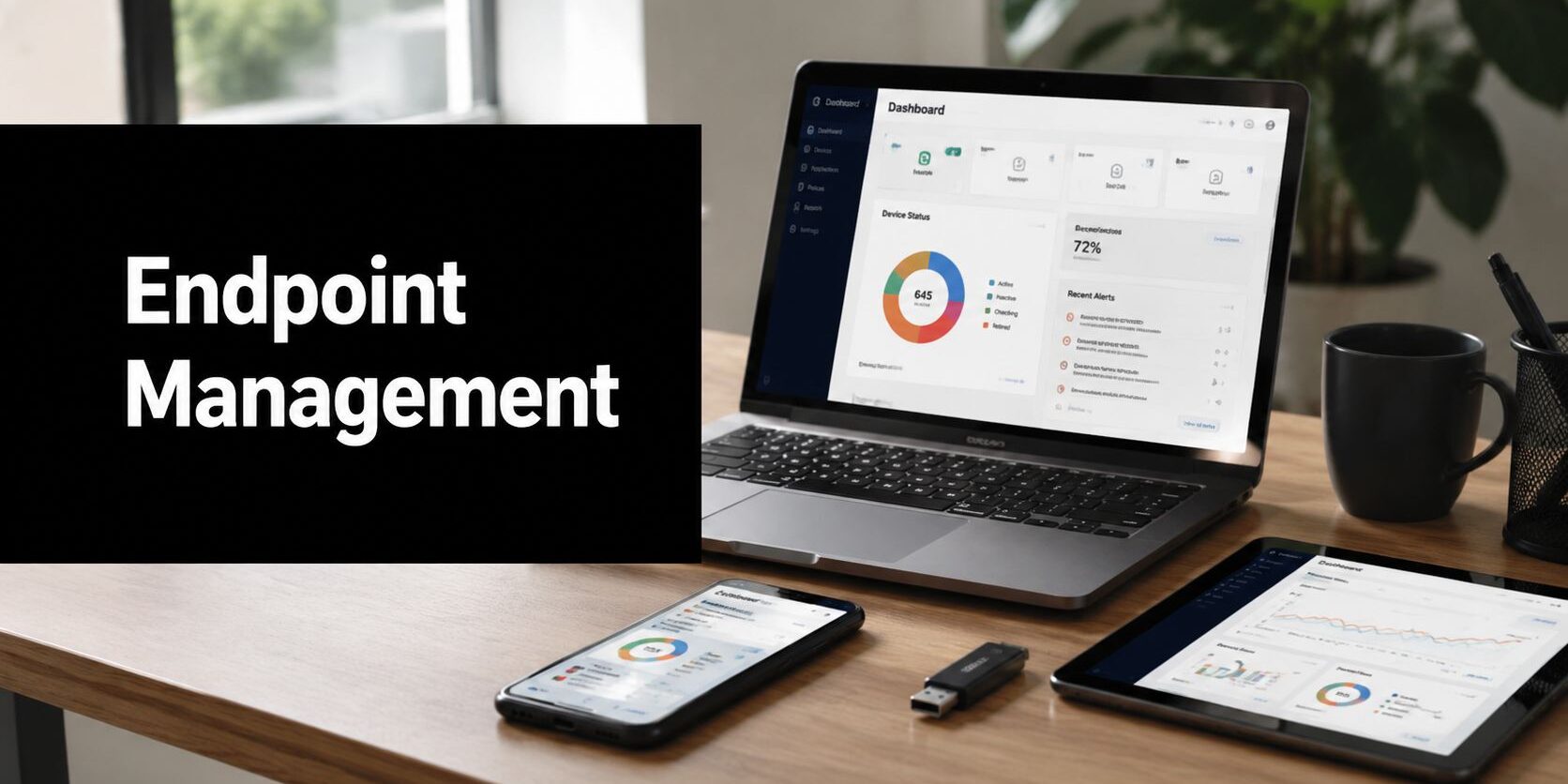
Endpoint management is the practice of keeping every device that touches company data configured, patched, monitored, and aligned with policy. The unified endpoint management market is projected at USD 4.48 billion in 2022 and USD 21.79 billion by 2030, reflecting how endpoint administration has become a core business discipline rather than a narrow desktop task.
A typical DFW business owner doesn't wake up thinking about endpoint drift. The concern arrives when a laptop won't install an update before a deadline, a former contractor's device still appears in an access log, or a desktop connected to a shared printer hasn't checked in for weeks. By then, the business isn't managing its devices. It's reacting to them.
Table of Contents
- The Moment a Dallas Business Owner Realizes Something Is Off
- What Endpoint Management Actually Means in Plain English
- The Six Building Blocks of a Working Endpoint Program
- Endpoint Management vs Endpoint Protection and Where They Overlap
- Practical Benefits and Real Tradeoffs for Growing Businesses
- How to Evaluate Endpoint Management for Your Own Organization
- Where to Go From Here and When Local Support Makes the Difference
The Moment a Dallas Business Owner Realizes Something Is Off
A 35-person professional services firm in Plano can look perfectly organized from the outside. Staff move between Dallas and Frisco, share printers, work from home, and meet client deadlines through a mixture of company laptops and contractor equipment. The owner may believe the environment is under control because everyone has a password and the office network still works.
Then Monday arrives.
Three laptops fail to complete updates before a critical deadline. A contractor's old device accesses client files. During a quick review, the owner discovers that two pieces of equipment haven't checked in for weeks. Someone applies a hasty Friday fix, the immediate symptoms disappear, and everyone returns to work. The underlying drift remains.
That moment isn't proof that the company has failed. It reveals that the company has been relying on memory, individual habits, and occasional troubleshooting instead of a repeatable operating process. An IT health check for the business can help establish what devices exist, which ones are active, and where management gaps already affect business operations.
The warning signs are operational
Each issue points to a different management decision:
- Failed updates: Who approves maintenance windows, and what happens when a device misses one?
- Unrecognized access: Which devices are permitted to reach company resources, and how quickly are exceptions removed?
- Silent endpoints: Who notices when a laptop stops reporting, and who investigates the reason?
- Friday fixes: Does the business have a documented baseline, or does each repair create another variation?
Endpoint management would have surfaced these conditions earlier through inventory, configuration checks, patch status, access policy, and monitoring. The value isn't theoretical. It gives an owner a reliable answer to three practical questions: who gets in, what has drifted, and where the next incident is most likely to begin.
That shift matters for a small business because the owner shouldn't need to become the dispatcher, auditor, patch coordinator, and incident triage lead. The business needs a system and an accountable operator that keep those decisions visible.
What Endpoint Management Actually Means in Plain English
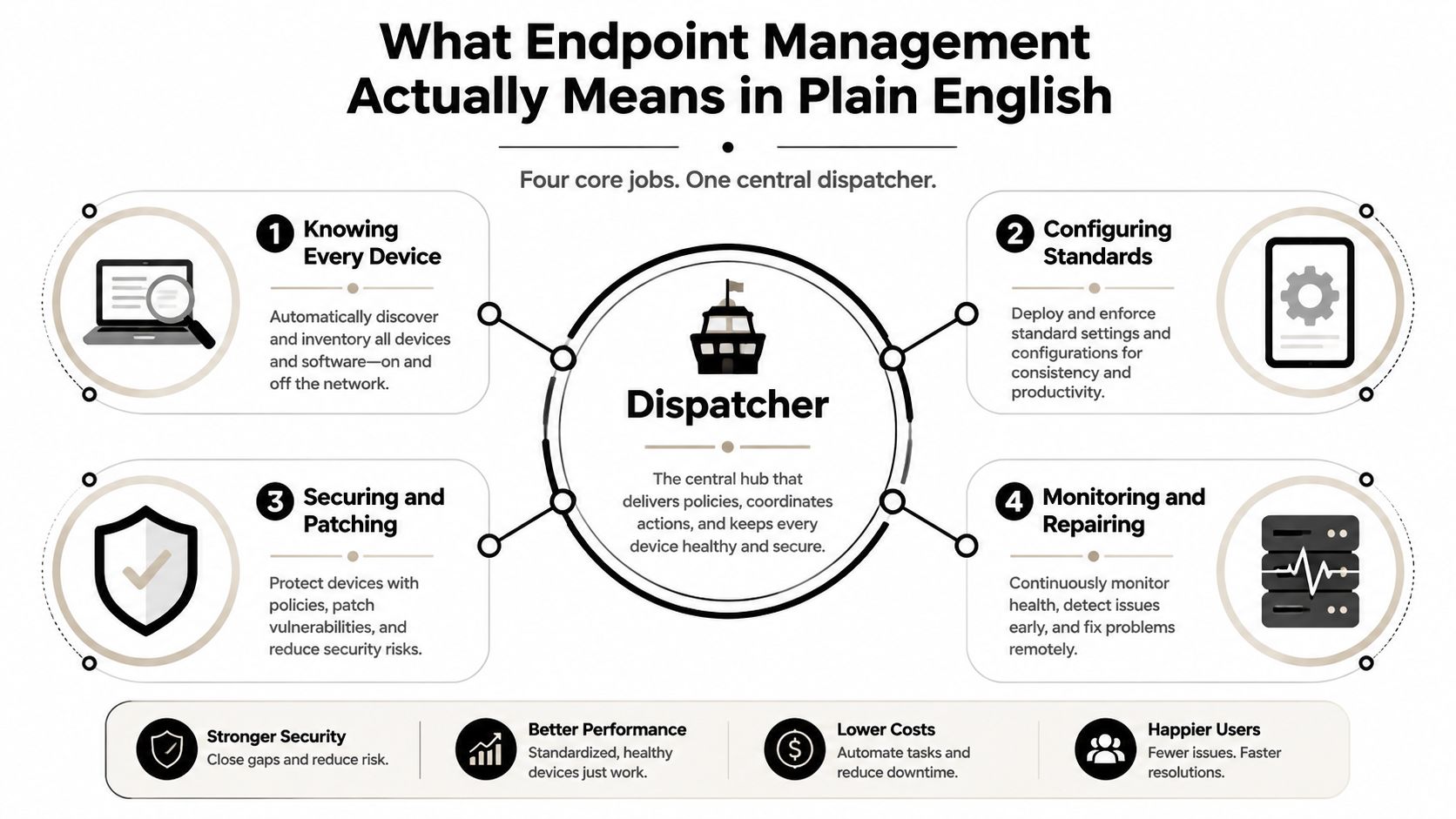
Think of a company's devices as a commercial fleet. The business needs to know which trucks exist, where they're assigned, whether inspections are current, which routes they can use, and what happens when one breaks down. Endpoint management provides the equivalent of a dispatcher for laptops, smartphones, tablets, and other devices that connect to company data or systems.
The administrative practice covers four connected jobs:
- Know every device. Enrollment and discovery establish which endpoints belong to the organization, who uses them, and whether they're checking in.
- Configure a consistent standard. Baselines define settings such as encryption, screen lock, approved applications, and user privileges.
- Keep devices secure and current. Patch management addresses operating-system and application updates before outdated software becomes an avoidable weakness.
- Monitor and correct drift. Reporting identifies devices that fall outside the standard so someone can investigate and restore alignment.
Management isn't the same as protection
Endpoint management establishes the condition a device must meet and keeps it there. Endpoint protection is the defensive layer that blocks malicious activity, detects suspicious behavior, and supports response when an attack occurs. Management asks whether a laptop is encrypted, patched, enrolled, and compliant. Protection asks whether something malicious is executing or attempting to move through the environment.
The two disciplines overlap, but neither replaces the other. A protected device can still be misconfigured or missing updates. A well-managed device can still encounter a threat.
Where UEM and MDM fit
Unified endpoint management, or UEM, is the broader model for managing different endpoint types through centralized policy and reporting. Mobile device management, or MDM, generally refers to controls for smartphones and tablets, including enrollment, application rules, and security settings. Modern endpoint administration brings these functions together across platforms, rather than treating a phone as someone else's problem.
Microsoft's endpoint administration guidance includes cloud-based identity, device deployment, security monitoring, automation, and management across Windows, macOS, iOS/iPadOS, and Android through services such as Intune, Autopilot, Defender for Endpoint, Entra ID, PowerShell, Graph, and Windows 365. Microsoft's MD-102 study guide reflects that broader operating model.
Endpoint management isn't a one-time project. Devices change, employees change roles, applications change, and policies must be reviewed. The program has to keep dispatching after the initial setup is complete.
The Six Building Blocks of a Working Endpoint Program
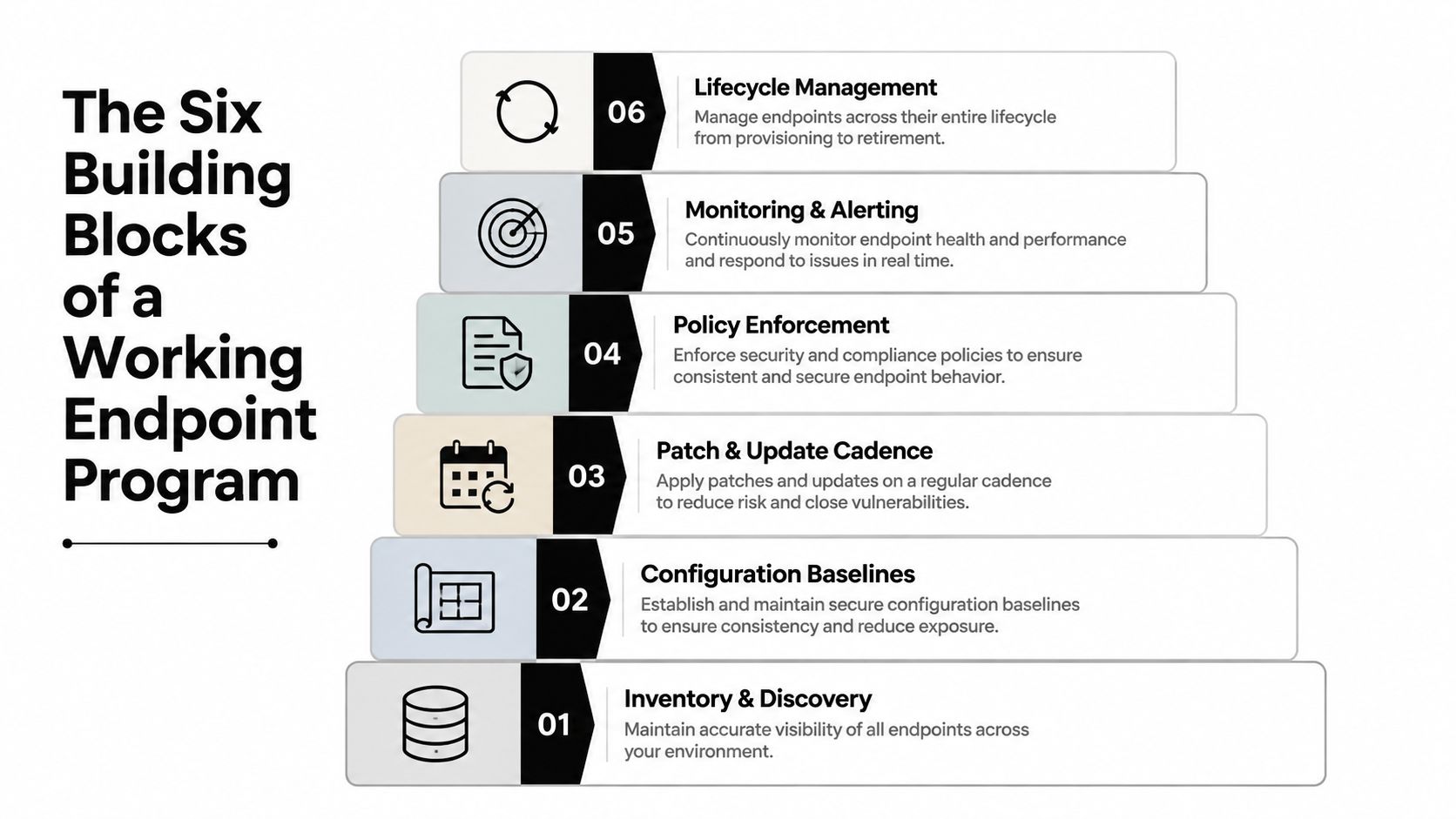
A functioning program rests on six blocks. Each one answers a question an owner or operations manager already asks, even if the technical team uses different language.
1. Inventory and discovery
What exists? The company needs a current list of laptops, desktops, phones, tablets, servers, and other managed endpoints. A laptop missing from inventory isn't merely an administrative nuisance. It may be outside patching, monitoring, and access controls.
Inventory also needs ownership, location, user assignment, operating system, and check-in status. Businesses that connect asset information with service and financial records may benefit from guidance on how to connect ITAM with ERP and ITSM, particularly when device ownership affects purchasing, support, and retirement decisions.
2. Configuration baselines
What should normal look like? A baseline defines the approved condition for each device group. It can cover encryption, firewall settings, screen-lock behavior, local administrator rights, application permissions, and browser configuration.
A baseline turns “please keep it secure” into a standard that can be checked. Without it, every technician repairs devices according to personal judgment.
3. Patch and update cadence
Who decides what runs when? Updates should follow a defined cadence, with testing, scheduling, reporting, and a recovery path for failures. A finance computer still running an outdated browser is a visible example of a process gap, not just an unlucky device.
Businesses evaluating this discipline can use patch management guidance to separate update deployment from informal reminders.
4. Policy enforcement
Policies need consequences. A company can require encryption, screen locks, approved software, and limited USB use, but the requirement has little value if noncompliant devices continue receiving unrestricted access.
Good enforcement applies different rules to different risk groups while keeping exceptions documented. A temporary exception for a field engineer should have an owner and an expiration decision.
5. Monitoring and alerting
How does drift get caught? Monitoring should show missing check-ins, failed updates, inactive security controls, unusual configuration changes, and devices that fall outside policy. Alerts need routing and ownership. A dashboard that nobody reviews is decoration.
6. Lifecycle retirement
When does a device leave the fleet? Retirement includes data removal, access revocation, inventory updates, and disposal records. It also covers reassignment when an employee leaves or a contractor's engagement ends.
A program that handles only enrollment creates orphaned devices. Lifecycle management closes the loop from purchase to retirement, keeping access and records aligned as the fleet changes.
Endpoint Management vs Endpoint Protection and Where They Overlap
Endpoint management is the maintenance discipline. Endpoint protection is the guard. The maintenance team keeps doors, locks, equipment, and inspection records in working order. The guard watches for suspicious activity and responds when someone tries to force entry.
Both functions matter, but they answer different operational questions.
| Dimension | Endpoint Management | Endpoint Protection |
|---|---|---|
| Primary purpose | Keep devices known, configured, patched, and policy-aligned | Block, detect, investigate, and respond to threats |
| Typical controls | Inventory, baselines, patching, application standards, lifecycle records | Antivirus, endpoint detection and response, exploit prevention, threat intelligence |
| Main evidence | Device status, configuration reports, update compliance, retirement records | Alerts, detections, investigations, response actions |
| Core decision | Should this device be trusted and maintained? | Is this activity malicious or suspicious? |
| Failure example | An unmanaged laptop retains access after a contractor leaves | Malicious code executes and attempts to spread |
The overlap is where operations improve
The two disciplines converge when device posture informs defensive action. A patch program can reduce exposure to known software weaknesses. A policy that limits removable-media use can feed security alerts when someone violates it. Configuration drift can trigger investigation, isolation, or a request for remediation.
Identity makes that connection practical. Intune compliance policies evaluate whether managed devices meet defined requirements, and Entra Conditional Access can consume those results to decide whether a user receives access. Microsoft documents the two-phase workflow in its guidance on device-based compliance policies.
A similar connection exists between device risk and compliance. Intune can integrate with Defender for Endpoint so risk levels become inputs to compliance policies, after which Conditional Access can block devices that don't meet the required posture. The documented Defender and Intune integration gives regulated organizations a concrete way to connect detection with access control.
Businesses deploying AI-enabled employees also need identity, permissions, device posture, and data handling to line up. A practical resource on secure AI employee deployment can help security teams think through that broader control surface.
Neither discipline should be purchased as a substitute for the other. Businesses that need to evaluate protection separately can review endpoint protection for business, then design management and protection as one operating motion with two clear job descriptions.
Practical Benefits and Real Tradeoffs for Growing Businesses
A working endpoint program changes ordinary workdays before it changes emergency response. New hires can receive a device with approved settings and applications instead of waiting for manual preparation. When hardware fails, the support team has an inventory record, user assignment, configuration history, and replacement process to work from.
The benefits are practical:
- Faster onboarding: A repeatable device profile removes guesswork from preparing a new employee's laptop.
- Fewer update surprises: Scheduled maintenance makes failed updates visible before a deadline crunch.
- Cleaner audit evidence: Reports can show device ownership, patch status, encryption state, and policy exceptions.
- Quicker replacement: A known configuration makes it easier to move a user to replacement hardware.
- Better remote support: Staff working across Dallas, Fort Worth, and home offices can receive consistent assistance without bringing every device into the office.
The tradeoffs are real
Endpoint management requires investment. Someone must build the inventory, define acceptable configurations, test policies, review alerts, and handle exceptions. The business also needs maintenance windows, because updates and configuration changes can interrupt work when they aren't planned properly.
Tooling alone won't solve the problem. A dashboard can report a failed update, but a person still needs to decide whether to retry it, contact the user, roll it back, or replace the device. Small firms often underestimate the human time required to tune policies and distinguish meaningful alerts from routine noise.
The cost of doing nothing is less visible
Avoiding the program doesn't eliminate cost. It moves cost into repeated troubleshooting, slow onboarding, devices that gradually fall out of policy, failed compliance attestations, and downtime when a preventable weakness becomes an incident.
A 2026 endpoint-management report found that 43% of teams spend 10 or more hours per week on manual endpoint tasks, while 6% reported full endpoint-management automation. Those figures come from the 2026 State of Endpoint Management report. The lesson for an SMB isn't to automate everything immediately. It's to identify which recurring work creates the most variance and assign it to a controlled process.
Practical rule: A small business should automate repeatable checks first, then reserve human attention for exceptions, decisions, and response.
Over-policy creates its own problems. Rules that block legitimate work without an exception path encourage employees to bypass controls. The right program is firm on core protections and practical about how people work.
How to Evaluate Endpoint Management for Your Own Organization
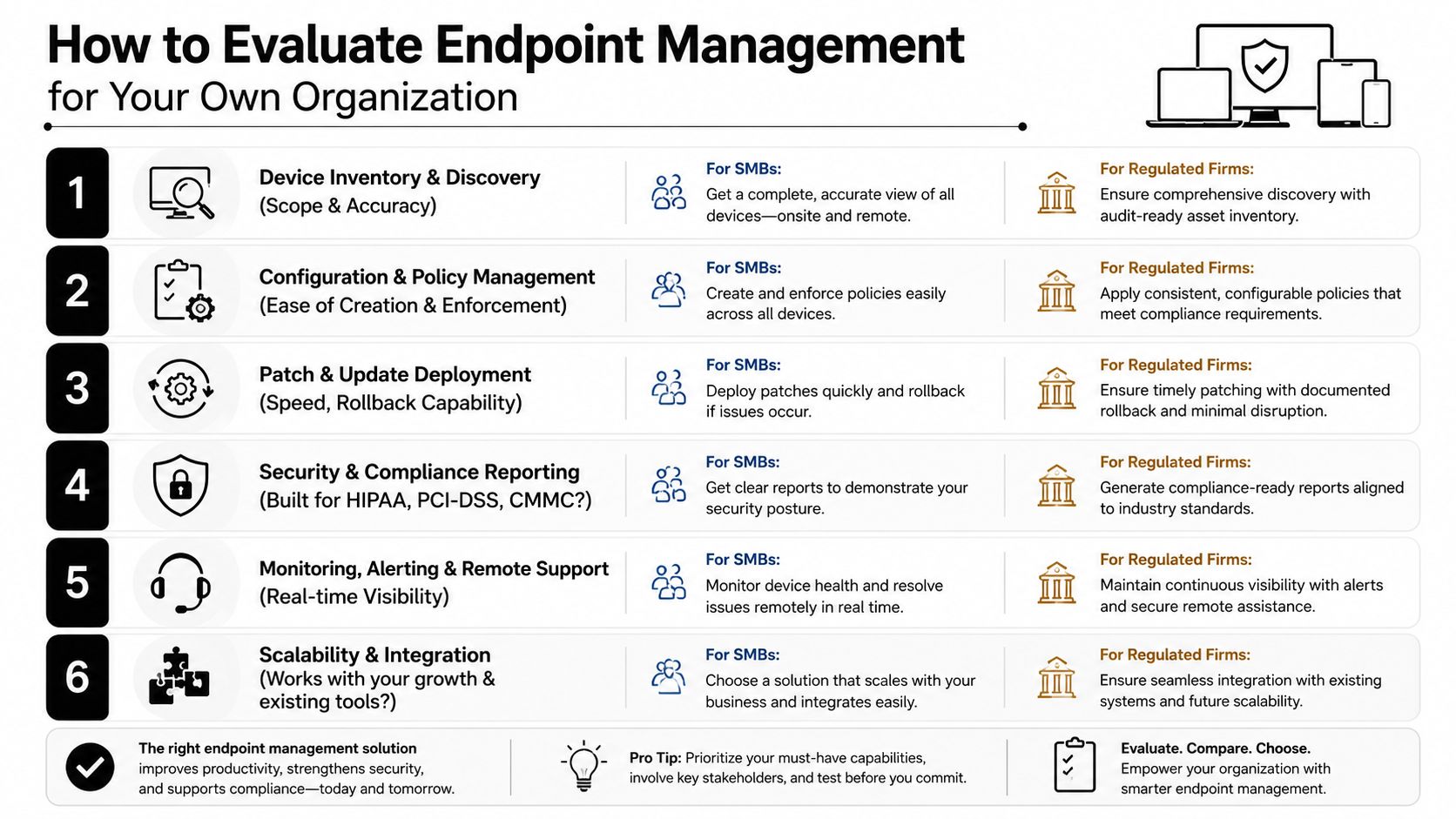
A business owner can assess the current position this week without conducting a lengthy technology project. Score each area as clear, partial, or unknown. “Unknown” is useful information because it identifies where management has been assumed rather than demonstrated.
Use six practical tests
Inventory completeness and accuracy. Good means every company and approved personal device appears with an owner, status, and last check-in. A typical gap is a contractor laptop or remote device that nobody can verify.
Patch latency for operating systems and applications. Good means the business has defined target windows, exception handling, and reports that show missed updates. A gap appears when staff rely on pop-ups or install updates only after a problem occurs.
Policy enforcement. Check encryption, screen locks, local privileges, application controls, and USB use. Good means policies apply automatically by device or user group. A gap means the company has written expectations but no reliable evidence that devices meet them.
Configuration-drift visibility. Good means an administrator can identify changed settings and assign remediation. A gap means technicians discover differences only while troubleshooting.
Audit evidence. Healthcare, financial, legal, and other regulated firms may need support for HIPAA, PCI-DSS, or CMMC obligations. Good means reports can show status, exceptions, actions, and ownership. A gap means staff assemble screenshots and spreadsheets under deadline pressure.
Human response. Good means everyone knows what happens when a device is lost, compromised, or assigned to a departing worker. A gap means the first call goes to whoever happens to know the password or remembers the old procedure.
Turn the score into a decision
A local managed IT partner such as Technovation can execute these controls day to day by onboarding a standardized laptop image, monitoring check-ins, coordinating patch activity, reviewing exceptions, and delivering recurring compliance reports. The important question isn't whether a business owns management software. It's whether someone is accountable for acting on what that software reports.
If a business has several “unknown” ratings, the next step is an inventory and control review, not an immediate purchase. If most areas are partial, co-managed support may close the operational gaps without removing internal staff from decisions.
Where to Go From Here and When Local Support Makes the Difference
The first week should produce facts. Run an endpoint inventory, identify devices that haven't checked in, compare the findings with the six evaluation criteria, and document the most urgent gaps. Then decide whether internal staff can watch the fleet every day or whether the business needs a fully managed or co-managed model.
That choice isn't mainly about technology. It determines who notices a failed update, who responds when a laptop stops reporting on Friday afternoon, who removes access after a contractor leaves, and who answers the phone when a user can't work. A platform without ownership creates the same drift under a different name.
Local support carries particular weight for hybrid workforces spread across the DFW metroplex, healthcare clinics, financial services firms, law practices, and businesses with compliance obligations. It also matters when an owner can't afford another avoidable outage but doesn't want to build an internal endpoint operation. Businesses comparing providers can use this guide on how to choose a managed service provider to evaluate accountability, response, security discipline, and fit.
A discovery call with Technovation should be treated as a working session. The useful questions are specific: What devices exist? Which ones are unmanaged? What policies are enforced today? How quickly can a missing or compromised device be contained? What will support cost, how soon can the program begin, and who will be responsible when the next exception appears?
Technovation LLC can map the current endpoint fleet, coordinate patch and asset management, connect device posture with access controls, and provide ongoing monitoring for DFW businesses. Visit Technovation LLC to schedule a practical review focused on inventory, drift, compliance evidence, and the people responsible for keeping endpoints reliable.