A Dallas-Fort Worth business owner may already be living with a remote setup that “works.” Staff log in from home. Files move. Meetings happen. Clients don't complain. On the surface, nothing looks broken.
That's exactly why remote risk gets ignored. In healthcare, legal, and finance, the danger usually isn't dramatic failure. It's quiet exposure: an employee using a personal device, a case file opened on unsecured Wi-Fi, or a team member with broader access than their role requires. Remote workforce solutions aren't about making remote work possible anymore. They're about making it defensible, supportable, and compliant.
Table of Contents
- Is Your Remote Setup an Asset or a Liability
- The Five Pillars of a Secure Remote Workforce
- Choosing Your Secure Access VPN vs Zero Trust
- Meeting Compliance Rules for DFW Industries
- A Practical Implementation Roadmap
- Choosing Your Partner DIY vs Managed Services
- Build Your Remote Workforce for Growth
Is Your Remote Setup an Asset or a Liability
A lot of DFW companies built remote capability in pieces. One app for meetings. Another for file sharing. A VPN added later. Personal laptops tolerated “for now.” Policies that exist mostly in someone's head. That patchwork may keep operations moving, but it doesn't create a reliable business system.
Remote work is no longer a temporary accommodation. As of 2026, remote and hybrid work collectively represent nearly half of the global workforce. In the U.S., the telework rate has stabilized around 22.1%, with 90% of companies planning to maintain or increase remote work options, according to remote work statistics compiled here. That changes the conversation. Remote access now belongs in core business infrastructure, not in the category of “good enough for now.”
Productivity is real, but unmanaged flexibility is expensive
Remote work can support stronger output, better recruiting reach, and faster response times. But those gains only hold when leadership treats remote work as an operating model. If access is loose, devices aren't managed, and data controls are inconsistent, the business eventually pays for that convenience through audit stress, avoidable downtime, and cleanup work.
Good remote operations don't happen because employees are capable. They happen because the business gives capable employees a controlled environment to work in.
For regulated firms, this matters even more. A medical clinic doesn't just need staff to reach records from home. It needs to know who accessed what, on which device, under which policy. A law office doesn't just need document sharing. It needs confidentiality controls that survive after-hours work and staff turnover.
A remote workforce solution should answer business questions
A business owner should be able to answer these questions without guessing:
- Access control: Which systems can each employee reach remotely?
- Device confidence: Are remote devices protected, monitored, and recoverable?
- Data handling: Is sensitive information encrypted in transit and at rest?
- Audit readiness: Can the company show what happened if a regulator, client, or insurer asks?
- Operational resilience: If a laptop fails or an account is compromised, how fast can the business recover?
If those answers aren't clear, the setup is a liability.
That's why a formal review matters. A structured IT infrastructure assessment from Technovation gives a business owner a clean picture of where the current environment supports growth and where it creates risk.
The Five Pillars of a Secure Remote Workforce
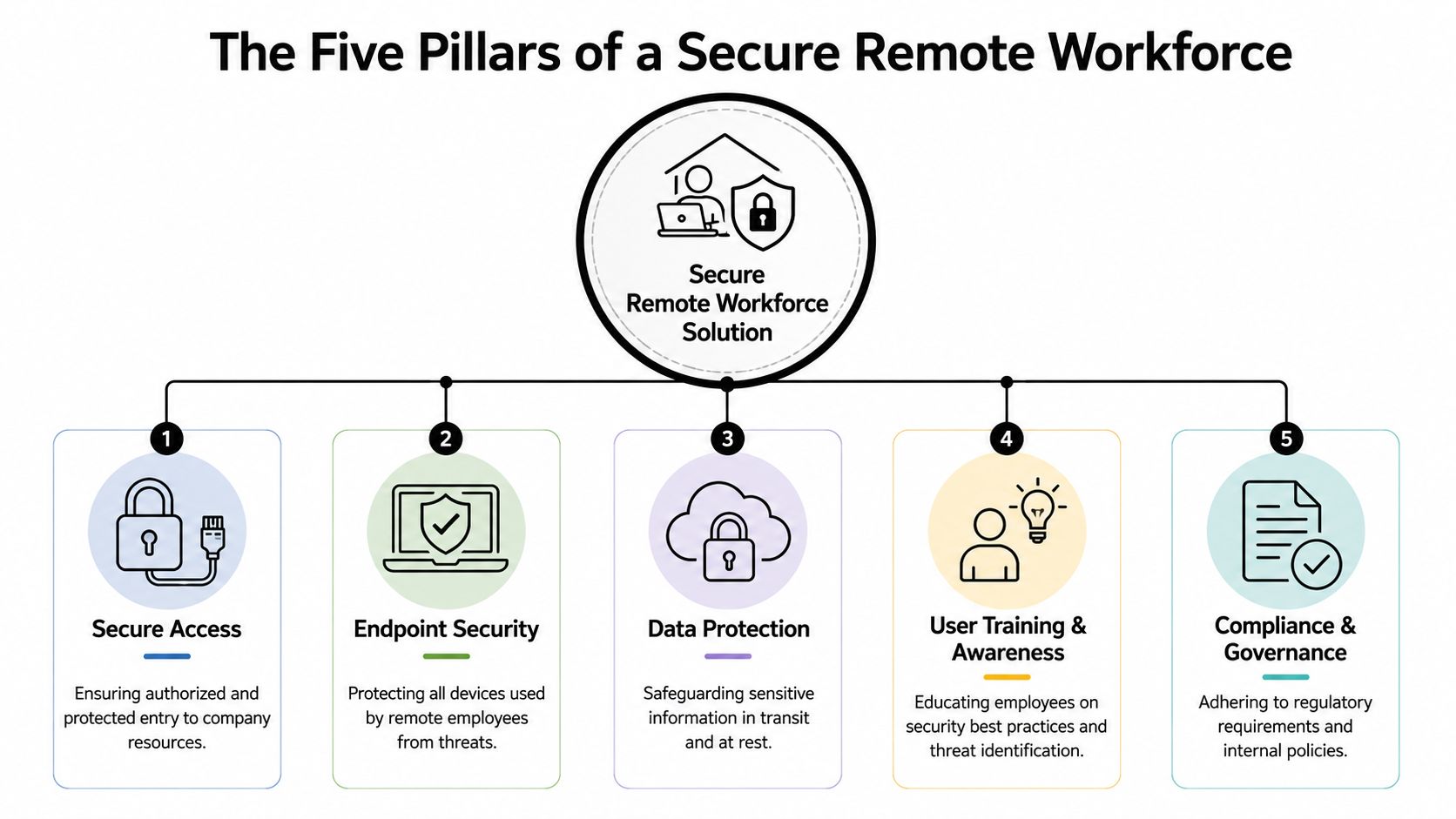
Remote workforce solutions fail when companies treat them as a single tool purchase. Security, compliance, and productivity come from a stack of controls working together. If one layer is weak, the rest of the environment has to compensate.
Secure access comes first
The first pillar is secure access. This is the front door. If remote users can connect without strong verification and controlled pathways, the rest of the system is exposed from the start.
The baseline standard should be clear. Implementing a multi-layered security architecture that includes VPNs, two-factor authentication, and encrypted communication channels reduces the probability of unauthorized data breaches by approximately 94% compared to single-layer security models, based on this remote work security guidance. That's not a minor improvement. It's the difference between hoping remote access is safe and building it to be safe.
The second pillar is endpoint security. Every laptop, tablet, and phone used for work becomes part of the business perimeter. A company can't claim control if remote devices are unpatched, unmanaged, or shared casually at home.
The rest of the structure has to hold
The third pillar is data protection. Sensitive information needs protection in motion and at rest. Encryption matters, but so do backup policies, recovery planning, and rules around where data can be stored or downloaded. In regulated industries, this pillar often determines whether a remote environment is merely functional or defensible.
The fourth pillar is user training and awareness. Most remote incidents don't start with complex attacks. They start with ordinary mistakes. Someone clicks the wrong link, forwards a file to a personal account, or approves a login prompt they shouldn't. Training has to be routine, short, and tied to actual workflows.
The fifth pillar is compliance and governance; through it, policy becomes enforceable. A company needs written standards for access, device use, retention, backup, and offboarding. It also needs logs, reviews, and accountability. Otherwise, “policy” is just preference.
A simple way to pressure-test these pillars is to map each one to a business outcome:
| Pillar | Business purpose |
|---|---|
| Secure access | Limits unauthorized entry and reduces exposure |
| Endpoint security | Keeps remote devices from becoming weak links |
| Data protection | Preserves confidentiality and recovery capability |
| User training and awareness | Reduces preventable mistakes |
| Compliance and governance | Supports audits, insurance questions, and client trust |
Practical rule: If leadership can't identify the owner of each pillar, then no one is actually managing the remote environment.
For firms building internal capability, hiring and role design matter too. Teams reviewing staffing paths can explore remote cybersecurity roles with Nexus IT to better understand the kinds of responsibilities remote security oversight requires.
Companies that want these five pillars to work together usually need tighter account control as well. That's where identity management services from Technovation become a practical next step for reducing role confusion and access sprawl.
Choosing Your Secure Access VPN vs Zero Trust
Most DFW businesses start with a VPN because it's familiar. That's reasonable. But familiar doesn't always mean right.
A VPN creates a protected tunnel between the employee and company resources. A Zero Trust model takes a stricter approach. It verifies each request based on identity, device condition, and context, instead of assuming that anyone inside the tunnel should be broadly trusted. The better option depends on how the business works, what data it handles, and how much complexity leadership is willing to manage.
Where a VPN still fits
For a smaller firm with a stable team, a limited set of applications, and straightforward remote access needs, a VPN can still be effective. It's often easier to understand, easier to roll out, and adequate when paired with strong authentication, endpoint controls, and tightly defined permissions.
A VPN is usually the better fit when:
- The environment is simple: Staff need access to a small number of internal systems.
- The team is stable: User roles don't change often.
- Legacy systems matter: Some line-of-business applications still depend on traditional network access.
- Budget discipline is tight: Leadership wants a practical starting point without redesigning everything at once.
The problem is that many companies stop there. They install a VPN and assume remote security is handled. It isn't.
Where Zero Trust is the better call
Zero Trust is stronger when the company has more moving parts. That includes multiple locations, remote contractors, bring-your-own-device pressure, cloud applications, or strict compliance expectations. It reduces lateral movement, narrows access by role, and supports the principle that no connection should be trusted by default.
This model usually makes more sense when the business needs:
| Decision factor | VPN | Zero Trust |
|---|---|---|
| Simplicity | Stronger fit | More planning required |
| Granular access control | Limited | Stronger fit |
| Growth readiness | Moderate | Stronger fit |
| Legacy compatibility | Stronger fit | Depends on environment |
| Compliance visibility | Moderate | Often stronger |
A legal practice sharing sensitive documents remotely may not want a user authenticated into a broad network segment when that user only needs one application. A finance firm with seasonal staff may need temporary, role-based access that expires cleanly. In those cases, Zero Trust usually aligns better with business risk.
The wrong access model creates hidden cost. Staff lose time, IT fights exceptions, and leadership inherits risk that no one intended to accept.
There isn't a universal winner. There is only the architecture that fits the business. A company reviewing options should start with its users, applications, and regulatory obligations, then decide. Businesses that need help sorting those access decisions can review remote access software tools from Technovation as part of a broader remote workforce strategy.
Meeting Compliance Rules for DFW Industries
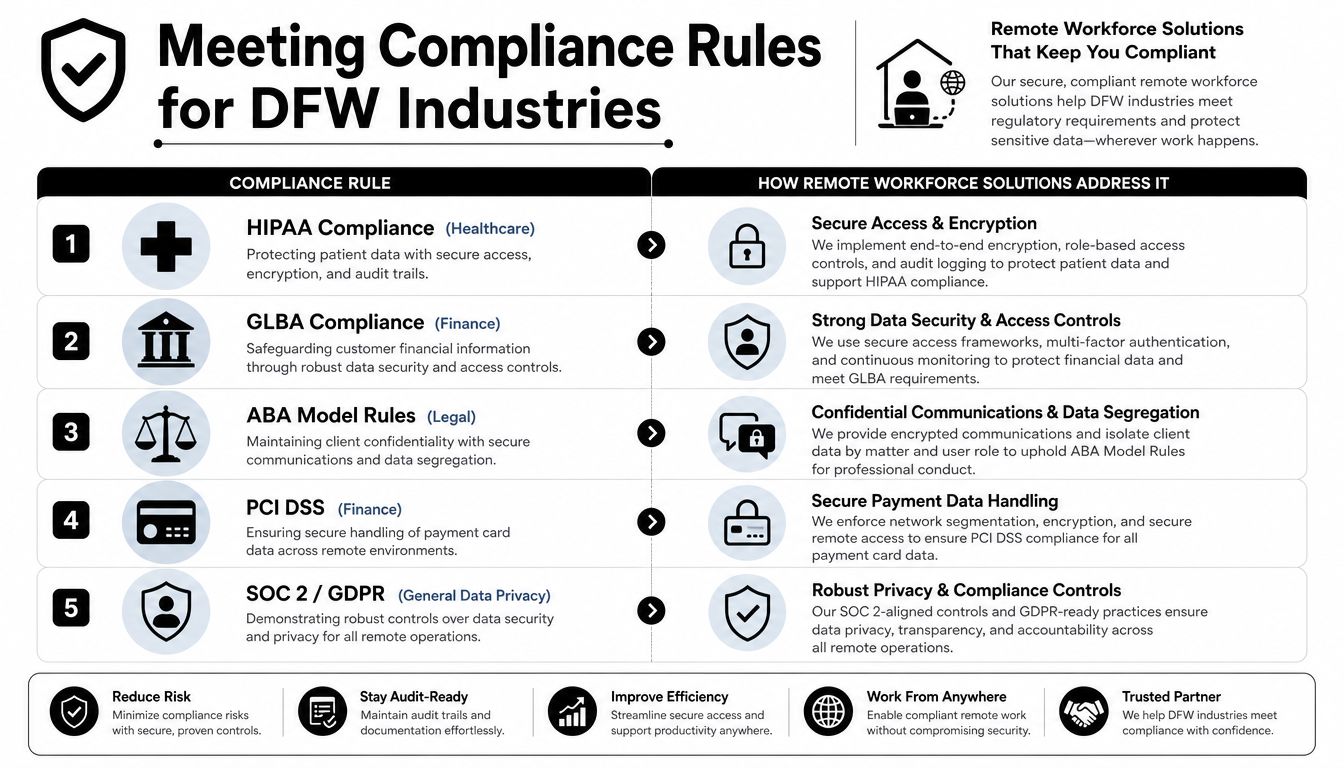
Generic remote work advice is almost useless for regulated firms. Healthcare, legal, and finance don't just need people to work from home. They need remote workforce solutions that preserve confidentiality, restrict access, document activity, and hold up under review.
That's where many small businesses get trapped. There's a critical gap in guidance for regulated SMBs. 74% of remote employees access company data from unsecured networks, 61% of SMBs had a remote-work-related cyber incident, and 89% lack dedicated security staff, according to this analysis of remote work risks for small organizations. Those numbers explain why so many local firms feel exposed even when they've already invested in “remote work.”
Healthcare needs controlled access, not convenience
A clinic with staff accessing patient records from home doesn't need maximum flexibility. It needs minimum necessary access, encrypted communication, protected endpoints, and reliable audit trails. Convenience without controls creates compliance trouble fast.
A practical healthcare checklist looks like this:
- Role-based permissions: Limit each user to the records and systems required for their job.
- Managed devices: Keep clinical and administrative access on monitored endpoints.
- Encrypted backups: Protect continuity if a remote device fails or data is corrupted.
- Access logging: Preserve a usable record of who viewed or changed sensitive information.
Remote work in healthcare can be efficient. It just can't be casual.
Legal and finance firms need proof, not assumptions
A law firm handling discovery, contracts, or privileged communications has a confidentiality problem before it has a technology problem. If attorneys and staff exchange files through uncontrolled channels or work from devices with mixed personal use, the firm may create unnecessary exposure without realizing it.
Financial firms have a parallel issue. Whether the obligation is tied to internal controls, customer data protection, or document retention, auditors and clients won't accept vague assurances. They want evidence that access is limited, changes are tracked, and sensitive information is protected throughout the remote workflow.
A useful way to think about compliance is to map controls to everyday work:
| Industry | Common remote scenario | Control that matters most |
|---|---|---|
| Healthcare | Staff view patient information from home | Managed access, encryption, audit logs |
| Legal | Attorneys share client files remotely | Confidential channels, file controls, device policy |
| Finance | Team members review financial data off-site | Identity control, logging, retention discipline |
A compliance problem rarely starts with a law or standard. It starts when an ordinary task happens outside a controlled process.
This is why remote policy has to be tied directly to operations. Offboarding matters because former staff shouldn't retain remote access. Backup discipline matters because data loss becomes a business interruption issue. Identity management matters because shared credentials and excess privileges create audit pain.
For DFW firms in regulated sectors, this work belongs inside a broader data security and compliance strategy from Technovation, not as a collection of one-off fixes.
A Practical Implementation Roadmap
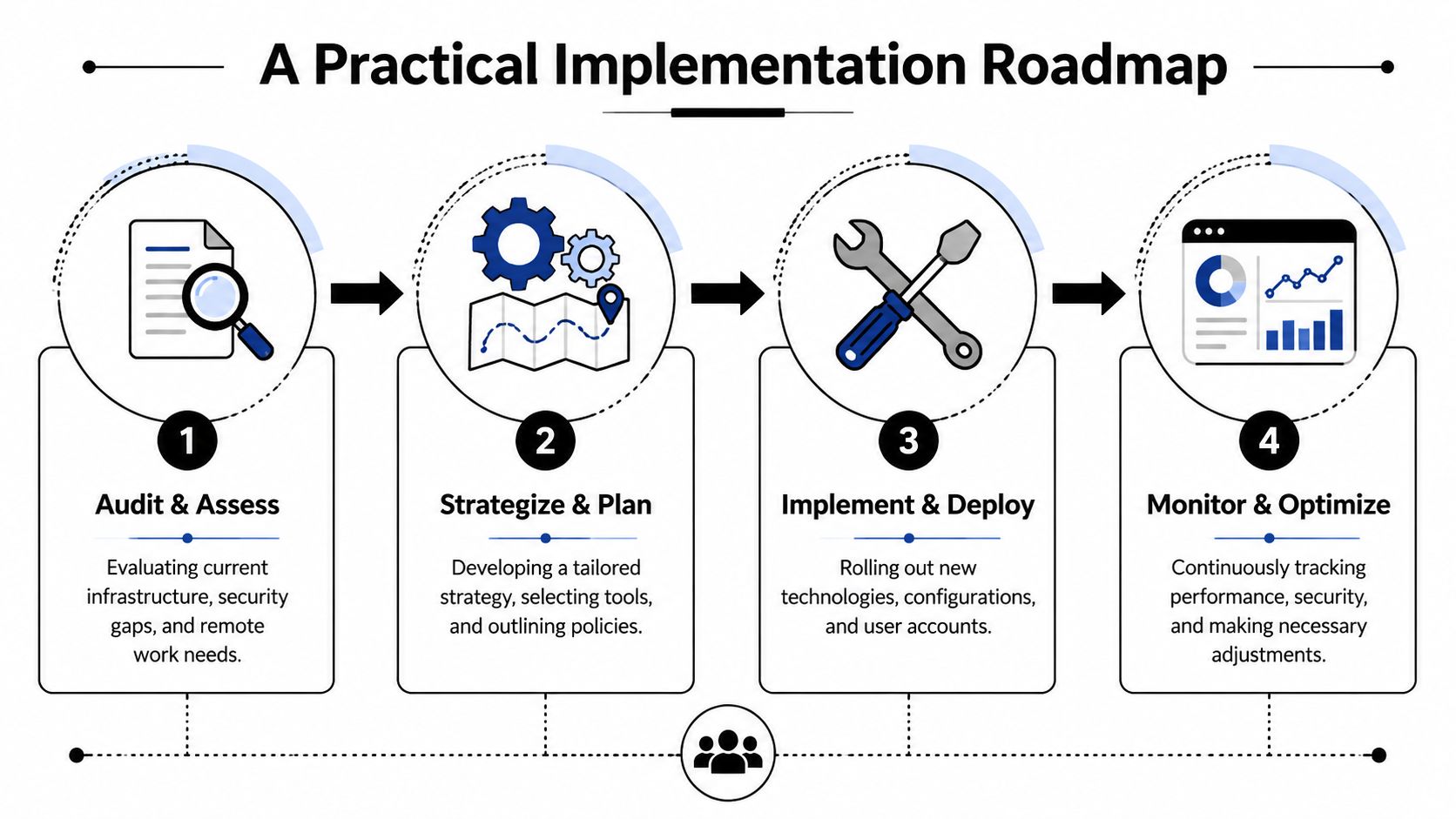
Remote workforce solutions become manageable when leadership stops treating the project as one giant upgrade. The strongest approach is phased. That reduces disruption, exposes risk earlier, and gives management a way to make decisions in sequence instead of all at once.
Structured planning also supports performance. Organizations achieve tangible gains with structured remote strategies, as 77% of employees report increased productivity, according to this overview of remote workforce performance. Productivity doesn't rise because a company declares itself flexible. It rises when the environment is organized.
Phase 1 and Phase 2
Phase 1 is Audit and Assess, during which the business identifies what exists, what's missing, and what's risky.
Key actions include:
- Inventory users and access: Document who connects remotely, from which devices, and to which systems.
- Review current controls: Check authentication, device management, backup coverage, and logging.
- Flag compliance gaps: Match current practice against industry obligations and internal policy.
- Define business priorities: Decide which systems must remain available and which risks need immediate attention.
A professional health check is the right starting point because most internal teams are too close to the environment to see every gap clearly.
Phase 2 is Strategize and Plan. Once the business understands the current state, it can design the target state.
That plan should cover:
- Access model: VPN, Zero Trust, or a staged combination
- Device standards: Company-managed endpoints, patching rules, and approved use policies
- Data handling rules: Backup scope, encryption standards, and storage boundaries
- Governance: Offboarding steps, review schedules, and escalation paths
Leadership check: If the remote work plan lives only inside IT, the company will struggle to enforce it. Operations, compliance, and management all need ownership.
Phase 3 and Phase 4
Phase 3 is Implement and Deploy. Many firms tend to move too fast here. A better approach is controlled rollout by user group, location, or business function.
The implementation should include:
- Pilot deployment: Start with a manageable group and document friction points.
- Account cleanup: Remove stale privileges before expanding access.
- Policy rollout: Give employees plain-language guidance on device use, file handling, and authentication.
- Targeted training: Teach staff what changed and what's expected in daily work.
Phase 4 is Monitor and Optimize. Remote security is not a set-and-forget project. Accounts change, staff leave, applications expand, and new compliance pressure appears.
This final phase should include:
| Ongoing activity | Why it matters |
|---|---|
| Access reviews | Prevents permission creep |
| Device monitoring | Detects drift from policy |
| Backup testing | Confirms recovery actually works |
| User refresh training | Reduces repeat mistakes |
| Policy updates | Keeps controls aligned with business change |
A company that wants the productivity upside of remote work has to operate remote work with discipline. That's what turns flexibility into a durable business advantage instead of a recurring support issue.
Choosing Your Partner DIY vs Managed Services
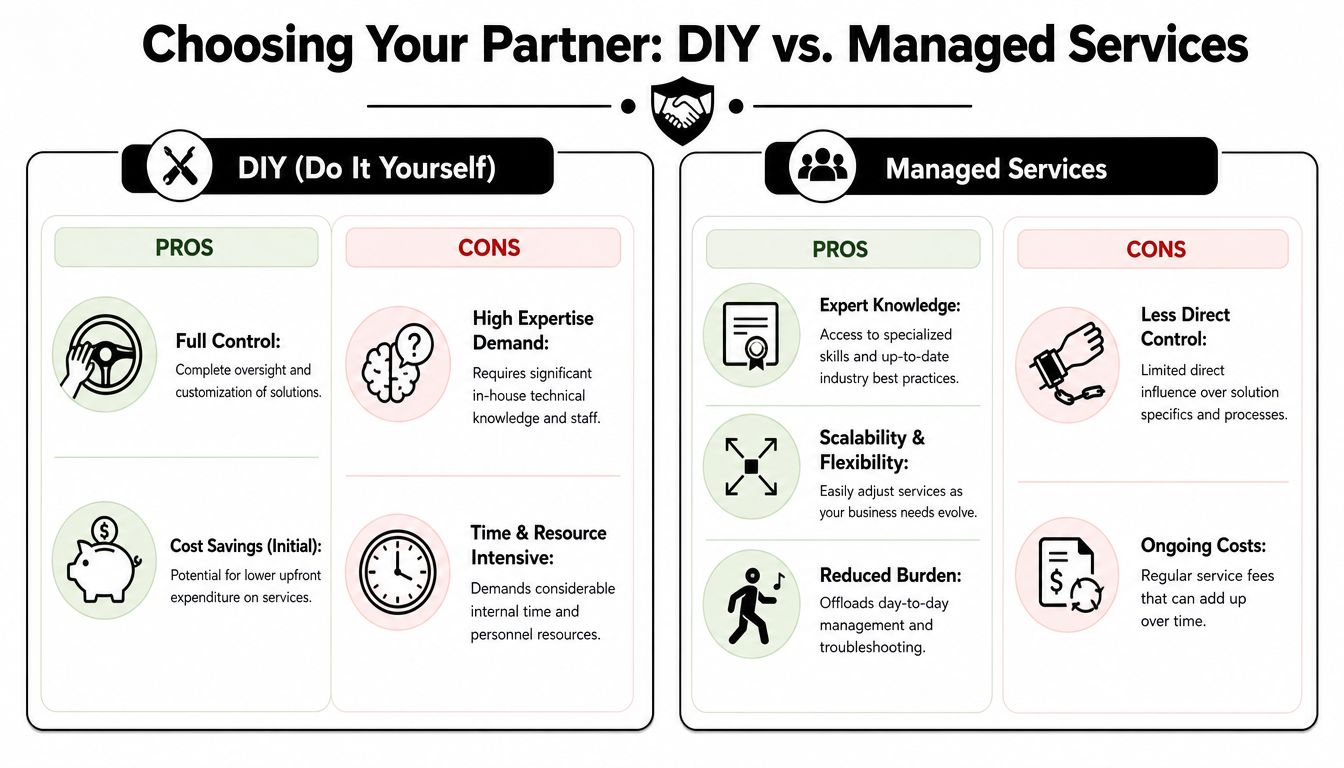
A lot of business owners assume remote workforce solutions should stay in-house because the tools seem straightforward. That assumption usually lasts until there's an access failure, an audit request, or a security incident that reveals how many moving parts were being held together informally.
The decision isn't whether internal staff are capable. It's whether the business wants to carry the operational burden of secure remote work every day.
What DIY really costs
DIY looks cheaper because the invoices are more visible than the labor. But internal management creates hidden costs that accumulate quickly.
Those costs usually show up in four places:
- Staff distraction: Internal teams spend time troubleshooting accounts, devices, and exceptions instead of supporting core operations.
- Configuration risk: Security controls fail when they're deployed inconsistently or left unreviewed.
- Policy drift: Written rules stop matching daily practice unless someone owns enforcement.
- Response pressure: When something breaks after hours, the business still needs expertise immediately.
For regulated firms, DIY also creates a documentation problem. It's one thing to say controls exist. It's another to show they're monitored, maintained, and reviewed consistently.
Why managed services change the risk equation
Managed services make sense when leadership wants predictable support, stronger oversight, and a cleaner line between business priorities and technical execution. That's especially true for small and mid-sized DFW organizations that need enterprise-grade discipline without building a large internal team.
This isn't theory. Over 50% of Fortune 1000 leaders placed remote work as a top strategic priority even before the pandemic, according to these insights on remote workforce leadership priorities. Large organizations recognized early that remote work needs expert management for business continuity and agility. Smaller firms need the same discipline, even if they reach it through a partner instead of internal headcount.
A side-by-side view makes the tradeoff clear:
| Model | Best case | Main exposure |
|---|---|---|
| DIY | Full internal control | Greater burden, uneven coverage, slower response |
| Managed services | Consistent oversight and support | Less day-to-day direct control |
Managed support isn't about giving up responsibility. It's about assigning technical responsibility to a team that can sustain it.
For many DFW firms, that's the smarter financial decision too. Leadership gets predictable service, tighter documentation, and faster remediation. The business keeps focus on clients, patients, or cases instead of spending management time chasing access issues and security gaps.
Build Your Remote Workforce for Growth
A patchwork remote setup may keep people working, but it won't reliably protect a regulated business. Secure remote workforce solutions support more than access. They support continuity, compliance, accountability, and better performance.
The companies that handle remote work well don't treat it as an employee perk or a temporary accommodation. They treat it like infrastructure. That means defined access, managed devices, enforced policy, and ongoing oversight. For healthcare practices, law firms, financial organizations, and other security-conscious businesses in DFW, that's the difference between remote work that helps the business grow and remote work that inadvertently expands exposure.
The next step should be simple. Stop guessing. Get the environment reviewed, identify the weak points, and fix them before they become expensive.
Technovation LLC helps DFW businesses turn remote work into a secure, compliant operating model instead of a collection of risky workarounds. With Technovation LLC, business owners can request a complimentary, no-obligation security audit to evaluate remote access, endpoint protection, compliance exposure, and overall IT health, then get a clear plan for what to improve next.