A lot of DFW business owners are in the same spot right now. The office has a firewall, the internet works, remote staff can connect, and nobody's completely sure whether the device is protecting the business or just passing traffic.
That uncertainty is normal. Firewall configuration sits in an awkward place between networking, security, compliance, and day-to-day operations. A medical practice needs staff to reach cloud apps and imaging systems. A law firm needs secure remote access without slowing attorneys down. A finance office needs tight controls without breaking client workflows. The challenge isn't buying the firewall. The challenge is deciding what to allow, what to block, how to document it, and how to keep it clean over time.
For small and mid-sized companies without a dedicated security team, learning how to configure firewalls starts with business decisions, not technical menus. The strongest setup usually isn't the one with the most features turned on. It's the one built around real users, specific systems, and rules somebody can still understand six months later.
Table of Contents
- Your Firewall Is On But Is It Working
- Planning Your Firewall Strategy Before You Click Anything
- Building Your Digital Fortress Zones Rules and Policies
- Essential Configurations NAT VPN and Common Platforms
- Verifying and Maintaining Your Firewall Security
- Beyond the Basics When to Partner with an Expert
Your Firewall Is On But Is It Working
A powered-on firewall can create a false sense of safety. The device may be installed correctly, but the rules, zones, remote access settings, and management controls may still be loose, outdated, or inconsistent with how the business operates.
That matters because 99% of firewall breaches are caused by misconfigurations, as predicted by Gartner in 2020, according to Fortinet's firewall configuration overview. The problem usually isn't that a company forgot to buy security hardware. The problem is that someone allowed too much traffic, left a temporary rule in place, exposed an admin interface, or never cleaned up old permissions after a software change.
Why set-it-and-forget-it fails
Most SMB environments change constantly. Staff roles shift. Vendors need temporary access. A cloud application gets added. A copier is replaced. A second office opens. If the firewall doesn't change with the business, the rule set starts reflecting old assumptions instead of current reality.
That's why a firewall should be treated as an active control, not a box on a shelf. A good setup blocks what the business doesn't need, allows what it does need, and gives someone enough visibility to tell the difference.
A firewall doesn't fail only when it goes offline. It fails when it quietly allows traffic nobody meant to permit.
For many owners, the first practical move isn't changing settings. It's verifying whether the current setup matches the company's real systems, users, and risks. A useful companion to that review is learning how vulnerability scanning supports network security decisions, because firewall rules make more sense when the exposed weaknesses are visible.
The right question to ask
The better question isn't “Do we have a firewall?” It's “Can somebody explain why each important rule exists, who needs it, and whether it's still required?”
If that answer is fuzzy, the configuration needs attention. That isn't a disaster. It's a manageable starting point.
Planning Your Firewall Strategy Before You Click Anything
The strongest firewall projects usually begin away from the dashboard. Before anyone creates rules, opens ports, or enables remote access, the business needs a clear idea of what it's protecting and what must keep working.
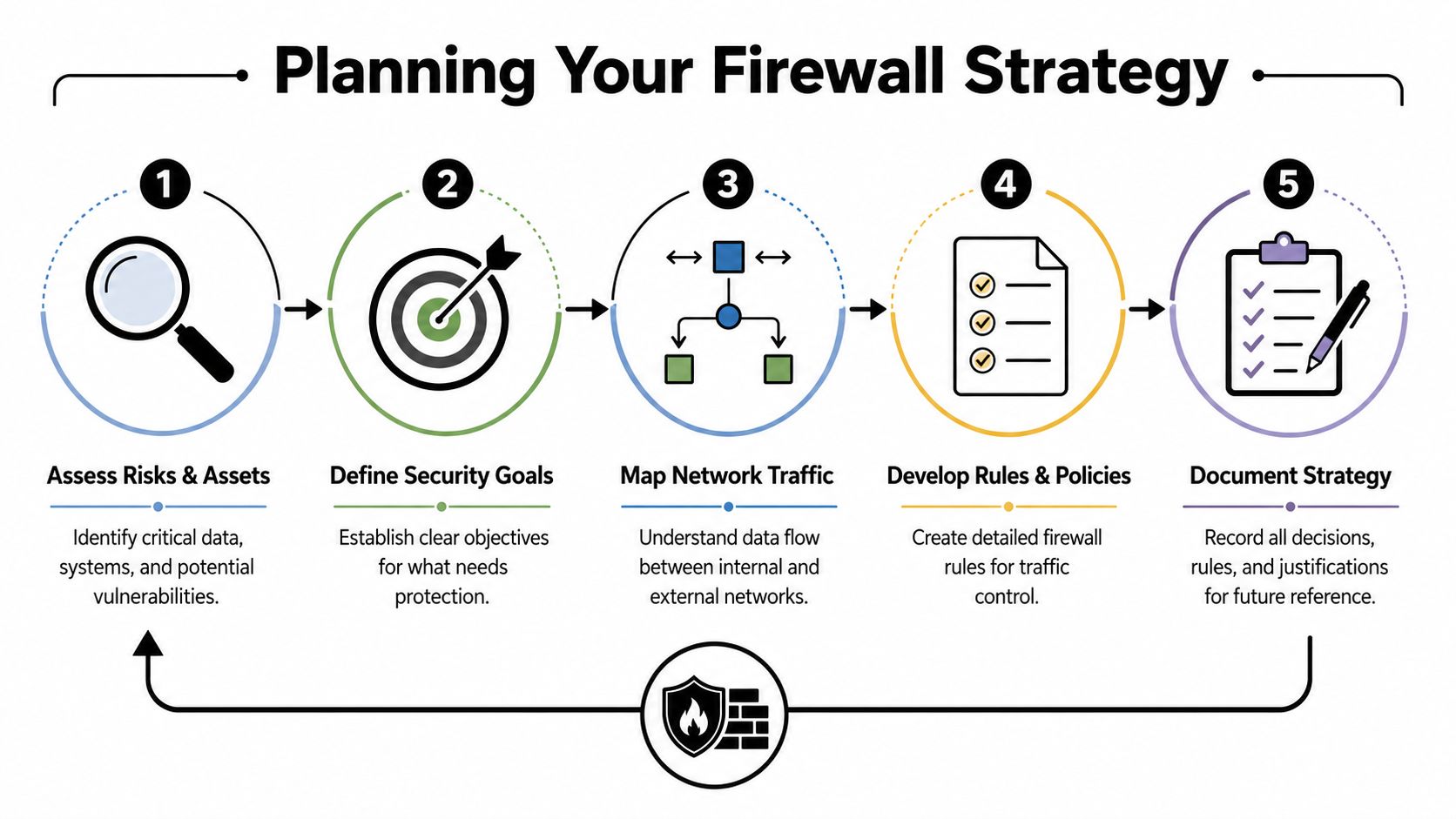
A professional starting point is a default-deny posture. The ITU Online firewall guidance states that a strict default-deny approach can reduce unauthorized access attempts by 85% compared to default-allow configurations. For an SMB, that means the firewall should block traffic by default and permit only the business traffic that has a documented reason to exist.
Start with a default-deny stance
Default-deny sounds restrictive, but it's easier to manage than the alternative. A default-allow setup often grows into a patchwork of exceptions, broad permissions, and troubleshooting shortcuts that never get removed.
A better planning model looks like this:
- Critical systems first. Identify systems that would hurt the business most if exposed or interrupted. In healthcare, that might be patient records and imaging access. In legal, it might be document management and secure file exchange. In finance, it might be accounting, tax, and client data systems.
- Users second. List who needs access. Front-desk staff, clinicians, attorneys, partners, remote employees, outside vendors, and managed service providers rarely need the same paths.
- Business functions third. Decide what must be reachable from the internet, what should only be reachable internally, and what should never be directly exposed at all.
That planning effort also aligns well with broader software and operational security work. If a company is reviewing internal apps or custom workflows, it helps to integrate security into your SDLC so firewall rules aren't compensating for weak application design.
Build a simple business traffic map
Most SMBs don't need a giant network diagram to make good firewall decisions. A short worksheet is enough if it answers the right questions.
| Business item | What to document |
|---|---|
| Public services | Which systems must be reachable from outside |
| Internal systems | Which systems should only be available inside the business |
| Remote access | Which employees need VPN access and to what |
| Vendor access | Which outside parties need access, for how long, and why |
| Compliance needs | Which systems handle regulated or sensitive data |
A small business firewall plan should also note where guest devices, employee devices, servers, phones, cameras, and specialty equipment sit. That becomes the basis for zoning and rule writing later. Companies that need a simpler starting point can review small business firewall basics before they start building policies.
Write down the reason for every rule
A firewall rule without a reason usually becomes permanent, even when the original need disappears. That's how clutter begins.
Practical rule: If a rule can't be explained in one sentence, it probably isn't specific enough.
A useful rule note includes four things:
- Who requested it
- What system or service it supports
- Whether it's permanent or temporary
- What breaks if it's removed
That level of documentation may feel tedious, but it saves time during audits, upgrades, and troubleshooting. It also keeps business owners from depending on one person's memory to understand the environment.
Building Your Digital Fortress Zones Rules and Policies
Firewall security gets stronger when the network is divided by purpose. Instead of treating the whole office as one flat environment, a smart configuration separates public services, employee devices, servers, guest traffic, and sensitive systems into controlled areas.

Create security zones that match business risk
One of the clearest examples is the DMZ, or demilitarized zone. According to SecurityMetrics' firewall configuration guidance, public-facing services like web servers must be placed in a DMZ, while sensitive assets like database servers must remain in internal networks to enforce segmentation.
That design matters because public systems carry a different risk profile than internal ones. A website, email gateway, or remote access portal faces outside traffic by design. A file server holding contracts, medical records, or financial reports should not sit in the same trust zone.
A practical SMB zone layout often includes:
- Public-facing zone. Systems that must accept outside traffic.
- Internal user zone. Workstations and standard office devices.
- Sensitive systems zone. Servers, databases, or line-of-business platforms with tighter access needs.
- Guest or untrusted zone. Visitor devices, personal devices, or contractor access.
- Management zone. Administrative access paths for IT management only.
A clinic, for example, may place patient-facing web functions in one zone, employee workstations in another, and the systems tied to records or billing in a tighter internal segment. A law firm may isolate document storage from general office browsing. A contractor may separate field devices from accounting and project systems.
Write rules that are narrow readable and owned
Once zones exist, the firewall rules should define exactly how traffic may move between them. Often, networks become messy at this point.
The safest rules are specific. They identify the source, destination, service, and purpose. The weakest rules are broad shortcuts, especially the old “allow anything from anywhere” style that gets added during testing and forgotten after launch.
The Tufin best-practices article on firewall optimization recommends removing fully shadowed and expired rules, breaking long rule sections into groups of no more than 20 rules, documenting rule ownership and intent, and replacing broad wildcards with specific objects or groups. That same source notes that organizations that fail to remove shadowed rules experience a 30-40% increase in firewall processing time and that legacy rules contribute heavily to misconfigurations, according to Tufin's firewall performance guidance.
Document the owner of every rule. If nobody owns it, nobody reviews it, and outdated access tends to survive far longer than it should.
A strong rule usually answers these questions:
- Source. Which user group, device group, or subnet is initiating traffic?
- Destination. Which application or system is being accessed?
- Service. Which protocol or port is required?
- Purpose. What business function depends on it?
- Duration. Is this permanent, temporary, or tied to a project?
Keep the rule base usable over time
Many SMBs get into trouble not because the first version was terrible, but because nobody maintained it. Temporary vendor access stays open. Old remote workers still have permissions. Legacy systems remain referenced after migration.
The easiest way to prevent that is to organize policies for people, not just machines. A readable firewall rule base is grouped by business area and supported by notes. It isn't a pile of overlapping entries added in a hurry.
A simple operating standard works well:
- Group related rules together. Keep remote access rules in one place, public service rules in another, and third-party access separate from employee access.
- Avoid broad wildcards. Specific objects are easier to audit than vague all-purpose entries.
- Review troubleshooting rules quickly. If a temporary rule was added to solve an outage, it should have an expiration note.
- Log important flows. Logging turns guesswork into evidence when something fails or behaves strangely.
For businesses learning how to configure firewalls, this is the point where the work shifts from theory to discipline. The firewall isn't just enforcing policy. It's reflecting how well the business manages change.
Essential Configurations NAT VPN and Common Platforms
Two firewall functions affect daily operations more than most owners realize. One is NAT, which controls how internal systems reach outside networks and how public traffic is mapped to internal services. The other is VPN, which gives remote users a secure way into business resources.
What NAT should do for a small business
Network Address Translation helps a company present a controlled public presence while keeping internal addressing private. For most offices, that means staff can browse, use cloud applications, and reach outside services without exposing the structure of the internal network.
Where companies get into trouble is inbound NAT. A rushed port forward may publish a service that wasn't meant to be publicly reachable. If a business needs a plain-language refresher on the risks and mechanics, this essential guide to port forwarding is useful background before making changes.
A safer NAT approach usually follows three rules:
| Need | Safer approach |
|---|---|
| Publish a business service | Expose only the exact service required |
| Support remote employees | Prefer VPN access over direct public exposure |
| Temporary vendor access | Time-box it and remove it when the work ends |
What secure VPN access should look like
A VPN should give remote staff access only to the systems they need. It shouldn't act like a universal back door into the entire office.
A sound configuration usually includes restricted user groups, limited reachable resources, strong authentication, and logging. Administrative access should be treated more carefully than ordinary employee access. A bookkeeper working from home doesn't need the same network visibility as someone managing infrastructure.
Remote access should mirror job duties, not convenience.
That matters even more in regulated environments. If remote users can reach sensitive files, billing systems, legal records, or financial data, the firewall policy needs to match the company's documented access model.
Platform differences matter more than most owners expect
Firewall concepts stay consistent across platforms, but the implementation varies. Menus, object handling, default behaviors, logging options, and VPN workflows differ enough that copying advice from one interface to another can create mistakes.
The market itself reflects that variety. TrustRadius' firewall market analysis reported that one major platform held 40% of the market in 2021, followed by several other widely used systems. For SMBs, that means administrators often inherit mixed environments and need to understand the principles rather than memorizing one layout.
A few practical differences show up often:
- Open-source style interfaces. These can be flexible and cost-conscious, but they often assume the administrator understands rule order, NAT behavior, and interface logic at a deeper level.
- Built-in operating system firewalls. These are useful for endpoint protection but don't replace a well-managed network edge strategy.
- Cloud-managed systems. These simplify deployment and remote administration, but simplified dashboards can still hide poor policy decisions.
The lesson is simple. The interface changes, but the core work remains the same: define access narrowly, document intent, and verify that the result matches the business need.
Verifying and Maintaining Your Firewall Security
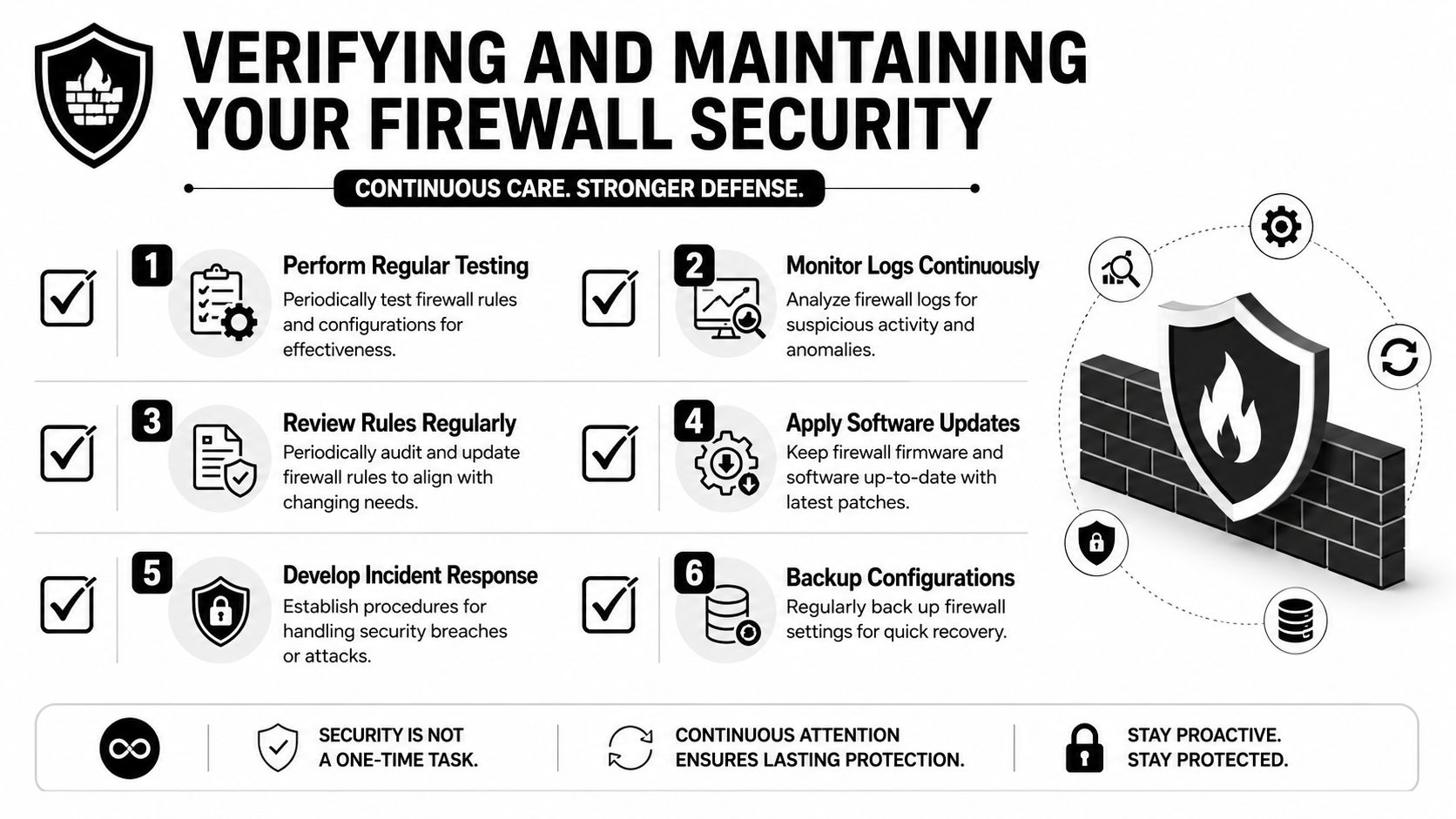
A firewall isn't finished when the initial rules are in place. It needs testing, log review, updates, backups, and regular cleanup. Without that ongoing care, a once-solid configuration can drift into a collection of exceptions nobody fully trusts.
That issue is especially serious for smaller companies. According to Gartner researchers cited in a 2025 analysis, over 60% of firewall breaches in SMBs stem from misconfigured or shadowed rules caused by poor governance and lack of regular audits, as noted in this analysis discussing SMB firewall rule governance.
Test changes without disrupting operations
Testing should be controlled and routine, not emergency-driven. Every meaningful firewall change should be checked to confirm two things: the intended traffic works, and unrelated business traffic still works.
A simple testing pattern helps:
- Confirm the expected path. Verify that the approved service is reachable from the intended user or location.
- Confirm blocked paths stay blocked. Make sure the change didn't open adjacent access by accident.
- Record the result. A short note on who tested it and what happened saves time later.
- Keep rollback options ready. Backups and change windows matter, especially when remote access or public services are involved.
For businesses that need stronger visibility into whether traffic and device behavior still match expectations, network monitoring as an ongoing practice complements firewall review well.
Use logs and reviews to catch drift early
Logs aren't just for technical staff. They're part of the business record of who tried to access what, when changes happened, and whether suspicious patterns are appearing.
Healthcare, legal, and financial organizations benefit from this discipline because logs help support internal reviews, incident response, and compliance discussions. Even outside regulated sectors, logs answer the practical questions that come up after a change: Did a blocked connection cause the problem, or is the application itself failing?
The most expensive firewall rule is often the one nobody notices until an audit, outage, or incident exposes it.
The key is to review logs with intent. Looking only when there's a problem isn't enough. Someone should routinely check for denied traffic patterns, repeated unusual access attempts, and old services that no longer appear active.
Build a quarterly review habit
Quarterly review is a realistic standard for many SMBs. It's frequent enough to catch drift, but not so frequent that the process gets ignored.
A useful quarterly review includes:
- Rule cleanup. Remove obsolete, duplicate, temporary, or shadowed entries.
- Access validation. Confirm current staff, vendors, and systems still need the access they have.
- Policy alignment. Compare the rule base to current business operations, not last year's org chart.
- Firmware and update checks. Make sure the firewall platform itself is current and supported.
- Configuration backups. Keep known-good copies in case a rollback is needed.
At this stage, many businesses discover the hidden cost of DIY administration. The initial setup may have been manageable. The sustained review process is what tends to slip.
Beyond the Basics When to Partner with an Expert
By this point, the shape of the job is clear. Learning how to configure firewalls isn't just about finding the right menu options. It means making access decisions, documenting them, testing them safely, reviewing them regularly, and keeping them aligned with compliance and business change.
That's a lot to ask from an owner, office manager, or general IT contact who already has a full-time role. In healthcare, legal, and finance especially, the cost of a bad decision isn't limited to downtime. It can also affect confidentiality, audit readiness, and client trust.
There's also the issue of continuity. A firewall that depends on one employee's memory is fragile. If that person leaves, the business inherits a security system full of unexplained exceptions. A managed approach reduces that dependency by making rule ownership, monitoring, change control, and maintenance part of an ongoing process instead of an occasional project.
Some owners find it helpful to compare service models before deciding whether to keep firewall management in-house. For that broader perspective, Redchip's guide for local companies offers a useful overview of what businesses should evaluate in managed support.
Strong firewall management also works best when it ties into adjacent protections. If a company is thinking beyond basic filtering and wants better visibility into suspicious behavior, intrusion detection systems as part of layered defense are worth evaluating alongside firewall policy.
The practical decision usually comes down to focus. If the company has internal staff who can own rule design, documentation, audits, and response, an internal model can work. If not, the better business move is often handing that responsibility to specialists and keeping internal attention on operations, clients, and growth.
Technovation LLC helps DFW businesses turn firewall management from a recurring uncertainty into a documented, monitored, and maintainable security process. With Technovation LLC, organizations in healthcare, legal, finance, construction, nonprofit, and general business can get help with firewall strategy, rule cleanup, network hardening, compliance readiness, and ongoing monitoring that fits real-world operations. If the current firewall is on but nobody's confident it's working the way it should, this is a good time to start the conversation.