
Many small businesses ask the wrong opening question about risk. They ask, “Are we likely to be targeted?” A better question is, “If something interrupts the business tomorrow, what fails first, and how quickly can operations recover?”
That shift matters because what is risk mitigation strategy isn't really a definition problem. It's a decision problem. A company can buy insurance, sign a policy, and still be unprepared for a locked file server, a payroll delay, a compliance gap, or a staff member who clicks the wrong link. Insurance may help with financial fallout, but it doesn't restore access, rebuild trust, or keep work moving during an outage.
For small and mid-sized organizations, risk mitigation is less about fear and more about control. It gives owners a way to decide what deserves attention now, what can wait, and what needs outside support. That matters in every industry, from clinics and law firms to construction and financial services.
Table of Contents
- Going Beyond Luck and Insurance
- The Four Core Risk Mitigation Strategies
- How to Build Your Strategy in 5 Steps
- Risk Mitigation Examples in Your Industry
- Tools and Services That Power Your Strategy
- How to Measure the Success of Your Strategy
- Your SMB Action Plan and Next Steps
Going Beyond Luck and Insurance
A lot of owners still treat risk like bad weather. If it happens, they'll deal with it. If it doesn't, no harm done. That approach worked better when systems were simpler, fewer operations depended on cloud platforms, and one account compromise couldn't affect the entire business in an afternoon.
Today, the stakes are much larger. Global cybercrime costs are projected to reach $15.63 trillion by 2029, according to Atlas Systems' discussion of risk mitigation. That projection explains why formal risk mitigation has moved out of the IT back room and into executive decision-making. It's now tied directly to uptime, customer confidence, and long-term resilience.
Risk isn't only a security issue
Risk shows up in ordinary business activities. A missed backup. An employee using a personal device for client files. A vendor process that depends on one person knowing the workaround. A website feature that creates accessibility exposure. For companies publishing podcasts, training content, or recorded customer material, even media accessibility belongs in the conversation, which is why ADA Compliance Pros' transcript guidance is useful as part of a broader operational risk review.
Risk mitigation starts when a business stops asking, “What policy do we need?” and starts asking, “What interruption can we no longer afford?”
Insurance still matters. Transferring some financial exposure is smart. But relying on insurance alone is incomplete because coverage doesn't prevent downtime, contain technical spread, or rebuild systems. Businesses exploring coverage decisions can see that tradeoff more clearly in this look at why cybersecurity insurance is so important for businesses.
What business owners actually need
Most companies don't need a thick binder full of theoretical risks. They need a practical operating discipline:
- Protect what stops revenue first. Client communications, line-of-business apps, email, files, and remote access usually matter more than edge cases.
- Lower the blast radius. If one account or device is compromised, the whole company shouldn't go down with it.
- Recover in an orderly way. Good risk work includes restoration, communication, and decision rights, not just prevention.
That is the answer to what is risk mitigation strategy. It's a structured way to reduce the chance of disruption, reduce the damage when something does happen, and keep the business functional while the issue is being handled.
The Four Core Risk Mitigation Strategies
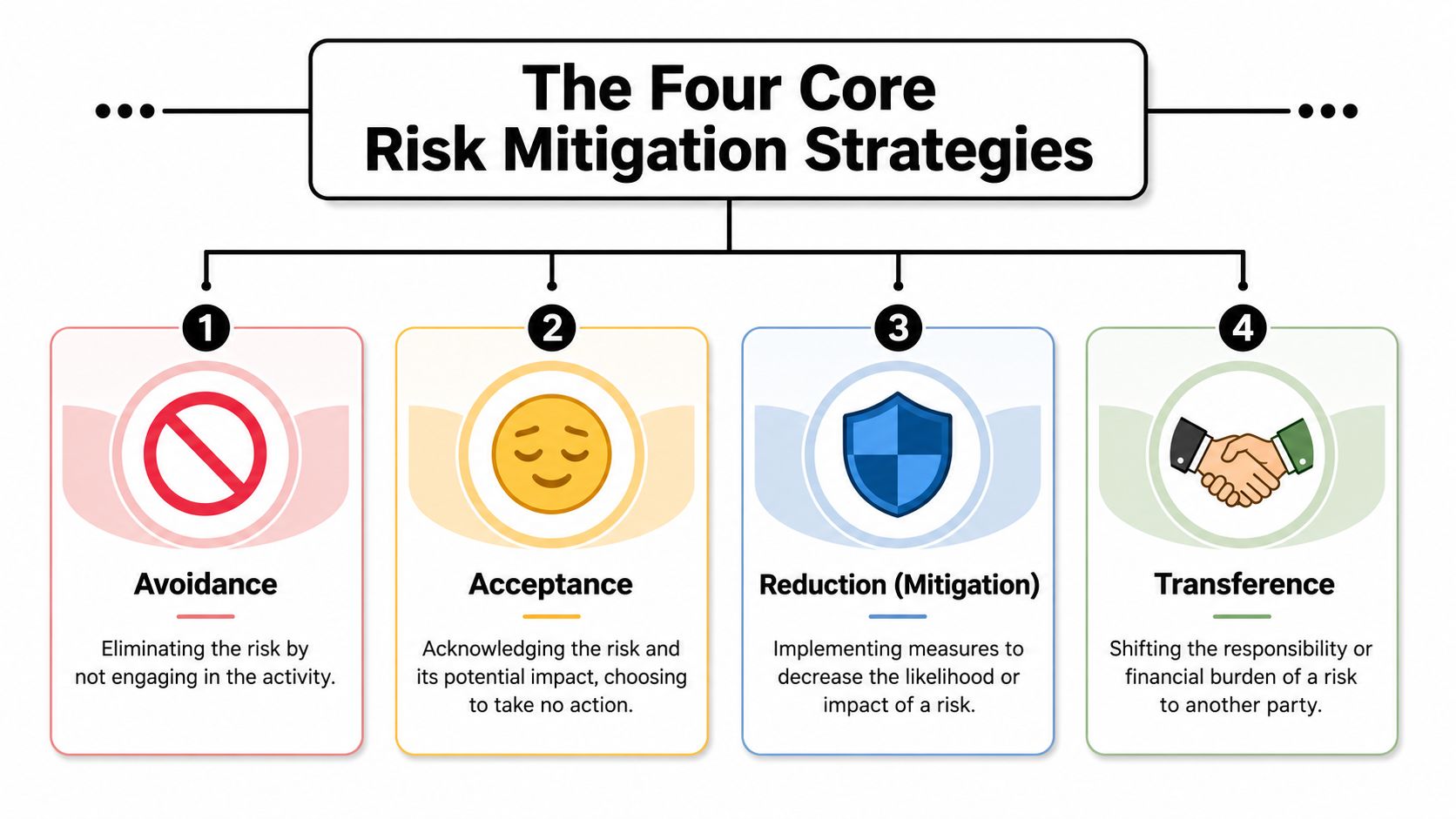
A business doesn't manage every risk the same way. Some risks should be removed. Some should be accepted. Some should be reduced. Some should be transferred. Thinking in those four buckets makes better decisions possible.
Why these four options matter
A home analogy helps. If a house sits in a floodplain and the owner decides not to buy it, that's avoidance. If the owner knows a shed lock isn't perfect but decides the exposure is minor, that's acceptance. Installing cameras, stronger locks, and smoke detectors is reduction. Buying homeowners insurance is transference.
Business risk works the same way.
- Avoidance means stopping an activity that creates too much exposure. A company may decide not to store certain sensitive data, not to support unmanaged devices, or not to use a fragile manual process for approvals.
- Acceptance means acknowledging a risk and documenting why no further action is justified right now. This only works when leadership understands the consequence and can tolerate it.
- Reduction is the most common path. The business keeps operating but adds safeguards that lower likelihood or impact.
- Transference shifts some financial responsibility through contracts, insurance, or outsourced arrangements.
Industry guidance is consistent on one key point. The goal isn't to eliminate all risk, but to reduce it to an acceptable level, and mature programs pair transference with practical controls like backups and incident response planning, as explained in MetricStream's overview of risk mitigation strategies.
The Four Methods of Risk Mitigation
| Strategy | Description | Business Example |
|---|---|---|
| Avoidance | Remove the risky activity entirely | A firm decides not to allow sensitive data on personal devices |
| Acceptance | Acknowledge the exposure and take no additional action for now | A company accepts a minor manual process issue because the impact is limited |
| Reduction | Add controls that lower likelihood or impact | The business enables MFA, improves backups, and restricts access |
| Transference | Shift some financial or contractual burden to another party | The company buys cyber insurance and tightens vendor agreements |
A common mistake is using only one method. That's rarely enough. Insurance without backups is weak. Security tools without staff training are incomplete. Policies without enforcement don't change outcomes.
Practical rule: Most SMBs should spend more time on reduction than on elaborate theoretical planning, because reduction directly improves day-to-day resilience.
For businesses trying to turn this into action, a good starting point is a clear set of cybersecurity best practices for small businesses. The point isn't to collect more controls. It's to choose the few that materially improve continuity and protect the systems people rely on every day.
How to Build Your Strategy in 5 Steps
A useful strategy has to be repeatable. Otherwise, risk review becomes a one-time meeting, a stale spreadsheet, and a pile of unresolved issues. The practical model is a cycle, not a project.
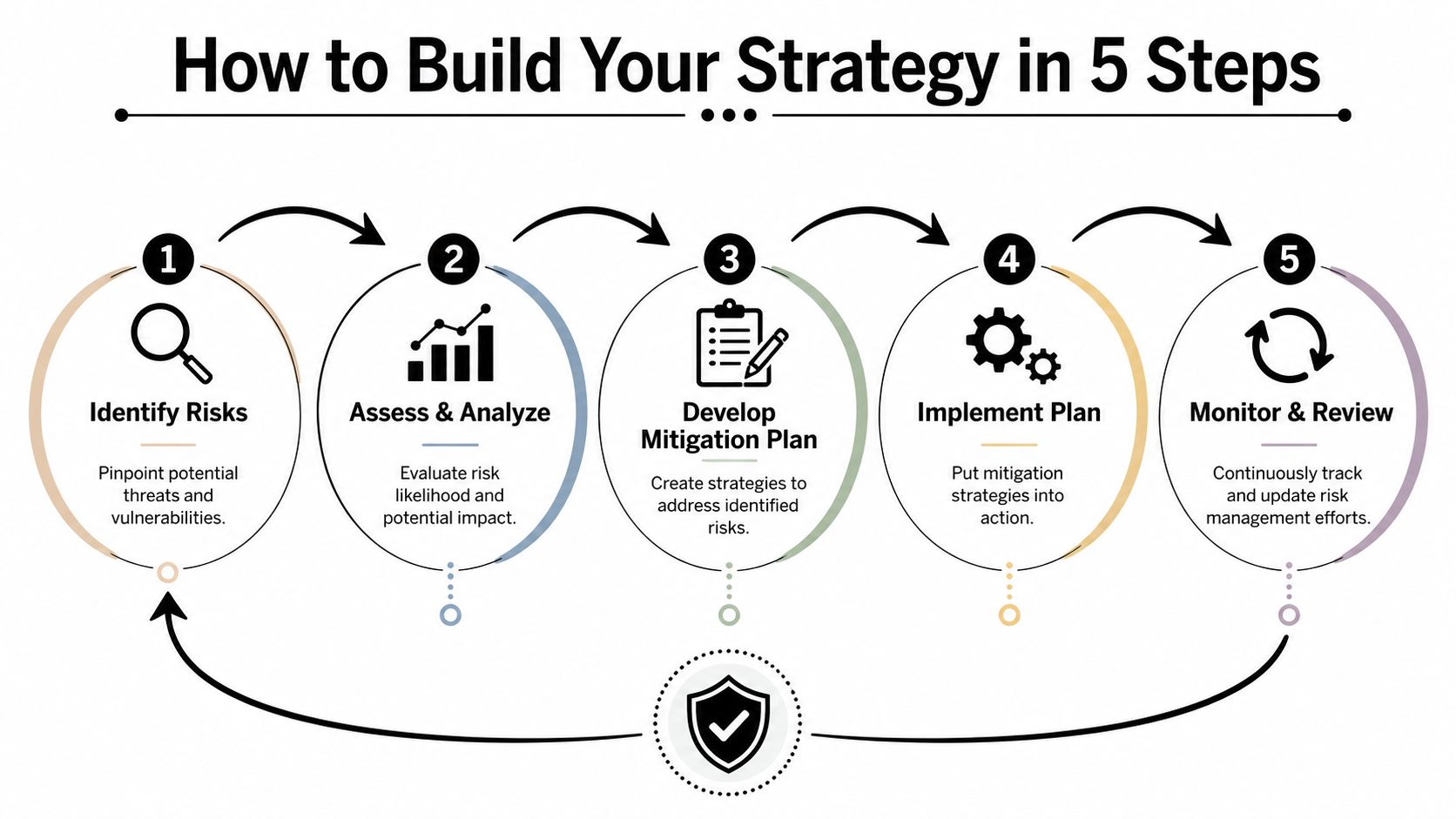
IBM describes risk mitigation as a five-step cycle that includes identifying threats, assessing likelihood and impact, prioritizing by severity, monitoring continuously, and reporting results in its explanation of risk mitigation strategy. That model works well for small businesses because it turns a vague concern into a manageable routine.
Step 1 and Step 2
Identify risks. Start with what can interrupt operations, expose data, or create compliance trouble. That usually includes email compromise, lost devices, weak passwords, accidental deletion, vendor dependency, poor backup coverage, and undocumented access rights. Staff interviews help here because employees often know where the fragile processes live.
Assess likelihood and impact. Not every risk deserves equal attention. A rare event with serious consequences may still matter less in the short term than a recurring operational failure that slows the business every week. Owners should ask two plain-language questions: how likely is this, and what happens if it does occur?
A simple list helps:
- Revenue impact: Does this stop billing, scheduling, intake, project delivery, or collections?
- Data impact: Could confidential records be exposed, altered, or lost?
- Operational impact: Can staff keep working, or does the issue stall everyone?
- Compliance impact: Would this create reporting, legal, or contractual problems?
Step 3 through Step 5
Prioritize risks. Strategy becomes useful for this. The top tier should usually include the items that combine meaningful likelihood with meaningful business disruption. That often means compromised accounts, missing backups, unsupported systems, weak remote access controls, and overly broad permissions.
Implement controls. Controls should match the actual problem. If account compromise is a top risk, stronger authentication and tighter access management belong near the top. If downtime is the bigger issue, recovery planning and tested backups matter more.
Monitor and review. Risks don't stay still. New staff members join, software changes, remote work expands, and vendors shift workflows. A business should revisit its register, control list, and responsibilities on a set cadence instead of waiting for a failure.
Good risk work is boring in the best possible way. It creates routines, ownership, and fewer surprises.
A lot of SMBs stall at implementation because they don't have the internal time to assess, document, and maintain the process. That makes provider selection part of the risk discussion, which is why this guide on how to choose a managed service provider is relevant. The right partner doesn't replace internal leadership. It gives the business a practical way to keep the cycle active instead of letting it fade after the first meeting.
Risk Mitigation Examples in Your Industry
Risk feels abstract until it shows up in familiar work. The details differ by industry, but the pattern is the same. A weak process creates an avoidable interruption. A better control keeps the business moving.
Healthcare and legal work
A medical practice has a simple scheduling workflow. Staff handle patient communication quickly, but messages and documents move through too many unsecured channels. The immediate risk isn't only a security incident. It's confusion, delayed care coordination, and compliance exposure. Mitigation means tightening communication methods, limiting who can access records, encrypting sensitive exchanges, and making sure backups support fast restoration if files become unavailable.
A law firm faces a different version of the same problem. Attorneys and staff need to move quickly, but speed often leads to oversharing, broad folder access, or weak document handling. One misplaced file or compromised account can affect privilege, deadlines, and client trust. Stronger access controls, secure document workflows, and role-based permissions reduce that exposure without slowing down legal work to a crawl.
Construction and financial services
Construction firms often overlook operational IT risk because field work feels more urgent than office systems. But estimate files, project documents, and mobile access can become single points of failure. When teams rely on digital bids, plans, and pricing, poor access control or unreliable file availability can delay work across office and field crews. Businesses that depend on estimating accuracy may already see how workflow software shapes operations, which is why resources like Exayard plumbing estimating software are useful for thinking about process reliability as part of risk mitigation.
Financial services firms have lower tolerance for inconsistency. They handle sensitive records, regulated communication, and client expectations around confidentiality. The danger isn't only external attack. Internal sprawl creates risk too. Shared credentials, excessive permissions, and weak review processes can create the kind of preventable exposure that causes serious business pain. For firms in that space, compliance solutions for financial services can help frame controls around actual regulatory and operational needs.
- Healthcare example: Protect records, secure communications, and preserve access during outages.
- Legal example: Limit document exposure and protect privileged information.
- Construction example: Keep field and office teams connected to current project data.
- Financial example: Control access tightly and document handling consistently.
The lesson across all four is simple. The right mitigation strategy fits the work itself. Generic advice rarely does.
Tools and Services That Power Your Strategy
A risk strategy becomes real only when controls are deployed, monitored, and adjusted. Tools matter, but isolated tools don't produce resilience. Businesses run into trouble when they buy products one at a time and assume that ownership equals protection.

Tools help, but coordination matters more
A technically sound cybersecurity mitigation strategy combines preventive controls and detective controls, as outlined in Scrut's overview of risk mitigation strategies. Preventive controls include MFA, network segmentation, encryption, least-privilege access, and patch management. Detective controls include intrusion detection, SIEM monitoring, and regular vulnerability scanning.
That combination matters because each control type solves a different business problem.
- Preventive controls: Reduce attack surface and make compromise less likely.
- Detective controls: Help teams spot suspicious activity early and limit spread.
- Recovery controls: Restore operations after deletion, outage, or compromise.
- Administrative controls: Define who approves access, reviews changes, and owns response actions.
Many SMBs already have some of these pieces. The main issue is usually fragmentation. One system has alerts nobody reviews. Another has backups nobody tests. Another has permissions nobody cleans up.
Where managed services fit
Managed service support becomes practical. A provider can help choose the controls that fit the risk profile, configure them consistently, monitor for issues, and keep documentation current. For companies without internal security staff, that operating model is often more important than the software itself.
Technovation LLC provides managed IT, cybersecurity, compliance support, cloud backup, and ongoing monitoring for organizations that need that structure but don't want to build a full internal team. In risk terms, that means translating broad goals like “reduce downtime” or “tighten access” into maintained controls, review cycles, and response procedures.
Businesses don't fail at risk mitigation because they lack a tool. They fail because nobody owns the system of controls from end to end.
That's the practical distinction. Tools are components. Service turns components into an operating model.
How to Measure the Success of Your Strategy
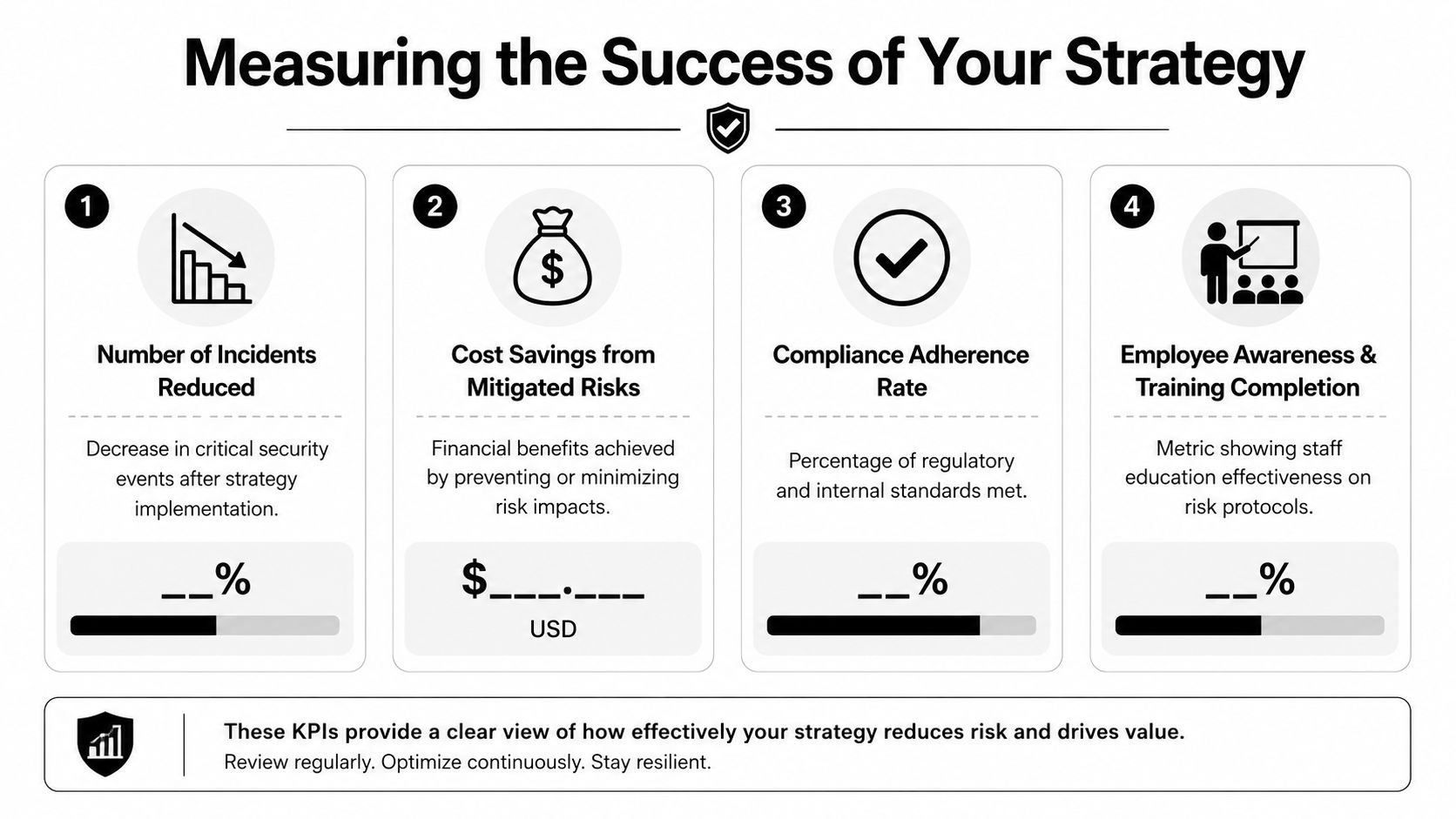
If a business can't tell whether risk mitigation is working, it probably isn't managing risk. It's just spending money and hoping the controls help. Measurement keeps the strategy grounded in outcomes the owner can evaluate.
What to track
The most useful indicators are simple enough to review regularly.
- Incident trend: Are serious security events becoming less frequent or less disruptive?
- Recovery performance: Can critical systems and files be restored within the time the business can tolerate?
- Control coverage: Are key protections in place across devices, users, and locations?
- Audit readiness: Can the business show policies, logs, access decisions, and training records when needed?
Some businesses also track training completion, backup success, and unresolved high-priority risks. The point isn't to build a giant dashboard. It's to see whether the organization is reducing exposure in the areas that matter most.
What good reporting looks like
A useful report connects technical activity to business impact. It shouldn't just say that patches were applied or alerts were reviewed. It should explain whether critical assets are better protected, whether recovery confidence improved, and where gaps still need attention.
A healthy program usually shows three things over time:
- Fewer preventable disruptions
- Faster and cleaner recovery when issues occur
- Better evidence for compliance, insurance, and client trust
Owners should also pay attention to near misses. If a phishing attempt was blocked, a device failure was recovered cleanly, or an access issue was corrected before it caused harm, that still indicates the strategy is doing its job.
Your SMB Action Plan and Next Steps
Small businesses rarely struggle because they don't understand that risk exists. They struggle because they don't know what to address first. That's the gap many basic explainers leave open. Most guides define the process but don't answer the practical SMB question of what should be mitigated first on a limited budget, as discussed in Pathlock's write-up on risk mitigation strategies.
A practical first move
A lean action plan works better than an ambitious plan nobody maintains.
- List the business functions that can't go down. Start with the systems tied to revenue, service delivery, records, and communication.
- Identify the most likely interruptions. Focus on account compromise, data loss, downtime, access sprawl, and weak recovery processes before chasing edge cases.
- Choose a minimum viable control set. Strong authentication, reliable backups, access review, patching discipline, and a documented response process usually matter early.
- Assign ownership. Every important control should have someone responsible for checking it, updating it, and escalating problems.
- Review the plan on a schedule. Strategy only works when the business returns to it.
That approach is manageable. It also creates a clear point where outside help becomes useful. If the company doesn't have time to assess systems, validate controls, monitor alerts, and keep documentation current, the risk strategy may exist on paper but not in practice.
A practical next step is to request a security and risk review from Technovation LLC. That gives a business owner a clearer view of which systems need attention first, which controls are missing, and how to build a realistic mitigation plan without overcomplicating the process.