
![Black sign reading 'Law Firm IT' mounted above a desk with a laptop, mug, notebook, and rows of legal books in a law office setting.]](https://technovationdfw.com/wp-content/uploads/2026/09/it-services-for-law-firm-law-office-1672x836.jpg "it-services-for-law-firm-law-office")
A managing partner can open the office, send email, access the document system, and conclude that the firm's IT is working exactly as it should. That conclusion is often based on visibility, not readiness. The systems that matter most can fail through stolen sessions, weak privileged access, untested backups, or an employee using an unmanaged device from home.
Modern IT services for law firms must protect more than uptime. They must preserve client confidentiality, support defensible operations, and give the firm a clear response when identity, email, data, or remote access comes under attack. The American Bar Association's 2025 legal technology survey reports that 73% of firms use cloud-based legal tools and 60% have formal cybersecurity policies, a sign that legal technology has moved well beyond printer support and workstation repair.
Table of Contents
- Why Law Firms Can No Longer Treat IT as Just Help Desk Support
- Essential IT Services Every Law Firm Needs in 2026
- The Hidden Security Gaps That Leave Law Firms Exposed
- Building a Defensible Security Program for Your Firm
- Navigating AI Adoption Without Compromising Client Trust
- How to Evaluate and Select the Right IT Provider
- Why Local DFW Expertise Matters for Legal IT Partnerships
Why Law Firms Can No Longer Treat IT as Just Help Desk Support
An attorney receives a convincing email, signs into a legitimate-looking page, and keeps working. Nothing crashes, and no warning appears. Days later, an intruder uses the stolen access to read correspondence, impersonate the attorney, or reach confidential matter files.
A working computer proves availability, not security. Identity-first attacks can involve stolen cloud email sessions, business email compromise aimed at wires and settlements, or extortion that threatens to publish client files instead of encrypting them. The attacker's first move may look like ordinary employee activity, a risk discussed in this 2026 cybersecurity guide for law firms.

The quiet failure behind the visible success
Legal IT is now a risk-management function. Document management, matter collaboration, billing, communications, remote work, and practice management all depend on controlled access and dependable recovery.
A help desk resolves the immediate issue, such as a failed connection or document that will not print. A capable legal IT partner also tests whether the firm can withstand the event behind that issue:
- Who has access: Can every privileged account be identified, limited, and reviewed?
- What happens after compromise: Can the firm isolate a device, preserve evidence, and contact the right responder?
- Can the firm recover: Are backups protected from the same identity compromise affecting production systems? Backup consoles need multifactor authentication too.
- What does the policy require: Do written procedures match employee behavior, including use of generative AI with client information?
Those questions expose the gap between support and governance. A provider that only measures whether devices are running leaves identity, recovery, and policy failures unexamined.
A 2026 industry compilation reports that 20% of surveyed U.S. law firms were targeted by cyberattacks in the past year, 8% lost or exposed sensitive data, and 56% of firms that suffered a breach lost sensitive client information. It also cites an average law-firm breach cost of $5.08 million, with the figure up 10% from the prior year. These figures appear in the law-firm cyberattack statistics compilation.
Practical rule: If the provider only measures whether devices are running, the firm is measuring availability while ignoring resilience.
For DFW firms, ask whether the provider can demonstrate deliberate control over access, backups, endpoints, vendors, and incident response. That evidence matters to clients, insurers, and opposing counsel. Help desk responsiveness still matters, but it is only one part of a defensible IT program.
Essential IT Services Every Law Firm Needs in 2026
The baseline has changed. Cloud-based legal tools are now common, and the ABA reports that multifactor authentication adoption continues to rise alongside formal security policies. A provider that still defines legal IT as desktop support is operating behind the firm's actual risk profile.
Operations that keep matters moving
Managed IT operations should cover monitoring, patching, user support, device standards, access changes, and technology planning. The provider should know which systems support casework and which failures would stop the firm from serving clients.
Cloud administration now includes identity management, secure configuration, permission reviews, and policy enforcement. Cloud adoption doesn't remove the need for governance. It changes where governance happens.
Endpoint protection and monitoring should cover laptops, desktops, servers, and mobile work patterns. The objective isn't just to install security software. It's to detect suspicious activity, investigate it, and contain it before an attacker moves further.
Firms evaluating day-to-day coverage can review fully managed IT support from Technovation to see how a managed model can combine user support with administration, monitoring, and planning.
Resilience for confidential work
Backup and disaster recovery must address more than whether a backup job completed. The firm needs protected recovery copies, documented ownership, restoration procedures, and regular tests. A backup that cannot be restored under pressure is an assumption, not a recovery plan.
Secure remote access should cover device health, identity verification, session controls, and home-network risks. Remote work is now routine for many firms, so access policies must reflect how attorneys and staff work rather than an office-only model.
Practice management integration requires careful coordination among matter systems, document repositories, billing workflows, calendars, and email. Poorly managed integrations create duplicate data, excessive permissions, and confusion during an incident.
Legal-specific support that generic providers miss
eDiscovery support depends on preservation, collection, access control, and chain-of-custody discipline. IT teams should understand how technical decisions affect litigation obligations and client confidentiality.
A useful provider also supports security documentation, vendor reviews, insurance questionnaires, employee training, and incident response. These services turn technology from a collection of tools into an operating system for the practice.
The practical benchmark is simple. If a provider can fix a workstation but can't explain privileged access, recovery testing, or remote-work controls, the firm has outgrown that service model.
The Hidden Security Gaps That Leave Law Firms Exposed
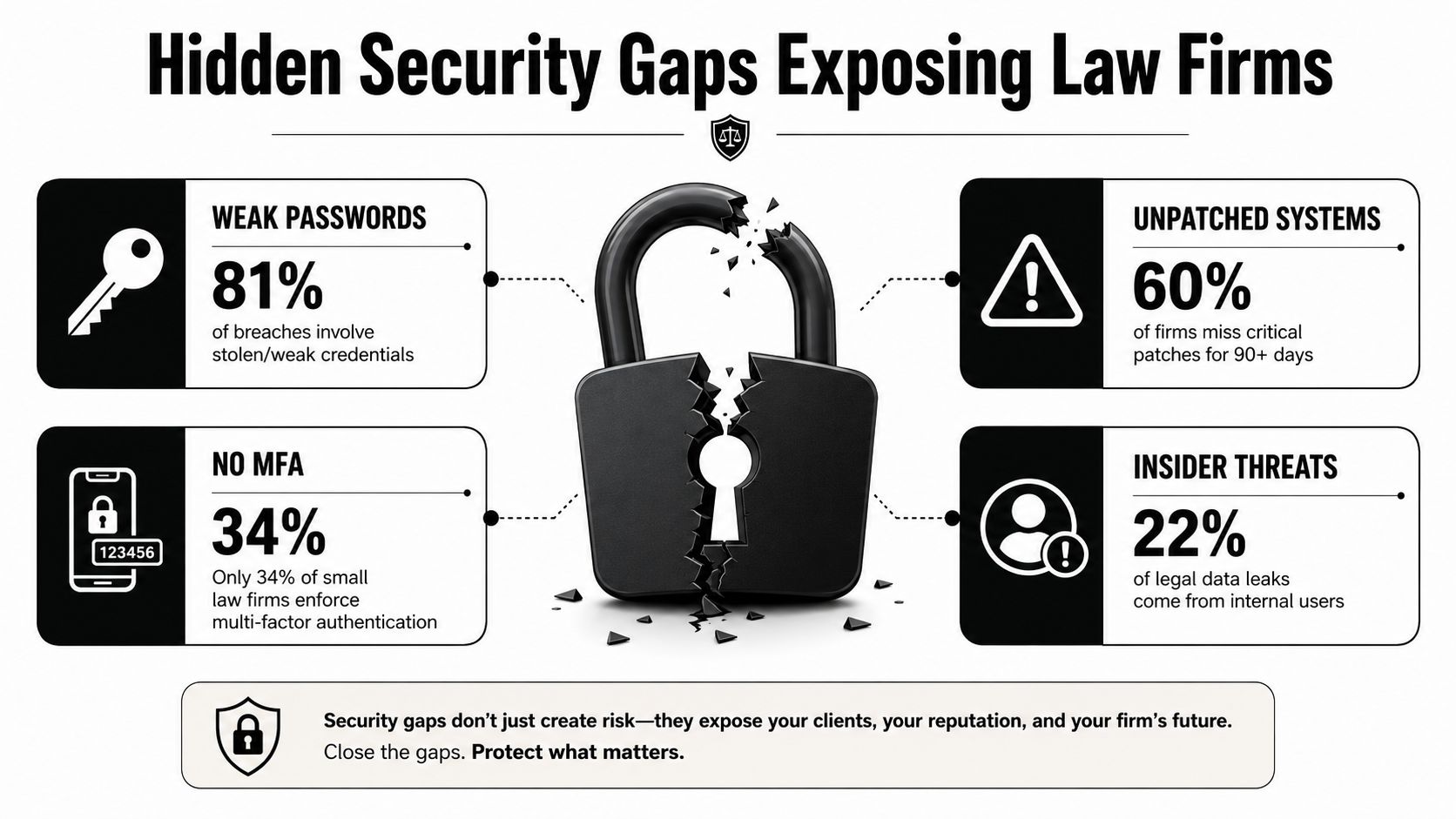
A formal cybersecurity policy can create false confidence. A document may require MFA, secure remote work, and controlled administration while the actual environment leaves critical consoles and access paths unprotected.
The most dangerous gaps often sit outside ordinary employee sign-in. Security reporting cited by TechNadu's coverage of law-firm security gaps reports that 50% of firms don't apply MFA to backup solution consoles, 63% don't apply MFA to backup storage consoles, and 82% don't apply MFA to production storage consoles. The same reporting says 52% don't enforce MFA on remote desktop access and 67% don't apply MFA to administrative functions such as PowerShell or WMI.
Why backup access deserves separate attention
Attackers don't need to encrypt every production file if they can destroy or alter recovery options. A compromised administrative credential may provide a path into backup consoles, storage systems, or management tools. Once recovery is impaired, the firm loses its position during an extortion event.
The fix isn't merely buying another security product. It requires MFA on every privileged path, segmented backup infrastructure, separate identity boundaries for production and recovery, and access reviews that confirm administrators still need the permissions assigned to them.
Policies must match actual behavior
The same reporting shows a gap between policy ownership and operational enforcement. A policy that says “MFA is required” isn't meaningful if administrative consoles, remote access, or recovery systems are exempted for convenience.
A practical review should ask:
- Can the provider inventory privileged accounts: The list should include service identities, administrators, recovery operators, and emergency access.
- Can the provider prove enforcement: Screenshots and written assurances are weaker than configuration evidence and review records.
- Can the provider isolate recovery systems: Production compromise shouldn't automatically grant access to backups.
- Can the firm test the response: Staff need clear instructions for reporting suspicious email, lost devices, and unusual account activity.
For firms also improving online visibility, law firm schema and AEO tactics offer a useful reminder that public-facing technology deserves structured governance too. Client trust is influenced by every digital touchpoint, not only the security controls hidden behind the scenes.
Technovation's cybersecurity services for law firms can be evaluated against these operational requirements. The important test is whether the engagement closes the privileged-access gaps, not whether the proposal contains a long list of security features.
Building a Defensible Security Program for Your Firm
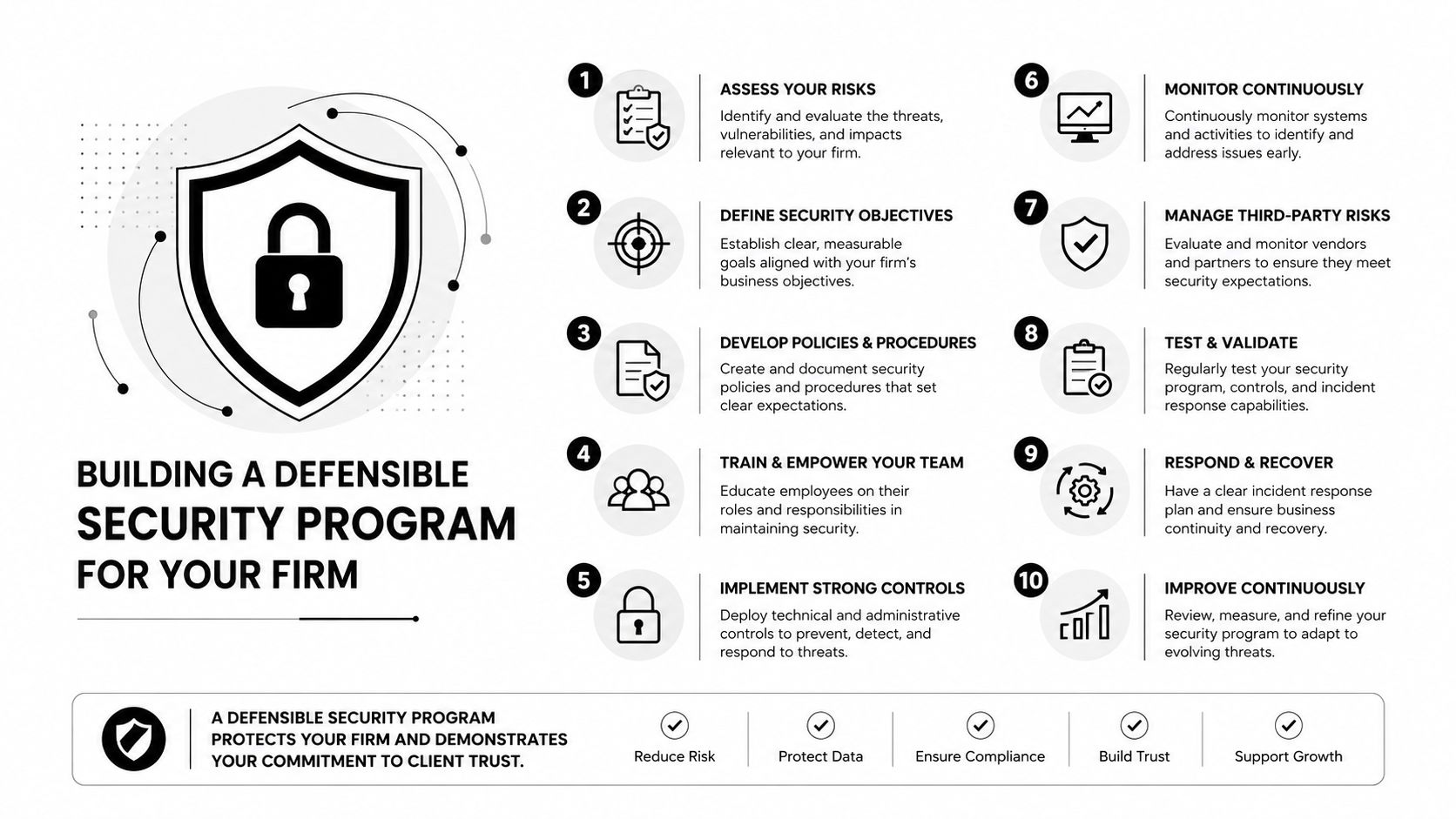
A defensible security program answers a practical leadership question: which controls protect client data, who owns them, and what evidence proves they work? For a small or mid-sized firm, security must be repeatable, documented, and visible to decision-makers.
Establish identity control first
Require phishing-resistant MFA wherever supported, including administrator accounts, remote access, backup consoles, and recovery systems. Enforce it on every privileged function. Disable legacy authentication because older sign-in methods can bypass modern access policies.
Apply least privilege by role. Attorneys, assistants, administrators, vendors, and service identities should not receive identical permissions for convenience. Review role changes promptly, remove access when responsibilities change, and disable accounts when people leave.
Protect endpoints and communication channels
Deploy endpoint detection and response across every endpoint and server. EDR must support investigation and containment, with someone assigned to review alerts and act on them. A checkbox on an asset report does not protect a compromised workstation.
Manage email authentication actively. Enable DMARC monitoring, review results, and move toward a quarantine policy within the operational window described in this 2026 legal-sector security guidance. This reduces impersonation risk and exposes unauthorized sending activity.
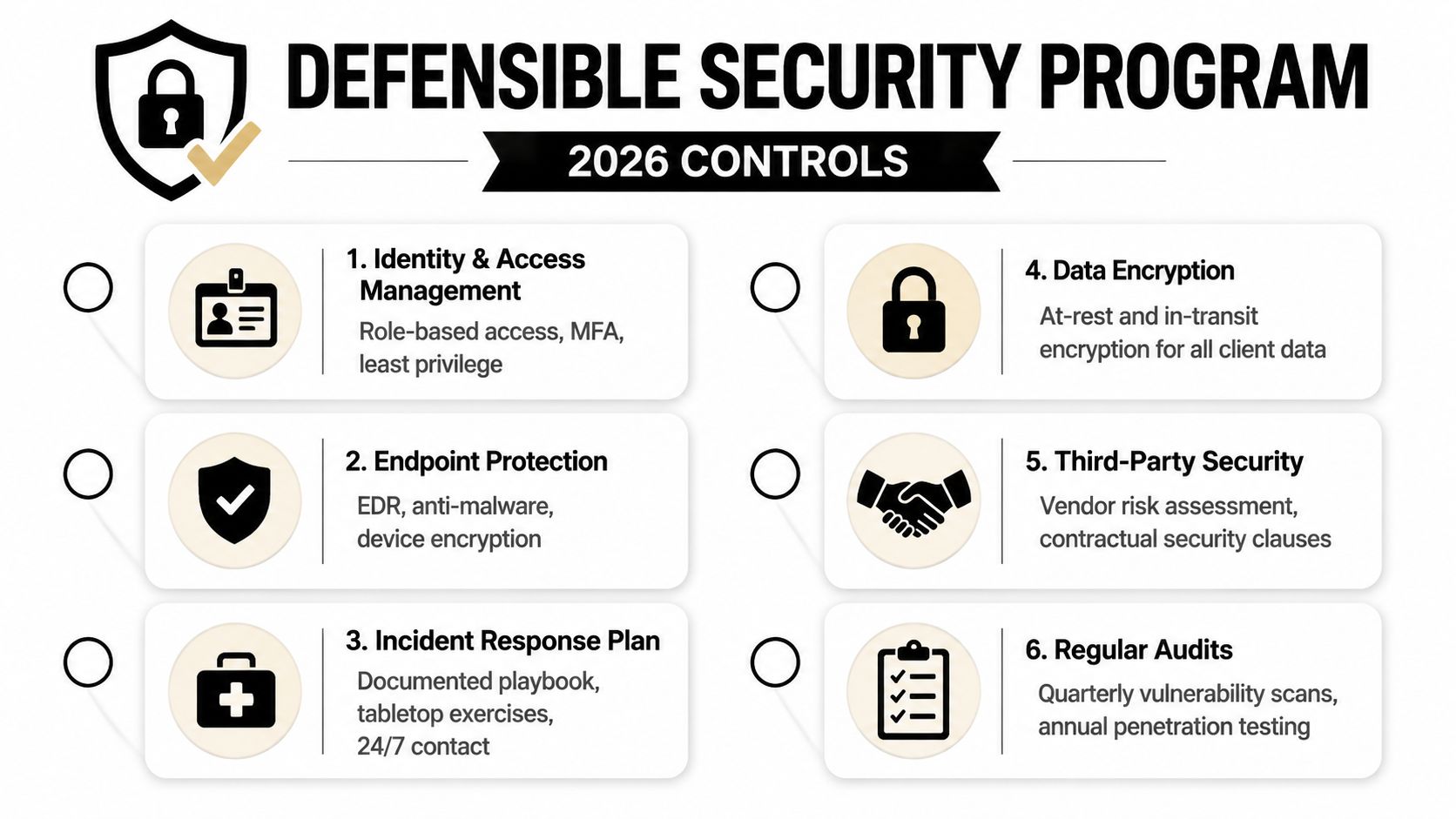
Assign ownership and deadlines for critical patches. Critical updates should be completed within 72 hours. The program should also include phishing-resistant MFA, EDR, immutable backups, restore testing, and a written information security program, as outlined in the defensible cybersecurity program guide.
Make recovery demonstrable
Keep backups immutable and offline where appropriate. Test a full restore, document what worked and failed, and record recovery time. The written plan should name decision-makers, communication responsibilities, legal obligations, and the order for returning systems to service. Put MFA on backup administration and separate recovery access from production credentials.
Maintain a control register that leadership can review:
- Identity: Account inventory, MFA enforcement, privileged-access reviews, and emergency access procedures.
- Endpoints: EDR coverage, encryption, patch status, device inventory, and isolation procedures.
- Email: Phishing reporting, authentication monitoring, suspicious-login response, and wire-transfer verification.
- Recovery: Immutable backups, separate administration, restore testing, and documented recovery priorities.
- Governance: Written policies, vendor reviews, employee training, insurance requirements, and incident exercises.
A law firm data security guide can help leadership organize these controls into a broader data-protection program. The provider must turn that program into recurring tasks, evidence, and accountable owners. Review the register after major system, staffing, or workflow changes so governance remains current.
Navigating AI Adoption Without Compromising Client Trust
Generative AI has moved from curiosity to an operational decision for law firms. The ABA reports that AI use tripled from 11% to 30% in one year, with adoption at 46% among large firms and 18% among solo practitioners, according to its 2025 legal industry report.
The hard question isn't whether attorneys can find useful applications. It's whether the firm can control confidential inputs, validate outputs, explain use to clients when necessary, and preserve an audit trail.
Set rules before broad adoption
An acceptable-use policy should define which information may enter an AI system, which matters require client consent, who may approve a use case, and how attorneys verify generated work. The policy should also address retention, vendor access, human review, records management, and prohibited uses.
Training must include realistic examples. Staff should understand that removing a client name doesn't necessarily remove identifying context, and that generated text still requires professional judgment. The firm's policy should distinguish administrative experimentation from work that affects legal advice, filings, discovery, or client communications.
Make transparency part of the workflow
Client-facing transparency shouldn't be treated as a public-relations exercise. The firm needs a consistent method for deciding when disclosure is appropriate, how the decision is recorded, and who answers client questions.
That matters because a 2026 report found 83% of clients say a firm's technology sophistication affects confidence, while 35% have switched or seriously considered switching because of technology or operational failures, as summarized in the verified industry data. A firm can lose trust through careless automation just as easily as through outdated infrastructure.
A responsible AI program includes:
- Approved use cases: Start with defined tasks and documented review requirements.
- Vendor controls: Assess data handling, retention, access, security commitments, and contract language.
- Audit trails: Record material prompts, outputs, reviewers, and final decisions where appropriate.
- Client communication: Use plain language when technology affects the delivery or handling of legal work.
- Continuous review: Update policies as capabilities, risks, and professional expectations change.
The IT provider should help enforce technical controls, but attorneys and firm leadership must own professional judgment. Technology can support that judgment. It can't replace it.
How to Evaluate and Select the Right IT Provider
A generic managed service provider may offer monitoring, ticketing, and device management. A legal IT partner must also understand privilege, matter confidentiality, secure transfers, access termination, recovery evidence, and the consequences of an email compromise involving a settlement or wire.
A vendor interview should produce evidence, not polished adjectives. The firm should ask how the provider handles privileged accounts, whether recovery tests are documented, who responds outside business hours, and how the provider communicates during a suspected breach.
Compare providers using operational criteria
| Evaluation Criteria | What to Look For | Red Flags |
|---|---|---|
| Service-level terms | Defined response targets, escalation paths, ownership, and reporting | Vague promises about fast support |
| Security posture | MFA enforcement, EDR coverage, patch governance, logging, and review evidence | Security described only as antivirus and backups |
| Legal experience | Familiarity with confidentiality, matter systems, eDiscovery, and access changes | The firm is treated like a generic office |
| Incident response | Written playbook, emergency contacts, containment process, and recovery coordination | No clear answer about the first hour |
| Backup resilience | Immutable or protected copies, separate administration, and restore tests | “Backups are running” with no restoration proof |
| Strategic planning | Roadmap tied to growth, risk, budget, and workflow | A recurring ticket service with no planning |
The proposal should identify what the provider monitors, what the firm must approve, and what evidence the provider supplies. It should also explain how onboarding will discover undocumented systems, stale accounts, unsupported devices, and vendor dependencies.
Firms comparing engagement models can use this guide to choosing a managed service provider as a starting point, then apply legal-specific questions during interviews.
Watch for attractive but weak proposals
Red flags include unlimited promises without response definitions, security packages that exclude privileged systems, backups without restore testing, and compliance language with no assigned owner. A low monthly price can conceal exclusions that surface during an incident.
Technovation LLC can provide managed and co-managed support, proactive monitoring, cloud backup, remote access, compliance assistance, and strategic planning. The firm should still evaluate those services against the same evidence-based criteria applied to every provider.
Why Local DFW Expertise Matters for Legal IT Partnerships
A law firm's IT partner doesn't need to sit in the same office every day. It does need to understand the firm's people, workflows, risk tolerance, and escalation preferences. Local DFW expertise helps when an issue requires an on-site visit, a leadership meeting, or a practical decision that can't wait for a distant queue.
A local provider can also build relationships across the firm instead of limiting communication to a ticket portal. That relationship matters during onboarding, office changes, partner transitions, incident response, and technology planning. Remote national coverage may offer scale, but it can feel transactional when the firm needs context.
The right local model combines proactive monitoring with clear human ownership. Technovation's managed IT services across Dallas and Fort Worth reflect a service approach built around 24/7 monitoring, risk mitigation, cloud backup, remote access, technology consulting, and strategic planning.
A useful first engagement should identify the firm's current control gaps, recovery assumptions, unsupported systems, and access risks. A free security audit or IT health check can give leadership a practical baseline before the firm commits to a larger roadmap. Pricing should then reflect the firm's size, growth plans, budget, and exposure, not a generic package designed for an unrelated industry.
For DFW law firms, the strongest partnership is the one that turns technology decisions into accountable operating practices. The provider should make security easier to manage, recovery easier to prove, and support easier to reach.
Technovation LLC provides managed and co-managed IT services for law firms, including 24/7 monitoring, cybersecurity, cloud backup, secure remote access, compliance support, and strategic IT planning. Visit Technovation LLC to request a security audit or IT health check and identify the operational gaps that deserve attention first.





