A growing Dallas business often reaches the same point at the same time. Revenue is improving, new clients are coming in, and the technology that felt “good enough” six months ago starts getting in the way. Staff members lose time to password resets, shared files become harder to track, remote access feels unreliable, and the owner starts wondering whether customer data is as protected as it should be.
That’s usually when small business it support dallas stops being a background task and becomes a business decision. In DFW, that decision matters even more for firms in healthcare, legal, finance, and other sectors where client trust depends on secure systems and disciplined processes. A local business doesn’t just need someone who can fix a printer or reboot a server. It needs a partner that can reduce friction, support growth, and make sure the company’s technology won’t become the thing that slows it down.
Table of Contents
- Why Your Growing DFW Business Needs a Technology Partner
- The Four Pillars of Modern Small Business IT Support
- IT Compliance for Regulated Industries in Dallas
- Understanding IT Support Pricing Models
- Your Checklist for Choosing a Dallas IT Partner
- Real-World Results in Dallas and Fort Worth
- Frequently Asked Questions About Local IT Support
Why Your Growing DFW Business Needs a Technology Partner
A Dallas owner with ten employees can still run technology informally for a while. One person knows the Wi-Fi password. Another person handles software renewals. Someone’s nephew set up the office network years ago. It works until growth exposes every shortcut.
Then the small problems start arriving in clusters. A new hire can’t access the right files. An employee clicks a suspicious email. A cloud folder sync breaks before a deadline. Nobody knows which laptop is encrypted, which backup is current, or who still has access after leaving the company.

That’s the point where technology stops being a utility and starts acting like a risk surface. In a market like Dallas-Fort Worth, where speed matters and clients expect professional handling of their data, reactive support usually isn’t enough. Waiting until something breaks is a little like maintaining a delivery truck only after it stalls on the freeway. The cost isn’t just the repair. It’s the missed appointments, delayed work, and erosion of confidence.
Growth creates technical complexity
Growth changes the IT workload in quiet ways.
- More people means more access decisions. Every hire, role change, and departure affects permissions, devices, and security.
- More clients mean more sensitive data. A business starts holding contracts, financial records, health information, or internal documents that deserve tighter controls.
- More software means more failure points. Billing tools, file sharing, email, phones, and cloud apps all have to work together.
Practical rule: If the owner is still the fallback IT person, the business has already outgrown its current support model.
A strong technology partner doesn’t just repair issues. That partner builds routines around updates, access control, monitoring, backups, and user support so the business can operate without constant improvisation. That shift matters because reliable systems do more than reduce headaches. They give a growing company room to sell, hire, and serve clients without carrying hidden operational drag.
The Four Pillars of Modern Small Business IT Support
A Dallas office can look fine at 8:30 a.m. By 9:15, staff cannot open shared files, a manager is locked out of email, and a client meeting starts with an apology instead of an agenda. That is usually how IT problems show up in small businesses. Not as a dramatic disaster, but as a chain of small failures that slow work, frustrate employees, and create risk.
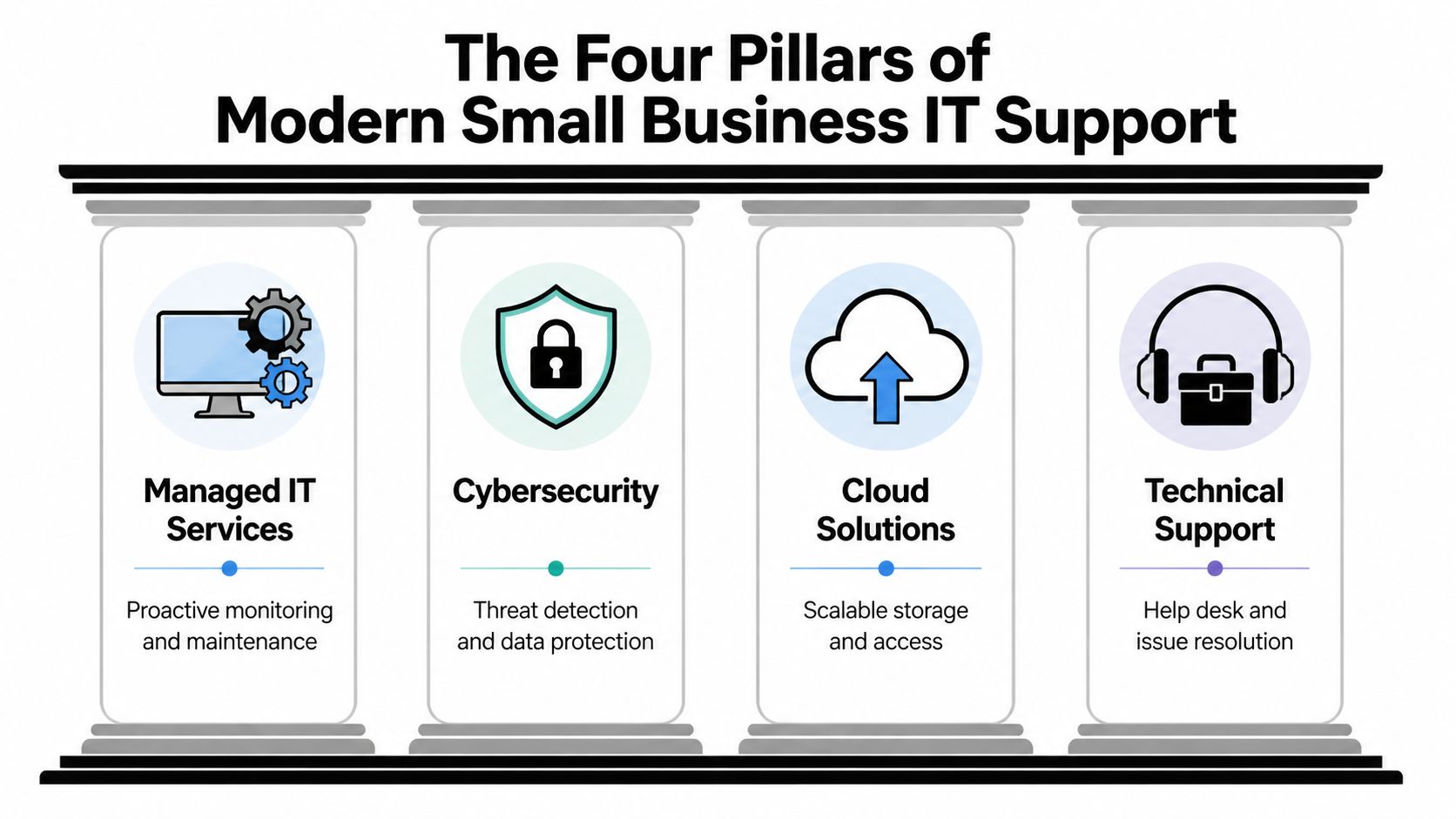
Modern IT support has four jobs: keep systems stable, protect sensitive data, recover quickly when something goes wrong, and help employees stay productive. For firms in healthcare, legal, finance, and other regulated fields around DFW, those pillars also need to support documentation, access control, and defensible security practices.
Managed services keep problems small
Managed services handle the routine work that prevents avoidable outages. That includes monitoring, patching, device inventory, capacity checks, warranty tracking, and regular review of servers, cloud systems, and workstations.
This is the operational discipline many growing companies miss. A server rarely fails without warning. Storage fills up. Backups start throwing errors. Updates get skipped. Remote access tools drift out of date. With steady oversight, those issues get fixed while the business is still running normally.
For regulated businesses, managed service work also supports accountability. If a law firm or medical practice gets asked how systems are maintained, "we update things when we remember" is not a credible answer. A documented process is far safer than a heroic scramble.
Cybersecurity protects trust
Security is not a single product purchase. It is a set of decisions about who gets access, how devices are protected, how email is filtered, how files are shared, and how quickly suspicious activity is contained.
Dallas businesses in regulated industries have less room for error here. A compromised inbox at a real estate office is disruptive. A compromised inbox at a clinic, accounting firm, or legal practice can become a reporting problem, a client confidence problem, and a compliance problem at the same time. That is why security controls need to fit the way the business works. Multi-factor authentication, endpoint protection, conditional access, and user training all matter, but they have to be configured so employees will follow the process instead of working around it.
Good support teams account for trade-offs. Tight security with poor usability leads to shadow IT. Loose security creates exposures that stay hidden until someone clicks the wrong link. The right balance depends on your staff, your data, and your obligations. Businesses that need help aligning protection with audit and privacy requirements should start with a clear data security and compliance strategy for Dallas businesses.
Backup and recovery keep a bad day contained
Backups are easy to overestimate. Many owners hear "your data is backed up" and assume recovery is handled. Those are two different questions.
A usable recovery plan defines what is backed up, how often copies are created, where they are stored, how restores are tested, and which systems come back first. If payroll, patient records, case files, or financial systems are unavailable, the sequence matters. Restoring the wrong thing first can waste half a day.
The practical test is simple. If a key system failed this afternoon, could your team keep serving clients tomorrow, and would you know who is responsible for each recovery step? If the answer depends on one employee's memory, the plan is too thin.
Helpdesk support keeps people productive
Helpdesk work is where employees feel the quality of IT support every day. Login problems, printer issues, broken remote access, sync errors, phone system glitches, and line-of-business software problems all pull people out of revenue-producing work.
One unresolved issue is manageable. Ten small issues across a 20-person office can steadily drain hours from the week. That lost time rarely shows up on a single invoice, but owners feel it in delayed proposals, slower billing, missed follow-ups, and staff frustration.
Strong helpdesk support also feeds the other three pillars. Repeated user tickets can reveal a security gap, a failing device, or a backup problem before it turns into a larger incident.
A mature support model ties all four pillars together:
- Managed services reduce preventable disruptions.
- Cybersecurity lowers risk around data, access, and email.
- Backup and recovery shorten the path back to normal operations.
- Helpdesk support keeps employees working without constant friction.
When those pillars are coordinated, technology supports the business the way utilities should. It stays available, predictable, and easier to trust.
IT Compliance for Regulated Industries in Dallas
A Dallas medical practice gets hit with a routine question from an insurer, an auditor, or a major client. Show who has access to sensitive records, how that access is reviewed, and what happens if a device is lost or an employee leaves. The computers may be working fine. That still does not answer the question.

That gap is where many regulated businesses in Dallas-Fort Worth get exposed. Healthcare, legal, and financial firms do not just need uptime. They need systems, policies, and records that hold up under scrutiny. If security work is not documented, reviewed, and tied to day-to-day operations, owners are left with risk they cannot easily measure or defend.
Healthcare practices need controlled access and documented safeguards
A clinic has to protect patient information in ways that are practical for a busy front desk, nursing staff, billing team, and providers. That usually starts with access by role, clear offboarding steps, encrypted devices, and secure ways to send records and messages. It also means keeping logs and policies current enough that the practice can explain what it is doing, not just assume it is covered.
Convenience causes many of the problems I see. Shared logins save a few seconds. An old employee account stays active because no one wants to interrupt the schedule. A doctor uses a personal device because it is faster. Each decision feels small. Together, they create weak audit trails and avoidable exposure.
Businesses that need a clearer baseline often start with a review of their data security and compliance posture.
Law firms need confidentiality that holds up outside the office
Legal work depends on trust, but trust alone does not protect files. Confidentiality also depends on how documents are stored, who can open them, how remote access is set up, and whether former employees and contractors are removed from the right systems at the right time.
Dallas law firms often run into a trade-off here. Attorneys need quick access from court, home, and client sites. If the approved process is too clumsy, people create their own. They email drafts to personal accounts, save files locally, or use unmanaged devices to keep work moving. The answer is not to make access harder. It is to make the secure path the easiest one to follow under pressure.
Strong support for a law office usually means tighter file permissions, standardized remote access, and document handling rules that staff can follow without stopping to interpret them.
Financial firms need process discipline that survives busy season
Accounting firms, wealth advisors, and other financial businesses deal with sensitive records, approval chains, seasonal workload spikes, and specialized applications that do not always fit neatly together. A few disconnected habits can undermine good security tools very quickly.
One partner uses a secure portal. Another sends attachments by email. One team reviews permissions after staffing changes. Another does not. The technical controls may exist, but the process breaks down, and that is often where compliance trouble starts.
For finance-oriented firms, the practical priorities are usually clear:
- Standardized workflows for storing and sharing client records
- Permission reviews after role changes, departures, and temporary staffing shifts
- Documented recovery procedures that keep work moving during tax deadlines, audits, or quarter-end reporting
This is the difference between generic support and support built for regulated industries in DFW. Technovation works with firms that need more than ticket resolution. They need IT decisions that reduce legal exposure, support audit readiness, and fit the way regulated offices actually operate.
Understanding IT Support Pricing Models
A Dallas office adds five employees, opens a second location, and starts using a few cloud apps that were never reviewed together. The first low IT quote can look attractive until the business learns that after-hours help, security monitoring, vendor coordination, and backup checks cost extra. Pricing only makes sense when the scope matches the way the company operates.
That matters even more for healthcare, legal, and financial firms in DFW. A lower monthly rate can become an expensive choice if it leaves out audit support, access reviews, encryption oversight, or documented response procedures after a security incident.
What Dallas owners are really paying for
Monthly IT pricing is rarely just about fixing computers. It usually includes some mix of help desk support, device management, Microsoft 365 administration, cybersecurity tools, backup oversight, vendor communication, and strategic planning. In regulated environments, the service list often needs to go further. Policy support, user access controls, log review, and documentation can carry as much business value as routine troubleshooting.
The common mistake is comparing totals without comparing responsibilities.
One proposal may look lower because it excludes project work, onboarding, firewall changes, compliance tasks, or onsite visits. Another may include those items and prevent surprise invoices later. The quote with the smaller number is not always the one with the lower operating cost.
For businesses reviewing providers, this managed service provider selection guide helps clarify which pricing questions belong in the conversation before signing an agreement.
IT Support Pricing Models Compared
| Model | How It Works | Best For |
|---|---|---|
| Per-User or Per-Device | The business pays based on headcount or managed endpoints. Cost rises as users or equipment increase. | Firms with stable environments that want pricing tied closely to size |
| Tiered Packages | Services are grouped into levels, usually with increasing coverage and support depth. | Businesses that want options and are comfortable choosing between service bands |
| Flat-Fee Managed Support | A broader monthly fee covers an agreed scope of ongoing support, maintenance, and oversight. | Companies that value predictable budgeting and fewer surprise charges |
The model name matters less than the fine print.
- Per-user or per-device pricing is easy to follow, but it can become confusing when one employee uses a laptop, phone, home workstation, and shared office equipment. It also needs clear rules for temporary staff and conference room devices.
- Tiered packages give a business options, but the gaps between tiers need to be easy to see. If security monitoring, compliance support, or backup testing only appears in the top tier, owners should ask whether the lower tiers fit their actual risk.
- Flat-fee managed support gives cleaner budgeting, especially for growing firms. It works best when the agreement clearly defines projects, after-hours work, onsite service, and what happens during major changes such as relocations or acquisitions.
A good pricing discussion sounds like operations planning. It should cover response times, security responsibilities, compliance support, and what work falls outside the monthly agreement.
For many Dallas businesses, the better question is not which plan is cheapest. It is which plan reduces disruption, supports regulatory obligations, and stays predictable as the company grows. A medical clinic, a law office, and a wealth management firm may all have similar headcounts, but they do not carry the same IT risk or support requirements.
Your Checklist for Choosing a Dallas IT Partner
A Dallas office can lose half a day before anyone says the word outage. Internet access gets spotty. Staff switch to personal hotspots. Someone cannot reach the practice management system. A partner meeting starts in twenty minutes, and the copier will not scan to email. In that moment, you learn whether your IT provider is a help desk or a true operating partner.
That distinction matters more in regulated businesses. A medical clinic, law firm, or financial office in DFW does not just need systems working again. It needs the problem contained, documented, and resolved in a way that does not create a compliance mess afterward.
Questions that show how a provider operates
Start with the situations that hurt your business most, not a generic feature list.
Ask how the provider handles on-site support across Dallas-Fort Worth. Remote support covers many problems, but some incidents need hands-on work. Failed firewalls, office moves, cabling issues, and hardware cutovers usually do. If the answer is vague, expect delays when timing matters.
Ask which regulated industries they support on a regular basis. A provider serving healthcare, legal, or finance should be able to explain how they handle access control, audit trails, retention requirements, secure remote work, and vendor coordination without speaking in slogans.
Ask how service commitments are documented. You want clear language on response targets, escalation paths, after-hours coverage, and who owns what. If a provider cannot show that in writing, disagreements tend to surface during stressful moments.
Then ask security questions that expose depth instead of polish:
- How do you separate sensitive systems and data from general office activity? This shows whether the provider plans for containment.
- How do you secure laptops, home users, and mobile staff? Dallas firms rarely work from one location anymore, especially in legal and financial services.
- How do you review user access over time? Permissions drift. Good providers have a process for cleaning that up.
- How do you support audits, documentation requests, and policy reviews? Regulated businesses need more than ticket resolution.
- How do you handle vendor coordination with EHR, legal software, line-of-business apps, and internet carriers? Ownership gaps create long outages.
A useful vetting process helps keep these conversations concrete. Businesses that want a more formal framework can use this managed service provider selection guide.
Red flags worth taking seriously
Weak providers do not always look weak at the proposal stage. Many sound organized until you ask who handles a failed backup test, a suspicious login, or an audit request from a client or regulator.
Watch for these warning signs:
- Vague compliance answers. General talk about security is not enough for healthcare, legal, and finance.
- A repair-first mindset. Fast fixes matter, but regulated businesses need prevention, documentation, and follow-through.
- Unclear ownership. Backup checks, access reviews, vendor management, and policy updates should have named responsibility.
- No local operating rhythm. If the provider cannot explain how they support DFW offices during on-site incidents, relocations, or multi-office growth, service can stall at the worst time.
- Security explained only in tool names. Tools matter. Process matters more. A good partner can explain how controls reduce business risk in plain English.
The right Dallas IT partner should make operations more predictable, keep staff productive, and reduce regulatory exposure when something goes wrong. For DFW firms in healthcare, legal, and finance, that is the standard. Not an upgrade.
Real-World Results in Dallas and Fort Worth
A Dallas office opens on Monday, and the first problem is not a server outage. It is an attorney who cannot reach a client folder from court, a clinic manager who is unsure whether a departing employee still has access, or a finance team that has to stop work because a line-of-business app is behaving unpredictably. That is how IT risk usually shows up in small and midsize firms. Inconspicuously, then all at once.
In Dallas-Fort Worth, the pattern is even more specific for healthcare, legal, and financial firms. The pressure is not just uptime. It is confidentiality, audit readiness, access control, and documentation that holds up when a client, insurer, or regulator asks questions. Good support should reduce friction for staff while making those controls easier to prove.
A law firm that needed safer access to client files
A small Dallas law office had grown into a mobile practice. Attorneys worked from the office, home, and client sites, but file access still depended on habits built for a single location. People could get to documents, but not always through approved paths, and that creates unnecessary exposure in a legal environment.
The fix was straightforward, but it had to be disciplined. Remote access was standardized, permissions were aligned to roles and matter needs, and account administration was cleaned up so former staff and unnecessary access did not linger. The visible result was faster, more consistent work. The bigger result was tighter control over confidential files and fewer workarounds that could create discovery or ethics problems later.
A clinic that needed cleaner compliance operations
A Fort Worth medical practice had decent systems and a capable team, but years of incremental changes had left too many gray areas. Access had expanded person by person. Backup routines existed, but ownership was not always clear. Leadership was not comfortable answering a simple question: if an audit happened next month, could the practice show who had access, what was protected, and how issues were handled?
The work here was less about buying new tools and more about tightening operations. User access was reviewed, backup checks became more consistent, and system handling procedures were documented in a way staff could readily follow. That matters in healthcare, because compliance trouble often starts with unclear process, not dramatic failure.
The result was a calmer environment. Staff spent less time guessing. Management had clearer accountability.
The best IT environments for regulated businesses feel predictable. People know how access is granted, where records live, how backups are checked, and what happens when something looks wrong.
A nonprofit that needed stability without overspending
A local nonprofit faced a different problem. It needed dependable systems, basic security discipline, and help desk support, but it could not justify a full in-house IT department. That is common in DFW organizations with lean teams and high reporting demands.
The right approach was a support model sized to the organization. User support, endpoint oversight, backup verification, and routine security maintenance were handled without adding the cost and complexity of an enterprise stack the nonprofit would never fully use. Leadership gained more predictable monthly spending and fewer surprise interruptions. Staff could stay focused on programs, donors, and reporting instead of becoming part-time IT coordinators.
These examples point to the same business outcome. Better IT support is not about adding more software. It is about reducing uncertainty, especially in Dallas-Fort Worth firms where client trust, regulated data, and day-to-day operations are tied together.
Frequently Asked Questions About Local IT Support
What’s the difference between managed IT services and a break-fix IT person
A break-fix model responds after something stops working. Managed IT services focus on maintenance, monitoring, security, and ongoing support before issues become major interruptions. One model buys repairs. The other buys stability.
Is a business ever too small for managed support
A business can be small in headcount and still carry real risk. Even a compact team may handle contracts, financial records, health information, or client communications that deserve structured protection. The better question is whether the company depends on technology every day. Most do.
How long does it take to switch IT providers
That depends on how well the current environment is documented. A smooth transition usually starts with account review, device inventory, access validation, backup checks, and a clear handoff plan. Businesses that prepare those basics tend to switch with far less disruption.
What should a Dallas business ask for first
A practical starting point is an IT health review. That should identify weak points in access control, backup readiness, endpoint management, user support, and compliance exposure. Once the business sees the current state clearly, the next steps become much easier to prioritize.
A Dallas-Fort Worth business doesn’t need more vague promises about “better tech.” It needs clear answers, sensible controls, and support that fits the way the company operates. Technovation LLC works with North Texas organizations that need stronger cybersecurity, compliance-ready systems, and dependable IT operations. A conversation about current gaps, risks, and priorities is often the fastest way to see what needs attention first.