
If a practice passes its annual compliance review but can’t restore patient access after a ransomware event, is its IT environment protecting the business?
That gap in thinking shows up across Dallas-Fort Worth. Many owners judge technology by visible performance: the internet works, files open, staff can log in, and nobody has reported a serious problem. But healthcare and other regulated firms don’t get targeted only when something looks broken. Sensitive data systems can stay operational while weak access controls, missing logs, or inconsistent device protections nevertheless increase legal and operational exposure.
HIPAA compliant IT services matter because they answer a broader business question than “Are the systems up?” They address whether the organization can protect patient information, prove it, recover quickly, and keep serving clients without chaos when something goes wrong.
Table of Contents
- Is Your IT Partner Truly Protecting Your Practice
- What HIPAA Compliant IT Services Really Mean
- Mapping HIPAA Safeguards to Your IT Strategy
- The Vendor Checklist How to Choose Your IT Partner
- Your Implementation Roadmap for DFW Businesses
- From Compliance Burden to Business Resilience
Is Your IT Partner Truly Protecting Your Practice
A practice can have responsive help desk support and still be exposed. Those aren’t the same thing.

Healthcare data breaches have climbed sharply since HIPAA enforcement began, and recent years included hacking incidents affecting millions, including 2.7 million people at Texas-based ESO Solutions. The average healthcare breach cost reached $7.13 million, which was 53% higher than the global industry mean, according to healthcare data breach statistics compiled here.
That doesn’t mean every clinic or professional office should panic. It means business owners should stop using silence as proof of safety. A quiet network isn’t the same as a controlled one. A clean inbox isn’t the same as a documented security posture. An IT provider who fixes printers and resets passwords may still leave the organization weak where regulators and attackers both pay attention.
A secure environment isn’t defined by the absence of complaints. It’s defined by the presence of controls, evidence, and recovery discipline.
For DFW organizations handling protected health information, the better question is practical. Can the current IT partner show how access is restricted, how data is protected, how activity is logged, and what happens after an incident? If the answer depends on vague reassurance, the practice has a business continuity problem, not just a compliance problem.
Three warning signs usually show up early:
- Security is reactive: Support starts after a user reports an issue, not before.
- Documentation is thin: Policies exist loosely, but evidence of enforcement is hard to produce.
- Recovery is assumed: Backups may exist, but restoration steps, testing, and accountability aren’t clearly owned.
HIPAA compliant IT services close those gaps by treating compliance as part of operations. That approach protects revenue, preserves patient trust, and gives leadership a clearer answer when someone asks whether the business is prepared.
What HIPAA Compliant IT Services Really Mean
Many owners hear “HIPAA compliant IT services” and think of a product. It isn’t a product. It’s an operating model.
The simplest way to view it is this: locking the front door doesn’t secure the building. The organization also needs controlled interior access, records of who entered, protected storage, alarm response, and a plan for what happens if someone gets in anyway. HIPAA works the same way. Compliance isn’t one software license or one policy binder. It’s technology, process, oversight, and accountability working together.
Compliance is more than encryption
Encryption matters, but encryption alone doesn’t solve the underlying business problem. If too many users can see data, if sessions stay open too long, or if wireless networks aren’t separated properly, risk remains.
Under HIPAA’s Security Rule, access controls are a required implementation specification. Practical best practices include role-based access with least privilege, multi-factor authentication, automatic session timeouts of 15 minutes or less on workstations, and segregated networks with VLANs to reduce lateral movement, as outlined in this HIPAA IT requirements checklist.
That has direct business meaning:
- Front desk staff should access only the information needed to do scheduling and intake.
- Clinical users should have broader access tied to treatment responsibilities.
- Departed employees should lose access immediately, not when someone gets around to it.
- Guest WiFi should never sit casually next to systems handling protected data.
The service has to be managed continuously
A compliant environment also depends on agreements, reviews, and evidence. If a vendor touches protected data, there should be a Business Associate Agreement. If risks are identified, someone needs to track remediation. If logs exist, someone has to review them. If backups are encrypted, someone should also confirm they can be restored.
Practical rule: If a provider can’t explain how controls are maintained over time, the service probably isn’t compliance-focused. It’s just general IT support wearing compliance language.
A useful way to test whether a service is real or superficial is to ask whether it covers these four areas:
| Area | What it should include |
|---|---|
| Access | User permissions, MFA, session control, account lifecycle management |
| Protection | Encryption at rest and in transit, secured endpoints, network separation |
| Evidence | Audit logs, policy documentation, risk analysis records, review procedures |
| Recovery | Backups, restoration testing, incident response, continuity planning |
When those pieces work together, hipaa compliant it services stop being a checklist item. They become a disciplined way to keep the business usable, defensible, and dependable.
Mapping HIPAA Safeguards to Your IT Strategy
Many owners get stuck because HIPAA language feels legal while daily operations feel technical. The practical move is to translate each safeguard category into services, routines, and responsibilities the business can manage.
A recent survey showed how often that translation fails in practice. Only 71% of surveyed healthcare entities encrypted patient data, 69% used MFA, and just 58% stored system logs as required, according to these 2024 HIPAA compliance trends. Those aren’t abstract misses. They point directly to missing IT controls.
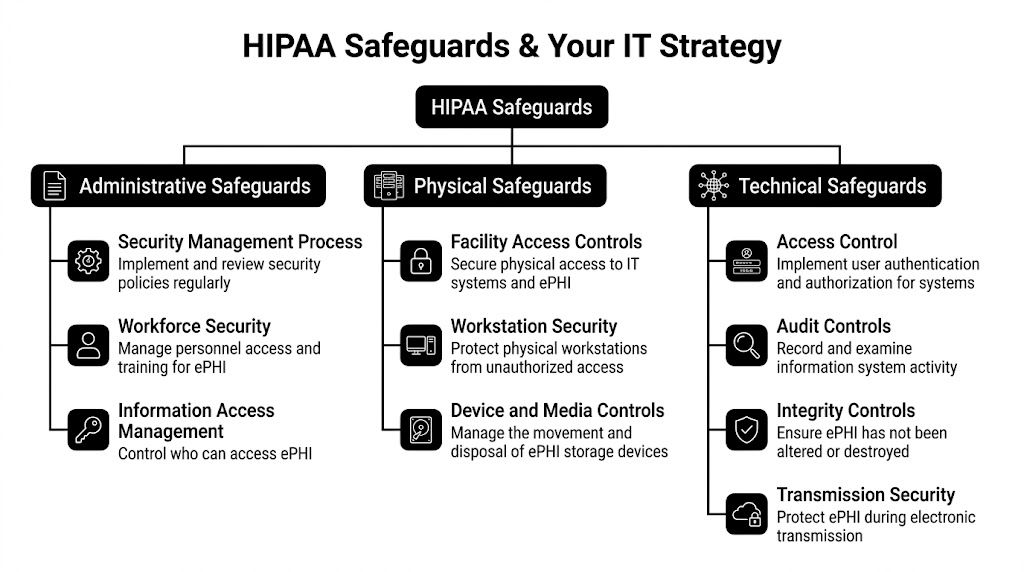
Administrative safeguards in daily operations
Administrative safeguards govern how the organization manages risk and people. Many practices often assume they have coverage here because they have a handbook or a login policy. That’s rarely enough.
A workable administrative program usually includes:
- Risk analysis ownership: Someone reviews systems, users, workflows, and vendors for exposure points.
- Access governance: New hires, role changes, and terminations trigger permission reviews.
- Training discipline: Staff learn how to handle data, recognize suspicious activity, and escalate issues.
- Review cadence: Leadership sees documented findings, open remediation tasks, and unresolved exceptions.
This category maps cleanly to managed services. An IT partner can maintain user onboarding and offboarding procedures, document policy enforcement, support risk assessments, and produce review-ready records. The value isn’t just “being compliant.” It’s reducing dependence on memory and informal habits.
A small clinic often doesn’t fail because nobody cared. It fails because nobody owned the follow-through.
Physical safeguards beyond the server closet
Physical safeguards are easy to underestimate because many firms now rely on cloud systems. But physical control still matters. Staff use laptops, tablets, workstations, phones, printers, and removable media. Those devices sit in exam rooms, front desks, shared offices, and vehicles.
What works in this area is specific and boring in the best way:
- Secured workstations: Devices lock automatically and aren’t left accessible in public-facing spaces.
- Encrypted endpoints: Lost hardware doesn’t turn into exposed data.
- Device handling procedures: Retired equipment is tracked and disposed of securely.
- Workspace design: Screens, printers, and sign-in areas don’t expose information casually.
A good IT strategy supports those controls with endpoint management, remote enforcement of device settings, encryption verification, and documented device inventories. A local managed provider can help operations teams align policy with how people work in DFW offices and clinics.
Most compliance failures in physical security don’t come from dramatic break-ins. They come from ordinary routines with no guardrails.
Technical safeguards where most gaps show up
Technical safeguards get the most attention because they touch systems directly. They also reveal whether the provider is thinking beyond basic support.
Strong mapping looks like this:
| HIPAA safeguard area | Practical IT service |
|---|---|
| Access control | Role-based permissions, MFA deployment, account audits, session timeout enforcement |
| Audit controls | Centralized logging, alerting, retention management, review workflows |
| Integrity controls | Endpoint protection, change monitoring, protected backups, tamper detection |
| Transmission security | Encrypted email workflows, secure remote access, protected wireless design |
This is one place where Technovation LLC fits naturally as an example. The company provides managed cybersecurity, compliance support, cloud backup, risk mitigation, monitoring, and strategic IT planning for North Texas organizations, which aligns with how HIPAA safeguards have to be implemented in real operations rather than treated as isolated tasks.
The key trade-off is straightforward. Generic IT support can keep systems running, but regulated businesses need proof that controls are configured, enforced, and reviewed. That means logs aren’t enough unless someone stores and checks them. MFA isn’t enough unless it’s deployed consistently. Backups aren’t enough unless they restore cleanly under pressure.
For most SMBs, the smartest strategy isn’t trying to memorize regulations. It’s building an IT environment where the safeguards are part of normal operations.
The Vendor Checklist How to Choose Your IT Partner
A vendor can say “HIPAA aware” and still leave the hard parts on the client’s desk. That’s why selection should focus less on marketing language and more on operational evidence.

Questions that expose shallow support
These questions tend to reveal whether the provider can support regulated workflows or only general business IT.
- How do you handle BAAs and vendor responsibility? The answer should be direct, documented, and clear about scope.
- How do you prove access controls are in place? A strong provider should explain user roles, review processes, MFA enforcement, and account lifecycle controls without hand-waving.
- What happens if suspicious activity appears after hours? The response should include monitoring, escalation, containment steps, and communication paths.
- How do you document encryption, logs, and endpoint protections? A real compliance-minded provider can show how those controls are verified, not just claimed.
- How often do you perform risk reviews and what do clients receive afterward? The deliverable matters as much as the meeting.
A business owner should also ask how the provider supports broader security operations. The answers should connect to practical services like business cybersecurity solutions rather than isolated point fixes.
What strong answers sound like
Strong answers aren’t flashy. They’re specific.
“We set up security” is weak. “We map roles, restrict privileges, enforce MFA, document exceptions, and review account changes on a schedule” is useful.
The same pattern applies to incident response. “Call us if something happens” isn’t enough. A better answer describes who triages, how systems are isolated, what gets documented, and how leadership gets informed.
This quick screening table helps separate a mature provider from a reactive one:
| Evaluation area | Weak signal | Strong signal |
|---|---|---|
| Compliance understanding | Talks mostly about antivirus and backups | Connects controls to HIPAA obligations and documentation |
| Incident response | Offers general reassurance | Describes containment, notification paths, and evidence handling |
| Reporting | Provides occasional updates when asked | Produces routine reports and remediation tracking |
| Access management | Creates accounts on request | Manages role changes, removals, MFA, and review cycles |
| Strategy | Waits for tickets | Advises on risk, continuity, and policy alignment |
The goal isn’t to find a vendor with the loudest compliance pitch. It’s to find one that can make security routine, visible, and manageable for leadership.
Your Implementation Roadmap for DFW Businesses
The biggest mistake SMBs make is treating HIPAA work like an all-at-once project. That approach creates disruption, resistance, and budget stress. A phased rollout works better because it lets leadership fix the highest-risk gaps first while keeping the business moving.

For small practices, cost is often the first objection. A 2025 analysis cited in this HIPAA compliance services pricing overview noted that 62% of small practices under 10 providers identified high implementation costs as the top barrier, with annual managed services commonly ranging from $15,000 to $50,000. The same source states that local MSPs in markets like DFW can deliver 30% to 40% cost savings through co-managed models, with a typical break-even timeline of 6 to 12 months when weighed against potential breach fines that averaged $1.5M per incident in 2025.
Phase one assessment and risk analysis
Start with the current environment, not the ideal one. Leadership needs a usable picture of systems, users, devices, vendors, access points, backup coverage, and policy gaps.
That review should answer questions such as:
- Where is protected data stored or transmitted
- Who can access it today
- Which devices are unmanaged or weakly managed
- What evidence exists for logs, encryption, and account controls
- What would break first during an outage or breach
This phase works best when the findings are prioritized by business impact, not just technical severity.
Phase two planning and remediation
After the assessment, the business needs a sequence. Not every gap gets fixed at once.
The best plans usually begin with identity, endpoint, backup, and network segmentation because those controls reduce broad exposure quickly. Policy cleanup also matters here. Access rules, offboarding, acceptable use, and incident response expectations should match the actual technology stack, not an old template stored in a drawer.
A co-managed approach can make this stage easier for internal staff. It lets the business keep local operational knowledge while shifting specialized security and compliance work to a partner who handles the design and enforcement details.
Phase three rollout and staff adoption
Many projects stall; technology changes get approved, but employees don’t understand what changes for them.
A strong rollout keeps the changes visible and simple:
- Account security updates: MFA enrollment, role changes, password handling, and login expectations
- Device standards: Encryption, timeout behavior, screen lock requirements, and remote access rules
- Workflow changes: Secure messaging, file handling, printing, and document disposal
- Escalation habits: Who staff contact when something looks wrong
Useful healthcare operations guidance often overlaps with broader managed services planning, including topics covered in managed IT services for healthcare efficiency and revenue.
The implementation succeeds when staff know what changed, why it changed, and what they’re expected to do differently tomorrow morning.
Phase four ongoing management and review
A compliant environment degrades if nobody maintains it. Users change jobs. Devices age out. New software gets added. Exceptions pile up.
Ongoing management should include recurring review of access, endpoint status, backup health, alerting, documentation, and recovery readiness. Leadership should receive concise reporting that translates technical findings into operational decisions. That gives owners a way to budget intelligently and defend decisions if questions arise later.
The ROI becomes evident. The return isn’t just reduced exposure to fines. It’s fewer operational surprises, faster recovery, less downtime, and stronger confidence that the business can keep serving patients when conditions aren’t ideal.
From Compliance Burden to Business Resilience
Owners who treat HIPAA as a paperwork exercise usually overspend in the wrong places and underinvest in continuity. They buy pieces of security without building a managed system around them.
The better approach is to treat hipaa compliant it services as infrastructure for trust. That means controlling access before misuse occurs, documenting activity before an audit asks for it, and preparing recovery steps before the first urgent phone call. Those actions support compliance, but they also support payroll, scheduling, patient relationships, and reputation.
A resilient practice doesn’t rely on luck. It relies on a partner that can convert legal requirements into operational controls leadership can understand and staff can live with.
Compliance becomes valuable when it keeps the business stable under pressure, not when it sits untouched in a policy folder.
For DFW organizations, local context matters. Response speed matters. Clear communication matters. Business owners don’t need more generic advice. They need a realistic view of where risk sits today, which fixes matter first, and how to implement them without derailing daily work.
Technovation LLC works with North Texas organizations that need that kind of clarity. Business owners who want a practical view of their current exposure, continuity gaps, and compliance readiness can contact Technovation LLC for a no-obligation security audit and a grounded discussion about what needs attention first.