A Tuesday morning in a Dallas–Fort Worth business can go sideways before the first client call. A printer stops working, a shared application slows down, an employee clicks a convincing message, and the owner becomes the unofficial IT manager. None of those events looks catastrophic by itself. Together, they expose the answer to why managed IT services matter: a modern MSP doesn't just fix equipment. It takes ownership of operational risk.
For small and mid-sized organizations, that distinction matters. Managed services have become a mainstream operating model, with the global market projected at USD 430.56 billion in 2026 and USD 704.20 billion by 2031, according to Mordor Intelligence's managed services market analysis. The decision isn't whether outsourcing costs less than hiring internally. It's whether the business can reliably manage downtime, cyber exposure, compliance work, backups, vendors, and technology planning without a dedicated operating system for IT.
Table of Contents
- The Day Your Business Stops Without Warning
- What Managed IT Services Actually Mean
- Business Benefits You Can Measure
- Staying Audit Ready in Regulated Industries
- How Managed IT Services Are Priced
- Red Flags and Misconceptions When Choosing a Provider
- Your Next Step Toward Safer IT Operations
The Day Your Business Stops Without Warning
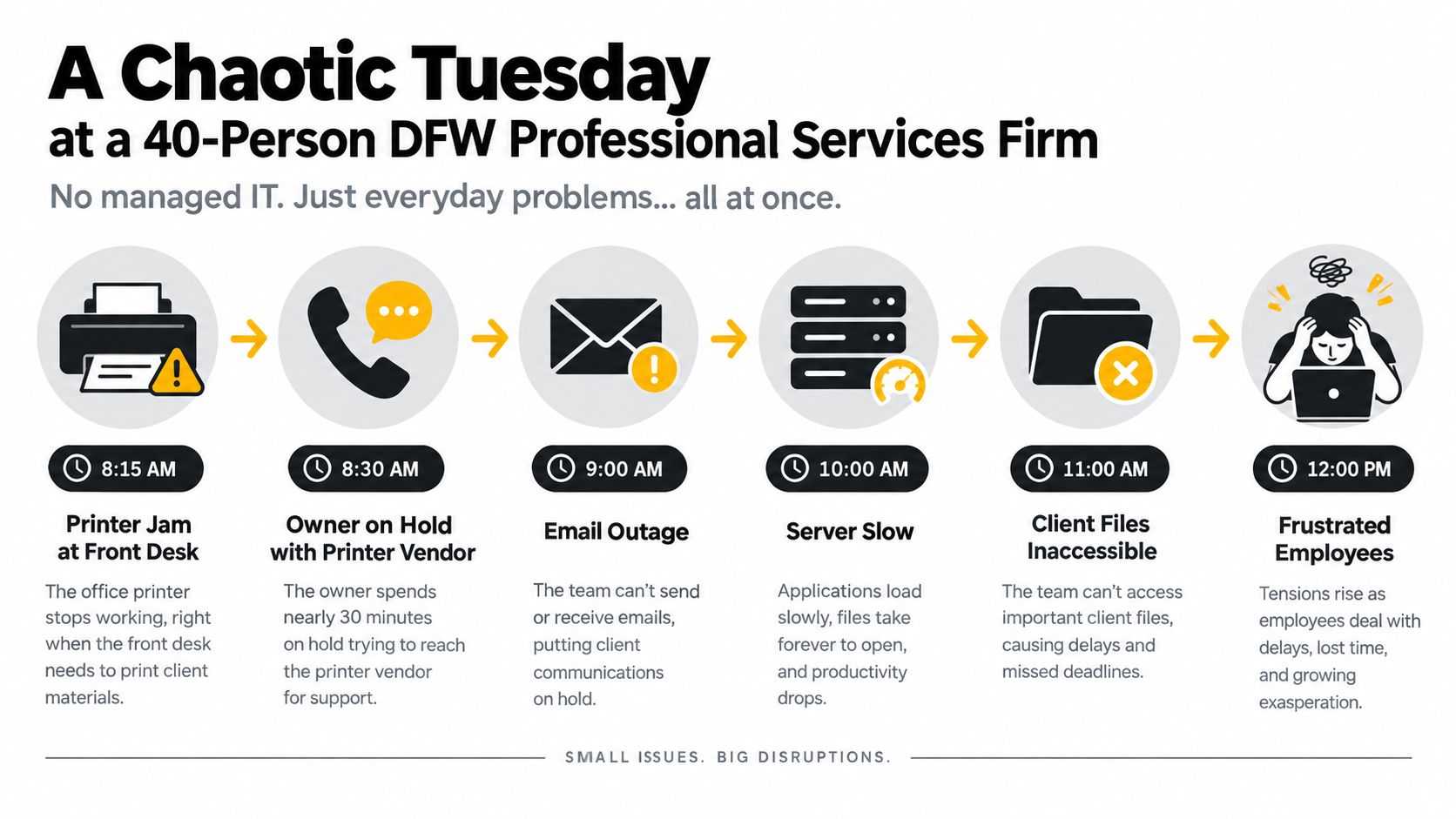
At 8:15 on a Tuesday, the front-desk printer fails at a 40-person professional services firm in DFW. The receptionist tries the usual restart, the office manager checks the cables, and the owner spends the next 45 minutes on hold with a break-fix vendor. Nobody is working on client matters during that time, but the business is already paying for the interruption.
At 10:30, a salesperson can't access the customer relationship system during a client call. The application may be healthy, but a failing network switch is creating intermittent lag. By lunch, a phishing message has reached three inboxes because nobody is actively filtering and reviewing the organization's email environment. The staff sees disconnected annoyances. The owner sees a day disappearing into technical distractions.
Practical rule: If the owner has to discover the same class of problem before anyone else does, the business is operating reactively.
Under proactive monitoring, the same Tuesday looks different. The printer issue is flagged and resolved remotely before staff notice. Network monitoring identifies the failing switch, the provider traces the CRM lag to that device, and a replacement is queued before the problem becomes a full outage. The suspicious message is quarantined at the gateway instead of becoming a lunchtime emergency.
That doesn't mean managed IT prevents every problem. It means problems enter a controlled workflow instead of landing randomly on the owner's desk. A sound disaster recovery planning process also defines what happens when prevention fails, while an infrastructure resilience test workflow helps leadership verify that recovery assumptions work outside a spreadsheet.
The risk is measurable. A benchmark reported about 0.29 outages per client per quarter, an average outage duration of 132 minutes, and roughly 2.6 hours of annual unplanned downtime, compared with an industry average near 14 hours. Using a modeled $12,500 per downtime hour for a 50-employee firm, the benchmark calculated about $32,500 in annual downtime cost versus approximately $175,000, an estimated 80% reduction in modeled loss (managed-client cyber resilience benchmark).
What Managed IT Services Actually Mean
Managed IT services replace the “call someone when something breaks” habit with continuous responsibility. A business pays a provider a predictable monthly fee to monitor, maintain, secure, and support its technology environment, with the exact scope defined in the service agreement.
A useful comparison is commercial property management. A building owner doesn't wait for the HVAC system, access controls, fire alarms, and elevators to fail before hiring anyone. An operations team inspects equipment, coordinates repairs, manages vendors, and keeps records. An MSP performs the equivalent job for the company's digital building.
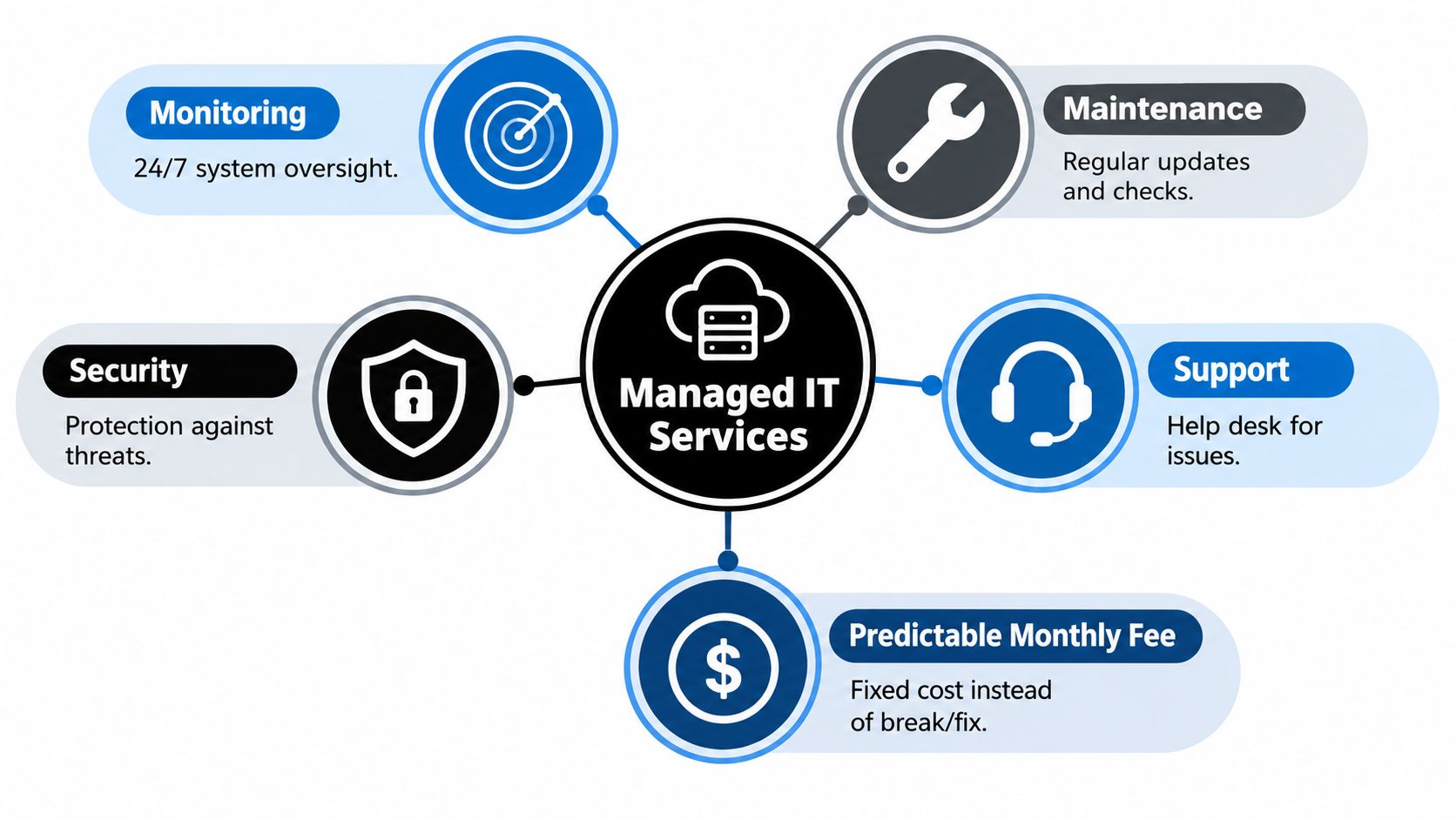
The deliverables behind the label
A modern agreement should make the following responsibilities visible:
- Monitoring and support: Continuous oversight, help-desk intake, alert triage, remote troubleshooting, and escalation for critical events.
- Security operations: Endpoint protection, email security, multifactor authentication management, vulnerability management, security awareness training, and incident response planning.
- Backup and recovery: Cloud backup, backup verification, recovery procedures, and business continuity planning.
- Cloud administration: User access, application configuration, licensing coordination, and policy management for cloud productivity environments.
- Network management: Firewall administration, wireless performance, switch health, segmentation, and lifecycle planning.
- Vendor coordination: Communication with internet, software, hardware, telecom, and line-of-business application providers.
- Strategic planning: Technology roadmaps, budgeting guidance, project prioritization, and fractional CIO-style oversight.
Endpoint management deserves special attention because unmanaged laptops and workstations create gaps that a firewall can't solve. A practical explanation of the operating model appears in Technovation's guide to what endpoint management includes.
The buyer isn't purchasing a vague promise of “IT help.” The buyer is purchasing repeatable controls, documented response, and an accountable team that keeps routine work from becoming executive work.
Business Benefits You Can Measure
The strongest business case for managed IT starts with avoided disruption, not a generic claim that outsourcing is cheaper. A small business benchmark reports losses of $137 to $427 per minute, or approximately $8,220 to $25,620 per hour, for organizations with fewer than 50 employees. The same reference attributes the widely cited $427-per-minute figure to Pingdom (SMB outage cost benchmarks).
For a firm billing by the hour, the calculation is straightforward. If a 50-employee company loses productive capacity while systems are unavailable, the cost includes employee time, delayed work, missed calls, rescheduled appointments, recovery labor, and the revenue that never gets created. The managed model changes the equation by funding monitoring, maintenance, backup verification, and response before the disruption becomes expensive.
| Metric | Without Managed IT | With Managed IT |
|---|---|---|
| Annual unplanned downtime benchmark | Near 14 hours | About 2.6 hours |
| Modeled downtime cost for a 50-employee firm | About $175,000 | About $32,500 |
| Outages per client per quarter | Not stated in benchmark comparison | About 0.29 |
| Average outage duration | Not stated in benchmark comparison | 132 minutes |
The figures above come from the managed-client benchmark cited earlier. They aren't a promise for every company, and leadership shouldn't approve a provider based on a benchmark alone. They do show why a monthly operating expense can be defensible when it reduces the frequency and duration of interruptions.
The return extends beyond uptime
Cyber resilience adds another layer. A managed benchmark analyzed 9.19 billion security events across approximately 1,700 businesses, recorded 215 verified incidents, and reported zero ransomware detonations. Those results illustrate the value of continuous visibility and rapid containment, but they should be read as benchmark evidence, not a universal guarantee (operational cyber resilience index).
Predictable budgeting also has practical value. The company can plan for monitoring, maintenance, security, and support instead of waiting for separate emergency invoices. Fewer recurring technology frustrations can protect employee focus, while documented controls may help the business present a stronger risk profile to insurers and clients. The decision should still account for contract scope, internal responsibilities, project fees, and onsite coverage.
Staying Audit Ready in Regulated Industries
Compliance becomes difficult when it exists only in a policy binder. Healthcare, legal, financial, and payment-processing organizations need controls that operate every day, produce evidence, and survive staff changes.
Healthcare organizations handling patient health information may fall under HIPAA. Financial institutions handling financial data may face GLBA obligations. Organizations with European customers may need to consider GDPR, certain California businesses may fall under CCPA or CPRA, and businesses accepting credit cards may have PCI DSS responsibilities. A compliance guide identifies MFA, access controls, encrypted backups, and a documented incident response plan as baseline needs for many small businesses.
Where the provider fits
| Framework | Core Requirements | MSP-Owned Controls | Business-Owned Controls |
|---|---|---|---|
| HIPAA | Access protection, auditability, encryption, workforce safeguards | Endpoint encryption, access reviews, logging, patching, backup controls | Privacy operations, workforce decisions, clinical procedures |
| GLBA | Risk management, safeguards, authentication, response planning | MFA administration, technical assessments, response documentation | Governance, customer notices, executive oversight |
| PCI DSS | Protected payment environments, vulnerability management, secure access | Network controls, patching, scanning coordination, endpoint protection | Payment-process design, vendor decisions, card-data handling |
| GDPR, CCPA, and CPRA | Data protection, access rights, privacy governance | Technical safeguards, account controls, evidence collection | Legal interpretation, notices, retention decisions |
| CMMC-related work | Security practices and documented evidence | Configuration management, access controls, logging, remediation tracking | Contract obligations, organizational policies, leadership accountability |
An MSP can own technical execution, but it can't own every business decision. A clinic still controls how staff handle patient information. A law firm still decides retention rules and client confidentiality procedures. A financial practice still needs leadership to approve risk tolerance.
Audit readiness improves when evidence collection becomes routine. Access reviews, patch records, backup reports, security training records, and incident documentation should be available before an auditor asks for them. Technovation's IT security audit checklist gives business leaders a practical way to identify missing controls before an assessment turns into a fire drill.
The right question isn't whether an MSP can “make the company compliant.” The right question is which technical controls the provider will operate, which evidence it will maintain, and which responsibilities remain with management.
How Managed IT Services Are Priced
Pricing works best when it matches the organization's risk and operating model. A 25-person healthcare clinic has different needs from a 12-employee accounting firm, a 60-seat retailer, or a three-person internal IT team at a mid-market manufacturer.
Four common structures
Per-device pricing charges for each managed workstation, server, network device, or other covered asset. It suits a stable environment where the device count is easy to forecast. The drawback appears when the business has many devices per employee or a complicated server estate.
Per-user pricing groups the technology assigned to each person. That can be cleaner for collaborative offices where employees use laptops, phones, and shared applications. A 12-employee accounting firm may prefer this structure because headcount is easier to track than every endpoint.
All-inclusive tiered pricing combines support, monitoring, patching, backup, and security into a defined monthly package. A 25-person healthcare clinic may value the simpler budget, but leadership should inspect tier limits, project exclusions, after-hours rules, and overage charges.
Co-managed IT extends an internal team rather than replacing it. A three-person manufacturing IT group might retain application ownership while an MSP supplies after-hours coverage, advanced security operations, backup oversight, or project capacity. A useful mid-market IT leadership guide can help executives think through the strategic role that sits above ticket resolution.
| Pricing Model | Typical Monthly Cost (DFW) | Best Fit For | Watch Out For |
|---|---|---|---|
| Per-device | Provider quote required | Stable endpoint environments | Device definitions, server charges, exclusions |
| Per-user | Provider quote required | Offices with several devices per employee | Shared accounts and special users |
| All-inclusive tiered | Provider quote required | Firms seeking budget predictability | Tier caps, project fees, response limitations |
| Co-managed | Provider quote required | Businesses with internal IT staff | Unclear ownership and overlapping tools |
The monthly number rises with seat count, server count, compliance scope, onboarding complexity, migrations, backup requirements, and onsite expectations. DFW buyers should ask for a written scope rather than compare headline prices. A cheap agreement that excludes security, projects, backups, or onsite response may move the cost elsewhere.
Red Flags and Misconceptions When Choosing a Provider
The cheapest MSP bid rarely deserves automatic approval. A quote 30% below market may indicate a narrow break-fix labor model, junior support coverage, hidden exclusions, or an offshore help desk that can't provide the local response a Plano manufacturer expects. That 30% figure appears in the planned buying scenario, not as a verified market statistic, so it should be treated as a screening signal rather than a universal rule.
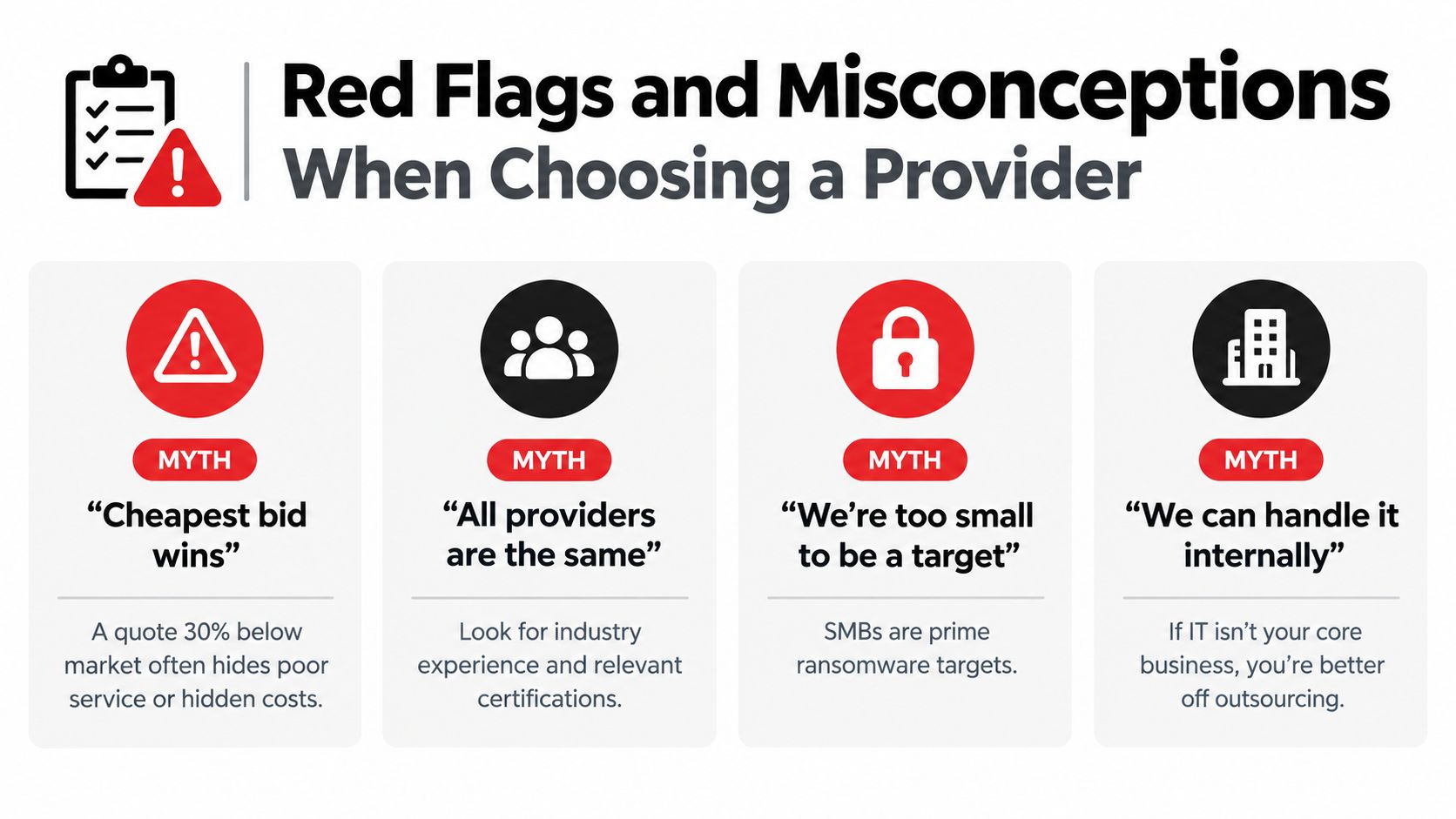
Questions that expose weak agreements
- Ask for response definitions: The SLA should distinguish acknowledgement, remote action, escalation, and onsite arrival. “Fast support” isn't a measurable commitment.
- Ask who owns security: The provider should identify the security controls, monitoring process, escalation path, insurance coverage, and relevant assurance documentation.
- Ask how patching works: A provider that can't explain maintenance windows, failed-patch handling, emergency remediation, and reporting isn't offering proactive management.
- Ask about compliance evidence: Regulated firms need documented controls, not a functioning firewall and a reassuring sales presentation.
- Ask about the exit: A 36-month contract without a practical transition process, data-return language, and an exit clause creates unnecessary dependency.
- Ask for operating cadence: Quarterly business reviews should cover ticket trends, risks, projects, lifecycle planning, and budget decisions.
The “we're too small to be a target” belief also deserves rejection. A managed benchmark's review of billions of security events shows why low-signal activity requires continuous analysis, not occasional inspection. Likewise, an internal employee who can reset passwords may still lack the time to manage vulnerability remediation, backup testing, compliance evidence, and incident response.
A credible DFW provider publishes useful service information, documents onboarding, explains what the agreement excludes, schedules strategy meetings, and welcomes reference calls. The provider should also describe how local coverage works, including whether technicians can reach offices in Plano, Midlothian, Fort Worth, or surrounding communities when remote resolution isn't enough.
Business owners can use Technovation's guide on how to choose a managed service provider as a practical interview checklist. The best fit isn't the company with the smoothest pitch. It's the one willing to put responsibilities, evidence, response, and accountability in writing.
Your Next Step Toward Safer IT Operations
Managed IT is best understood as a risk-transfer decision. The business still owns its mission, staff, customers, and legal obligations. The MSP takes responsibility for defined technical risks, including unmanaged endpoints, missed patches, weak backup processes, slow response, and fragmented evidence.
A disciplined transition doesn't require a reckless overnight change. A practical 30-60-90 day path creates control without disrupting operations.
A workable onboarding path
- Week one, discover the environment. The provider inventories endpoints, servers, network equipment, cloud accounts, users, vendors, backup jobs, and critical applications. This often reveals unsupported systems, unknown assets, dormant accounts, and shadow SaaS.
- Month one, establish the baseline. Monitoring, alert routing, patch policies, endpoint protection, ticket workflows, and backup verification become operational. Leadership receives a prioritized risk register rather than a pile of technical observations.
- Month two, enforce core protections. The provider tightens MFA, access controls, backup retention, recovery procedures, security policies, and staff responsibilities. Exceptions should be documented, assigned, and given a remediation path.
- Month three, review the gaps. The first compliance and security review identifies remaining exposure, overdue lifecycle work, policy weaknesses, and projects that need funding. The roadmap should connect each recommendation to business impact.
A free security audit or IT health check can start the conversation. It typically looks for unpatched systems, dormant user accounts, missing or unverified backups, excessive permissions, unsupported equipment, and shadow SaaS. The useful output isn't a fear-based sales report. It's a prioritized list showing what needs attention, who owns it, and what happens if the business delays.
Local response still matters
Remote management handles many issues, but DFW businesses should ask how quickly onsite help can arrive when a network device fails, a clinic loses connectivity, or a construction office needs a field intervention. A provider serving Midlothian healthcare practices and Plano financial advisors should understand that local context changes the response conversation.
Before signing, leadership should ask:
- Which services are included in the monthly fee?
- What happens during a critical security incident?
- Who handles backups, recovery testing, and compliance evidence?
- What are the remote and onsite response commitments?
- How does the provider report risk, ticket performance, and project status?
- What does transition assistance look like if the relationship ends?
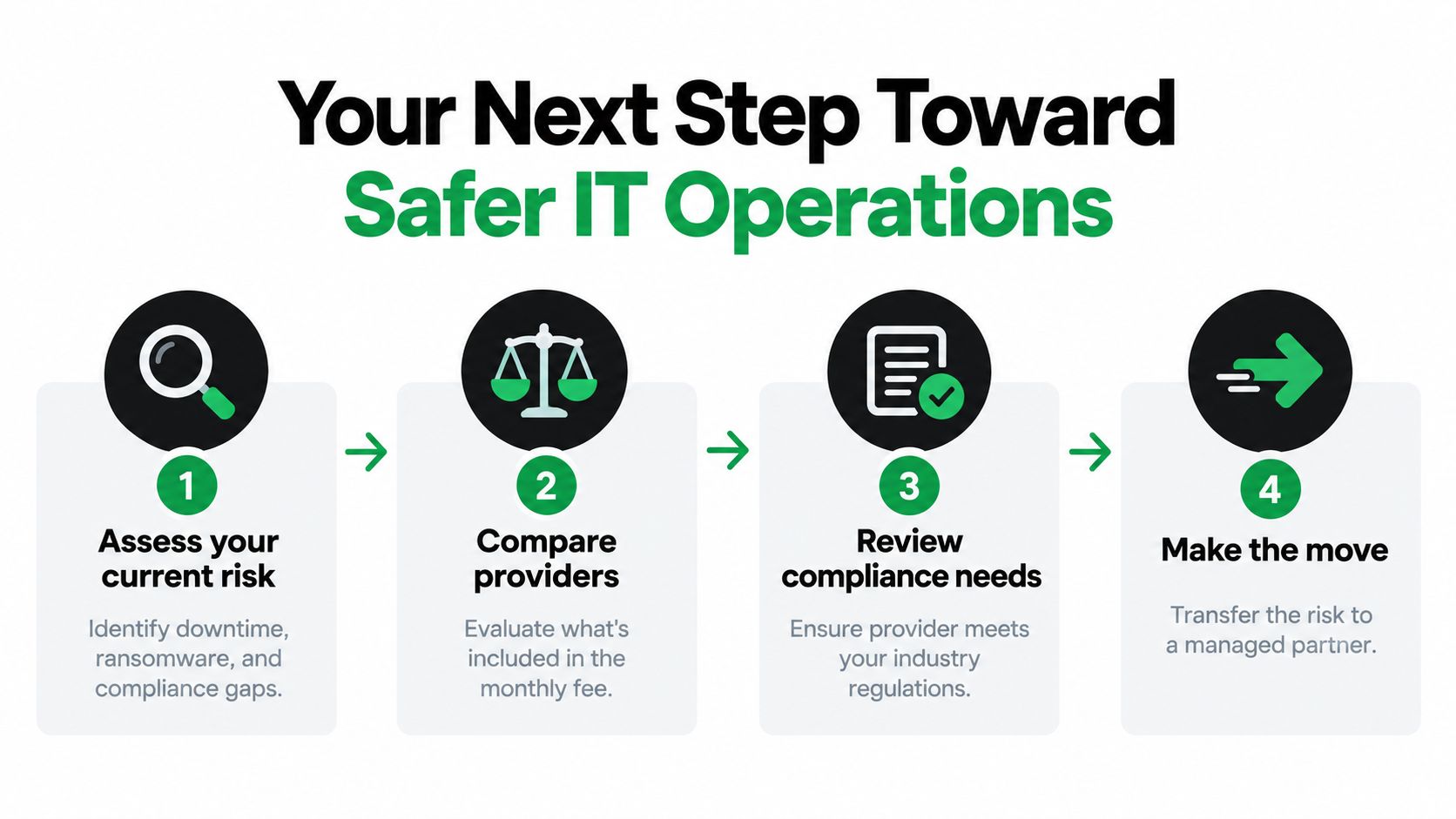
Technovation LLC provides managed IT, cybersecurity, compliance support, cloud backup, remote access, monitoring, and strategic technology planning for DFW organizations that need defined ownership instead of reactive troubleshooting. Schedule a free security audit or IT health check through Technovation LLC and get a clear view of the operational risks that deserve attention first.