
A former employee's mailbox is still active. A clinic workstation uses the same login for everyone. A project manager who left a construction firm weeks ago can still open shared files. None of these problems requires an elaborate attack. They're failures in user access controls, and they build gradually inside trusted systems.
For a regulated Dallas, Fort Worth, Plano, or Frisco business, access management is an operating discipline, not a one-time software purchase. Healthcare practices, law firms, financial companies, construction businesses, and nonprofits all need a repeatable way to decide who gets access, why they get it, how long they keep it, and what proves the decision was correct.
Table of Contents
- The Access Risk Hiding Inside Your Dallas Business
- What User Access Controls Mean in Practice
- The Five Building Blocks of Strong Access Controls
- From Day One to Offboarding a Practical Access Lifecycle
- Role Templates That Fit DFW Regulated Industries
- Compliance and Audit Without the Headache
- Common Pitfalls and a Quick Maturity Checklist
- How Technovation Turns Access Controls Into a Managed Program
The Access Risk Hiding Inside Your Dallas Business
Monday morning starts normally at a small North Texas law firm. A partner asks a staff member to retrieve a matter file from a former paralegal's account. The account still works weeks after departure. Nobody knows whether the access was intentional, missed during offboarding, or copied through a shared folder.
That is access drift. Permissions accumulate as employees change roles, contractors join projects, departments reorganize, and cloud applications multiply. The risk appears as a trusted identity with yesterday's permissions, an old mailbox forwarding messages, or a shared drive exposing confidential client material.
Practical rule: Every active account needs an owner, a business purpose, an expiration or review point, and an audit trail.
The exposure is broad. OWASP's 2025 Broken Access Control guidance places broken access control in the number one risk category again. Its research summary reports that 100% of tested applications had some form of broken access control, with 1,839,701 total occurrences across mapped weaknesses, a 20.15% maximum incidence rate, and a 3.74% average incidence rate. Those figures come from application testing. A Plano clinic with a shared EHR login exhibits the same failure pattern at the identity layer: people receive access without clear individual accountability.
DFW businesses face this risk in different forms. A healthcare provider may leave a former billing employee connected to a patient system. A boutique law firm may preserve a departing associate's document access for convenience. A financial company may allow broad permissions across sensitive records. A construction firm may leave project files open to a former contractor, while a nonprofit may grant wide cloud access because nobody has time to create narrower roles.
The practical response is direct: define controls, assign ownership, create role templates, preserve evidence, and make reviews workable for a 25- to 150-person business. A local MSP such as Technovation can operationalize that program through account reviews, documented approvals, offboarding checks, and audit-ready records.
What User Access Controls Mean in Practice
A Dallas law firm can grant a new paralegal access to the right matter files without opening every client folder. A healthcare clinic can restrict patient records by job function. A construction company can limit project documents to assigned teams. User access controls apply this same discipline to email, accounting systems, shared drives, remote connections, administrative consoles, and other business systems.
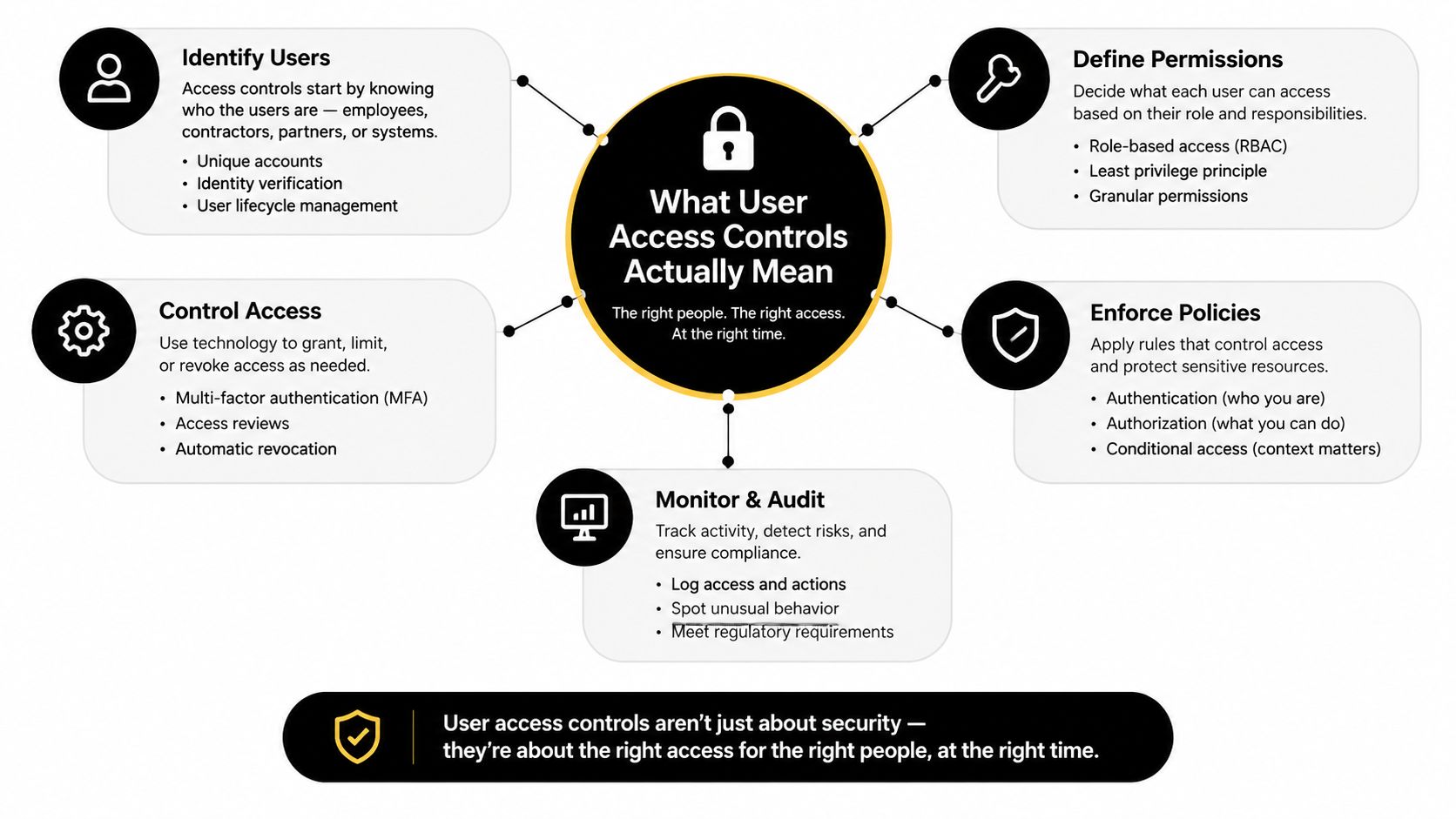
Four policy layers work together:
- Least privilege: Give each person only the permissions required for current duties. Remove convenience-based access that no longer has a business reason.
- Role-based access control: Use defined roles, such as Front Desk Coordinator or Litigation Paralegal, to establish repeatable permission sets.
- Attribute-based access control: Add context, including department, assigned matter, device status, location, or time, to refine each decision.
- Zero Trust: Verify every access request instead of treating a valid account, device, or network connection as permanently trustworthy.
These layers solve different problems. Role-based access creates a workable starting point. Least privilege keeps permissions narrow. Attributes account for changing circumstances, while Zero Trust requires verification before access is granted.
For a business using a cloud identity environment, groups, conditional access policies, and device-compliance controls can work as one operating model. A user may hold the correct role but still be denied access because the device lacks encryption, the sign-in carries risk, or stronger authentication is required. Businesses using other identity systems can apply the same model.
Leaders should separate routine account administration from broader authorization governance. Identity and access management guidance for business owners provides a useful framework for making that distinction.
For regulated North Texas SMBs, the standard is operational consistency. A local MSP such as Technovation can turn these policies into documented approvals, role assignments, access decisions, and review evidence that owners can inspect.
The Five Building Blocks of Strong Access Controls
Strong access controls start with least privilege, not with a long list of security products. NIST defines least privilege as restricting users and processes to the minimum access required for assigned tasks, and its control guidance recommends separate privileged and non-privileged accounts, regular privilege reviews, restricted privileged network access, and logging of privileged functions through NIST SP 800-53 AC-6 guidance.
A Coppell medical practice shouldn't give every nurse full write access across every EHR function. A better design separates clinical documentation, scheduling, billing, prescribing, and administrative capabilities according to actual duties.
Role-based access control makes that design repeatable. The Frisco law firm's Litigation Paralegal role should map to defined document, matter, and workflow permissions rather than a manager manually approving access application by application. A nonprofit in Addison can create roles for program staff, development staff, finance staff, and executives, then review exceptions separately.
Multi-factor authentication protects the identity after the role is defined. SMS codes may be better than passwords alone, but phishing-resistant authentication and authenticator-based approval deserve priority for administrators, remote access, financial systems, and sensitive records. Every exception should have a documented business reason, an owner, and a deadline.
Privileged access management isolates high-impact accounts. Domain administration, EHR super-user access, finance administration, and security configuration shouldn't be attached permanently to ordinary daily accounts. Separate accounts, approval workflows, credential vaulting, session logging, and just-in-time elevation reduce the number of identities that can make damaging changes.
Identity governance and administration keeps the model accurate. It connects hiring, role changes, contractor expiration, access certification, and termination to a controlled process. A Fort Worth construction project manager leaving mid-build shouldn't retain access just because the project team still needs the files. The project can preserve the records while removing the person's identity.
The regulatory context varies, but the operating logic is consistent across HIPAA, GLBA, PCI DSS 4.0, and CMMC Level 2. Technovation's access control policy guidance provides a useful starting point for formalizing those decisions.
| Building Block | DFW SMB Risk It Mitigates | First Action |
|---|---|---|
| Least privilege | Excess access to patient, client, financial, or project data | Compare current permissions with actual job duties |
| Role-based access control | Inconsistent approvals and permission sprawl | Build a role matrix with department leaders |
| Multi-factor authentication | Stolen credentials used for remote entry | Require strong MFA for every account and document exceptions |
| Privileged access management | Administrative changes made without oversight | Separate admin accounts and record privileged activity |
| Identity governance | Orphaned, stale, or unreviewed accounts | Tie onboarding, reviews, role changes, and exits to tickets |
From Day One to Offboarding a Practical Access Lifecycle
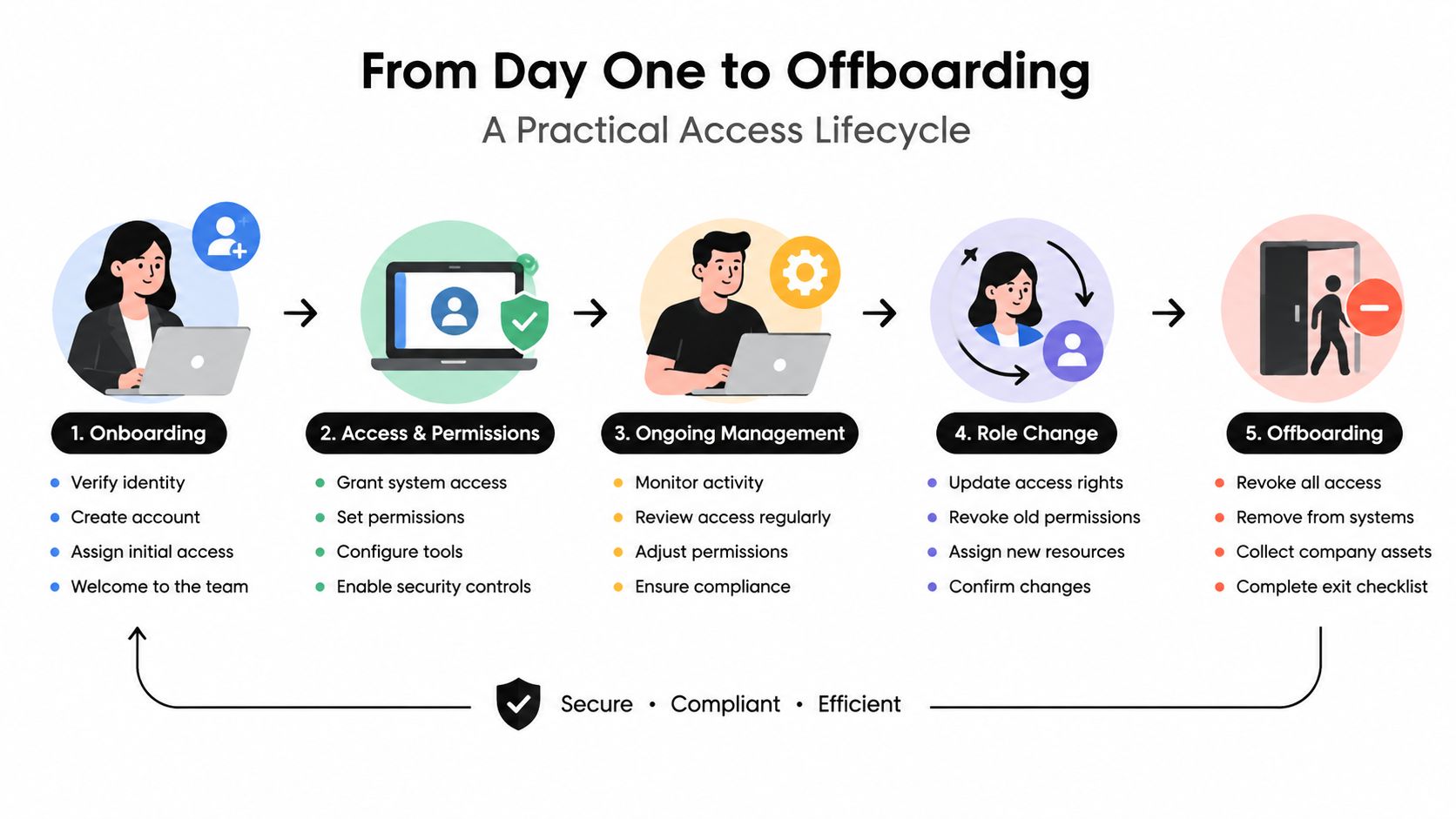
A new employee in a regulated DFW business should never receive a laptop and broad access by default. For a clinic, law firm, financial office, construction company, or nonprofit, access should follow a documented chain of decisions from hiring through departure. The process ends only after every account, token, device, and credential is accounted for.
Before the first day
After an offer is approved, HR should trigger an identity record in the organization's identity provider. Before provisioning begins, HR confirms screening requirements, the signed acceptable-use policy, employment status, department, manager, start date, and any contractor end date.
The direct manager selects an approved role instead of requesting a vague bundle such as “everything needed for operations.” IT provisions the identity, group memberships, assigned device, and baseline applications. Compliance or a designated security owner reviews exceptions involving regulated data or privileged access.
Onboarding and active employment
On day one, the employee enrolls in MFA, signs in with a unique identity, and completes device-compliance checks. The manager confirms that the approved role supports assigned duties without unnecessary access, then approves the grants. IT records the ticket, approver, systems granted, and activation date.
A structured multi-factor authentication setup process belongs in onboarding. Do not wait for a suspicious sign-in to discover that remote access was never configured correctly.
Access must change when the work changes. A billing employee moving into operations needs a fresh role review, removal of obsolete permissions, and manager approval. Contractors receive only project-required systems, with a time-boxed expiration and a named internal sponsor.
Quarterly reviews should cover role memberships, direct permissions, privileged access, contractor accounts, service accounts, and inactive identities. A North Texas MSP can turn these reviews into recurring tickets, route exceptions to the right owner, and preserve approval evidence for an audit. NIST's Zero Trust guidance calls for per-session resource access, least privilege, explicit authorization, and a default-deny posture until policy permits the request in NIST SP 800-207.
Departure and evidence
HR must notify IT and the manager before or at termination. IT disables email, business applications, remote access, clinical systems, shared drives, and other identity-connected services on the same day. The team recovers devices, removes sessions and tokens, transfers business records, and rotates credentials the departing person may have known.
A clear RACI model prevents handoff failures:
- HR: Responsible for employment status, start dates, and termination notices.
- Direct manager: Accountable for role selection, access approval, and review decisions.
- IT: Responsible for provisioning, technical enforcement, disablement, device recovery, and evidence.
- Compliance officer: Consulted on regulated systems, exceptions, and audit readiness.
- Business owner: Accountable for accepting residual risk and funding corrective work.
Role Templates That Fit DFW Regulated Industries
A role template is a starting scaffold, not an excuse to grant broad access. The same title can carry different permissions depending on the data, professional duties, separation-of-duties requirements, and systems used by the business.
A Dallas healthcare clinic and a Fort Worth law firm illustrate the difference. The clinic's Provider role needs clinical write access and prescribing capabilities, while the firm's Partner role may need broad matter visibility but still require controlled trust-account actions and conflict checks.
| Role | Healthcare Clinic (EHR + Billing) | Law Firm (DMS + Practice Mgmt) |
|---|---|---|
| Provider | Assigned-patient records, clinical documentation, prescribing module subject to policy | Matter documents, work product, client communications, supervised matter access |
| Medical Assistant | Clinical intake and limited record updates, no unrestricted billing administration | Not applicable |
| Biller | Billing records and claims workflows, restricted clinical detail and PHI export | Billing records, time entry, invoice preparation, restricted trust-account functions |
| Front Desk | Scheduling, demographics, patient communication, limited record visibility | Legal Assistant equivalent, calendar, contact records, filing support |
| Practice Admin | Operational reporting, approved user administration, controlled patient portal administration | Practice management, staffing, reporting, controlled financial administration |
| Partner | Not applicable | Matter oversight, approved document access, conflicts visibility, supervised financial authority |
| Associate | Not applicable | Assigned matters, documents, research, court workflow access |
| Paralegal | Not applicable | Assigned matters, document management, docket and filing support |
| Legal Assistant | Not applicable | Assigned matter support, calendaring, document preparation |
| Billing | Not applicable | Time, invoices, billing records, limited trust-ledger access |
The matrix shows why “billing admin” can't be treated as a universal role. A clinic must protect patient information and limit unnecessary clinical visibility. A law firm must account for matter confidentiality, conflicts processes, client funds, and ethical separation of duties.
ABAC adds the second layer. Department, patient assignment, matter assignment, device compliance, and location can narrow what a role can see. A Paralegal role might open the document system, but only assigned matters should be visible. A Provider may access the EHR, but patient assignment and treatment context should further constrain records.
Organizations that need a broader role-design reference can review RBAC best practices for Church Extension Funds, particularly the emphasis on mapping permissions to actual functions and reviewing roles over time. The templates should then be adapted with department leaders, compliance staff, and system owners.
Compliance and Audit Without the Headache
Auditors rarely care whether a business can produce a polished policy that nobody follows. They want evidence that the policy governs real accounts, real permissions, real approvals, and real departures.
A Plano dental group should be able to show that access to patient information follows minimum-necessary principles and that relevant access activity can be reviewed. A DFW mortgage broker needs role decisions that support protection of customer nonpublic personal information under GLBA. A Frisco retailer handling card data needs unique credentials, appropriate segmentation, and access evidence around the cardholder environment. A Richardson defense subcontractor must connect access practices to its CMMC Level 2 control environment.
The evidence pack should be assembled continuously:
- Provisioning records: The request, manager approval, assigned role, systems, and activation date.
- Review attestations: Evidence that managers reviewed memberships, direct permissions, and exceptions.
- Authentication evidence: MFA enrollment, enforcement status, and approved exception records.
- Privileged activity: Administrative account ownership, elevation approvals, and session logs.
- Termination records: HR notice, disablement timestamps, device recovery, and credential actions.
A business can run a pre-audit review without turning it into a month-long project. Select a sample of recent hires, role changes, contractors, privileged accounts, and departures. Verify that each has a matching ticket, approval, technical action, and retained record. Then investigate any account that lacks a clear owner or business purpose.
The NIST compliance checklist for SMBs can help organize control ownership and supporting artifacts. The objective isn't checkbox compliance. It's an access program that continues working when an employee changes roles, a contractor's project ends, or an auditor asks why a person could open a sensitive system.
Common Pitfalls and a Quick Maturity Checklist
Most North Texas SMBs don't fail because they lack a security slogan. They fail because an operational shortcut becomes permanent.
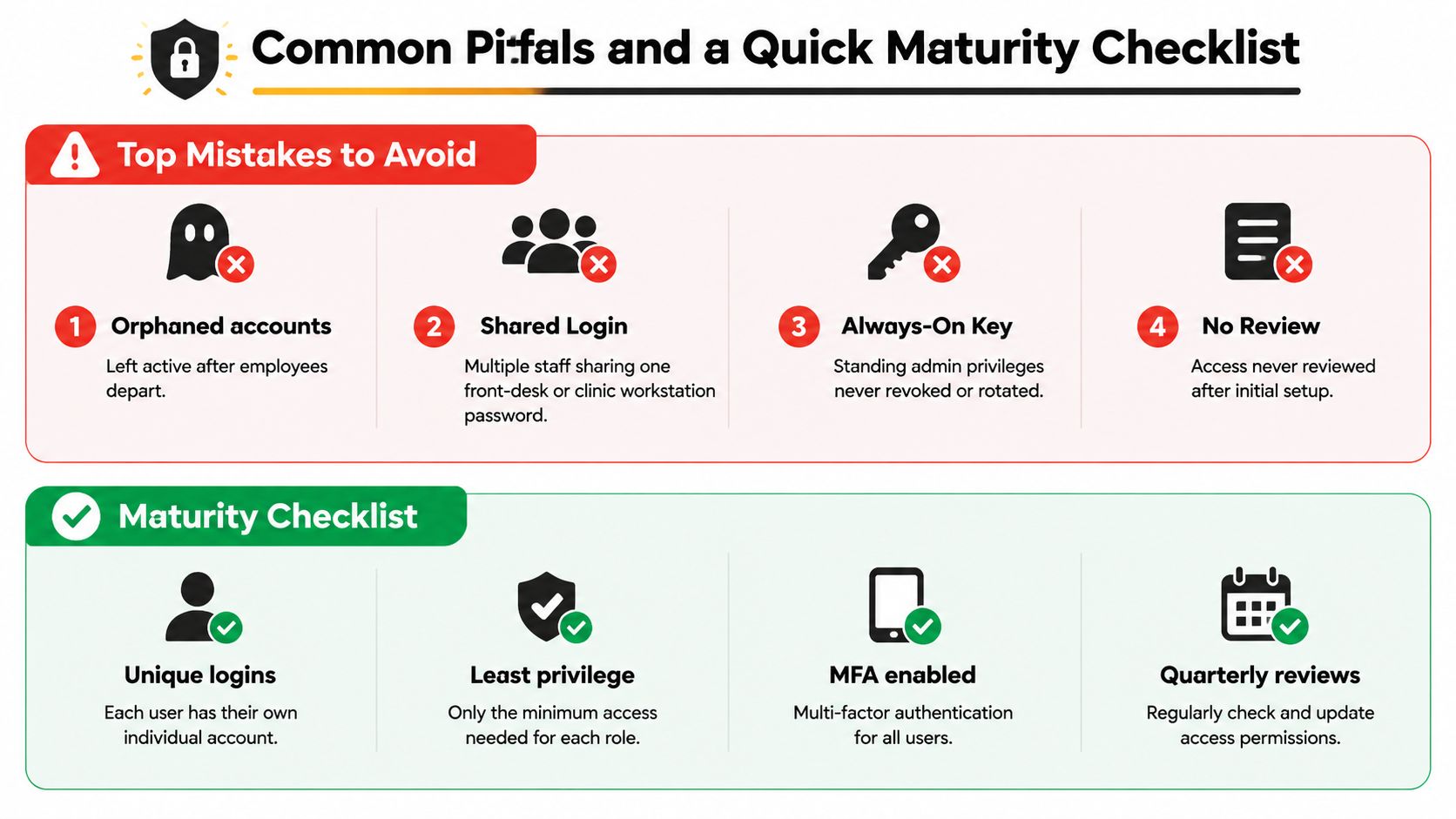
Orphaned accounts are the clearest example. A Plano construction firm may disable the employee's laptop but forget the mailbox, project portal, or file-sharing account. The correction is a termination checklist that names every access path and records completion.
Shared logins create an accountability hole at reception desks, clinics, and warehouse offices. If several people use one password, an audit can't reliably identify the person who viewed or changed a record. Unique accounts, fast workstation locking, and role-appropriate access are better than convenience disguised as efficiency.
Standing administrator rights turn ordinary malware or a stolen session into a high-impact event. NIST's least-privilege guidance supports separating administrative and standard accounts, reviewing privileges, and logging privileged functions. The practical correction is to remove local admin rights from daily accounts and provide approved elevation only when the task requires it.
MFA exemptions for trusted staff age badly. Partners, executives, senior clinicians, and longtime project managers can be targeted precisely because their access matters. The policy should require strong authentication for them, with documented break-glass procedures rather than informal exceptions.
Role sprawl appears when every temporary request becomes a permanent group membership. Department owners should review roles, remove direct grants where a role can serve, and document exceptions with expiration dates.
Unmanaged contractor access is especially common on construction and engineering projects. Each contractor needs a sponsor, defined systems, limited data scope, and an automatic end date.
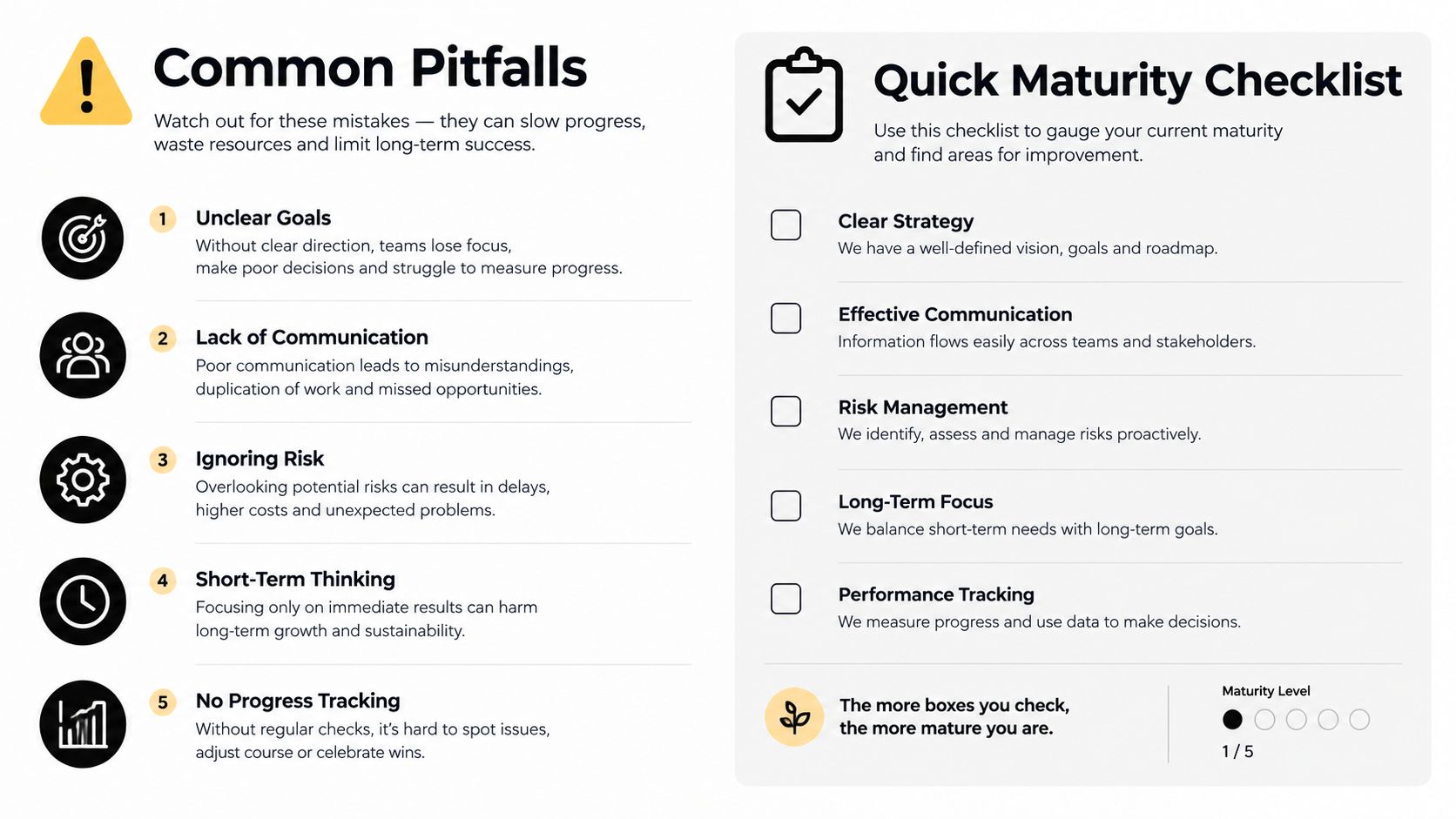
A quick maturity check asks whether the business has:
- A documented role matrix: Job functions map to approved permissions.
- MFA on every account: Exceptions are rare, owned, and time-limited.
- Quarterly reviews: Managers certify access and remove excess rights.
- Joined-up lifecycle workflows: HR, managers, IT, and compliance share one process.
- Privileged account vaulting: Administrative credentials aren't left in ordinary workflows.
- Tested break-glass procedures: Emergency access is controlled, logged, and reviewed.
How Technovation Turns Access Controls Into a Managed Program
Access controls fail when responsibility sits between departments. Technovation LLC can operationalize the program as a managed service for DFW businesses that need identity governance without building a full internal security function.
The engagement starts with an access assessment. The team inventories identities, groups, applications, privileged accounts, direct permissions, contractors, and termination practices. It then works with business owners to design a role matrix that reflects actual healthcare, legal, financial, construction, or nonprofit workflows.
The ongoing program can include:
- Policy design: Least-privilege standards, role definitions, exception handling, and break-glass procedures.
- Sign-in enforcement: MFA, conditional access, session controls, and device-compliance requirements.
- Lifecycle administration: Joiner, mover, contractor, and leaver workflows tied to HR and ticket approvals.
- Privilege oversight: Separate administrative identities, credential vaulting, elevation approvals, and activity logging.
- Review operations: Recurring access certifications with HR, managers, system owners, and compliance staff.
- Audit preparation: Evidence packs for HIPAA, GLBA, PCI, and CMMC assessors.
For a regulated client with 40 to 150 seats, the onboarding arc should be staged. First comes discovery and risk ranking. Next comes identity cleanup and MFA enforcement. Then the team builds role templates, fixes privileged access, connects lifecycle events, and establishes recurring reviews. Mature clients may use a fully managed model, while companies with internal IT can choose co-managed support with clear service-level responsibilities.
The tooling categories matter, but the operating model matters more. An identity provider handles authentication, privileged access management controls high-impact credentials, single sign-on reduces fragmented account administration, and security monitoring preserves useful signals. Technovation's role is to connect those controls to people, policies, approvals, and evidence.
Technovation LLC provides managed IT, cybersecurity, compliance support, identity governance, and co-managed services for Dallas-Fort Worth businesses that need user access controls to work every day. Visit Technovation LLC to request an access-control assessment at a business location in Dallas, Fort Worth, Plano, or Frisco.





