
A clinic owner discovers the problem at 2 a.m., but the problem usually started earlier. An employee clicked a convincing payroll message, a password was reused, a cloud session stayed active, or a new laptop never made it into the security console. By the time someone notices, the business may have plenty of cybersecurity monitoring tools and still lack visibility where it matters.
That's the central issue for Dallas–Fort Worth SMBs. Security monitoring is a layered coverage problem, not a product popularity contest. SIEM, EDR, NDR, XDR, cloud, and identity tools each see different evidence. The right question isn't which platform wins. It's which layer is missing, who will investigate the alert, and what happens when the alert arrives outside business hours.
Table of Contents
- The 2 A.M. Moment That Changes How SMBs Think About Monitoring
- How Modern Cybersecurity Monitoring Tools Are Built
- Comparing the Leading Tools Across Each Monitoring Layer
- Choosing the Right Tool Set for Your Size and Industry
- When Managed Monitoring Beats DIY Cybersecurity Tools
- A Practical Monitoring Stack for DFW SMBs and Regulated Firms
- Rolling Out Cybersecurity Monitoring Tools in 30 60 and 90 Days
- Quiet Failures That Break Even Good Monitoring Programs
The 2 A.M. Moment That Changes How SMBs Think About Monitoring
At 1:47 a.m., a payroll phishing email detonates inside a 60-person Dallas medical billing firm. The attacker replays stolen credentials against the VPN, reaches a file share, and begins copying a patient billing folder.
The owner doesn't see the attack. The owner sees an inbox full of unread alerts, a help desk that won't answer until 8, and a HIPAA response clock already ticking. The firm may have antivirus, a firewall, and a security dashboard. None of those controls matter much if nobody can connect the clues or make a decision at 2 a.m.
With layered coverage, the same event looks different. EDR flags suspicious endpoint behavior. SIEM correlates the VPN authentication with an impossible-travel event. NDR identifies an unusual internal traffic pattern. Cloud and identity monitoring highlights the abnormal session. A managed SOC analyst reviews the sequence, contacts the firm, and begins the documented response process.
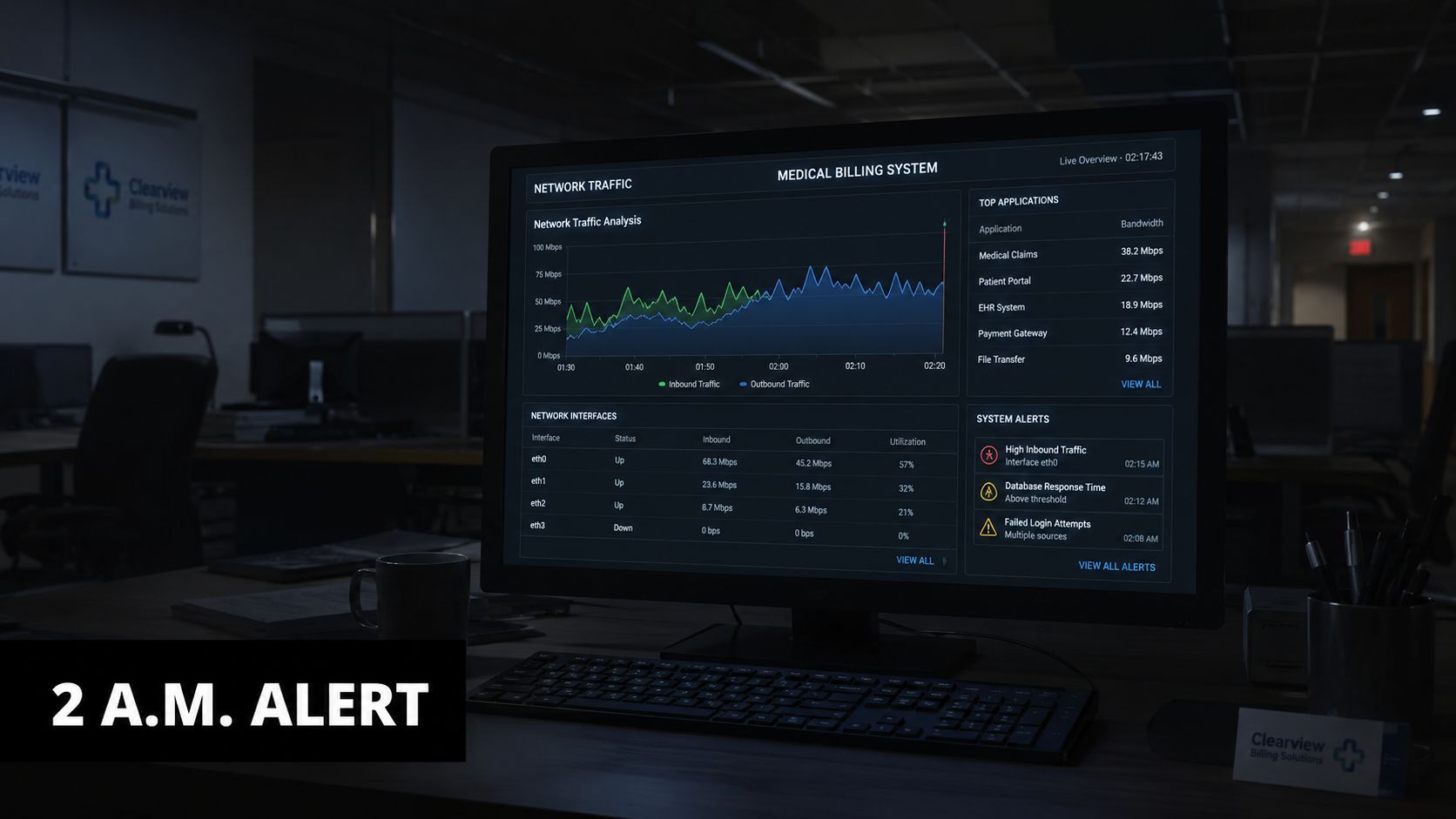
Practical rule: A dashboard doesn't protect a business unless a named person can interpret its alerts and act on them.
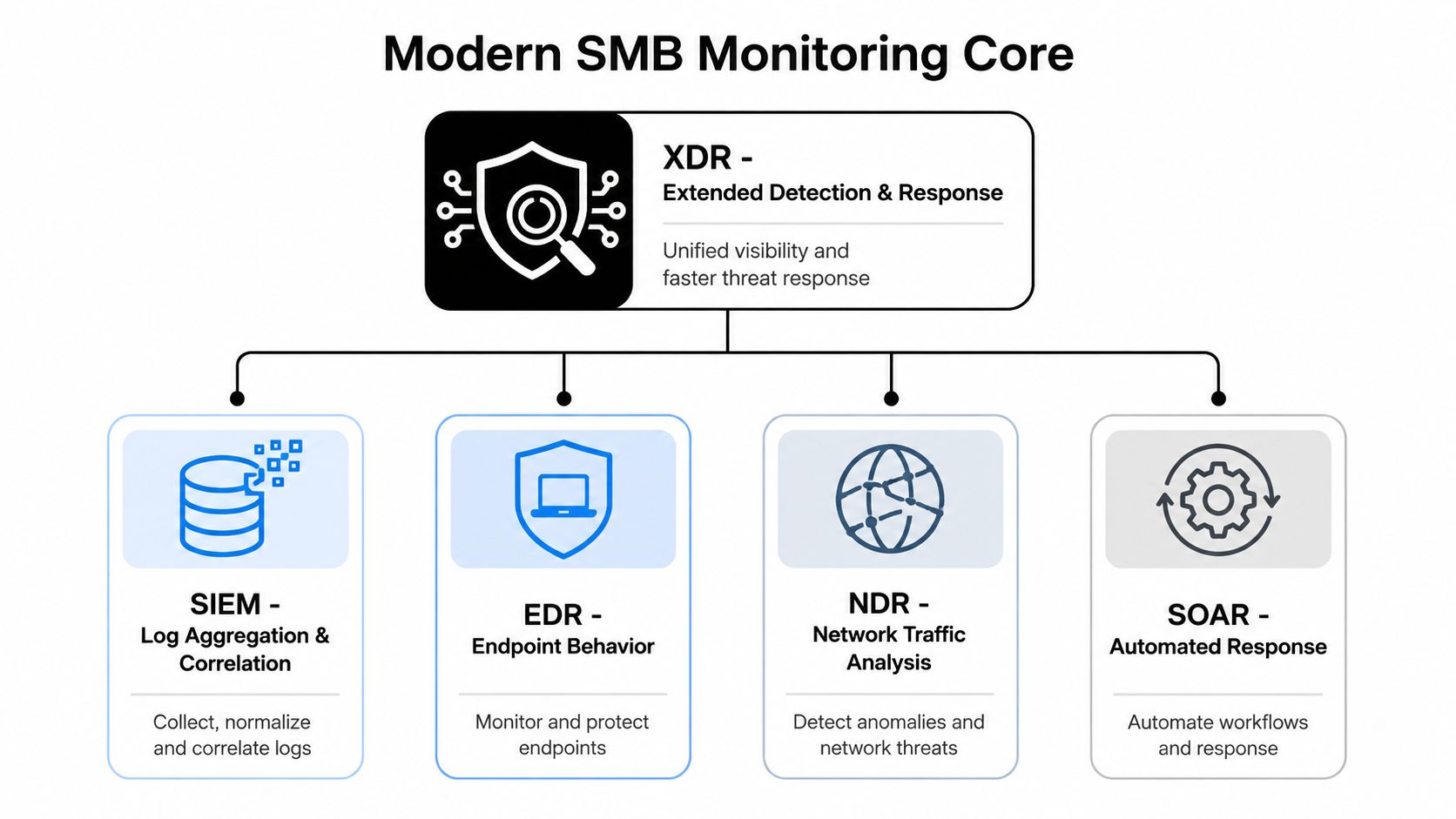
Modern monitoring generally falls into five overlapping zones:
- SIEM: Collects and correlates logs from many systems.
- EDR: Watches endpoint behavior and can contain suspicious devices.
- NDR: Examines network traffic, including east-west movement.
- XDR: Connects endpoint, identity, email, and network signals.
- Cloud and identity monitoring: Watches Microsoft 365, Azure, AWS, and SaaS activity.
IBM's 2024 breach data, as summarized in the market research cited here, reported that organizations without mature monitoring took an average of 194 days to identify a breach and 64 days to contain it, with an average incident cost of USD 4.88 million. Organizations with mature monitoring saw cited savings of USD 1.76 million. Those figures don't prove that a single product solves risk. They reinforce the operational question: which gaps exist when nobody is watching? (breach and monitoring context)
How Modern Cybersecurity Monitoring Tools Are Built
A practical stack starts with visibility, not branding. Each layer answers a different question about what happened, where it happened, and whether the activity connects to a broader attack.
Five coverage zones
SIEM is the evidence hub. It ingests authentication logs, firewall events, endpoint alerts, application activity, and cloud records, then correlates them. SIEM is useful for investigations and compliance reporting, but it's demanding to tune. DIY works for a capable IT team with time to build rules, preserve logs, and investigate. Managed operation is the better choice when nobody owns that work after hours.
EDR focuses on laptops, desktops, and servers. It can identify suspicious scripts, credential theft behavior, ransomware staging, and unauthorized process activity. EDR is usually the first security layer an SMB should standardize because endpoints are where users open files, authenticate, and access sensitive data. Internal IT can manage basic deployment, but detection tuning and incident containment often belong with a security specialist.
NDR examines traffic between systems, not just traffic entering through the firewall. That helps expose lateral movement, unusual data transfers, and beaconing from compromised devices. NDR is valuable in regulated or hybrid environments, though sensor placement and interpretation make DIY deployment harder.
XDR connects signals across security controls. It can turn isolated endpoint, identity, email, and network events into one incident storyline. XDR can reduce tool switching, but it still needs careful integration and human triage. A managed provider should run it when the internal team lacks threat-hunting experience.
Cloud and identity monitoring covers services that traditional network tools can't fully see. It watches sign-in anomalies, privilege changes, token misuse, risky SaaS behavior, cloud configuration drift, and suspicious mailbox activity. For cloud-heavy firms, this layer isn't optional. A firm evaluating broader cybersecurity solutions should map these signals before selecting a platform.
The market reflects that security monitoring is becoming infrastructure rather than an add-on. The global monitoring tools market was estimated at USD 36.66 billion in 2024 and is projected to reach about USD 185.78 billion by 2034, a projected 17.62% CAGR from 2025 to 2034. Security monitoring tools generated over 38% of total market share in 2024, while on-premises deployment represented more than 60% of the market. (monitoring tools market data)
The stack's value comes from overlap. A SIEM may show the login, EDR may show the process, NDR may show the movement, and identity monitoring may explain how access was obtained. A security operations center gives those signals an operating model, as explained in what a security operations center does.
Comparing the Leading Tools Across Each Monitoring Layer
A clinic owner may have endpoint alerts, cloud logs, firewall data, and suspicious mailbox activity waiting in separate consoles at 2 A.M. The right buying question is not which tool wins a leaderboard. It is whether each monitoring layer covers the firm's actual assets, produces usable evidence, and has an assigned person who can investigate and respond.
Use a coverage map before reviewing products. Record the systems each layer can see, the alerts it creates, the response actions it supports, and the work required to keep it accurate. Pricing depends on endpoint count, log volume, retention, integrations, service scope, and contract terms, so a vendor quote is more useful than a generic market range.
| Monitoring layer | What it should cover | Selection criteria | DIY or managed recommendation |
|---|---|---|---|
| SIEM | Identity, server, application, firewall, and cloud logs | Collection breadth, retention, search, correlation, and compliance reporting | Managed for most SMBs, co-managed when internal staff can investigate |
| EDR | Laptops, desktops, servers, and suspicious processes | Device coverage, behavioral detection, isolation, rollback, and response workflow | DIY for a simple environment with assigned ownership, managed for lean teams |
| NDR | East-west traffic, remote access, unmanaged devices, and unusual data movement | Sensor placement, traffic visibility, baseline quality, and investigation tools | Managed for most SMBs because traffic analysis requires ongoing review |
| XDR | Correlated signals across endpoint, identity, email, cloud, and network layers | Integration depth, alert reduction, investigation context, and response actions | Co-managed when internal IT can handle incidents, managed when it cannot |
| Cloud monitoring | Cloud accounts, workloads, storage, permissions, and configuration changes | Multi-cloud coverage, identity context, misconfiguration detection, and workload visibility | Co-managed for capable cloud teams, managed when ownership is unclear |
| Email and identity monitoring | Phishing, suspicious forwarding, risky sign-ins, and mailbox changes | Detection quality, policy controls, investigation context, and tuning | Managed tuning is recommended when alerts require continuous review |
SIEM and EDR decisions
A SIEM earns its place when it connects logs that explain one incident from several angles. Evaluate whether it collects identity events, endpoint activity, firewall records, cloud audit data, and application logs without creating retention costs the firm cannot sustain. A budget-oriented open-source approach can work, but the license is only one part of the expense. Deployment, storage, rule maintenance, upgrades, and response labor still belong to someone.
For a small law firm or clinic, managed SIEM is usually the better operating choice. Internal IT can own access, integrations, and business context while a security provider monitors correlations, validates alerts, and escalates incidents. DIY SIEM is reasonable only when the firm has a named owner, documented escalation paths, scheduled review time, and the authority to act after hours.
EDR decisions should start with coverage, not feature count. Endpoint hygiene starts with disciplined endpoint management, which keeps every device enrolled and patched. Then assess behavioral detection, device isolation, process investigation, remote response, and evidence export. A tool that misses an unmanaged laptop is not protecting the firm, regardless of how advanced its dashboard appears.
DIY EDR fits a small, stable environment when someone can review alerts and isolate devices promptly. Managed EDR fits better when the owner, office manager, or IT generalist cannot investigate suspicious processes during evenings, weekends, or a patient-care disruption. Regulated firms should also confirm that the platform and operating process support the evidence their obligations require. The technology can produce records, but it does not create compliance by itself.
A useful F1Group SMB monitoring tools guide can help organize an evaluation. Keep the final decision tied to an asset and coverage map. A straightforward endpoint rollout may be quick, while a program involving log sources, identity providers, retention, sensors, and response workflows requires more planning.
NDR, XDR, and cloud coverage
NDR fills gaps that endpoint telemetry cannot. It can expose unusual internal traffic, suspicious remote access, communication from unmanaged devices, and movement between systems. It fits firms with multiple locations, sensitive internal applications, guest networks, or devices that cannot run an endpoint agent. DIY operation is realistic only when someone can establish traffic baselines, validate anomalies, and investigate incidents instead of forwarding every alert to an inbox.
XDR reduces the effort needed to connect signals across layers, but correlation does not replace judgment. Select it when the firm already has compatible endpoint, identity, email, cloud, or network telemetry and needs one investigation view. Do not buy XDR merely to avoid identifying a coverage gap. A managed provider can make the model practical by tuning detections, connecting the data sources, and handling escalation. Co-managed XDR works when internal IT owns remediation and the provider owns monitoring and analysis.
Cloud monitoring needs its own review. Confirm visibility into accounts, workloads, storage, permissions, configuration changes, and administrative activity. A cloud team with clear ownership can manage posture and workload alerts internally, but a smaller firm usually needs help tuning findings and separating exploitable exposure from low-priority configuration noise.
Email and identity signals should connect to the broader investigation. Suspicious forwarding, unusual sign-ins, privilege changes, and token misuse may explain an endpoint or cloud alert. Managed monitoring is the stronger choice when the firm cannot review those events continuously, especially where a compromised mailbox could expose client records, legal work, or protected health information.
Choosing the Right Tool Set for Your Size and Industry
Buying decisions improve when the business scores its environment before reviewing product demonstrations. A 20-person professional services firm with one IT generalist has a different operating problem from a 120-person clinic handling protected health information or financial data.
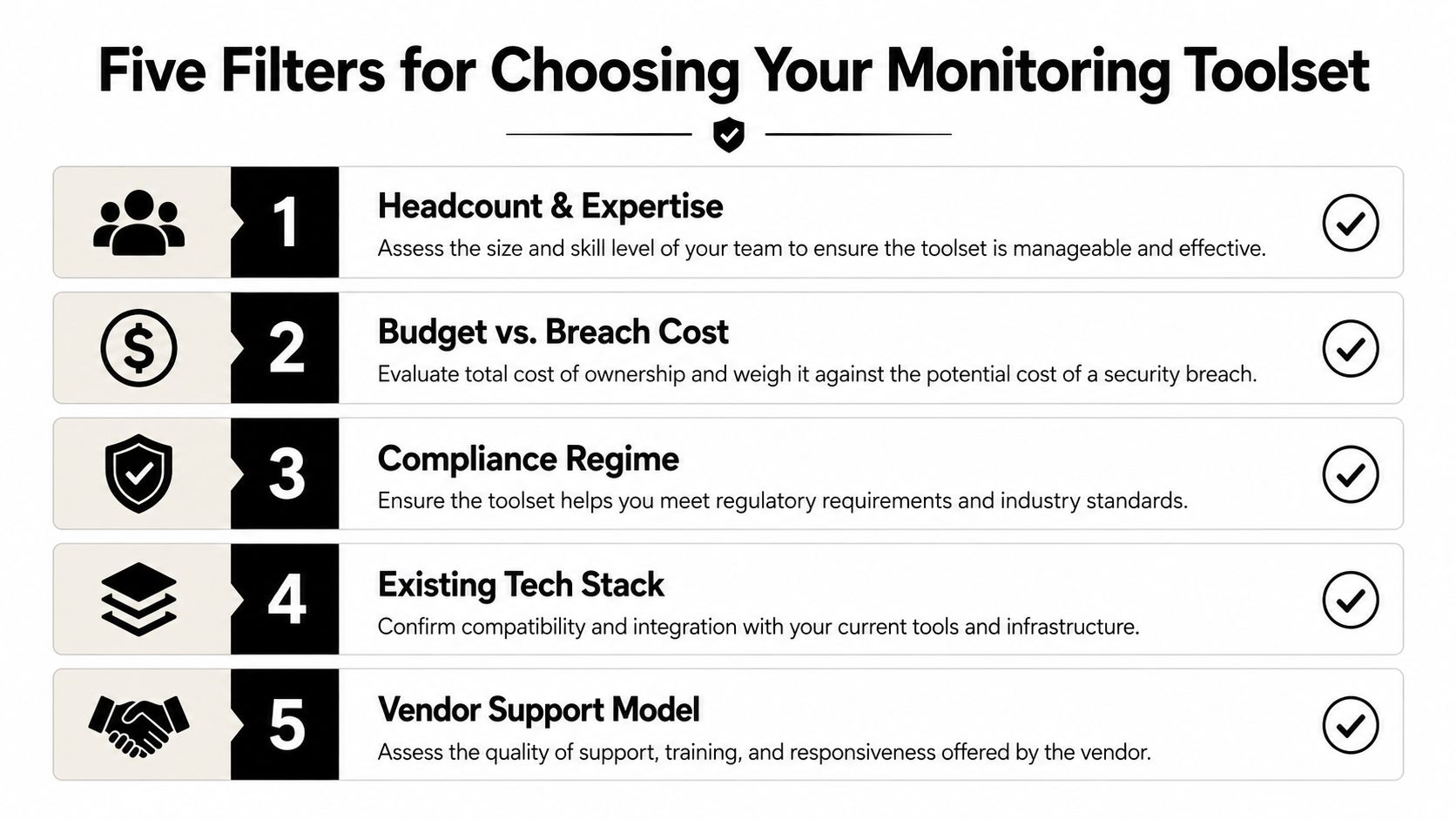
Five filters provide a useful starting point:
Headcount and expertise. Count the people who can investigate an alert, isolate a device, review identity activity, and document the decision. An IT generalist may manage deployment but still need outside help for threat analysis.
Budget versus breach exposure. Compare recurring tooling and service costs with the disruption created by lost access, legal review, customer notification, restoration, and audit response. The least expensive license can become the most expensive choice when nobody operates it.
Compliance regime. Identify the actual driver, whether that's HIPAA, PCI-DSS, CMMC, GLBA, state privacy obligations, contractual security language, or an insurer's requirements. Compliance evidence must match the applicable framework. Managed SIEM can support log collection, retention, monitoring, and reporting, but it doesn't make a firm compliant by itself because requirements vary by industry and regulation.
Existing technology. Inventory endpoints, servers, locations, cloud tenants, identity providers, firewalls, business applications, and remote access. A platform that integrates with the existing stack may deliver more practical coverage than a technically impressive product that creates another isolated console.
Alert tolerance. Ask how much noise the team can review without ignoring the queue. If the answer is “not much,” the business needs better correlation and managed tuning, not just more detections.
The self-test is straightforward: list every endpoint, write down the regulatory driver, name the people available after hours, and document the last security incident or serious alert. A small professional firm may need an XDR or SIEM-light approach with managed tuning. A clinic or RIA handling sensitive information generally needs layered SIEM and EDR, reliable audit trails, and a partner able to produce evidence on demand.
When Managed Monitoring Beats DIY Cybersecurity Tools
DIY monitoring is a reasonable choice only when the organization can operate it consistently. Buying licenses is the easy part. Someone still has to maintain integrations, review alerts, investigate suspicious behavior, update rules, preserve evidence, and respond when an employee is unavailable.
A managed SOC or co-managed model becomes the practical choice when any of these conditions apply:
- No full-time security analyst exists. IT support and security operations are different jobs.
- The environment exceeds 500 endpoints. Scale increases the need for repeatable triage and automation.
- Regulated data comes with audit deadlines. Evidence gathering cannot depend on one overloaded administrator.
- The alert queue already exceeds internal capacity. Unreviewed alerts are not coverage.
- The firm plans to pursue Cyber Insurance, HITRUST, or SOC 2 within the next twelve months. Documentation and control operation need an owner before the assessment begins.
Managed monitoring can provide centralized visibility, 24/7 review, log collection, retention, reporting, detection tuning, threat hunting, escalation, and written incident response. SOC as a Service is a cloud subscription model that supplies third-party 24/7 threat detection, monitoring, and response, and can integrate with existing SIEM, EDR, and XDR tools while providing compliance reporting.
| Factor | DIY Tools | Managed SOC |
|---|---|---|
| Coverage hours | Depends on employee availability | Continuous monitoring model |
| Detection tuning | Internal staff must maintain rules | Provider tunes content and thresholds |
| Alert response | Competes with help desk and IT work | Dedicated triage and escalation |
| Staffing risk | Turnover can remove critical knowledge | Responsibility is distributed through a service |
| Compliance evidence | Built internally | Reporting and documentation support |
| Cost control | License cost may hide labor cost | Predictable service scope, subject to contract |
Managed Detection and Response deserves a separate evaluation because the service combines technology with human investigation, as outlined in managed detection and response.
If nobody can name the person who responds to a 3 a.m. alert, the business is already operating like a managed-SOC customer. It just isn't receiving managed-SOC coverage.
The most honest trade-off is control versus operational capacity. DIY gives a firm direct control over configuration and response decisions. Managed service gives the firm a repeatable operating process when internal coverage is thin. For a clinic or law firm, that trade usually favors managed or co-managed monitoring.
A Practical Monitoring Stack for DFW SMBs and Regulated Firms
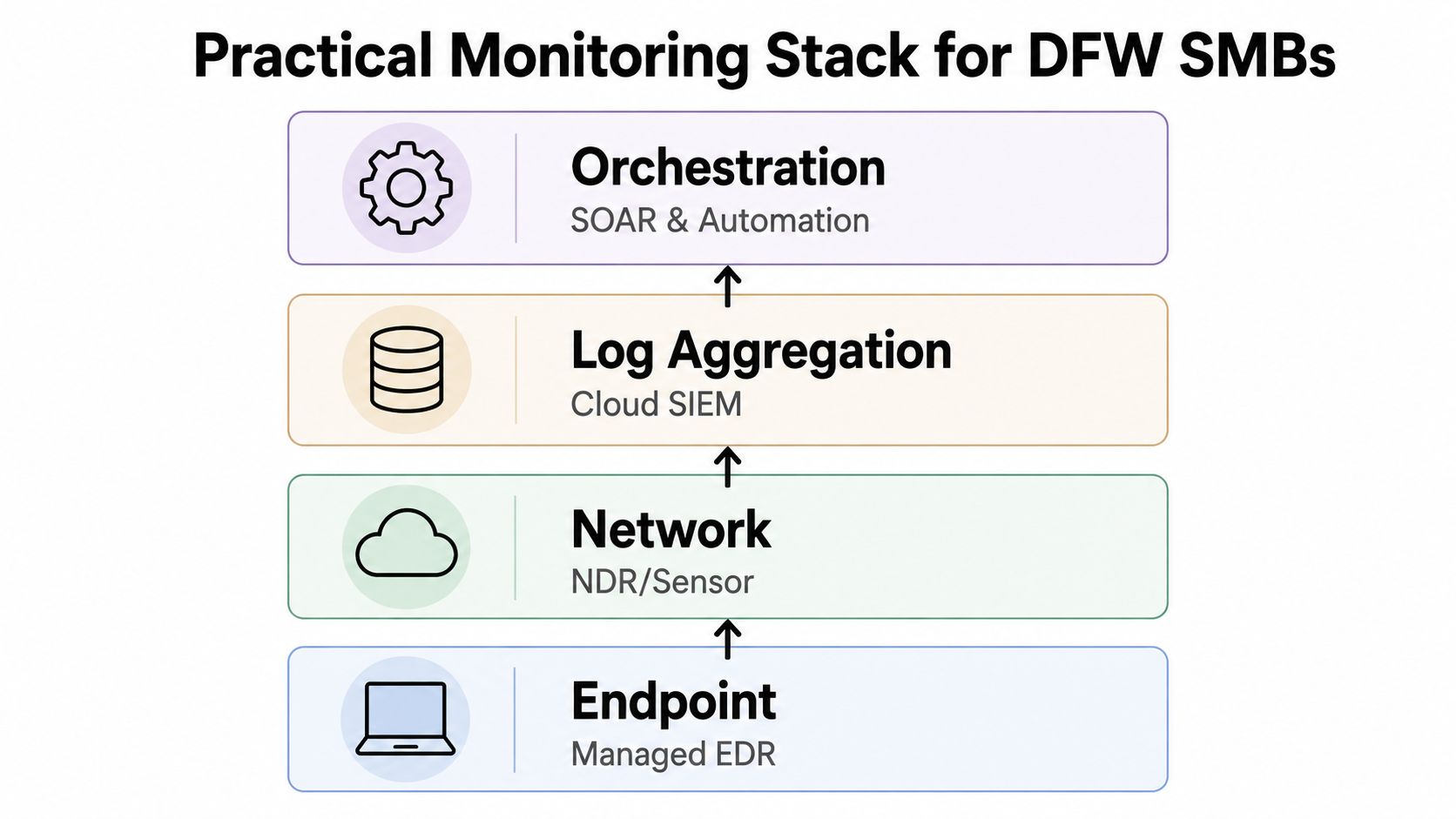
A 25-to-150-person Dallas–Fort Worth firm doesn't need every security product on the market. It needs a connected stack for the endpoint, identity, network, cloud, and response process.
The foundation is managed EDR on every laptop and server. Unenrolled devices create immediate blind spots, especially when procurement or remote work bypasses IT. Endpoint controls should feed incident context into the central monitoring platform so analysts can connect a suspicious process with the user, device, and related access events.
The next layer protects Microsoft 365 or Google Workspace identities. Monitoring should include sign-in behavior, MFA events, administrative changes, mailbox rules, risky sessions, and access to sensitive files. A firewall cannot explain a stolen cloud token, and endpoint telemetry may not show what happened inside a SaaS application.
Network detection belongs at the firewall and core switch where practical. It adds visibility into lateral movement and unusual internal communications. Cloud posture monitoring should cover Azure, AWS, or Microsoft 365 configurations, workloads, privileges, and audit activity.
A workable operating model
A cloud SIEM or XDR platform should correlate the signals. A managed SOC should sit above that platform for continuous triage, tuning, escalation, threat hunting, and compliance reporting. Managed SIEM can support centralized visibility and reporting, but the compliance program still needs documented policies, access controls, risk management, and other applicable safeguards.
DFW buyers should connect the stack to the business context. A HIPAA-covered practice needs evidence around access and protected data. A law firm must account for client confidentiality and applicable Texas privacy obligations. An RIA needs monitoring and records that support its security expectations. Construction and nonprofit organizations may have fewer formal obligations, but they still depend on email, cloud files, remote access, and payment systems.
A sensible stack list is:
- Endpoint: Managed EDR for laptops and servers.
- Identity: Monitoring for Microsoft 365 or Google Workspace.
- Network: Firewall telemetry plus NDR or an appropriate sensor.
- Cloud: Posture and workload monitoring for active cloud services.
- Correlation: SIEM or XDR with useful retention and reporting.
- Operations: Managed SOC coverage for triage, response, and tuning.
Coverage should drive the architecture. Brand loyalty should not.
Rolling Out Cybersecurity Monitoring Tools in 30 60 and 90 Days
A rollout should produce evidence of progress, not just a collection of completed vendor tasks. The following sequence gives an SMB a practical way to separate visibility, tuning, and operational readiness.
Days 0 to 30 build visibility
Deploy EDR across every known laptop and server. Turn on cloud audit logs, baseline identity events, and connect each meaningful data source to the SIEM or XDR console. Document assets that cannot send telemetry and assign an owner for closing each gap.
The first milestone is a defensible coverage record. It should show which endpoints report, which identities are monitored, which cloud services produce logs, and which network segments have usable visibility.
Days 31 to 60 tune the signal
Write detections around the threats most relevant to the firm, including phishing, ransomware staging, suspicious administrative actions, unusual authentication, and sensitive data access. Suppress known benign activity only after someone validates the pattern. Every alert needs an owner, an escalation path, and enough context for the next action.
Thresholds should buy response time rather than generate noise. A warning may permit hours or days for action, while a critical condition may require action within minutes. Thresholds should connect to service objectives, include actionable details, and receive quarterly review. (warning threshold guidance)
Days 61 to 90 produce proof
Build reports aligned with the firm's obligations, such as HIPAA, PCI, FTC Safeguards, or CMMC requirements where applicable. Run a tabletop exercise using a realistic phishing, ransomware, or account-compromise scenario. Confirm who contacts leadership, who isolates systems, who preserves evidence, and who communicates with legal or compliance stakeholders.
A final review should record detections that fired, alerts that were suppressed, unresolved coverage gaps, and response ownership. Where staffing is thin, hand off continuous monitoring to a managed SOC and retain clear approval authority inside the business.
Quiet Failures That Break Even Good Monitoring Programs
Most monitoring programs fail around the tool, not inside it. An un-tuned dashboard teaches staff to ignore alerts. A rule review that never happens lets detection logic drift away from the environment. A tabletop exercise that stays on the calendar instead of being run leaves decision-makers unfamiliar with their own response process.
DFW healthcare, legal, and construction firms commonly encounter the same quiet breakdowns:
- Alert fatigue: Default thresholds create repetitive false positives, so analysts stop trusting the queue.
- Skipped rule reviews: New cloud services, remote access methods, and business changes outpace detection content.
- Missing tabletop exercises: The first real incident exposes unclear authority and missing contacts.
- Shadow IT endpoints: Devices purchased outside the normal process never enroll in EDR.
- Single-console dependence: A SIEM without identity, cloud, endpoint, or network context can preserve logs without explaining the incident.
Independent 2026 coverage and survey research identified persistent challenges in operational validation, adversarial resilience, cross-environment generalization, and evaluation for AI-driven alert screening. Industry reporting also describes overwhelming alert volumes and high false-positive rates, reinforcing the practical conclusion that firms need better correlation, context, and triage rather than an endless stream of new alerts. (alert fatigue analysis)
Before renewal, leadership should run a short pre-mortem:
- Who owns every high-priority alert?
- What proof shows that important detections fired and were reviewed?
- Which rules changed during the last 90 days?
- Which devices, identities, cloud services, or network segments remain uncovered?
- When was the last response exercise, and what did it change?
A written incident response procedure turns those answers into an operating process. Without that process, cybersecurity monitoring tools become expensive evidence collectors instead of working security controls.
Technovation LLC provides DFW businesses with 24/7 cybersecurity monitoring, managed IT security, compliance support, and coverage-gap reviews across endpoints, identity, network, and cloud environments. Clinic, law firm, and professional-services owners can visit Technovation LLC to request a security audit and discuss a managed or co-managed monitoring plan built around their actual staffing, systems, and regulatory obligations.





