A lot of Plano business owners are in the same spot right now. The company is growing, employees depend on cloud apps all day, clients expect fast response times, and technology keeps interrupting work instead of supporting it. A slow network during payroll, a user who clicks a suspicious email, a backup that nobody has tested, or a server issue that shows up at the worst possible time can turn a normal day into a management problem.
That’s why managed it services plano tx has become less about fixing broken devices and more about running a stronger business. For many small and mid-sized companies, the true value isn’t just outsourced support. It’s having a structured way to reduce risk, stabilize operations, and make smarter technology decisions before a problem affects revenue, service delivery, or reputation.
Table of Contents
- Beyond Break-Fix Your Introduction to Strategic IT
- What Modern Managed IT Services Actually Include
- The Tangible Business Benefits for Plano Companies
- Sample Service Packages and Pricing Models
- How to Choose the Right IT Partner in Plano
- Take the First Step With a Free IT Health Check
- Frequently Asked Questions
Beyond Break-Fix Your Introduction to Strategic IT
A break-fix model sounds simple until it starts shaping the entire business. Something breaks, somebody calls for help, work slows down, and the bill arrives after the damage is already done. That approach might feel cheaper in quiet months, but it usually creates hidden costs through downtime, rushed decisions, and recurring issues that never get solved at the root.

A more strategic model starts with a different question. Instead of asking, “Who can fix this today?” smart operators ask, “What needs to change so this stops happening?” That shift matters in Plano because many local companies are balancing growth with compliance pressure, client expectations, and lean internal teams.
Three situations usually push owners to reconsider how IT is handled:
- Recurring interruptions: The same printer, Wi-Fi, login, or line-of-business issue keeps coming back and stealing staff time.
- Security uncertainty: Employees work fast, but leadership isn’t confident that email, endpoints, remote access, and permissions are being managed consistently.
- No roadmap: The business keeps buying technology one issue at a time, with no clear plan for upgrades, budgeting, or risk reduction.
Practical rule: If leadership only talks about IT when something fails, the business is still treating technology as a repair expense instead of an operating system for growth.
Managed services change that operating model. The provider monitors systems, maintains devices, manages security layers, supports users, and helps leadership make better decisions about budget, compliance, and scalability. That creates a steadier environment where employees can work without constant technical friction.
For a Plano company, that can mean fewer operational surprises during a busy quarter, cleaner audit preparation for a regulated workflow, and better alignment between technology spending and business goals. The value isn’t in having more tools. The value is in getting fewer distractions, better visibility, and a partner that helps keep the business moving.
What Modern Managed IT Services Actually Include
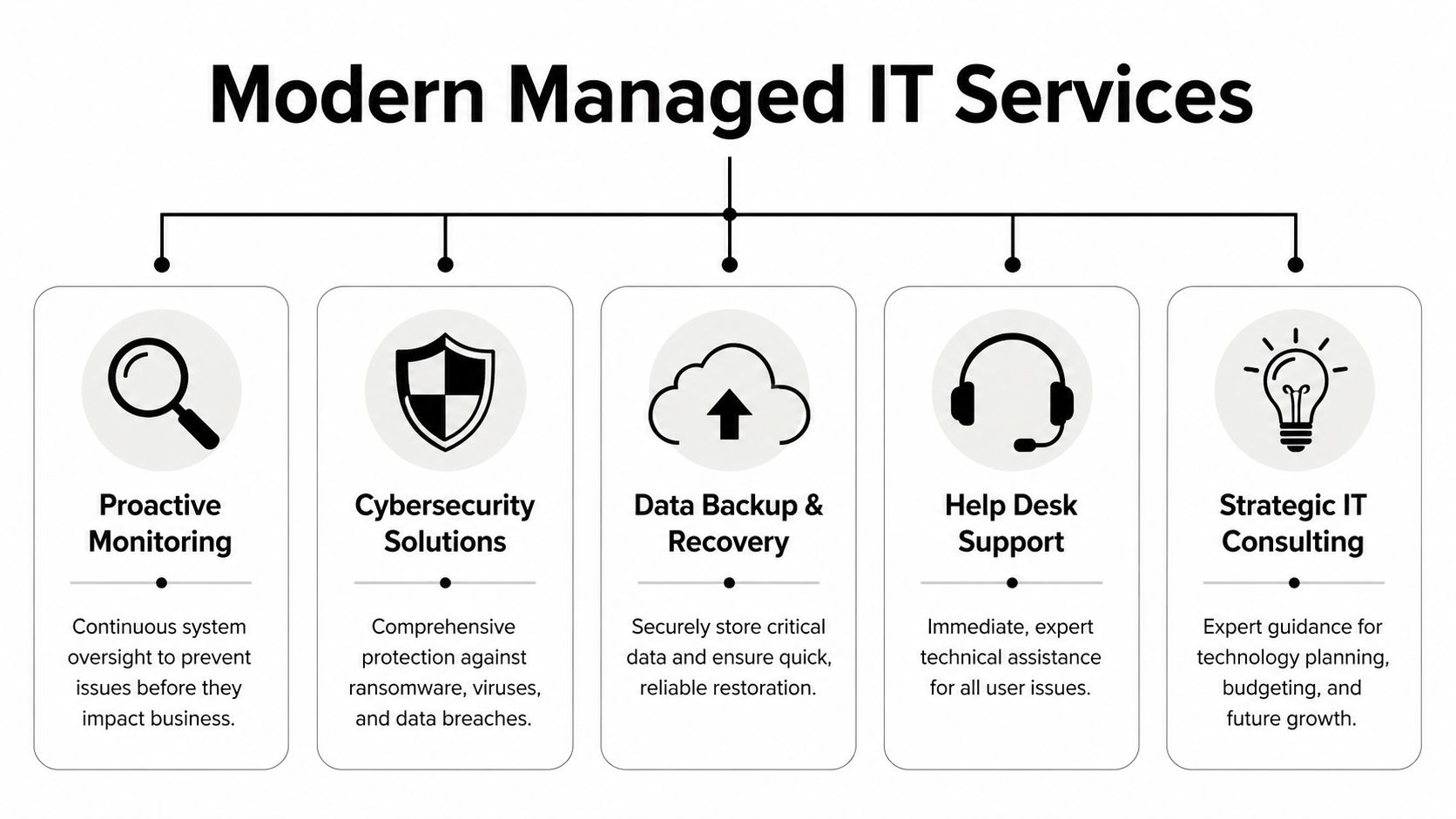
A good managed services agreement should cover much more than a help desk. If the offering is just ticket handling, the business is still too close to a reactive model. Modern service should combine oversight, protection, recovery planning, and guidance.
Monitoring that works in the background
Monitoring is the quiet part of managed IT, but it’s often the most important. Systems are watched continuously so failing drives, storage shortages, patch issues, performance degradation, and unusual device behavior get caught early. That’s what keeps a minor issue from becoming a work stoppage.
This kind of maintenance also includes routine patching, software updates, endpoint oversight, and network health review. A business owner may never see most of that work directly, which is exactly the point. When it’s done properly, employees experience fewer interruptions.
Security that does more than install antivirus
Security has to be layered. Email filtering, endpoint protection, access control, firewall management, vulnerability review, user awareness, and policy enforcement all matter because attackers rarely rely on a single path. A provider that only talks about one security tool is usually solving the wrong problem.
For Plano businesses in healthcare, legal, finance, construction, and other sensitive sectors, the goal is practical control. Who can access what, from where, and under what conditions? Which alerts deserve escalation? How quickly can suspicious activity be contained? Those are management questions as much as technical ones.
A strong managed service relationship also includes advisory support. That’s where virtual CIO planning becomes useful. It helps leadership connect security decisions, lifecycle planning, vendor coordination, and budgeting to actual business priorities instead of treating every request as a separate project.
Backups recovery and compliance discipline
Backups are often misunderstood because many businesses assume backup exists if data syncs somewhere. That assumption causes problems. Real backup strategy includes retention, restoration testing, recovery priority, and clear expectations for what gets restored first if operations are disrupted.
Managed services should also address disaster recovery. That means deciding in advance how the company will keep functioning if a key system fails, a site becomes unavailable, or data has to be restored quickly to support operations.
A practical service scope usually includes:
- User support: Fast help for login problems, device issues, application errors, and day-to-day technical questions.
- Infrastructure care: Ongoing attention to networks, servers, endpoints, cloud environments, and remote access.
- Backup oversight: Review of backup success, restore procedures, and business continuity priorities.
- Compliance readiness: Support for documented controls, access discipline, and technical safeguards tied to regulated environments.
Managed IT should remove decision fatigue. Leadership shouldn’t have to guess whether updates were applied, backups worked, or a security alert was ignored.
When these elements are in place together, the business gets more than support coverage. It gets a stable operating foundation.
The Tangible Business Benefits for Plano Companies
A Plano company usually feels the need for managed IT in the middle of growth. Headcount is up, systems are more connected, customers expect faster response, and one outage now affects sales, service, accounting, and leadership at the same time. At that stage, managed it services plano tx stop being a repair function and start acting like operating infrastructure.

Less disruption more productive time
The clearest benefit is fewer interruptions to normal work.
A proactive IT model catches many issues before employees open a ticket. That includes failing hardware, storage limits, patch problems, unusual login activity, and backup errors. The business result is straightforward. Staff spend more time doing billable work, serving customers, and keeping projects on schedule instead of waiting on fixes.
Downtime also carries a management cost that owners often underestimate. When systems fail, leaders get pulled into decisions they should not have to make in real time. Who needs access first. What workaround is acceptable. Whether the issue is isolated or broader. A managed service relationship reduces that pressure with documented response procedures, assigned ownership, and a support team that already knows the environment.
For growing firms, consistency matters as much as speed. One avoided outage during payroll, month-end close, or a client deadline can protect far more value than the monthly service fee suggests.
Predictable cost better planning
The second benefit is control over IT spending.
Managed services shift technology from irregular emergency spending to a planned operating expense. That makes it easier to budget for support, security, maintenance, and lifecycle decisions without getting surprised by a server failure, rushed replacement purchase, or after-hours repair bill. Finance teams can plan with more confidence, and leadership can tie IT spending to business priorities instead of reacting to whatever broke first.
That predictability supports better decisions across the company:
- Budget discipline: Technology costs are easier to forecast and defend.
- Growth planning: New employees, office moves, cloud changes, and remote access needs can be priced before they become urgent.
- Risk reduction: Security reviews, maintenance, and recovery preparation happen on a schedule instead of after an incident.
- Staffing efficiency: Companies get access to support, security, infrastructure, and planning skills without hiring a full internal team for every specialty.
There is a trade-off. A monthly agreement can feel higher than handling problems one at a time, especially if the business has been fortunate and avoided major incidents. But break-fix usually looks cheaper only until downtime, recovery labor, lost output, and rushed projects are counted together.
The real financial advantage is not that problems disappear. It is that the business can plan for technology, contain risk earlier, and avoid expensive surprises.
For Plano companies competing in fast-moving local markets, that shift creates more than technical stability. It gives the business room to grow with fewer disruptions, better cost control, and stronger operational resilience.
Sample Service Packages and Pricing Models
Pricing decisions shape more than monthly spend. They determine how much operational risk a company keeps, how quickly issues get resolved, and whether IT can support growth instead of slowing it down.
In Plano, most managed IT agreements are built around a per-user monthly model, but the number alone does not tell you much. Two proposals can look similar on price and differ sharply in what they cover. One may include user support, security oversight, backup review, and planning meetings. Another may cover basic ticket handling and leave recovery testing, vendor coordination, and strategic planning to your staff.
That gap matters.
A low entry price often works for a very small company with stable systems and limited compliance pressure. It becomes expensive fast if the business is adding employees, relying on cloud applications, supporting remote users, or carrying contractual security requirements. If you want a useful framework for evaluating providers beyond the monthly fee, this guide on how to choose a managed service provider helps clarify what should be included before you sign.
Comparing common managed IT service tiers
The table below shows a practical way to compare service levels. These are sample structures, not fixed offers.
| Feature | Essential Security | Proactive Growth | Complete Compliance |
|---|---|---|---|
| Core help desk | Business-hours support for user issues | Expanded support with broader device and application coverage | Priority support with structured escalation and documentation |
| Monitoring | Device and system monitoring on key assets | Full environment monitoring with maintenance workflows | Full monitoring plus tighter oversight for regulated operations |
| Cybersecurity | Baseline endpoint and email protection | Layered protection with policy enforcement and review | Layered security with stronger control mapping and audit readiness |
| Backup | Standard backup oversight for core systems | Backup plus recovery planning for critical workloads | Backup, recovery validation, and stricter continuity procedures |
| Strategic guidance | Limited planning discussions as needed | Regular technology planning tied to business goals | Ongoing planning with compliance and risk alignment |
| Best fit | Small firms with basic support needs | Growing companies with multiple systems and users | Organizations with sensitive data or regulated requirements |
The point is not to buy the highest tier by default. The point is to match service depth to business exposure.
Here is a practical way to sort the fit:
- Essential Security: A sensible starting point for smaller firms that need reliable support, patching, endpoint protection, and basic operational discipline.
- Proactive Growth: A better fit for companies hiring steadily, adding locations, increasing cloud reliance, or dealing with more vendor and workflow complexity.
- Complete Compliance: Often the right choice when the business handles sensitive records, must document controls, or cannot afford uncertainty around access, recovery, and audit preparation.
How to evaluate value without getting lost in seat cost
Good pricing conversations start with business impact. If a system outage stops scheduling, billing, manufacturing, customer support, or sales activity, the cheaper package may not be cheaper in practice. If leadership expects IT to support expansion, a plan with no roadmap, lifecycle planning, or recovery validation will create friction later.
Ask direct questions:
- What happens during a serious outage? Confirm whether recovery coordination, backup validation, and after-hours response are included.
- Who reviews security alerts and policy gaps? Tools alone do not reduce risk if nobody owns follow-up.
- What planning time is built into the agreement? Quarterly strategy meetings, budgeting guidance, and infrastructure planning have real business value.
- What is excluded? Onboarding, vendor management, compliance work, and project labor are common areas where costs surface later.
The strongest package is usually the one that fits the company’s current stage and leaves room for the next one. That is the strategic shift many Plano businesses need. Managed IT should not sit in the budget as a repair line item. It should function as an operating investment that protects margin, supports expansion, and keeps technology decisions aligned with the business.
How to Choose the Right IT Partner in Plano
A Plano business usually feels the cost of a weak IT partner before leadership sees it on a spreadsheet. New hires wait too long for access. Routine changes turn into ticket chains. Security recommendations show up without context, and nobody can explain which risks matter now versus later. That is why provider selection deserves the same scrutiny as any other operating partner tied to revenue, compliance, or customer experience.

In this market, businesses have choices. The challenge is not finding a provider. It is finding one that can support day-to-day operations while also helping the company make better technology decisions over the next one to three years. A managed IT relationship should improve execution, reduce avoidable risk, and give leadership clearer control over cost.
What to verify before signing anything
Start with operating fit. A provider may sound polished in a sales call and still fall short once the work begins. Ask how they run service delivery during normal weeks, not only during outages. The quality of patching, user onboarding, backup review, documentation, escalation, and follow-through will shape the relationship more than a fast response during a single incident.
A practical checklist includes:
- Local support capacity: Can they handle on-site needs in Plano when remote help is not enough?
- Industry experience: Have they supported companies with similar audit, security, or documentation requirements?
- Service discipline: Do they have defined processes for patching, account changes, backup checks, and incident escalation?
- Leadership support: Will they advise on priorities, budgeting, and lifecycle planning, or mainly react to tickets?
- Reporting: Will management get useful updates on risks, trends, unresolved issues, and recommended next actions?
The best conversations sound like an operational review. They include questions about your workflows, line-of-business systems, vendor dependencies, approval process, and growth plans. If the provider does not ask those questions, expect shallow guidance later.
What a strong partner should clarify early
A serious provider should be able to explain scope in plain language. What is included after hours? Who owns vendor coordination? How are projects separated from monthly support? What happens if leadership wants help with budgeting, security policy, or a recovery plan?
Those details matter because hidden gaps turn a fixed monthly agreement into an unpredictable expense. They also reveal whether the MSP sees its role as a repair function or as part of the company’s operating model. For many Plano businesses, the better long-term choice is the partner that prevents disruption, supports growth decisions, and helps management avoid expensive surprises.
Where Technovation fits
For companies evaluating local options, Technovation’s guide to choosing a managed service provider outlines the selection criteria that matter in real operating environments. Technovation LLC works across DFW and focuses on cybersecurity, compliance, proactive monitoring, strategic planning, and support for regulated or security-conscious businesses.
That focus matters for companies that need more than general help desk support. They need a partner that can connect technical decisions to business exposure, staffing changes, recovery expectations, documentation, and planned growth. A good IT partner makes operations easier to run and gives leadership better control over risk, cost, and future capacity.
Take the First Step With a Free IT Health Check
Most businesses don’t need to replace everything. They need visibility. A key challenge is that leadership often knows something feels off, but can’t see exactly where the risk sits. That’s where a health check becomes useful.
A practical IT health check should answer a few direct questions. Are backups aligned with business priorities? Are access rights too broad? Are endpoints being maintained consistently? Are there compliance gaps in documentation or technical safeguards? Is the current setup supporting growth, or forcing the company into workarounds?
What a useful health check should uncover
A worthwhile review should produce findings that management can act on, such as:
- Hidden operational weaknesses: Unsupported devices, inconsistent patching, or fragile dependencies.
- Security exposure: Gaps in access control, monitoring, endpoint coverage, or user processes.
- Recovery concerns: Unclear restore priorities, untested backups, or vague continuity expectations.
- Planning issues: Technology spending that isn’t aligned with business direction or risk level.
This kind of assessment is valuable even if the business keeps its current model. It gives ownership and leadership a clearer picture of what’s working, what’s exposed, and what needs attention first.
For a Plano company that’s serious about resilience and growth, proactive IT management is no longer a back-office upgrade. It’s part of how the business protects time, reputation, and momentum.
Frequently Asked Questions
Can managed services work with an internal IT person
Yes. Many companies use a co-managed model. Internal staff may handle business-specific systems, user relationships, or daily coordination, while the managed provider supports monitoring, cybersecurity, backup oversight, escalation, and strategic planning. That setup often works well when the company wants more depth without adding full-time headcount.
Is managed IT only for larger companies
No. Smaller firms often benefit the most because they have less room for downtime and fewer internal resources to absorb technical problems. Managed services can scale with the business, whether the need is baseline support, stronger security, or more formal processes around growth and compliance.
What does onboarding usually involve
A proper onboarding process should document users, devices, systems, permissions, backup status, support procedures, and key business dependencies. It should also identify immediate risks that need correction early. Good onboarding isn’t just administrative. It’s where the provider builds a working map of how the business operates.
How important is compliance support
For healthcare, legal, financial, and other sensitive environments, it’s extremely important. Compliance readiness isn’t just about passing an audit. It affects access control, documentation, recovery planning, data handling, and day-to-day operating discipline. A provider should be able to support those realities in practical terms, not just mention compliance in marketing language.
A no-pressure next step is to request a free IT health check from Technovation LLC. That review can help identify hidden risks, weak points in security or recovery, and opportunities to align technology with the way the business needs to operate.