Most Dallas business owners still ask the wrong question about security. They ask, “What will it cost?” instead of “What happens to revenue, operations, and client trust if systems go down on a Tuesday morning?”
That gap in thinking is where problems start. IT security isn’t a background IT chore. It’s part of business continuity, compliance, hiring credibility, contract readiness, and day-to-day stability. In a market as competitive as Dallas-Fort Worth, the companies that treat security as a business function move faster after disruptions, protect client relationships better, and avoid the chaos that stalls growth.
A company doesn’t need to be large to be exposed. It only needs email, cloud files, remote access, shared documents, payment data, or regulated client information. That describes most small and mid-sized businesses in North Texas.
Table of Contents
- Is Your Dallas Business Ready for Today’s Threats
- The Reality of Cyber Threats in Dallas Fort Worth
- Navigating DFW Compliance and Regulatory Hurdles
- Your Proactive Defense A Look at Managed IT Security Services
- How to Choose the Right Dallas IT Security Partner
- The Real ROI of Proactive IT Security
- Secure Your Business’s Future Today Your Next Steps
Is Your Dallas Business Ready for Today’s Threats
A business owner who thinks security is too expensive is usually comparing it to nothing. That comparison is flawed. The appropriate comparison is between planned monthly protection and unplanned operational disruption.
Texas businesses aren’t dealing with a niche problem. Texans lost over $1 billion to cybercrime in 2023, and AI-driven attacks surged by 135% in 2024, according to Texas cybercrime reporting highlighted for Dallas-Fort Worth businesses. Small and mid-sized businesses are affected disproportionately because attackers often see them as easier targets.
That matters in Dallas-Fort Worth because many local firms sit in high-trust industries. Medical practices hold sensitive patient records. Law firms store privileged communications. Accounting firms manage financial data. Construction companies share plans, bids, and payment details across multiple parties. Nonprofits often work with lean staff and fragmented systems. None of those organizations can afford confusion, downtime, or a breach that clients hear about before leadership does.
The mistake that keeps costing SMBs
Many owners still assume one of three things:
- “We’re too small.” Small companies are often easier to pressure because they have fewer internal controls and less time to investigate suspicious activity.
- “We’ve got antivirus, so we’re covered.” Basic protection doesn’t equal monitoring, policy enforcement, secure backup, or incident readiness.
- “We’ll deal with it if it happens.” That’s not a strategy. That’s delayed decision-making under stress.
Practical rule: If a company can’t explain how it would detect account abuse, isolate a compromised device, continue working during an outage, and restore critical data, it isn’t secure. It’s exposed.
The smarter position is simple. Security supports continuity. It keeps staff productive, protects reputation, and gives leadership fewer ugly surprises. In Dallas, that’s not overhead. That’s operational discipline.
The Reality of Cyber Threats in Dallas Fort Worth
What happens if your team loses access to email, files, or client records on a Tuesday morning? For many Dallas-Fort Worth businesses, that is not a remote scenario. It is the kind of disruption that stalls revenue, strains customer trust, and forces leadership into expensive decisions under pressure.
A local example makes the risk concrete. In October 2023, Dallas County disclosed a ransomware incident affecting 201,404 individuals, with exposed data that included names, Social Security numbers, dates of birth, driver’s license or identification numbers, taxpayer identification numbers, and in some cases medical and health insurance information, according to reporting on the Dallas County ransomware breach. The response required outside cybersecurity support, password resets, blocking malicious IP addresses, broader endpoint monitoring, and credit monitoring for affected individuals.
That is the business lesson. An attack is not just a technical event. It becomes an operations problem, a customer confidence problem, a legal problem, and a leadership problem all at once.
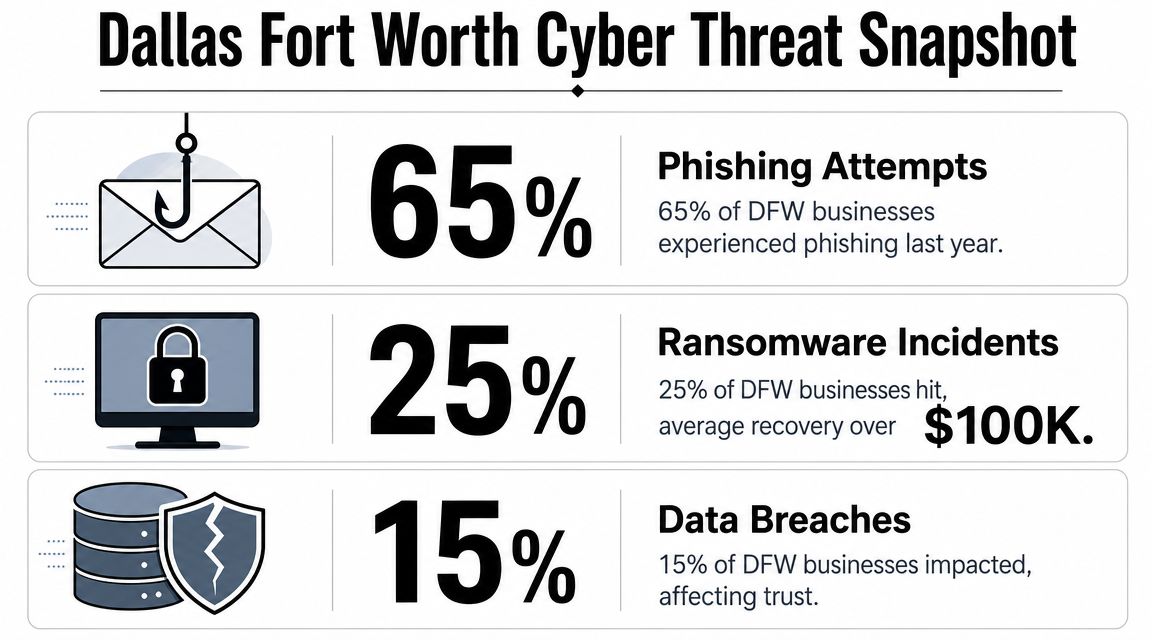
What hits Dallas businesses most often
In DFW, attackers usually do not break in through some exotic method. They get access through ordinary business habits. A reused password. A fake Microsoft 365 login page. A vendor impersonation email. A cloud folder with weak permissions. A remote access tool left exposed.
Three threat categories deserve constant attention:
- Ransomware: Systems become unavailable, work stops, and every hour of downtime gets more expensive.
- Business email compromise: A criminal hijacks or imitates a trusted account, then redirects payments, changes banking details, or inserts themselves into sensitive conversations.
- Data exposure from weak controls: Files, cloud apps, and remote access stay open wider than leadership realizes, which creates quiet risk long before anyone notices.
These incidents hit Dallas companies hard for a reason. This region runs on speed, coordination, and trust. Healthcare groups share sensitive records. Law firms handle privileged material. Construction and logistics companies depend on fast approvals and accurate documentation. Financial and professional services firms move money and confidential data every day. When access breaks down, the business does not just slow down. It loses momentum in one of the most competitive markets in the country.
That is why smart owners stop treating security as an IT line item. They use it to protect uptime, keep deals moving, reassure customers, and avoid preventable disruption. If you want a practical view of how security controls support those outcomes, review these data security and compliance priorities for growing businesses.
The companies that handle this well gain an advantage. They recover faster, make cleaner decisions during incidents, and look more credible to customers, partners, and insurers. In Dallas-Fort Worth, that matters. Resilience is not a side benefit. It is part of how a business stays competitive.
Navigating DFW Compliance and Regulatory Hurdles
What happens if a client, regulator, or insurer asks you to prove your controls worked last month?
Compliance is where many Dallas-Fort Worth businesses get exposed. Leaders assume it is a paperwork exercise they can clean up later. It is a management discipline. If your company cannot show who had access, what was protected, which rules were enforced, and how incidents were handled, you have an operational weakness, not a filing problem.
In DFW, that weakness carries real business consequences. Healthcare practices, law firms, manufacturers, construction companies, and financial firms all face pressure to protect sensitive data while keeping work moving fast. The companies that handle compliance well do more than avoid fines. They win trust faster, pass client reviews with less friction, and keep larger deals from stalling in procurement.
Compliance is leadership work
Security controls exist to meet business obligations. A clinic must protect patient information. A law firm must preserve confidentiality. A company processing card payments must control access to payment systems and records. Those requirements are not abstract. They shape daily operations, hiring, vendor access, remote work, recordkeeping, and response planning.
Owners often make the same mistake. They push compliance to IT, then expect IT to solve a policy and accountability problem on its own. That approach fails. Compliance needs leadership ownership because the hardest parts involve decisions about access, approvals, exceptions, documentation, and enforcement.
What you should manage
A sound compliance posture comes from a few disciplined choices:
-
Limit access on purpose
Give employees access based on role, not convenience. Broad permissions create avoidable exposure and make reviews harder. -
Write policies people can follow
Passwords, personal devices, file sharing, remote access, and vendor connections need clear rules. If the policy is too vague to enforce, it is useless. -
Keep proof ready
Clients, auditors, insurers, and regulators want evidence. Maintain logs, access reviews, training records, backup records, and incident documentation in a form you can produce quickly. -
Treat incident response like an operating process
Decide in advance who approves isolation steps, who documents the event, who speaks to customers, and who works with legal or insurance contacts.
Compliance failures usually start with ownership failures. No one reviewed exceptions, no one checked whether controls worked, and no one noticed the gap until someone outside the company asked for proof.
For many businesses, the hard part is turning legal or contractual requirements into repeatable daily habits. That is why a structured data security and compliance plan for Dallas businesses matters. It connects policies to workflows, assigns responsibility, and gives leadership a way to verify that the rules are being followed.
That is the value of compliance in DFW. It protects revenue, shortens sales friction, supports insurance conversations, and keeps a preventable control failure from turning into a business disruption.
Your Proactive Defense A Look at Managed IT Security Services
What happens to your business if a compromised account goes unnoticed until Monday morning?
That is the problem managed IT security is supposed to solve. It is not an add-on for cautious companies. It is an operating function that protects revenue, keeps client work moving, and prevents leadership from making decisions in the middle of a preventable mess.
In Dallas-Fort Worth, that matters more than many owners admit. This market moves fast. Construction firms share plans across job sites, healthcare groups depend on constant system access, law offices handle sensitive files under deadline, and logistics companies cannot afford delays. A security gap is not just an IT issue. It can stall billing, disrupt service, damage trust, and hand faster competitors an opening.
What managed security should include
A good service stack should reduce specific business risks, not pile up disconnected tools.
- Continuous monitoring: Someone should review unusual activity, repeated login failures, suspicious access behavior, and policy violations after hours, not just during the workday.
- Endpoint protection and response: Laptops, desktops, and servers need active detection, investigation, and containment. Antivirus alone is not a security plan.
- Patch and update management: Delayed updates leave known weaknesses open because internal teams are busy with daily work.
- Backup and recovery planning: Backups should support business continuity. If recovery is slow, incomplete, or untested, the business is still exposed.
- Security awareness for employees: Staff need practical training for email threats, approval requests, file sharing, password habits, and remote work behavior.
- Access control discipline: Users should have only the access they need, and temporary exceptions should expire on purpose, not by accident.
Why configuration discipline matters so much
A large share of avoidable risk comes from misconfigured systems, weak permission settings, poor alerting, and sloppy administrator practices. Companies buy cloud platforms assuming the provider handled security for them. That assumption causes trouble.
A proper review should answer a few blunt questions.
- Are admin roles tightly limited? Too many privileged accounts increase the damage a single mistake or compromise can cause.
- Are sharing settings controlled? Convenience often creates exposure leadership never approved.
- Are alerts set up to reach the right people? If suspicious behavior triggers no response, the control failed.
- Is remote access restricted and monitored? Staff need access. They do not need broad entry from unmanaged devices and risky locations.
Good security starts with consistency. The companies that recover faster and win more trust in DFW are usually the ones that treated security as an operating discipline before an incident forced the issue.
For businesses without internal security depth, managed support fills that gap with process, coverage, and accountability. Technovation LLC provides DFW businesses with managed cybersecurity, compliance support, 24/7 monitoring, cloud backup, remote access security, and strategic IT planning. If you are weighing providers, this guide on how to choose a managed service provider for security and long-term support will help you separate real protection from basic help desk coverage.
How to Choose the Right Dallas IT Security Partner
A provider shouldn’t be judged by how well it talks about threats. It should be judged by how clearly it prevents operational messes.
Too many business owners buy support based on friendliness, vague promises, or a low monthly quote. Then they discover the provider is really a help desk with limited security depth. IT security requires more than ticket handling. It requires process, accountability, and regional understanding.
Questions that reveal whether a provider is reactive or strategic
The fastest way to evaluate a partner is to ask sharper questions.
- Ask how they monitor after hours. If the answer is vague, coverage is probably weak.
- Ask how they handle a compromised account. A serious provider should explain isolation, investigation, password control, and recovery workflow in plain language.
- Ask what they do for regulated firms. Healthcare, legal, and financial organizations need more than generic support.
- Ask how they document risk. If they can’t show a structured review process, they probably operate from memory and tickets.
- Ask how they reduce future exposure. Fixing today’s issue matters. Preventing the next one matters more.
A good local partner should also understand business pressure in North Texas. That means knowing that a construction firm can’t lose access to plans mid-project, a clinic can’t tolerate interruptions around patient scheduling, and a law office can’t shrug off document exposure as an IT inconvenience.
Business owners should also review how the provider educates clients. A strategic firm explains tradeoffs, flags bad assumptions, and helps leadership prioritize. A weak firm waits for emergencies.
For companies evaluating options, this guide to choosing a managed service provider is a useful benchmark because it focuses on fit, accountability, and support structure instead of generic sales language.
IT Security Partner Evaluation Checklist
| Evaluation Criteria | Question to Ask | What to Look For |
|---|---|---|
| Local presence | Can they support Dallas-Fort Worth operations directly? | Clear local coverage, fast communication, and understanding of regional industries |
| Security monitoring | Who watches for threats when the office is closed? | Defined monitoring process, escalation path, and response ownership |
| Industry fit | Do they support healthcare, legal, finance, construction, or nonprofits? | Experience aligning controls to operational and compliance needs |
| Incident handling | What happens if an account or device is compromised? | A step-by-step containment and recovery process, not generalities |
| Cloud security | How do they review cloud permissions and configuration? | Regular audits, access reviews, and policy enforcement |
| Backup readiness | How is recovery handled if systems are encrypted or unavailable? | Business-focused recovery planning tied to critical operations |
| Communication | Will leadership receive usable risk guidance? | Plain-English reporting with priorities and decisions, not noise |
| Strategic value | Do they only fix issues, or do they improve the environment over time? | Ongoing recommendations, policy refinement, and security maturity planning |
The right provider should make leadership calmer, not more dependent on guesswork.
The Real ROI of Proactive IT Security
What does good security buy a Dallas business? More operating time, fewer expensive surprises, stronger client trust, and a company that can keep growing without getting knocked sideways by a preventable incident.
That is why security belongs in business planning, not in the leftover IT budget.
Security protects revenue, margin, and momentum
Business owners often look at security as overhead. That is a mistake. In Dallas-Fort Worth, where firms compete on speed, reliability, and client confidence, security supports the parts of the business that produce revenue.
A weak environment slows billing, disrupts scheduling, stalls projects, and pulls leadership into cleanup instead of decision-making. A disciplined environment keeps systems available, controls access, and shortens recovery if something does go wrong. The financial return shows up in fewer interruptions, lower emergency spend, and less wasted executive time.

A useful way to judge return on security investment is to ask four direct questions:
- Are your people able to keep working during an incident? If yes, downtime stays contained instead of spreading across the business.
- Will a client or prospect trust how you handle sensitive data? If yes, security supports retention and helps sales conversations.
- Can you budget for protection instead of paying for chaos? Planned controls cost less than rushed remediation, legal review, recovery work, and lost productivity.
- Is leadership focused on growth instead of damage control? Owners should spend time on hiring, sales, operations, and expansion. Security helps protect that focus.
Stable operations win business in Dallas-Fort Worth
DFW is crowded with capable firms. Clients and partners have options. They notice which companies respond quickly, protect information, and keep operations steady under pressure.
That creates a competitive edge.
A law firm that controls access and documents procedures looks lower risk to clients. A medical practice with stable systems protects patient flow and trust. A construction company with secure file sharing and account controls avoids project delays, rework, and communication errors across the field and office. Those outcomes matter because buyers are not purchasing technology. They are purchasing reliability.
Security works like infrastructure. Insurance helps after the loss. Security helps reduce the chance that normal business stops in the first place.
A company that keeps serving clients during stress is easier to trust, easier to recommend, and better positioned to grow.
That is the return on proactive IT security. Business continuity. Stronger credibility. Better margins. In a fast, competitive Dallas market, those advantages are hard to replace once lost.
Secure Your Business’s Future Today Your Next Steps
Most business owners don’t need more cybersecurity headlines. They need a clear decision.
The practical decision is this. Treat security as part of business resilience, not as a delayed IT purchase. In Dallas-Fort Worth, that means building controls around how the company works. Email, remote access, cloud collaboration, client records, payment workflows, field operations, and compliance obligations all need structure.
Waiting until something breaks is expensive because it forces leadership to make rushed choices under pressure. A planned review is cheaper, calmer, and more useful. It shows where access is too broad, where cloud settings are weak, where backups aren’t aligned to business priorities, and where policy exists on paper but not in practice.
Common final questions
Is a small business really a target?
Yes. Attackers often prefer environments with fewer controls, less oversight, and limited internal security staff. Size doesn’t protect a company that relies on email, cloud systems, and client data.
Can a company afford managed security?
The better question is whether it can afford preventable disruption. Most SMBs don’t need a massive internal security department. They need a right-sized program with monitoring, access control, backup discipline, and expert guidance.
What if the company already has basic IT support?
Basic support and actual security readiness aren’t the same thing. A help desk may solve user issues quickly and still leave serious gaps in monitoring, policy enforcement, cloud configuration, and incident response.
What should leadership do first?
Start with a security review tied to business operations. Identify the systems that can’t go down, the data that can’t be exposed, the people with too much access, and the processes that would fail during an incident.
The right next step isn’t panic. It’s visibility.
A practical next move is to schedule a security audit and IT health check with Technovation LLC. That gives a Dallas-Fort Worth business a clearer view of risk, compliance exposure, cloud security gaps, backup readiness, and operational weak points before those issues turn into downtime or client trust problems.