The workday starts normally. Then a hailstorm opens the roof above a Plano server room, a ransomware notice locks the files at a Frisco dental practice, or a rolling power outage interrupts a Hurst manufacturer during production. The owner calls the IT provider and hears the familiar reassurance: “The backups are running.” That answer is incomplete. A backup is only one ingredient in disaster recovery for small business. The test is whether people can make decisions, restore the right systems in the right order, communicate with customers, and keep cash moving while the business is impaired.
For DFW owners, preparation must be treated as financial and operational resilience, not as a technical project that ends when a backup job turns green. The widely cited 2016 U.S. Chamber of Commerce Foundation survey found that 68% of small-business owners lacked a written disaster recovery plan, while 49% said recovery from a natural disaster would take at least three months. The same survey found that 71% lacked business interruption insurance and 22% had already been affected by a natural disaster (U.S. small-business preparedness summary). Those figures describe a planning gap, but they also describe a cash-flow problem. A company that can't invoice, schedule work, access records, or pay employees has a business problem first and an IT problem second.
Table of Contents
- Why Most Small Business Recovery Plans Fail Before the Disaster
- Identifying the Risks That Actually Threaten a DFW Business
- Setting Recovery Objectives That Match Your Real Outage Tolerance
- Choosing the Right Backup and Replication Strategy
- Testing the Plan So It Works on the Worst Day
- Prioritizing Compliance, Communication, and Recovery Cost
- Checklists, Runbook Templates, and Your Next Step With Technovation
Why Most Small Business Recovery Plans Fail Before the Disaster
A server room doesn't need to be destroyed for recovery to fail. A storm can damage the facility, but the deeper failure usually began months earlier, when leadership accepted “backups are in place” as a recovery strategy. The same pattern appears after ransomware. Files may exist in a backup repository, yet nobody has confirmed whether identity services, line-of-business applications, internet access, phones, endpoints, and vendor connections can return in a workable sequence.
Vendor brochures tend to emphasize storage capacity, dashboards, and automated alerts. Owners need answers to harder questions:
- Who can authorize an emergency shutdown?
- Which system comes back first?
- How does staff work while the office is unavailable?
- How much payroll and customer service can continue without core applications?
- Who contacts the insurer, regulators, clients, and critical suppliers?
A written plan without testing is weak. A tested backup without assigned authority is also weak. Technovation's virtual CIO service can help turn those disconnected technical tasks into an operating decision framework, but ownership still belongs with business leadership.
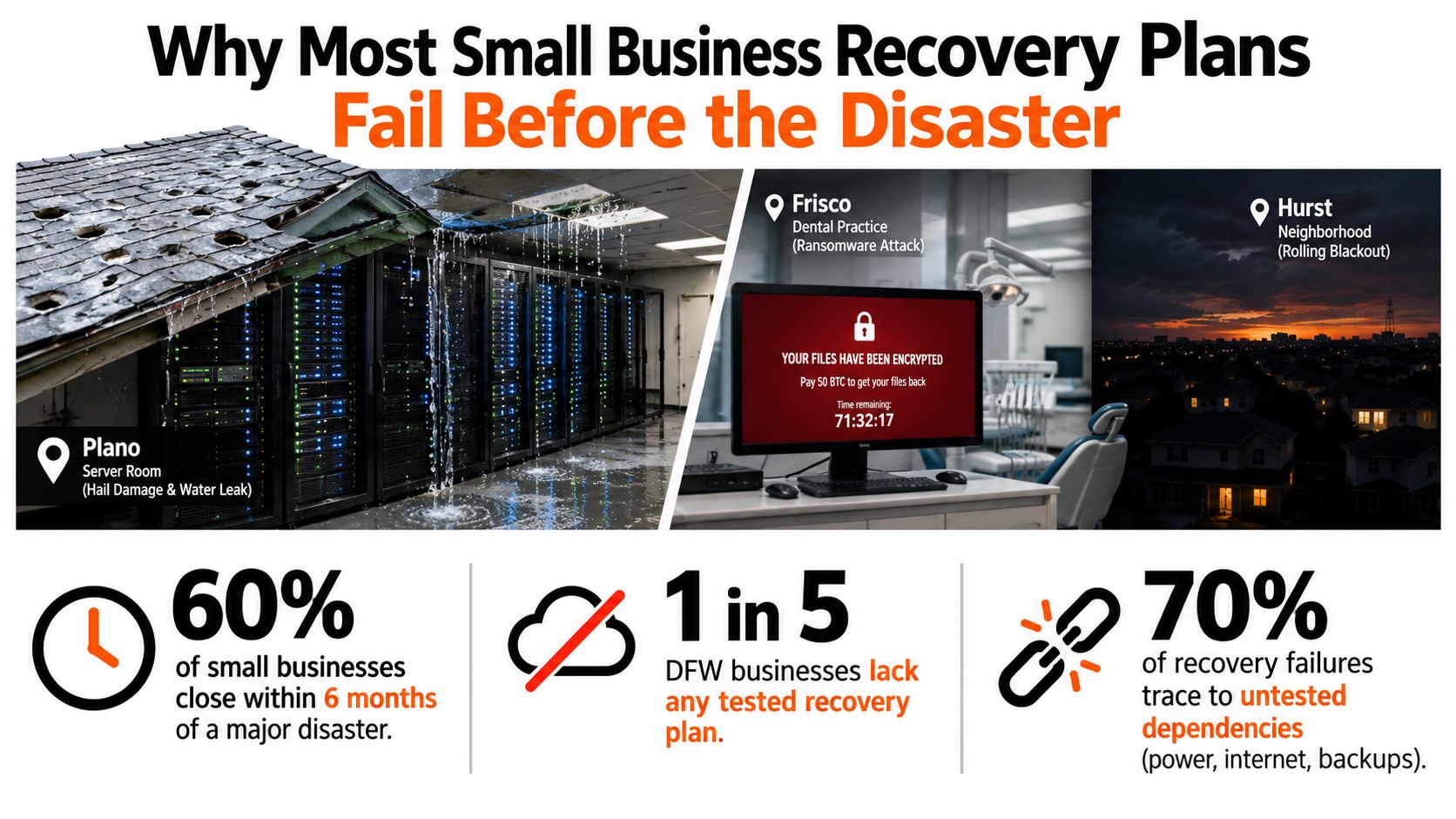
Three failure modes deserve immediate attention
Untested backups are the first. A successful backup job proves that data was copied. It doesn't prove that a complete machine can be rebuilt, that credentials still work, or that the recovered database is usable.
A single power or internet dependency is the second. A company may have resilient storage but no alternate connection, no usable power protection, and no way for employees to reach cloud systems when the primary site fails.
An undefined decision chain is the third. During a cyber incident, employees may continue using compromised devices, managers may delay isolation, and the owner may not know whether to notify customers or the cyber insurer. Recovery time expands while everyone waits for someone else to decide.
Practical rule: If a plan doesn't name the decision-maker, the recovery order, and the evidence required after a test, it isn't ready for an incident.
The Federal Reserve Bank of New York found that 63% of small businesses reporting natural-disaster losses were forced to close temporarily (small-business recovery research). That finding makes the central point clear. Recovery planning must protect the operating model, not just the data center.
Identifying the Risks That Actually Threaten a DFW Business
A business owner can produce a useful risk inventory in an afternoon without building an academic risk register. The exercise should end with a short, opinionated top-ten list tied to real processes, not a catalog of every imaginable catastrophe. A business risk assessment can add structure, but the owner and process leaders must identify what failure would stop revenue.
Start with four threat groups
Natural threats include North Texas tornadoes, hail, and flash flooding near Trinity River corridors. The affected process might be patient scheduling if a clinic loses its facility, or warehouse picking if inventory access becomes unsafe.
Infrastructure threats include utility outages, water main breaks, and fiber cuts. These can interrupt manufacturing, phones, payment processing, shipping labels, and remote access without damaging a single server.
Human and cyber threats include ransomware, phishing, accidental deletion, and a disgruntled former employee retaining access. Each requires a different response. A deleted file may need a targeted restore, while ransomware requires isolation, evidence preservation, identity review, and a controlled rebuild.
Regulatory threats arise when an interruption affects protected health information, payment data, financial records, or contractual service obligations. A healthcare practice should identify how a system outage affects e-prescribing and patient records. A law firm should map document access, deadlines, and secure client communication.
Use a simple impact rating
Rate each threat as low, medium, or high for likelihood and operational impact. Then name the process it touches. Avoid rating “the business” as a single unit. Invoicing, patient care, order fulfillment, payroll, and customer communication have different tolerances.
| Threat | Likelihood | Operational Impact | Affected Process |
|---|---|---|---|
| Severe hail or tornado | Medium | High | Facility access, scheduling, production |
| Flash flooding | Medium | High | Office access, records, warehouse operations |
| Utility outage | High | Medium to high | Workstations, phones, manufacturing |
| Fiber cut | Medium | High | Cloud access, payments, communications |
| Ransomware | High | High | Files, applications, customer service |
| Phishing compromise | High | High | Email, identity, financial approvals |
| Accidental deletion | High | Medium | Documents, accounting, case files |
| Former-employee access | Medium | High | Identity, confidential records |
| Cloud application outage | Medium | High | Scheduling, invoicing, operations |
| Vendor failure | Medium | Medium to high | Supply chain, payments, support |
Build the business impact worksheet
For each critical process, record revenue per hour, dependency systems, minimum staffing, acceptable downtime, and the person who owns the process. If an exact revenue-per-hour figure isn't available, use a defensible qualitative category such as low, moderate, or severe rather than inventing precision.
The result should show which failures threaten payroll first, which affect compliance, and which merely inconvenience staff. That distinction determines where recovery spending belongs.
Setting Recovery Objectives That Match Your Real Outage Tolerance
Recovery Time Objective, or RTO, answers a practical question: how long can a system remain unavailable before the business crosses an unacceptable line? Recovery Point Objective, or RPO, answers a different question: how much recently created data can the business afford to lose?
For a dental or veterinary clinic, an RTO measured in hours may fit the electronic health record and practice-management systems because appointments, patient histories, and clinical workflows depend on them. The RPO may need to be similarly tight if staff can't recreate recent entries safely. A professional-services firm may place accounting and payroll in the same-day tier, while a general file share may tolerate a longer restoration window.
Assign tiers by consequence
The following targets are planning examples, not universal defaults. The owner should approve them after comparing downtime against cash flow, customer commitments, and compliance obligations.
| System | Business Tier | RTO | RPO |
|---|---|---|---|
| EHR and practice management | Tier 1 | 4 hours | 1 hour |
| E-prescribing or clinical workflow | Tier 1 | 4 hours | 1 hour |
| Accounting and payroll | Tier 2 | Same business day | 4 hours |
| E-commerce and warehouse management | Tier 2 | Same business day | 4 hours |
| General file share | Tier 3 | 24 to 72 hours | 24 hours |
Tier 1 systems support safety, revenue, or essential service delivery and require restoration within hours. Tier 2 systems support the same business day. Tier 3 systems can wait longer, provided staff have a workable interim process.
The trade-off is direct. Tighter objectives demand more frequent protection, more isolated recovery capacity, stronger connectivity, and more testing. Those choices can multiply cost compared with a basic nightly backup, so an owner shouldn't copy a provider's default objectives without understanding the financial consequence.
A worked allocation example
A 50-person professional-services firm might place identity and client operations in Tier 1, accounting and payroll in Tier 2, and archival documents in Tier 3. The exercise may reveal that the largest exposure isn't the file repository. It may be the identity system and the internet connection that every cloud application requires.
That insight changes the budget. Instead of spending equally across every workload, leadership can fund stronger recovery for the dependency chain that supports the most important processes. The firm can accept slower restoration for archives while protecting active client work, billing, and payroll.
Decision test: Every RTO and RPO should answer, “What business consequence justifies this target?”
Choosing the Right Backup and Replication Strategy
Backup methods should be judged by what they restore, not by how impressive the feature list sounds. A file-level backup can recover a deleted spreadsheet. It may not rebuild the operating system, application dependencies, permissions, and database services required by a QuickBooks server. An image-based backup captures an entire machine, which is more useful when a server must be rebuilt after hardware failure.
Snapshot replication keeps recent copies available on another system, often improving recovery speed. It isn't automatically ransomware protection, because malicious or encrypted changes can replicate unless the design includes retention, immutability, or isolation. Active-active failover keeps workloads running across separate environments, but it requires the most careful dependency mapping and operational discipline.
| Method | What It Restores | Best Fit | Typical RTO |
|---|---|---|---|
| File-level backup | Individual files and folders | Documents and shared files | Longer recovery |
| Image-based backup | Full machine image and system state | Small application servers | Same day or faster |
| Snapshot replication | Recent system or data state | Important workloads needing quicker recovery | Hours |
| Active-active failover | Service across alternate environments | High-consequence, continuously operating workloads | Minutes to hours |
Compare architecture on honest trade-offs
Local-only protection can restore quickly when the site and hardware remain usable. It fails badly when fire, theft, flooding, or ransomware reaches the same location.
Cloud-only protection provides geographic separation and can reduce onsite infrastructure. Recovery speed depends on connectivity, provider capacity, identity access, and the ability to reconstruct complete workloads.
Hybrid protection combines local recovery convenience with offsite resilience. It costs more to design and maintain, but it gives the owner more options when one recovery path is unavailable.
The National Cybersecurity Center of Excellence recommends the 3-2-1 backup rule, keeping three copies of important files, on two different media types, with one copy off-site (ransomware data protection guidance). For a 25-person firm, that may mean managed image backups, immutable cloud storage, and an offline copy for the most important records. A 250-person firm may need separate recovery environments, stronger isolation, and an air-gapped option for critical systems.
A useful shortcut is simple. Tier 1 workloads justify replication or a hot recovery path. Tier 2 workloads often need reliable image backup with frequent recovery points. Tier 3 data may be adequately protected with file backup or controlled synchronization, provided deletion and ransomware recovery are covered.
For practical background on protecting sensitive records, Alignmint's data security guide offers useful context. Technovation's cloud backup solutions for small business can also help owners connect backup design to the RTO and RPO decisions already approved.
Testing the Plan So It Works on the Worst Day
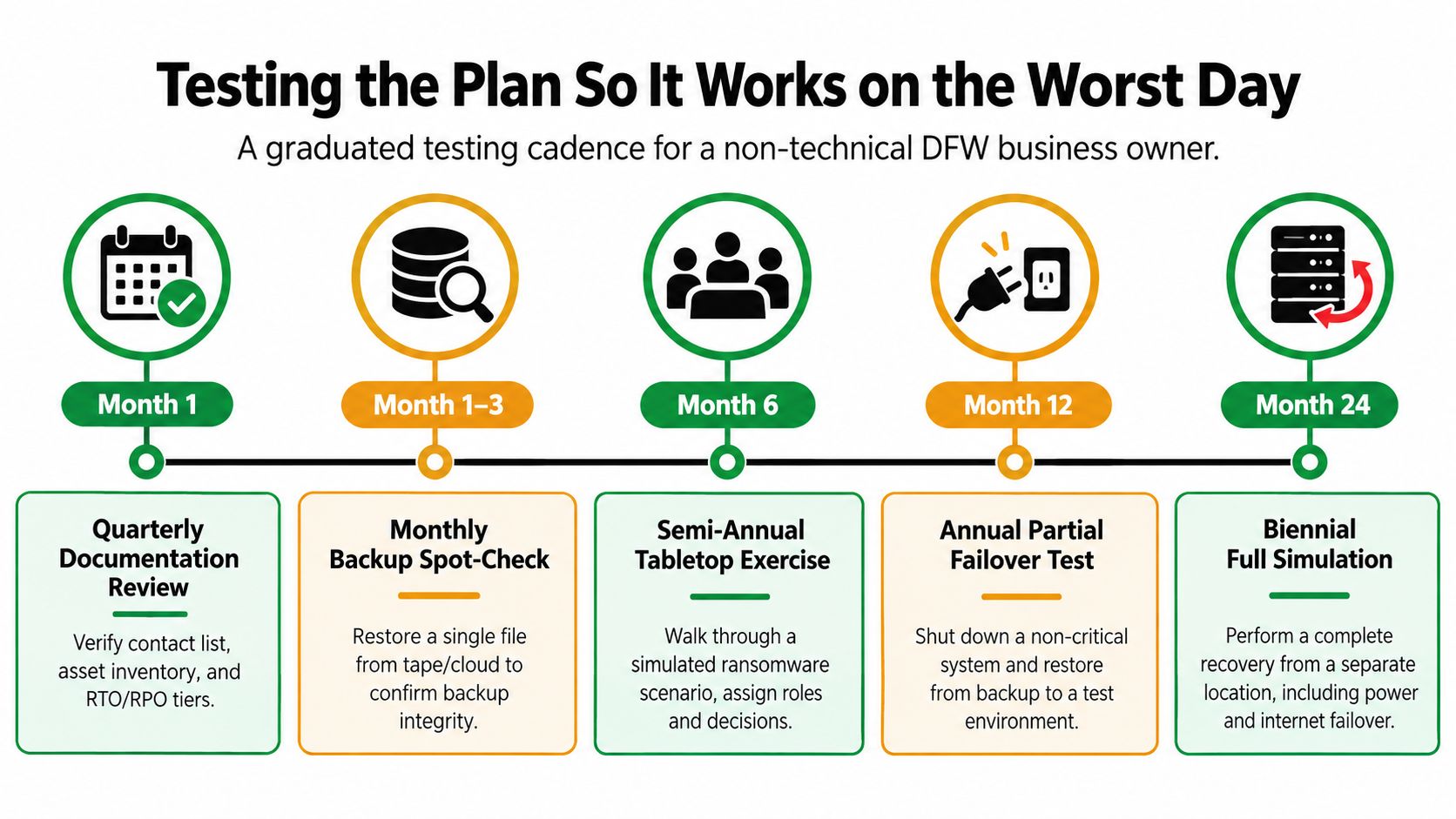
Most owners don't need to begin with a dramatic full-site failover. They need a repeatable schedule that exposes gaps before an incident does. An untested RTO is fiction, regardless of how carefully it appears in a document.
Use a graduated testing cadence
Every quarter, review the documentation. The owner, IT lead, department owners, and communications lead should verify contacts, asset lists, system owners, recovery objectives, and vendor escalation details. Capture the review date, approver, changed items, and unresolved gaps. This should take a few hours.
Twice a year, conduct a tabletop exercise. Include leadership, IT, operations, communications, facilities, and the person responsible for insurance or compliance. Set aside a few hours and force decisions rather than discussing theory.
Every year, restore a component. Choose a representative file, workstation image, database, or noncritical application. Record the start time, restore time, data integrity result, permissions result, and any manual work required.
At least once every 18 months, run a full failover test. Include power, internet, identity, core applications, communications, and business-process validation. Capture the actual elapsed time, dependencies that failed, staffing requirements, and the point at which normal work resumed.
Two tabletop scenarios for DFW teams
Saturday ransomware inject: Staff discover that the file server is encrypting documents. The exercise asks who isolates devices, who preserves evidence, who contacts the insurer, who authorizes restoration, and how client communications continue without compromised email.
Hailstorm facility-loss inject: The building is unavailable for a week after a storm. The team must decide where employees work, how phones are answered, how records are accessed, how customers receive updates, and which vendors need immediate notice.
The review should focus on evidence, not blame. Add each gap to the runbook with an owner and a due date. A failed test is useful because it reveals a problem while the business still has time to fix it.
Prioritizing Compliance, Communication, and Recovery Cost
Disaster recovery spending should survive a budget meeting. That requires a one-page connection between regulatory exposure, lost revenue, communication obligations, and the cost of a recovery option.
Healthcare organizations should map HIPAA exposure to patient records, scheduling, prescribing, and secure communications. Payment environments should account for PCI-DSS obligations and forensic requirements. The FTC Safeguards Rule, Texas data laws, and customer contract SLAs may apply different notification, protection, and service expectations. Legal and financial consequences vary by organization, so counsel and compliance specialists should confirm the specific obligations.
Turn system importance into a spending decision
| System | Compliance Exposure | Revenue Impact | Recovery Cost | Priority |
|---|---|---|---|---|
| Patient or client records | High | High | High | Critical |
| Payment processing | High | High | Medium to high | Critical |
| Identity and remote access | Medium to high | High | Medium | Critical |
| Accounting and payroll | Medium | High | Medium | High |
| General documents | Medium | Medium | Low to medium | Moderate |
| Archives | Low to medium | Low | Low | Planned |
The owner can rank each system by combining three questions: how serious is the compliance exposure, how quickly does revenue stop, and what does the required recovery design cost? A system with high exposure and high revenue impact deserves stronger protection even when the recovery option costs more. A low-impact archive shouldn't consume the same budget as patient scheduling or payment processing.
Make communication part of the budget
The communication order should be written before the incident:
- Staff and safety leads receive the initial operational direction.
- The incident lead and IT lead confirm containment and recovery status.
- Critical customers receive a factual update and next expected communication.
- Cyber insurers, legal counsel, and regulators are contacted according to the incident type and applicable obligations.
- The press or public channels are handled by one authorized spokesperson.
The plan should specify who communicates, through which unaffected channel, and what evidence supports each message. The timing depends on the incident and applicable requirements, so the runbook should avoid promises that haven't been reviewed by counsel.
Insurance belongs in the same conversation. Owners reviewing how to secure business revenue should examine business interruption coverage, waiting periods, documentation requirements, and exclusions alongside technical recovery investments. Insurance doesn't replace restoration capability, and backup technology doesn't replace cash-flow protection.
A quarterly DR budget line is easier to defend when it names the protected process, the outage consequence, the chosen RTO and RPO, the recovery method, and the test evidence. That memo gives leadership a rational basis for funding immutable backup, redundant connectivity, or replication above the minimum compliance bar.
Checklists, Runbook Templates, and Your Next Step With Technovation
A useful plan should fit on working pages that staff can open during pressure. Long policy documents often fail because the person responding can't find the next action, the owner, or the contact number.
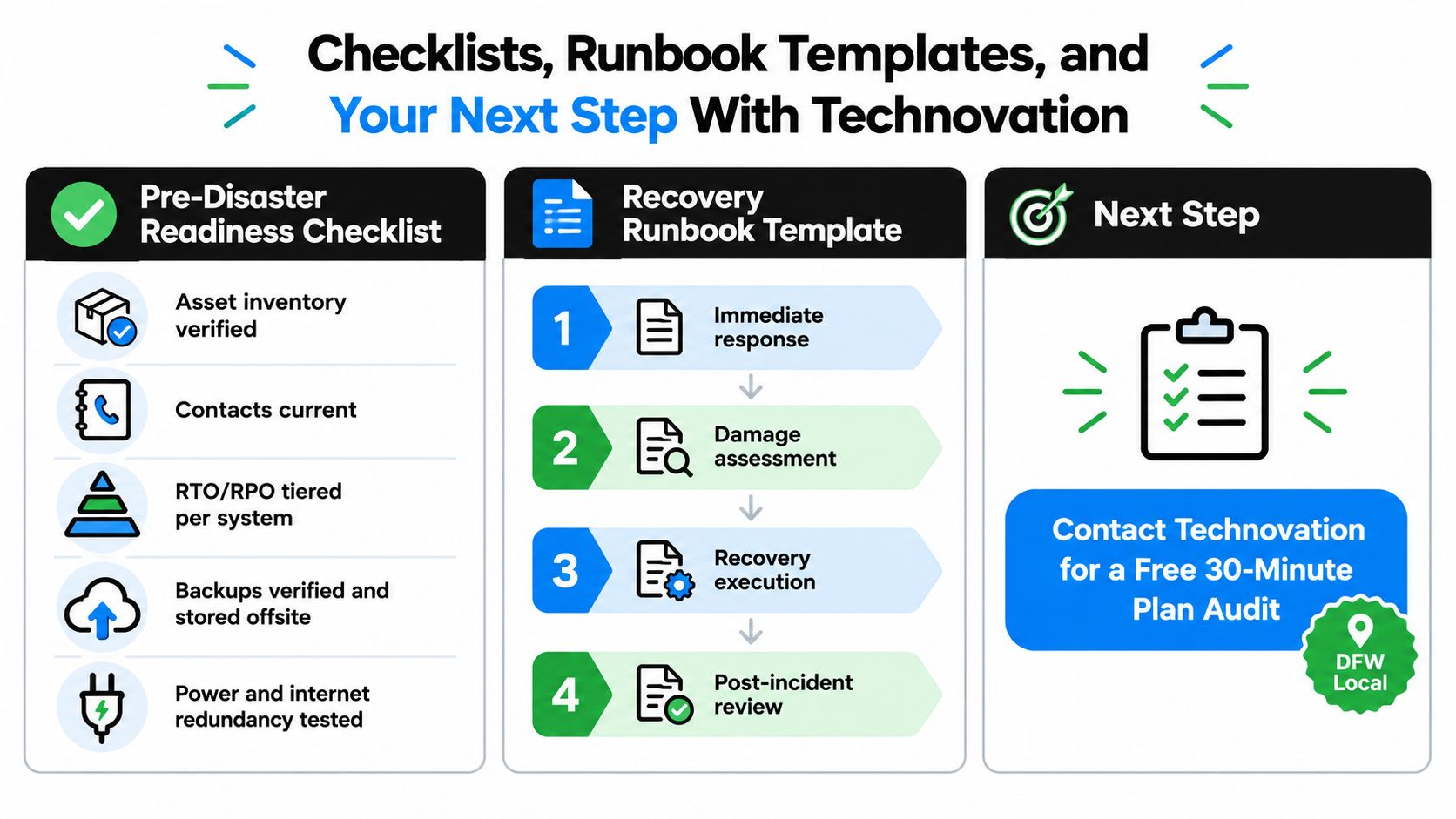
Pre-disaster readiness checklist
The quarterly checklist should confirm:
- Asset inventory: Servers, endpoints, applications, data stores, facilities, vendors, and dependencies are verified.
- Contacts: Primary and backup owners, insurer, legal counsel, vendors, facilities, and communications contacts are current.
- Recovery objectives: Each critical system has an approved RTO and RPO tier.
- Backup protection: Copies are encrypted, stored off-site, isolated from production, and covered by retention rules.
- Recovery evidence: A restore or recovery test has been executed within the last 90 days.
- Workarounds: Staff know how to operate remotely or manually when a core system is unavailable.
- Compliance records: Required policies, contracts, notifications, and evidence locations are documented.
One-page incident runbook template
The runbook should use four blocks:
- Immediate response: Identify the event, protect people, isolate affected systems, preserve evidence, and activate the incident lead.
- Damage assessment: Record affected locations, systems, data, vendors, customers, and known dependencies.
- Recovery execution: Follow the approved restoration sequence, validate identity and access, confirm application integrity, and obtain process-owner approval.
- Post-incident review: Record actual downtime, data loss, decisions, communications, costs, and corrective actions.
Add decision thresholds beside each block. Examples include “isolate all affected endpoints,” “activate alternate internet,” “notify the cyber insurer,” or “move staff to manual scheduling.” Notification triggers should name the responsible person and the unaffected communication channel.
Technovation's incident response playbook resources can support the runbook design, but the final document must reflect the company's systems, contracts, regulatory obligations, and staffing.
Post-incident review checklist
After service returns, the team should document:
- Timeline: What happened, when detection occurred, and when each service recovered.
- Business impact: Which customers, appointments, orders, billings, and staff workflows were affected.
- Technical findings: Which dependency, control, or recovery step failed.
- Decision quality: Which approvals were delayed or unclear.
- Evidence quality: What records support insurance, legal, regulatory, and customer requirements.
- Corrective action: Each fix has an owner, priority, and completion date.
- Retest requirement: The revised procedure receives a scheduled validation date.
A 30-minute review with Technovation's DFW team can benchmark the current posture against HIPAA, PCI, and SOX-adjacent SMB expectations and identify the top three gaps before the next storm season.
Technovation LLC provides DFW businesses with managed IT, cybersecurity, cloud backup, recovery planning, compliance support, and incident response coordination built around operational needs. Schedule a 30-minute disaster recovery readiness review by visiting Technovation LLC and turn an assumed recovery plan into one the team can test and trust.